| Description | BRAND NEW 3Shape Trios Cart T12A dental impression intraoral 3D scanner, it is new in the original crate with all accessories including scanner, wand and tips and has never been used. | The iTero Element Scanner is a digital impression system that eliminates the need for messy putty in your mouth.Improving iTero Intraoral ScannersWhile it’s already a leader in dental technology, iTero is constantly refining its intraoral scanning options. Its Element Itraoral Scanner, introduced in March 2015, captures 6,000 frames per second, up to 20 times faster than its predecessor. Its wand is also smaller and lighter, with in-built controls for more intuitive operation. Intraoral scanners from iTero are renowned for their accuracy, but the increased capture speed improves the company’s already impressive statistics. | By Sirona has remained the preferred CAD/CAM technology of dentists worldwide for the fabrication of all-ceramic dental restorations in a single treatment appointment. CEREC is proven by hundreds of clinical studies and is offered by thousands of dentists to millions of patients around the world each year. It also has the broadest restorative range of any dental CAD/CAM system on the market. Proven performance, unrivalled success, and unequalled capabilities have made CEREC the number one dental CAD/CAM choice for over 30 years. | With the intraoral scanner dwio the canadian company Dental Wings presented at the IDS a really revolutionary approach in the field of intraoral scanner. The digitally interested users will have noticed the similarity of the dwio with the Steinbichler intraoral scanner which was launched at the IDS 2 years before. In fact, the dwio intraoral scanner represents a further development. | Benefits:- Faster Scan Speed
- Superb Image Quality
- Light Guidance System
- Portable for Easy Sharing
- Lightweight Hand Piece
| Medit i700 makes the scanning experience a comfortable one for both the dentist and patient. Medit i700 is a fully open-source intraoral scanner, compatible with Medit’s Link software, as well as software from other CAD/CAM providers. |
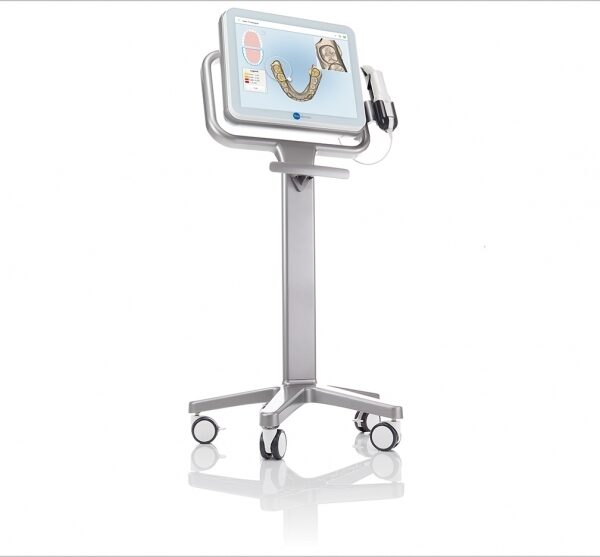
| Content | 3Shape Trios Cart T12a Impression 3D Intraoral Scanner3Shape TRIOS is a next-generation intraoral impression solution that is fast, accurate and easy to use. TRIOS is built on 3Shape’s Ultrafast Optical Sectioning™ technology and its features include high accuracy capture, spray- and powder-free scanning, clinical scan validation, intuitive Smart-Touch user interface, and more. TRIOS is optimized for a wide range of indications.TRIOS scanner benefits and features:
-Up to 1000 3D pictures for true geometries
-Spray-free for optimal accuracy and comfort
-Designed for high-speed impression capture
-Ergonomic grip for perfect control
-Autoclaveable scanner tip
-Scanning has never been easier. No need to hold the scanner at a specific distance or angle for focus. Dentists or assistants can even rest the scanner on the teeth for support as they scan.TRIOS cart benefits and features
-Live 3D visualization
-Easy-to-use touch screen
-Sleek design
-Unique motion sensor interface
-Mobility and Wi-Fi
-Easy-to-clean
-General benefits of digital impression takingDENTISTS:
-Less adjustment and grinding during seating
-Improved accuracy and clinical results
-Faster than traditional impression taking
-Reduced need for retakes
-No impression materials and mess
-Cost savings related to materials and shippingPATIENTS : 3Shape Trios Cart T12a Impression 3D Intraoral Scanner
-Quick and comfortable experience
-Better restoration fits and minimal grinding
-Improved clinical results
-Reduced number of appointments due to fewer retakes
-Reduced over-all chair-time3.5 Tips to Obtaining a Good Scan
PREPARATION
1. Turn on the cart or PC in advance to allow the system to heat up. See section Heating and
Mounting the Scanner Tip, step 1. Allow the system to warm up for about 10 minutes prior to use. If
using the heater, the final temperature is reached when the light goes out.
2. Retract the gingiva around the preparation for the preparation to stand out clearly.
3. Make sure the scanner tip is warm to avoid condensation on the mirror. See section Heating
and Mounting the Scanner Tip, step 5.
SCANNING
1. Dry the teeth lightly using compressed air. Be sure to reach the narrow regions between teeth.
Consider using a saliva ejector and/or tampons.
2. Get a good start:
• Start at preparation (or 1st molar if antagonist).
• Wait for about 5 scanner "clicks" before proceeding (helps build up a good starting point).
• Complete preparation including preparation line.
• Scan neighboring teeth: Occlusion, lingual/palatinal side, buccal/labial side.
3. Keep scanner head at 0-5mm from the teeth, it is OK to touch the teeth occasionally.
4. Move the scanner slowly and smoothly, you should hear a more rapid clicking sound.
41
5. Keep lips, cheeks, and tongue out of the scanner’s view:
• Use your finger or a dental mirror to create space between the teeth, lips and cheeks.
• Use a lip-and-cheek-retractor to keep lips and cheeks away.
• Be careful not to scan your own or assistant’s fingers.
• If you get lips, cheeks or tongue in the scan, make sure to delete it all, especially where they have
contact with the teeth (no surfaces should stick out from the teeth).
6. Keep focus on:
• Option 1 - Look at the teeth while scanning and listen to the "clicks". If it stops clicking/capturing,
carefully move back to the area marked on the screen.
• Option 2 - Look at the 2D image at the lower right corner. What you see here is what you scan.
Avoid lips, cheeks and the tongue to get an easy scan.
7. When scanning is complete, inspect the result by rotating the scan.
The important areas are:
• Preparation line (avoid interference from gingiva, saliva, blood).
• Contact points.
• Occlusal surfaces.
• If an important area is missing, simply touch this area on the model, and re-start scanning from
this point.
8. Bite Scan:
• Start from the second molar or at canine if you make an anterior scan.
• While centering the 2D image on occlusion plane, slowly move the scanner tip in straight mesial
direction with equal coverage of the upper and lower teeth.
• Scan 4 teeth for optimal alignment. This should take no more than 5 seconds.
9. Important for good colors:
• Avoid the light from the dentist chair lamp pointing directly into the patient's mouth. | iTero Element Intraoral Scanner
What Are iTero Intraoral Scanners?Intraoral scanners from iTero scan the mouths of patients, capturing images to create three-dimensional dental images in minutes. Intraoral scanners are simple to use and can be operated by one person. Their user-friendly nature helps dental professionals get the best results. The scans they produce are also more detailed than the traditional two-dimensional images they replace.Intraoral digital scans help dental professionals create accurate physical dental models for restorative work, including crowns, veneers, and implants. They also help orthodontists diagnose orthodontic problems and develop the best treatment plans.The company’s digital ecosystem software works seamlessly with its intraoral scanners, improving workflow for dental professionals working on orthodontic and restorative cases. However, unlike many early intraoral scanners, they are open systems. This feature gives dental professionals more flexibility about how they use their digital scan files. Intraoral digital scans from iTero scanners can be easily shared with other dental professionals and third-party providers such as Invisalign. When all relevant parties have the scans, they can communicate better to improve patient outcomes.What iTero Intraoral Scanners DoIntraoral scanners feature a wand, which the dental professional moves around a patient’s mouth. In the latest versions, the wand captures thousands of frames per second which are pieced together to create a three-dimensional visualisation of the patient’s mouth. The wands on iTero intraoral scanners are smaller than early intraoral scanners, allowing them to scan molars in the back of the mouth which were traditionally difficult to reach. Dental professionals using small wands also aren’t limited by how wide their patients can open their mouths. The small wands are also less likely to make patients gag than older forms of scanning technology.Intraoral scanners also have screens which display the digital dental images as they’re captured in real time. The screens show whether the scan is good or not before it’s saved and submitted to the lab. This feature can be a real time-saver for dental professionals who, in the past, could receive word from the lab two or three weeks later that their scans were inadequate. By providing immediate feedback, intraoral scanners can save dental professionals and patients time and frustration.Unlike many intraoral scanners, patients don’t need to cover their teeth in titanium dioxide powder before an iTero intraoral scan. This benefit further improves the scanning process for dental patients.How Intraoral Scanners Make Invisalign Orthodontics Easier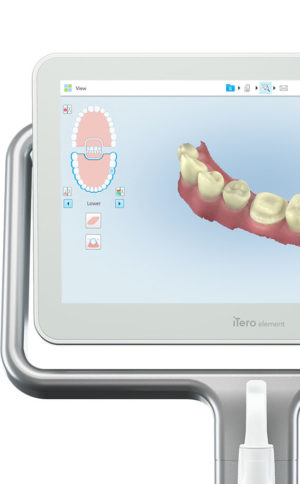 Invisalign clear aligners are one of the most popular teeth-straightening aids used today as they’re effective, removable, and virtually undetectable. Unlike many intraoral scanners, iTero intraoral scanners have open architecture which makes them compatible with the Invisalign system, including its Invisalign Outcome Simulator. Orthodontists can scan their patients’ mouths with an iTero intraoral scanner, then show them how their Invisalign treatment will look. This technology improves the patient experience because patients can know what to expect and feel more confident in their diagnosis and treatment plan. It also makes the ClinCheck setup three times faster.After setup, speed is still on the iTero intraoral scanners’ side. iTero states ClinCheck treatment plans submitted with its scans are usually posted to the Invisalign Doctor Site three times faster than traditional polyvinyl siloxane scans. As a result, your Invisalign aligners are created and posted back to your orthodontist sooner so that you can start treatment faster. Since the iTero intraoral scanning system is open, orthodontists can also send the scan files to any laboratory of their choosing for the creation of a retainer, which reinforces your treatment after the Invisalign process, and other dental tools.Orthodontists can also create better Invisalign treatment plans for their patients using iTero intraoral scans. Align Technology research shows orthodontists who use the scans have 10 times fewer rejections and seven times fewer issues with the fit of the Invisalign aligners. These results may be because iTero intraoral scanners can help orthodontists track their patients’ progress. Regular scans throughout Invisalign treatment can help orthodontists compare expected outcomes with results. If results aren’t as expected, orthodontists can use the scans to educate their patients about their treatment and the importance of complying with their recommendations.Improving iTero Intraoral Scanners iTero Element Intraoral ScannerWhile it’s already a leader in dental technology, iTero is constantly refining its intraoral scanning options. Its Element Itraoral Scanner, introduced in March 2015, captures 6,000 frames per second, up to 20 times faster than its predecessor. Its wand is also smaller and lighter, with in-built controls for more intuitive operation. Intraoral scanners from iTero are renowned for their accuracy, but the increased capture speed improves the company’s already impressive statistics. Invisalign clear aligners are one of the most popular teeth-straightening aids used today as they’re effective, removable, and virtually undetectable. Unlike many intraoral scanners, iTero intraoral scanners have open architecture which makes them compatible with the Invisalign system, including its Invisalign Outcome Simulator. Orthodontists can scan their patients’ mouths with an iTero intraoral scanner, then show them how their Invisalign treatment will look. This technology improves the patient experience because patients can know what to expect and feel more confident in their diagnosis and treatment plan. It also makes the ClinCheck setup three times faster.After setup, speed is still on the iTero intraoral scanners’ side. iTero states ClinCheck treatment plans submitted with its scans are usually posted to the Invisalign Doctor Site three times faster than traditional polyvinyl siloxane scans. As a result, your Invisalign aligners are created and posted back to your orthodontist sooner so that you can start treatment faster. Since the iTero intraoral scanning system is open, orthodontists can also send the scan files to any laboratory of their choosing for the creation of a retainer, which reinforces your treatment after the Invisalign process, and other dental tools.Orthodontists can also create better Invisalign treatment plans for their patients using iTero intraoral scans. Align Technology research shows orthodontists who use the scans have 10 times fewer rejections and seven times fewer issues with the fit of the Invisalign aligners. These results may be because iTero intraoral scanners can help orthodontists track their patients’ progress. Regular scans throughout Invisalign treatment can help orthodontists compare expected outcomes with results. If results aren’t as expected, orthodontists can use the scans to educate their patients about their treatment and the importance of complying with their recommendations.Improving iTero Intraoral Scanners iTero Element Intraoral ScannerWhile it’s already a leader in dental technology, iTero is constantly refining its intraoral scanning options. Its Element Itraoral Scanner, introduced in March 2015, captures 6,000 frames per second, up to 20 times faster than its predecessor. Its wand is also smaller and lighter, with in-built controls for more intuitive operation. Intraoral scanners from iTero are renowned for their accuracy, but the increased capture speed improves the company’s already impressive statistics. | SIRONA Cerec Omnicam+MCXL Milling
Single Appointment Dental Care
Most dental restorative methods require more than one visit to the dentist. This means that on the first visit, you get an injection of anaesthesia, your tooth prepared, an impression taken, and a temporary restoration put on your tooth. You make a second appointment for a couple of weeks later, get another injection, have the temporary pried off (if it hasn’t fallen off already), and have a permanent restoration put on. With CEREC, the procedure is done in a single appointment, start to finish. No temporary restorations. Now with CEREC Omnicam,MC XL Inlab milling unit and sinter and crystallisation ovens, 3-4 unit bridges can be fabricated in a day.Finest Dental Materials
A CEREC tooth restoration isn’t just convenient, it is also healthy. Many years ago, dentists had few options to repair decayed and damaged teeth other than amalgam, gold, and other metals. With CEREC, your dentist can use strong, tooth coloured ceramic materials to restore your teeth to their natural strength, beauty, and function. These materials closely match the composition of natural tooth structure. The materials are chemically bonded to your tooth, so your dentist can save as much healthy tooth tissue as possible while providing you with a dental restoration that strengthens your tooth. Using metal free materials that are the closest to your natural enamel, CEREC gives you the highest quality restorative care.Smile Enhancement SIRONA Cerec Omnicam+MCXL Milling
We use CEREC for more than just crowns. CEREC Omnicam and the MC XL inlab milling unit is capable of producing any single tooth restoration, implant abutments and up to 9 unit bridges. Chipped or discoloured front teeth can be repaired with beautiful CEREC porcelain anterior crowns or veneers. Your smile makes a lasting first impression. Enhance it with CEREC.Your dentist is in complete control of the final result
Since the crown, inlay, onlay or veneer is designed and fabricated from start to finish by your dentist, he has total control over how it will look and fit.No temporary restorations
With Cerec your restorations are placed in a single appointment. If you have lab made veneers you would require temporary veneers during the wait whilst your new teeth are being made by the technician. These have been known to fall off and cause problems. This step is eliminated with CEREC restorations.Crystallisation, characterisation and glaze ovens
In certain circumstances it may be necessary to customise your restorations to blend in with your natural neighbouring teeth. This is accomplished by adding colouring stains to your restoration and firing it in an oven before the final glazing is done.
Glazing gives the restoration a very smooth and shiny surface texture, enhancing optimum oral hygiene.
Sinter ovens are used to harden and bake zirconium materials for implant abutments and bridge frameworks. | Dwio Intraoral Scanner Dental WingsIntraoral scanner
Based on a novel and incredibly compact 3D capture technique called Multiscan Imaging, the Dental Wings intraoral scanner allows dentists to take digital impressions in a natural, fluid manner. Its remarkably small handpiece, gesture control, and easy maintenance make it a compelling digital impression option for clinicians.Design approach: the patient first
The intraoral scanner was designed to address the needs of dental professionals looking for an intuitive technology for capturing digital impressions. With the overall objective to help dentists focus on the patient rather than the technology, the Dental Wings intraoral scanner offers:– A remarkably small handpiece very similar in size, shape, and weight to existing dental handpieces. Its familiar shape allows to assume a natural position relative to the patient.
– Visual and auditive feedback — a luminescent ring and audible signals indicate when data is being successfully captured, allowing the user to focus in the mouth rather than on the screen.
– Easy maintenance of the lightweight all-metal handpiece that has no moving parts, no complex illumination or cooling system.
– Motion control technology for a no-touch operation of the system while the user has gloves on.Scanning technology Dwio Intraoral Scanner Dental Wings
Five miniaturized 3D scanners in the handpiece tip directly view the teeth and soft tissue from multiple orientations simultaneously, capturing even the most difficult to see areas of preparations with minimal effort by the user.Open workflows
The intraoral scanner is a dedicated “scan only” chairside system with multiple options for the design and fabrication steps. Captured data is seamlessly transmitted to in-office or remote systems via DWOS Connect for prosthesis design and production. Users of Dental Wings’ simple to use yet powerful DWOS CAD suite of design applications, as well as other open dental CAD software, are able to import the scan data directly. | Carestream CS 3600 Intraoral ScannerAcquire true color:With the CS 3600 Intraoral Scanner, practitioners can access 2D and 3D images that can be used with CS Restore software to design restorations within their practice. Colored 3D scans allow practitioners to easily define the margin lines and identify the differences between natural tooth structure and existing restorations. This makes restoration planning more accurate for practitioners.No external heater, powder or trolley system needed:The CS 3600 does not require you to spray powder of liquid over the patient’s teeth or gingival tissue before scanning. It features high-angulation scanning of up to 45 degrees and to a depth from -2 to +13m.Features a unique light guidance systemYet another feature of the CS 3600 that assists it in the capture of the data during the image acquisition process. This feature allows the user to place more focus on the patient’s mouth rather than the monitor.This device is easily shared:The CS 3600 can be easily shared between operatories because there is no heavy trolley to push around. Additionally, the intraoral scanner connects via USB 2 cable* to any PC workstation or laptop. * Windows 7, 32-bit minimum; 64-bit recommendedEasy to use and hold:The CS 3600’s sleek, lightweight design (295 grams) makes it comfortable and easy for users to navigate the intraoral scanner around patients’ mouths, especially during full arch acquisitions.Benefits:Carestream CS 3600 Intraoral Scanner- Faster Scan Speed
- Superb Image Quality
- Light Guidance System
- Portable for Easy Sharing
- Lightweight Hand Piece
- Features
- High Speed Continuous Scanning
- Fast, Simple and Smooth user experience
- Freefill Missing Scan Data at your Leisure
- Scan History allows you to remove excess scanned tissue for more refined final digital impression
- Three Workflows
- user friendly interface
- Autoclavable reusable tips in two interchangeable styles
- Accurate full 3D HD Color scanning
| Medit i700 intraoral scanner
The new medit i700 intraoral scanner is smaller, lighter and 2X faster than its predecessor. Summary of improvements:Hardware- Twice as fast as i500/ more vivid lifelike colors
- 18% smaller
- 12.5% lighter
- UVC light to disinfect camera internals
- Scanning area was 14×13 now 15×13
- Accuracy twice as good for full arch
- Room to room mobility with usb 3 cable connection
- 180-degree rotation on tip
- 45-degree mirror angle vs 40 – distal second molars
- Just plug right into computer for power and usb
- 100 uses for the tips autoclave vs 50
- Scans up to 70 frames per second (i500 30 frames per second)
- Remote control button – switch between scan stages / rotate without having to go back to keyboard
- Vibration when break continuity with scan
- Coverage of internal hardware
Software- Create master model from scan segments – 5 separate boxes will stitch together in segments
- Multiple bites
- Faster time to process scan
- Ortho module auto tooth segmentation
Other- Scan and produce open source .STL, .OBJ, .PLY files
- Normally delivers within 5-7 business days
- One year manufacturer warranty included (additional 2 year manufacturer warranty can be purchased at check out – Just remember, your assistant is not going to tell you s/he dropped the camera at month 13. S/He will tell you “the camera just stopped working!”)
- Includes Membership to CAD-Ray.com
- Includes Level 2 Training: two day hands-on training in Heidelberg (valid for 12 months after purchase, non-transferable)
- Includes initial remote training session
- Instructional videos to get started right away
- Peer to peer online support and private discussion forum
- Unlimited remote and phone support
- Satisfaction guarantee with return policy
- 10% restocking fee within 30 days
Full Service PackageIncludes Remote TrainingIncludes Unlimited Remote and Phone Support |




Reviews
There are no reviews yet.