3Shape Trios Cart T12a Impression 3D Intraoral Scanner
View cart “iTero Element Intraoral Scanner For Sale” has been added to your cart.
-33%
Availability: In Stock
3Shape Trios Cart T12a Impression 3D Intraoral Scanner
$7,200.00$4,800.00
BRAND NEW 3Shape Trios Cart T12A dental impression intraoral 3D scanner, it is new in the original crate with all accessories including scanner, wand and tips and has never been used.
Other people want this. 15 people have this in their carts right now.
3Shape Trios Cart T12a Impression 3D Intraoral Scanner
3Shape TRIOS is a next-generation intraoral impression solution that is fast, accurate and easy to use. TRIOS is built on 3Shape’s Ultrafast Optical Sectioning™ technology and its features include high accuracy capture, spray- and powder-free scanning, clinical scan validation, intuitive Smart-Touch user interface, and more. TRIOS is optimized for a wide range of indications.
TRIOS scanner benefits and features:
-Up to 1000 3D pictures for true geometries
-Spray-free for optimal accuracy and comfort
-Designed for high-speed impression capture
-Ergonomic grip for perfect control
-Autoclaveable scanner tip
-Scanning has never been easier. No need to hold the scanner at a specific distance or angle for focus. Dentists or assistants can even rest the scanner on the teeth for support as they scan.
TRIOS cart benefits and features
-Live 3D visualization
-Easy-to-use touch screen
-Sleek design
-Unique motion sensor interface
-Mobility and Wi-Fi
-Easy-to-clean
-General benefits of digital impression taking
DENTISTS:
-Less adjustment and grinding during seating
-Improved accuracy and clinical results
-Faster than traditional impression taking
-Reduced need for retakes
-No impression materials and mess
-Cost savings related to materials and shipping
PATIENTS : 3Shape Trios Cart T12a Impression 3D Intraoral Scanner
-Quick and comfortable experience
-Better restoration fits and minimal grinding
-Improved clinical results
-Reduced number of appointments due to fewer retakes
-Reduced over-all chair-time
3.5 Tips to Obtaining a Good Scan
PREPARATION
1. Turn on the cart or PC in advance to allow the system to heat up. See section Heating and
Mounting the Scanner Tip, step 1. Allow the system to warm up for about 10 minutes prior to use. If
using the heater, the final temperature is reached when the light goes out.
2. Retract the gingiva around the preparation for the preparation to stand out clearly.
3. Make sure the scanner tip is warm to avoid condensation on the mirror. See section Heating
and Mounting the Scanner Tip, step 5.
SCANNING
1. Dry the teeth lightly using compressed air. Be sure to reach the narrow regions between teeth.
Consider using a saliva ejector and/or tampons.
2. Get a good start:
• Start at preparation (or 1st molar if antagonist).
• Wait for about 5 scanner “clicks” before proceeding (helps build up a good starting point).
• Complete preparation including preparation line.
• Scan neighboring teeth: Occlusion, lingual/palatinal side, buccal/labial side.
3. Keep scanner head at 0-5mm from the teeth, it is OK to touch the teeth occasionally.
4. Move the scanner slowly and smoothly, you should hear a more rapid clicking sound.
41
5. Keep lips, cheeks, and tongue out of the scanner’s view:
• Use your finger or a dental mirror to create space between the teeth, lips and cheeks.
• Use a lip-and-cheek-retractor to keep lips and cheeks away.
• Be careful not to scan your own or assistant’s fingers.
• If you get lips, cheeks or tongue in the scan, make sure to delete it all, especially where they have
contact with the teeth (no surfaces should stick out from the teeth).
6. Keep focus on:
• Option 1 – Look at the teeth while scanning and listen to the “clicks”. If it stops clicking/capturing,
carefully move back to the area marked on the screen.
• Option 2 – Look at the 2D image at the lower right corner. What you see here is what you scan.
Avoid lips, cheeks and the tongue to get an easy scan.
7. When scanning is complete, inspect the result by rotating the scan.
The important areas are:
• Preparation line (avoid interference from gingiva, saliva, blood).
• Contact points.
• Occlusal surfaces.
• If an important area is missing, simply touch this area on the model, and re-start scanning from
this point.
8. Bite Scan:
• Start from the second molar or at canine if you make an anterior scan.
• While centering the 2D image on occlusion plane, slowly move the scanner tip in straight mesial
direction with equal coverage of the upper and lower teeth.
• Scan 4 teeth for optimal alignment. This should take no more than 5 seconds.
9. Important for good colors:
• Avoid the light from the dentist chair lamp pointing directly into the patient’s mouth.
Reviews (0)
Reviews
There are no reviews yet.
Be the first to review “3Shape Trios Cart T12a Impression 3D Intraoral Scanner” Cancel reply
BRAND NEW 3Shape Trios Cart T12A dental impression intraoral 3D scanner, it is new in the original crate with all accessories including scanner, wand and tips and has never been used.
With the intraoral scanner dwio the canadian company Dental Wings presented at the IDS a really revolutionary approach in the field of intraoral scanner. The digitally interested users will have noticed the similarity of the dwio with the Steinbichler intraoral scanner which was launched at the IDS 2 years before. In fact, the dwio intraoral scanner represents a further development.
The i500 intraoral scanner, exemplifies three qualities:Value, Efficiency, and ProductivityPerfect software and hardware combination:Value, Efficiency, and ProductivityOne Software to connect them all
3Shape TRIOS MOVE is the ultimate patient/dentist communication tool. Show patients their digital scans and dynamic treatment information close-up and create greater opportunities for treatment dialogue and joint decision-making. The ergonomic and lightweight design of TRIOS MOVE allows you to always position the screen in the right place and enjoy superior user experience.
Automatic Positioning
With Quick Denta, setting up a file for 3D printing is no longer a manual process. It automatically adjusts 3D data to produce the most efficient and stable position on the printer’s work surface. Theoptimum angle of orientation can also be automatically saved as a preset value and configured for each type of model being made- eliminating the need to reset values each time.
It really is that simple. Once a user imports an STL 3D file, Quick Denta software not only detects and heals errors but also does all the complex digital set-up for you.
Milling Unit:• Choose from CEREC MC, CEREC MC X or CEREC MC XL
• Get access to the entire range of chairside treatment with up to 40 mm block size, including bridges and abutments
• Create fully anatomic, precise treatments quickly
• CEREC Guide 2 surgical guide
• Dry mill ready
• Includes CEREC software
Content
3Shape Trios Cart T12a Impression 3D Intraoral Scanner3Shape TRIOS is a next-generation intraoral impression solution that is fast, accurate and easy to use. TRIOS is built on 3Shape’s Ultrafast Optical Sectioning™ technology and its features include high accuracy capture, spray- and powder-free scanning, clinical scan validation, intuitive Smart-Touch user interface, and more. TRIOS is optimized for a wide range of indications.TRIOS scanner benefits and features:
-Up to 1000 3D pictures for true geometries
-Spray-free for optimal accuracy and comfort
-Designed for high-speed impression capture
-Ergonomic grip for perfect control
-Autoclaveable scanner tip
-Scanning has never been easier. No need to hold the scanner at a specific distance or angle for focus. Dentists or assistants can even rest the scanner on the teeth for support as they scan.TRIOS cart benefits and features
-Live 3D visualization
-Easy-to-use touch screen
-Sleek design
-Unique motion sensor interface
-Mobility and Wi-Fi
-Easy-to-clean
-General benefits of digital impression takingDENTISTS:
-Less adjustment and grinding during seating
-Improved accuracy and clinical results
-Faster than traditional impression taking
-Reduced need for retakes
-No impression materials and mess
-Cost savings related to materials and shippingPATIENTS : 3Shape Trios Cart T12a Impression 3D Intraoral Scanner
-Quick and comfortable experience
-Better restoration fits and minimal grinding
-Improved clinical results
-Reduced number of appointments due to fewer retakes
-Reduced over-all chair-time3.5 Tips to Obtaining a Good Scan
PREPARATION
1. Turn on the cart or PC in advance to allow the system to heat up. See section Heating and
Mounting the Scanner Tip, step 1. Allow the system to warm up for about 10 minutes prior to use. If
using the heater, the final temperature is reached when the light goes out.
2. Retract the gingiva around the preparation for the preparation to stand out clearly.
3. Make sure the scanner tip is warm to avoid condensation on the mirror. See section Heating
and Mounting the Scanner Tip, step 5.
SCANNING
1. Dry the teeth lightly using compressed air. Be sure to reach the narrow regions between teeth.
Consider using a saliva ejector and/or tampons.
2. Get a good start:
• Start at preparation (or 1st molar if antagonist).
• Wait for about 5 scanner "clicks" before proceeding (helps build up a good starting point).
• Complete preparation including preparation line.
• Scan neighboring teeth: Occlusion, lingual/palatinal side, buccal/labial side.
3. Keep scanner head at 0-5mm from the teeth, it is OK to touch the teeth occasionally.
4. Move the scanner slowly and smoothly, you should hear a more rapid clicking sound.
41
5. Keep lips, cheeks, and tongue out of the scanner’s view:
• Use your finger or a dental mirror to create space between the teeth, lips and cheeks.
• Use a lip-and-cheek-retractor to keep lips and cheeks away.
• Be careful not to scan your own or assistant’s fingers.
• If you get lips, cheeks or tongue in the scan, make sure to delete it all, especially where they have
contact with the teeth (no surfaces should stick out from the teeth).
6. Keep focus on:
• Option 1 - Look at the teeth while scanning and listen to the "clicks". If it stops clicking/capturing,
carefully move back to the area marked on the screen.
• Option 2 - Look at the 2D image at the lower right corner. What you see here is what you scan.
Avoid lips, cheeks and the tongue to get an easy scan.
7. When scanning is complete, inspect the result by rotating the scan.
The important areas are:
• Preparation line (avoid interference from gingiva, saliva, blood).
• Contact points.
• Occlusal surfaces.
• If an important area is missing, simply touch this area on the model, and re-start scanning from
this point.
8. Bite Scan:
• Start from the second molar or at canine if you make an anterior scan.
• While centering the 2D image on occlusion plane, slowly move the scanner tip in straight mesial
direction with equal coverage of the upper and lower teeth.
• Scan 4 teeth for optimal alignment. This should take no more than 5 seconds.
9. Important for good colors:
• Avoid the light from the dentist chair lamp pointing directly into the patient's mouth.
Dwio Intraoral Scanner Dental WingsIntraoral scanner
Based on a novel and incredibly compact 3D capture technique called Multiscan Imaging, the Dental Wings intraoral scanner allows dentists to take digital impressions in a natural, fluid manner. Its remarkably small handpiece, gesture control, and easy maintenance make it a compelling digital impression option for clinicians.Design approach: the patient first
The intraoral scanner was designed to address the needs of dental professionals looking for an intuitive technology for capturing digital impressions. With the overall objective to help dentists focus on the patient rather than the technology, the Dental Wings intraoral scanner offers:– A remarkably small handpiece very similar in size, shape, and weight to existing dental handpieces. Its familiar shape allows to assume a natural position relative to the patient.
– Visual and auditive feedback — a luminescent ring and audible signals indicate when data is being successfully captured, allowing the user to focus in the mouth rather than on the screen.
– Easy maintenance of the lightweight all-metal handpiece that has no moving parts, no complex illumination or cooling system.
– Motion control technology for a no-touch operation of the system while the user has gloves on.Scanning technology Dwio Intraoral Scanner Dental Wings
Five miniaturized 3D scanners in the handpiece tip directly view the teeth and soft tissue from multiple orientations simultaneously, capturing even the most difficult to see areas of preparations with minimal effort by the user.Open workflows
The intraoral scanner is a dedicated “scan only” chairside system with multiple options for the design and fabrication steps. Captured data is seamlessly transmitted to in-office or remote systems via DWOS Connect for prosthesis design and production. Users of Dental Wings’ simple to use yet powerful DWOS CAD suite of design applications, as well as other open dental CAD software, are able to import the scan data directly.
Our Intraoral Scanner Delivers: Value, Efficiency, and Productivity
Together, these three qualities make it easy to incorporate our intraoral scanner into your workflow. Designed with quality in mind, we created the i500 to add value to your practice. Regardless of specialization the i500 ensures that professional needs are met, workflows are optimized, and flexibility is guaranteed.High ROI
An unparalleled performance combined with a competitive price delivers exceptionally fast return on investmentFlexibility
An open system for integrated CAD/CAM workflow allows for the export of STL files for easy file transfer and thus optimized collaborationImpressive Speed
Intelligent scan-detecting algorithm with two high-speed cameras for quick and efficient intraoral scanningPowderless
No need for powder in most regular cases, allowing for a seamless scanning process and increased patient comfortHigh Accuracy
Single crown* :Trueness (Accuracy) = 5.1 μm (±0.49 μm)
Precision (Consistency) = 3.2 μm (±0.74 μm)*Single crown accuracy test was conducted by Medit according to the methods in “Evaluation of the Accuracy of Six Intraoral Scanning Devices: An in-vitro Investigation. ADA Professional Product”
SPECIFICATION
Tip
18 x 15.2 mm (WxH)
Overall handpiece length
266 mm
Weight
276g
Imaging technology
3D-in-motion video technology
Color
3D full color streaming capture
Connectivity
USB 3.0
Scanning FOV
14 x 13 mm
The Medit i500 intraoral scanner delivers efficiency, productivity, and affordability.This scanner has been designed with quality in mind to add value to your practice. With its fast speed and powderless system, it allows for a smoother, more efficient scanning experience.The Medit Link software and hardware with workflow management and communication software will enhance and support your everyday CAD performance. Completed with integrated cloud storage and open data architecture.
Scanning for iOS in real time
High-speed continuous scanning
Color structure of the surface in the resolution of Full HD 3D
Quick scan
Natural color transfer
Capturing UHD images (SR virtual viewer)
Real-time 3D visualization (15 FPS 3D Data)
Without using a spray
Diagnostic image 2D
Open file format (.stl)
Scanner with the smallest size of the scanning module
3Shape TRIOS MOVE Intraoral Scanning Setup
3Shape TRIOS MOVE is the ultimate patient/dentist communication tool. Show patients their digital scans and dynamic treatment information close-up and create greater opportunities for treatment dialogue and joint decision-making. The ergonomic and lightweight design of TRIOS MOVE allows you to always position the screen in the right place and enjoy superior user experience.
Introducing 3Shape TRIOS MOVE
3Shape spoke to more than a hundred dentists and identified their biggest problem; having the screen in the right place to show patients their teeth and the treatment needed. We used this insight to create an ergonomic solution that ensures the screen is always in the right place to engage, excite and drive treatment acceptance with patients
The brand new hardware setup placed the 3Shape TRIOS 3 scanner, monitor, and PC on the lightweight, fully-adjustable, ergonomic 3Shape TRIOS MOVE. TRIOS MOVE’s mobility enables doctors to always position the screen in the right place to provide a superior experience for both dentists and patients. TRIOS MOVE is perfectly balanced and can be rolled effortlessly from operatory to operatory.All TRIOS 3 intraoral scanners, including the new 3Shape TRIOS 3 Wireless model, work seamlessly with TRIOS MOVE. The amazing TRIOS 3 scanners improve patient experience through remarkable scanning speed, and documented accuracy. Thanks to TRIOS MOVE, the digital impressions in realistic colors can easily be shown to your patients to engage and excite them about their treatment options.
Use 3Shape TRIOS apps to give your patients insights into their dental health and proposed treatment plans.
Provide better preventative care with 3Shape TRIOS Patient Monitoring*
Compare a patient’s scans between visits to monitor changes in their dental status, and identify a timely and effective care plan. Share the insights with your patient to gain acceptance for the treatment they really need.
Show patients their future smile with 3Shape TRIOS Smile Design
Simply take a photo of your patient’s face, and easily create their new beautiful teeth in minutes. Share the photo-realistic image with your patient to excite them and advance treatment acceptance.
Grow orthodontic treatments with 3Shape TRIOS Treatment Simulator*
Scan your patient and show their present dentition compared to the final results of orthodontic treatment to gain case approval.
The best solution for the patient and the best satisfaction for the patient
We spoke to hundreds of dentists and discovered that they needed an easy way to get the screen positioned in the right place to share intraoral scans and images with patients. This is important, as seeing is believing and patients trust a dentist they believe in.With this insight, TRIOS MOVE was born, allowing you to easily share your digital scans, images, and treatment plan with patients. This helps patients picture their final results and ultimately, advance case acceptance.The new 3Shape TRIOS MOVE now places the 3Shape TRIOS intraoral scanner, monitor and PC on the lightweight, fully-adjustable, ergonomic 3Shape TRIOS MOVE. The mobility of the 3Shape TRIOS MOVE enables doctors to always position the screen in the right place. This provides a superior experience for both the orthodontist and patient and makes it easy to share dynamic treatment information close-up with patients to advance treatment dialogue and acceptance. 3Shape TRIOS MOVE is perfectly-balanced and can be rolled effortlessly.Professionals using the 3Shape TRIOS MOVE with TRIOS 3 Wireless additionally benefit from complete freedom of movement because there are no connecting cables between the wand and hardware.
Features 3Shape TRIOS MOVE Intraoral Scanning Setup
13.3″ Full HD touch LCD screen
Adjustable arm & swiveling screen
Powerful custom PC designed for scanning
Apps designed to excite
Four wheels with integrated brakes
The perfect size for bringing in front of a patient or when working with up close.
Show scans easily, boost involvement
One of the challenges of working with intraoral scans is in organizing the physical space: how to position your screen in the right place to not only prepare and scan but also share your work? To help you solve this, we developed a TRIOS MOVE. It allows you to move your screen with digital scans, images, and simulated expected treatment outcomes to where the patient sits. This helps them picture their final results and ultimately, advance case acceptance. On top of that, it is more ergonomic for dentists
Superior scanning technology, always where you need it
All TRIOS 3 intraoral scanners, including the new 3Shape TRIOS 3 Wireless model work seamlessly with TRIOS MOVE. The amazing TRIOS 3 scanners improve patient experience through remarkable scanning speed, and documented accuracy. Thanks to TRIOS MOVE, the digital impressions in realistic colors can easily be shown to your patients to engage and excite them about their treatment options.
TWO OPTIONS
Our flexible TRIOS setup solution comes in two sizes: 15.6″ (MOVE+) and 13.3″ (MOVE). Both come with a stylus touch pen and a powerful 1TB PC, specially designed for scanning. They can be purchased in combination with TRIOS 3 Basic, TRIOS 3 and TRIOS 4.
TRIOS 3 Wireless scanner wand
Charger incl. power cord
Wall mount kit for the charger
3x batteries
5x TRIOS 3 scanner tips
TRIOS 3 Protection tip
TRIOS 3 Calibration tip
TRIOS 3 Color Calibration kit
TRIOS MOVE incl. power cord
HEX S10 key (for foot assembly)
Screwdrivers TX6 and TX8
Ethernet cable
2x Fuses
USB Dongle with software
Documentation
Also available as a stand-alone accessory for all existing TRIOS 3 users. Can be used as a second scanning station or replacement for a PC/CARTCompatible with TRIOS 3 Mono, TRIOS 3 & TRIOS 3 Wireless in both, Pen or Handle grip
With Quick Denta, setting up a file for 3D printing is no longer a manual process. It automatically adjusts 3D data to produce the most efficient and stable position on the printer’s work surface. The optimum angle of orientation can also be automatically saved as a preset value and configured for each type of model being made- eliminating the need to reset values each time.
Automatic Support Generation
Quick Denta simplifies the complex process of model support creation by automatically generating support structures with a single click.
Error Detection and 3D Mesh Healing
An optional feature allows Quick Denta to automatically detect and repair minor errors during the STL importing process, without the need to return to the CAD software.
Cost-Effective Resin Calculation
Quick Denta provides accurate, timesaving and cost-effective production by calculating the exact amount of resin needed for each job.
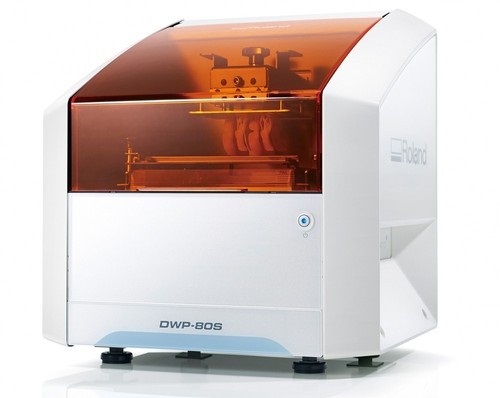
Specs Roland DWP-80S Dental 3D Printer
Applications
Custom trays, base plates, and frameworks
Build technology
Layered projection system
Build size
3.15 (W) x 3.15 (D) x 3.15 (H) in.
(80 (W) × 80 (D) ×80 (H) mm)
(The maximum amount of use per job is 300g(0.66 lb.))
Light source
UV-LED (Ultraviolet light-emitting diode)
Machine Power Supply
DC 24 V、0.8 A
Dedicated AC adapter
AC 100 to 240V ± 10%、50 / 60 Hz
Power consumption
20 W
During standby
49 dB (A) or less
External dimensions
16.93 (W) x 14.37 (D) x 17.72 (H) in.
(430 (W) × 365 (D) × 450 (H) mm)
Interface
USB
Noise During
operation
55 dB (A) or less
Noise Power off
49 dB (A) or less
External dimensions
16.93 (W) x 14.37 (D) x 17.72 (H) in.
(430 (W) × 365 (D) × 450 (H) mm)
Weight
24 kg (53 lb.)
Interface
USB
Installation Environment During Operation
Temperature: 68 to 86°F (20 to 30°C),
Humidity: 35 to 80% RH (no condensation)
Power off
Temperature: 41 to 95°F (5 to 40°C),
Humidity: 20 to 80% RH (no condensation)
Included items
AC adapter, power cord, USB cable, liquid material vat, printing/cleaning tools (Metallic spatula, plastic spatula, tweezers, washing container x 2, hexagonal wrench, rubber gloves, work tray, etc.), Read First (booklet), Roland DG Software Package CD, etc.
CEREC Primescan AC Intraoral scanner
Cerec Primescan from Dentsply Sirona is the most advanced digital scanner on the market. It’s providing a level of accuracy never before seen in dentistry. At the peak of innovation, it is widening the gap between those with and without digital dentistry. The Prime Scan is the fastest most accurate intraoral scanner to date. With new scanning technology, it is the ultimate in scanning. Prime Scan and CEREC 5.0 combinations are greatly reduced because more data allows many applications to become automated.For more than 30 years, CEREC® has provided technological precision, superior design and excellent performance to thousands of practices. Now, experience a brand-new fully integrated solution with CEREC Primescan AC. Acquire precise digital impressions with Primescan, design your proposal on the Primescan AC using the intelligent software, then produce precise, smooth restorations with your choice of milling unit. Find the next level of productivity and patient care – it’s all here.How Does CEREC Primescan Work?
CEREC Primescan is an alternative to traditional intraoral dental impressions, which use a putty-like substance to take physical impressions of your teeth. This method does not allow for digital assessment of your mouth, and some patients find it the process of physical impressions to be uncomfortable.CEREC Primescan uses a wand-like device, loaded with powerful imaging sensors which can capture more than 50,000 images of your mouth per second. These images are quickly stitched and compiled into a 3D image of your teeth, jaw, gums, and mouth, and displayed on a high-definition screen for immediate assessment by our doctors.Using this sensor, our doctors can image your entire mouth up to 20mm in depth, including gums, blood, and bone structures, quickly and accurately. The Primescan software (as compared to the Omnicam) creates high-resolution 3D models to assess your oral health and create the very best crowns, implants, removable prosthesis, restorations, and even 3D prints. With just a few quick sweeps of the CEREC Primescan device, we’ll be able to generate an in-depth, modifiable 3D image of your mouth in minutes.The Benefits of CEREC Primescan:
An excellent choice for outstanding results: Primescan is your perfect starting point in digital dentistry. No matter how you would like to design your workflows, Primescan is the enabler for efficient digital workflows – both chairside in your practice and with your preferred partners.Well designed and perfectly compatible: Along with the high-performance intraoral scanner comes the new Acquisition Center. Together, they form a highly effective and most comfortable system – meeting your needs with two individual software configurations:So, why is CEREC Primescan such a big deal? Here are just a few improvements to this sophisticated system:Shorter wait times – We can quickly image your mouth without waiting for dental impressions to set, allowing us to treat each patient more quickly and effectively. A full jaw impression only takes 2 minutes. This adds up to less time spent in the dental chair.Real-time image processing – Our dentists can quickly adjust and modify scanned images using filters and other tools, leading to more accurate diagnostics and better overall patient outcomes.Extremely versatile – CEREC Primescan can be used for almost any dental procedure. From implant dentistry to the creation of CEREC same-day crowns, the straightening of teeth, whitening, development of dentures and partial dentures.CEREC Primescan AC with CEREC Software Sirona Advantages:
Enables all kinds of treatment, from a single tooth to full arch
With Primescan intraoral scanning is now more accurate, faster and easier
Allows an efficient workflow, both chairside and with preferred partners
Along with the high-performance intraoral scanner comes the new Acquisition Center, together forming an effective and most comfortable system, meeting your needs with two individual software configurations: Primescan AC with Connect Software (supports the connection to established partners workflows) and CEREC Primescan AC with CEREC Software (ideal for cabinets)
Smart Pixel Sensor technology – allows superior precision and excellent detail reproduction, processes more than 1 million 3D points per second, producing photorealistic and highly accurate data
Due to its ability to scan at an incredible data density, it delivers complete 3D structures of everything in its field of view
Its dynamic depth scan technology enables perfect sharpness and outstanding precision, even at a measuring depth up to 20 mm
Easy to use
Easy scanning of all dental materials and hard to access areas
Allows you to start scanning right away
Self-heating for fog-free scanning
The increased field of view visualizes larger areas with fewer sweeps and immediate precision
Faster scanning with a smooth scan flow
Consolidating more than 50.000 images per second and fast processing of exactly the data the software needs Easy capturing and quicker processing of more data in higher resolution
Complete 3D-scan models are displayed immediately, no matter how fast you scan
Accelerate your workflow: Due to seamless, validated and open data transfer options, labs and other third parties are supplied with high-resolution models at an instant
3 different sleeves (disposable and stainless steel, with sapphire glass or autoclavable)
Acquisition Center – Smart features and greater comfort: intuitive use via movable 16:9 touchscreen and touchpad for perfect ergonomics
Kinematics for perfect ergonomic positioning
Smart Hygiene concept for fast and easy disinfection
Full mobility with more than 60-min. battery buffer
CEREC Primescan AC with CEREC Software – complete chairside system, which offers flexible data export options, with automatized workflow thanks to Artificial Intelligence and touch-enabled and intuitive user interface
Milling Unit:• Choose from CEREC MC, CEREC MC X or CEREC MC XL
• Get access to the entire range of chairside treatment with up to 40 mm block size, including bridges and abutments
• Create fully anatomic, precise treatments quickly
• CEREC Guide 2 surgical guide
• Dry mill ready
• Includes CEREC softwareStriking in every detail: The new Acquisition CenterThe new Acquisition Center is a work station designed for modern dentistry and with the dentist in mind. It comes with a touchpad and a 16:9 wide-format movable touchscreen, offering you a highly intuitive and ergonomic work platform.Your benefits at a glance:
Touchscreen & Touchpad for most comfortable, intuitive use
Kinematics for perfect ergonomic positioning
Smart Hygiene concept for fast and easy disinfection
Mobility concept for full mobility with more than 60-min. battery buffer
The best choice for your practice: Take digital impressions and continue working with your trusted partners or enjoy the benefits of complete chairside workflows.Primescan meets your needs with two individual software configurations:Primescan AC with Connect Software:
Supports data transfer options to your preferred partners
Secure and encrypted data transfer through Connect Case Center Inbox
Easy upgradability to full chairside workflow
Touch-enabled and intuitive user interface
CEREC Primescan AC with CEREC Software:
Supports full chairside workflows for single-visit dentistry
Flexible data export options
Automatized workflow thanks to Artifical Intelligence
Touch-enabled and intuitive user interface
Technical Data:CEREC Primescan AC Intraoral scanner
CAD system for high-precision intraoral optical impressions
High-resolution, heated intraoral 3D scanner
Integrated image processing
High processing power due to state-of-the-art processor
Trackball or touchpad
Hand and foot controlled enter keys
Ethernet port and WLAN
USB interfaces
The high-resolution 3D intraoral scanner allows image acquisition with the image control inside the scanner, the image data transfer is made through USB 2.0 interface
21.5″ inch TFT LED flat-screen display, HD resolution: 1920 x 1080 pixels
Mobile housing, with no water or air connection required
Voltage: 100 – 240 VAC/50-60Hz
Nominal current: 5.0 – 2.1 A
Type of protection against electric shock: Class I device




 An excellent choice for outstanding results: Primescan is your perfect starting point in digital dentistry. No matter how you would like to design your workflows, Primescan is the enabler for efficient digital workflows – both chairside in your practice and with your preferred partners.Well designed and perfectly compatible: Along with the high-performance intraoral scanner comes the new Acquisition Center. Together, they form a highly effective and most comfortable system – meeting your needs with two individual software configurations:So, why is CEREC Primescan such a big deal? Here are just a few improvements to this sophisticated system:Shorter wait times – We can quickly image your mouth without waiting for dental impressions to set, allowing us to treat each patient more quickly and effectively. A full jaw impression only takes 2 minutes. This adds up to less time spent in the dental chair.Real-time image processing – Our dentists can quickly adjust and modify scanned images using filters and other tools, leading to more accurate diagnostics and better overall patient outcomes.Extremely versatile – CEREC Primescan can be used for almost any dental procedure. From implant dentistry to the creation of CEREC same-day crowns, the straightening of teeth, whitening, development of dentures and partial dentures.CEREC Primescan AC with CEREC Software Sirona Advantages:
 The new Acquisition Center is a work station designed for modern dentistry and with the dentist in mind. It comes with a touchpad and a 16:9 wide-format movable touchscreen, offering you a highly intuitive and ergonomic work platform.Your benefits at a glance:


Reviews
There are no reviews yet.