| Content | 3Shape Trios Cart T12a Impression 3D Intraoral Scanner3Shape TRIOS is a next-generation intraoral impression solution that is fast, accurate and easy to use. TRIOS is built on 3Shape’s Ultrafast Optical Sectioning™ technology and its features include high accuracy capture, spray- and powder-free scanning, clinical scan validation, intuitive Smart-Touch user interface, and more. TRIOS is optimized for a wide range of indications.TRIOS scanner benefits and features:
-Up to 1000 3D pictures for true geometries
-Spray-free for optimal accuracy and comfort
-Designed for high-speed impression capture
-Ergonomic grip for perfect control
-Autoclaveable scanner tip
-Scanning has never been easier. No need to hold the scanner at a specific distance or angle for focus. Dentists or assistants can even rest the scanner on the teeth for support as they scan.TRIOS cart benefits and features
-Live 3D visualization
-Easy-to-use touch screen
-Sleek design
-Unique motion sensor interface
-Mobility and Wi-Fi
-Easy-to-clean
-General benefits of digital impression takingDENTISTS:
-Less adjustment and grinding during seating
-Improved accuracy and clinical results
-Faster than traditional impression taking
-Reduced need for retakes
-No impression materials and mess
-Cost savings related to materials and shippingPATIENTS : 3Shape Trios Cart T12a Impression 3D Intraoral Scanner
-Quick and comfortable experience
-Better restoration fits and minimal grinding
-Improved clinical results
-Reduced number of appointments due to fewer retakes
-Reduced over-all chair-time3.5 Tips to Obtaining a Good Scan
PREPARATION
1. Turn on the cart or PC in advance to allow the system to heat up. See section Heating and
Mounting the Scanner Tip, step 1. Allow the system to warm up for about 10 minutes prior to use. If
using the heater, the final temperature is reached when the light goes out.
2. Retract the gingiva around the preparation for the preparation to stand out clearly.
3. Make sure the scanner tip is warm to avoid condensation on the mirror. See section Heating
and Mounting the Scanner Tip, step 5.
SCANNING
1. Dry the teeth lightly using compressed air. Be sure to reach the narrow regions between teeth.
Consider using a saliva ejector and/or tampons.
2. Get a good start:
• Start at preparation (or 1st molar if antagonist).
• Wait for about 5 scanner "clicks" before proceeding (helps build up a good starting point).
• Complete preparation including preparation line.
• Scan neighboring teeth: Occlusion, lingual/palatinal side, buccal/labial side.
3. Keep scanner head at 0-5mm from the teeth, it is OK to touch the teeth occasionally.
4. Move the scanner slowly and smoothly, you should hear a more rapid clicking sound.
41
5. Keep lips, cheeks, and tongue out of the scanner’s view:
• Use your finger or a dental mirror to create space between the teeth, lips and cheeks.
• Use a lip-and-cheek-retractor to keep lips and cheeks away.
• Be careful not to scan your own or assistant’s fingers.
• If you get lips, cheeks or tongue in the scan, make sure to delete it all, especially where they have
contact with the teeth (no surfaces should stick out from the teeth).
6. Keep focus on:
• Option 1 - Look at the teeth while scanning and listen to the "clicks". If it stops clicking/capturing,
carefully move back to the area marked on the screen.
• Option 2 - Look at the 2D image at the lower right corner. What you see here is what you scan.
Avoid lips, cheeks and the tongue to get an easy scan.
7. When scanning is complete, inspect the result by rotating the scan.
The important areas are:
• Preparation line (avoid interference from gingiva, saliva, blood).
• Contact points.
• Occlusal surfaces.
• If an important area is missing, simply touch this area on the model, and re-start scanning from
this point.
8. Bite Scan:
• Start from the second molar or at canine if you make an anterior scan.
• While centering the 2D image on occlusion plane, slowly move the scanner tip in straight mesial
direction with equal coverage of the upper and lower teeth.
• Scan 4 teeth for optimal alignment. This should take no more than 5 seconds.
9. Important for good colors:
• Avoid the light from the dentist chair lamp pointing directly into the patient's mouth. | 3Shape TRIOS MOVE Intraoral Scanning Setup3Shape TRIOS MOVE is the ultimate patient/dentist communication tool. Show patients their digital scans and dynamic treatment information close-up and create greater opportunities for treatment dialogue and joint decision-making. The ergonomic and lightweight design of TRIOS MOVE allows you to always position the screen in the right place and enjoy superior user experience. Introducing 3Shape TRIOS MOVE
 3Shape spoke to more than a hundred dentists and identified their biggest problem; having the screen in the right place to show patients their teeth and the treatment needed. We used this insight to create an ergonomic solution that ensures the screen is always in the right place to engage, excite and drive treatment acceptance with patients
The brand new hardware setup placed the 3Shape TRIOS 3 scanner, monitor, and PC on the lightweight, fully-adjustable, ergonomic 3Shape TRIOS MOVE. TRIOS MOVE’s mobility enables doctors to always position the screen in the right place to provide a superior experience for both dentists and patients. TRIOS MOVE is perfectly balanced and can be rolled effortlessly from operatory to operatory.All TRIOS 3 intraoral scanners, including the new 3Shape TRIOS 3 Wireless model, work seamlessly with TRIOS MOVE. The amazing TRIOS 3 scanners improve patient experience through remarkable scanning speed, and documented accuracy. Thanks to TRIOS MOVE, the digital impressions in realistic colors can easily be shown to your patients to engage and excite them about their treatment options. Use 3Shape TRIOS apps to give your patients insights into their dental health and proposed treatment plans.Provide better preventative care with 3Shape TRIOS Patient Monitoring*
Compare a patient’s scans between visits to monitor changes in their dental status, and identify a timely and effective care plan. Share the insights with your patient to gain acceptance for the treatment they really need. Show patients their future smile with 3Shape TRIOS Smile Design
Simply take a photo of your patient’s face, and easily create their new beautiful teeth in minutes. Share the photo-realistic image with your patient to excite them and advance treatment acceptance. Grow orthodontic treatments with 3Shape TRIOS Treatment Simulator*
Scan your patient and show their present dentition compared to the final results of orthodontic treatment to gain case approval. The best solution for the patient and the best satisfaction for the patient
We spoke to hundreds of dentists and discovered that they needed an easy way to get the screen positioned in the right place to share intraoral scans and images with patients. This is important, as seeing is believing and patients trust a dentist they believe in.With this insight, TRIOS MOVE was born, allowing you to easily share your digital scans, images, and treatment plan with patients. This helps patients picture their final results and ultimately, advance case acceptance.The new 3Shape TRIOS MOVE now places the 3Shape TRIOS intraoral scanner, monitor and PC on the lightweight, fully-adjustable, ergonomic 3Shape TRIOS MOVE. The mobility of the 3Shape TRIOS MOVE enables doctors to always position the screen in the right place. This provides a superior experience for both the orthodontist and patient and makes it easy to share dynamic treatment information close-up with patients to advance treatment dialogue and acceptance. 3Shape TRIOS MOVE is perfectly-balanced and can be rolled effortlessly.Professionals using the 3Shape TRIOS MOVE with TRIOS 3 Wireless additionally benefit from complete freedom of movement because there are no connecting cables between the wand and hardware. Features 3Shape TRIOS MOVE Intraoral Scanning Setup- 13.3″ Full HD touch LCD screen
- Adjustable arm & swiveling screen
- Powerful custom PC designed for scanning
- Apps designed to excite
- Four wheels with integrated brakes
- The perfect size for bringing in front of a patient or when working with up close.
Show scans easily, boost involvementOne of the challenges of working with intraoral scans is in organizing the physical space: how to position your screen in the right place to not only prepare and scan but also share your work? To help you solve this, we developed a TRIOS MOVE. It allows you to move your screen with digital scans, images, and simulated expected treatment outcomes to where the patient sits. This helps them picture their final results and ultimately, advance case acceptance. On top of that, it is more ergonomic for dentists Superior scanning technology, always where you need itAll TRIOS 3 intraoral scanners, including the new 3Shape TRIOS 3 Wireless model work seamlessly with TRIOS MOVE. The amazing TRIOS 3 scanners improve patient experience through remarkable scanning speed, and documented accuracy. Thanks to TRIOS MOVE, the digital impressions in realistic colors can easily be shown to your patients to engage and excite them about their treatment options. Our flexible TRIOS setup solution comes in two sizes: 15.6″ (MOVE+) and 13.3″ (MOVE). Both come with a stylus touch pen and a powerful 1TB PC, specially designed for scanning. They can be purchased in combination with TRIOS 3 Basic, TRIOS 3 and TRIOS 4. - TRIOS 3 Wireless scanner wand
- Charger incl. power cord
- Wall mount kit for the charger
- 3x batteries
- 5x TRIOS 3 scanner tips
- TRIOS 3 Protection tip
- TRIOS 3 Calibration tip
- TRIOS 3 Color Calibration kit
- TRIOS MOVE incl. power cord
- HEX S10 key (for foot assembly)
- Screwdrivers TX6 and TX8
- Ethernet cable
- 2x Fuses
- USB Dongle with software
- Documentation
Also available as a stand-alone accessory for all existing TRIOS 3 users. Can be used as a second scanning station or replacement for a PC/CARTCompatible with TRIOS 3 Mono, TRIOS 3 & TRIOS 3 Wireless in both, Pen or Handle grip | Roland DWX-42W Wet Dental Milling Machine
The DWX-42W enables wet milling of popular glass-ceramic composite resins with high precision and accuracy. High-Speed Production with proprietary DGSHAPE spindle. Expanded 6-tool Automatic Tool Changer for uninterrupted milling. LAN capable for network and hardware connection and communication. VPanel user interface for easy monitoring of milling jobs and tools.The DGSHAPE DWX-42W enables wet milling of popular glass ceramic and composite resins with high precision and accuracy.- High speed production with proprietary DGSHAPE spindle
- Expanded 6-tool Automatic Tool Changer for uninterrupted milling
- LAN capable for easy connectivity
- Included VPanel for easy monitoring of milling jobs and tools
DWX-42W Roland DWX-42W Wet Dental Milling Machine| Millable material | Glass ceramics, Composite resin, PMMA | | Loadable workpiece shape | Width | Maximum 40 mm | | Depth | Maximum 20 mm | | Height | Maximum 20 mm | | Operating speed | 0.24 to 70.9 in./min. (6 to 1,800 mm/min.) | | Spindle speed | 15,000 to 60,000 rpm | | Rotary axis travel angle | A axis | ±360° | | Number of burs housed | 6 | | Attachable bur | Shank diameter | 3 mm, dedicated milling bur | | Compatible compressed air | Control Pressure | 0.3 MPA or more | | Air Capacity | 39 L/min or more | | Interface | USB, Ethernet (10 BASE-T/100 BASE-TX automatic switching) | | Control command set | RML-1, NC code | | Power requirements | AC 100 to 240 V ± 10%, 50/60 Hz (overvoltage category II, IEC 60664-1), 2.1 A | | Power consumption | Approximately 190 W | | Operating noise | During operation | 70 dB(A) or less (when not cutting) | | During standby | 48 dB(A) or less | | External dimensions | Width x Depth x Height | 19.0 x 22.0 x 23.6 in. (482 x 560 x 600 mm) | | Weight | 135 lbs. (61 kg) | | Installation environment | Indoor use, Altitude | Up to 6,562 ft. (2,000m) | | Temperature | 41 to 82 °F (5 to 28°C) | | Humidity | 35 to 80%RH (no condensation) | | Ambient pollution degree | 2 (as specified by IEC 60664-1) | | Short-term temporary overvoltage | 1,440 V | | Long-term temporary overvoltage | 490 V | | Included items | Power cord, USB cable, Roland DG Software Package CD, setup guide, drain hoses, dedicated milling burs (4), detection pin, dummy pin, rotary axis correction jig, ATC magazine correction jig and screw, hexagonal screwdriver, hexagonal wrench, measuring cup, mounting screws (4), milling bur removal jig, coolant tank, waste receptacle, filters (2), regulator with stay and screws (2), maintenance kit, daily maintenance card, 6 mm air hose, coolant additive, MillBox CAM software, Ethernet cable |
| iTero Element Flex Intraoral Scanner
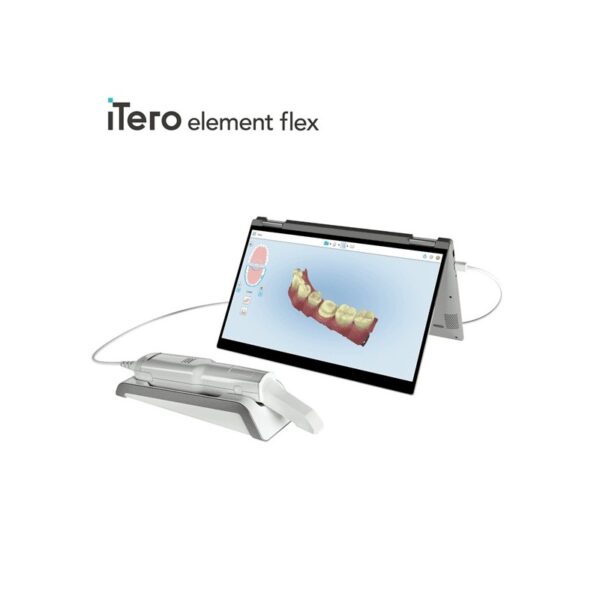
iTero Element Flex is a system allowing for quick and easy transfer between offices, enabling GPs and orthodontists the capacity to perform scans that are full-arch beyond the practice.The iTero Element Flex wand-only configuration is a portable scanner for transport from office to office, enabling doctors to leverage the power of chairside visualization. It is ideal for practices with multiple locations who want a scanner that’s convenient and easy to transport. Working using notebooks that are compatible, professionals are now able to scan everywhere, even at the smallest of operatories. The Element Flex contains a custom-designed carrying case.The Element Flex, which is the choice includes a custom-designed carrying case, and allows for connectivity. Every scanner maintains the same capabilities as its predecessor.Initially, intraoral scanning wands considered as difficult to use, and were bulky. Therefore, when it came time to make a purchasing decision clinicians chosen to forego it. Now, there are options provided by a vast assortment.With the launch of this Element Flex, scans can be carried out directly onto notebooks, making scanning that was intraoral more mobile than ever before. However, that’s not the only invention in IOS scanning. The most recent release from 3shape, the TRIOS MOVE, offers a wireless scanning wand along with an arm and swiveling screen which makes it possible for clinicians to readily show patients the process, as well as the treatment planning.The iTero Element Flex system is delivered as a laptop-based workstation for performing oral scans from the office of the doctor. This operation manual describes how to boot and shut down the machine to Deal with cable and the, and also to clean the scanning device and replace its sleevesThe iTero Element Flex system provides an intuitive user interface for performing digital scans for Indices or use. The physician is directed by means of text and visual aid via the arrangement. The notebook’s touch screen and also the wand buttons are used to respond to display instructions.Benefits of this iTero Element Flex system
The Element Flex system that is iTero Offers significant advantages over present methods that are crown-production, such as higher precision that is crown-production scanning, and instant feedback through the
Scanning procedureStreamlined Workflows with Full-Color Scans
Like most iTero Element scanners, iTero Element two and iTero Element Flex are designed to operate with present iTero orthodontic and restorative workflows, such as laboratory workflows, custom made models, open STL export, custom implant abutment and chairside milling partners. Sharp, full-color 3D scans that may be taken in as few as 60 seconds4 are generated by all of iTero Element scanners.iTero Element Flex Features iTero Element Flex Intraoral Scanner- -Compact footprint for transportability and convenience
- -Custom-designed carrying case for the ultimate in mobility
- -Enhanced color for stunning and precise imaging
- -Perform crisp, full-color, high-definition 3D scans in as little as 60 seconds*
- -Wand touchpad is as intuitive and easy as gesturing on your smartphone
| Gendex Orthoralix 9200 DDE Digital Cephalometric + Panoramic X Ray
The versatile Orthoralix 9200 system offers standard panoramic projections, as well as a full array of advanced programs to satisfy the demanding needs of dental specialists. Plus, with both ?lm-based and direct digital models and the optional cephalometric arm, the capabilities of the 9200 can expand with your practice.Discover all of the benefits and options this imaging system has to offer.Wide Range of Projections – The Orthoralix 9200 offers 10 standard projections, with the ability to add 5 Cephalometric projections and the Transcan tomography projection to satisfy the needs of today’s dental specialists. Its intuitive control panel and easy-to-read display simplifies the process of selecting projections. Plus, with the precision of morphology following and multi-motorized arm rotation, the 9200 excels at focal trough reconstruction.- 10 standard imaging projections and 6 additional with optional upgrades
- Meets the demands of today’s orthodontists, oral and maxillofacial surgeons, and other specialists
Advanced Image Quality – Three technical factor setting modes are available to ensure complete flexibility and quality control. Manual mode for total operation control, Preset mode where the operator can customize settings, and Automatic Exposure Control (AEC) mode. With AEC, the 9200 automatically raises or lowers the kV setting based on measurements of bone size and density.- Triple laser beam guide system and motorized column for simple, accurate patient positioning
- Automatic Exposure Control (AEC) to ensure optimum image contrast and balance
- Real-time image reconstruction with the direct digital model
Gendex Orthoralix 9200 DDE Digital Cephalometric + Panoramic X Ray
Expand Your Capabilities – Utilizing the latest in CCD sensor technology and built-in LAN connectivity, the 9200 DDE model allows clinicians to digitally capture x-ray images and share them with any computer connected to the network for maximum productivity. With the option to add a Cephalometric arm, the Transcan cross-sectional tomography projection, and convert to direct digital technology, the 9200 is one of the most expandable panoramic systems available.- Direct digital model with the latest CCD sensor technology and direct LAN connectivity
- Optional Cephalometric arm attachment
- Optional Transcan implantology projection for transverse cross-sections of upper and lower jaw
Gendex Orthoralix 9200 DDE Digital Cephalometric + Panoramic X Ray| Power Supply | 115-250 VAC ± 10% | | Frequency | 50/60 Hz ± 2 Hz | | Maximum Line Power Rating | 10 A at 250 V, 20 A at 115 V | | Anode Voltage | 60 – 84 kV, in 2 kV steps | | Anode Current | 3 – 15 mA, in 1 mA steps | | Exposure Time | 12 s for standard pan, 0.16 – 2.5 s for Cephalometric | | Duty Cycle | 1:20 at full power operation | | Focal Spot | 0.5 mm, IEC 336 (1993) | | Vertical Reach | 39′ to 71′ (100 to 180 cm) from ?oor to occll plane | | Weight | 410 lbs (115 kg), 467 lbs (212 kg) with Ceph arm | | Active Area CCD Sensor | 147 x 6 mm (Standard Pan), 220 x 6 mm (Ceph) | | Image Size | 1536 x 2725 pixels (Standard Pan), 2304 x 2529 pixels (Ceph – Maximum) | | Minimum PC Requirements | Pentium® II CPU, 400 MHz, 256 MB RAM | | Required Operating System | Microsoft® Windows 98®/ Windows 2000®/ Windows XP® |
| PlanScan CAD/CAM Scanner Intraoral
Excellent usability and workflow:
– Powder-free scanning
– Extremely easy to use
– Real-time, quick scanning
– True dental unit integration
– Autoclavable tip for perfect infection control
– Accurate results from single indication to full arch
– Comfortable solution
– Open STL format
– Windows support
– Works with a laptop – easy to shareSuperior scanning speedPlanmeca Emerald is a blazingly fast intraoral scanner that allows full arches to be scanned in a few minutes or even less. The scanner’s active antifog feature ensures that Planmeca Emerald is always immediately ready to be used in seconds after plugging it in.Ergonomic and lightweight designPlanmeca Emerald is exceptionally small and smooth to use. It has been designed to fit the user’s hand and places minimal strain on the wrist due to its light weight. The intraoral scanner’s small size is also very comfortable for patients.True digital accuracyPlanmeca Emerald produces true-to-life colours with flawless detail. The scanner is superbly accurate and allows restorations and appliances designed onto digital impressions captured with it to fit flawlessly.Two tip sizes PlanScan CAD/CAM Scanner IntraoralIn addition to the scanner’s ergonomic standard tip, Planmeca Emerald also has an even thinner tip available. The SlimLine tip is ideal for patients with smaller mouths and makes reaching posterior teeth and capturing interproximal areas easier. Both tips are autoclavable.Flexible imports and exportsPlanmeca intraoral scanners support imports and exports in STL file format, as well as PLY exports – making digital impressions captured with them easy to share with partners either in or outside a clinic without click fees.
For cooperation with dental labs, Romexis LabApp offers an easy and secure application for sending intraoral scans or other types of image data.Comfortable scanning experiencePlanmeca Emerald is comfortable for patients and users alike. The intraoral scanner’s small size and light weight support ergonomic chairside work and its speed ensures that scanning sessions remain short.Various workflow possibilitiesOur intraoral scanners offer unmatched flexibility. You can capture quadrants or full arches and either complete the entire restorative workflow on-site or conveniently export any part of it to your external partners. |




Reviews
There are no reviews yet.