| Description | BRAND NEW 3Shape Trios Cart T12A dental impression intraoral 3D scanner, it is new in the original crate with all accessories including scanner, wand and tips and has never been used. | A true open architecture system, the compact DWX-50 integrates with industry standard 3D scanners, computers and all popular CAD/CAM software to provide a very cost-effective production solution. Advanced communications tools and operating features allow the DWX-50 to mill unattended while providing confidence in the finished product to the lab technician. | Explore Planmeca PlanScan – the first dental unit integrated intraoral scanner for digital 3D impressions. This high-performance intraoral scanning solution can also be connected to your laptop. | The industry’s most cost-effective and user-friendly dental mill, the DWX-4 produces single crowns, copings, bridges and hybrid abutments with precision and ease. The DWX-4 is the ideal device for labs just getting into digital milling or labs that need a second device for urgent jobs. With the DWX-4 dental milling system, you can quickly and economically mill on-demand in a wide variety materials, including the latest hybrid ceramics. | Automatic Power Control: Epic Pro cuts four times faster1 than a classic diode laser with
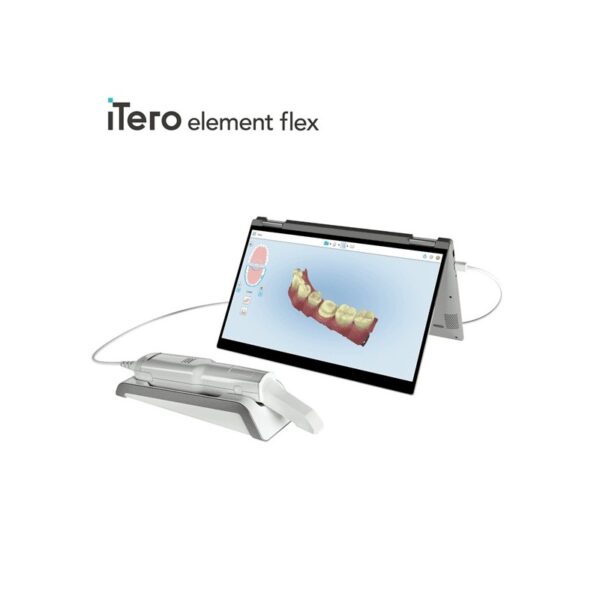
minimal collateral damage. In this treatment mode, the laser in continuous wave mode converts light energy to thermal power at the tip. Laser energy is adjusted automatically in real time to maintain constant tip temperature. The result is extremely consistent and reliable cutting conditions, regardless of speed of movement, tissue type, etc. | iTero Element Flex is a system allowing for quick and easy transfer between offices, enabling GPs and orthodontists the capacity to perform scans that are full-arch beyond the practice. iTero Element Flex Features- -Compact footprint for transportability and convenience
- -Custom-designed carrying case for the ultimate in mobility
- -Enhanced color for stunning and precise imaging
- -Perform crisp, full-color, high-definition 3D scans in as little as 60 seconds*
- -Wand touchpad is as intuitive and easy as gesturing on your smartphone
|
| Content | 3Shape Trios Cart T12a Impression 3D Intraoral Scanner3Shape TRIOS is a next-generation intraoral impression solution that is fast, accurate and easy to use. TRIOS is built on 3Shape’s Ultrafast Optical Sectioning™ technology and its features include high accuracy capture, spray- and powder-free scanning, clinical scan validation, intuitive Smart-Touch user interface, and more. TRIOS is optimized for a wide range of indications.TRIOS scanner benefits and features:
-Up to 1000 3D pictures for true geometries
-Spray-free for optimal accuracy and comfort
-Designed for high-speed impression capture
-Ergonomic grip for perfect control
-Autoclaveable scanner tip
-Scanning has never been easier. No need to hold the scanner at a specific distance or angle for focus. Dentists or assistants can even rest the scanner on the teeth for support as they scan.TRIOS cart benefits and features
-Live 3D visualization
-Easy-to-use touch screen
-Sleek design
-Unique motion sensor interface
-Mobility and Wi-Fi
-Easy-to-clean
-General benefits of digital impression takingDENTISTS:
-Less adjustment and grinding during seating
-Improved accuracy and clinical results
-Faster than traditional impression taking
-Reduced need for retakes
-No impression materials and mess
-Cost savings related to materials and shippingPATIENTS : 3Shape Trios Cart T12a Impression 3D Intraoral Scanner
-Quick and comfortable experience
-Better restoration fits and minimal grinding
-Improved clinical results
-Reduced number of appointments due to fewer retakes
-Reduced over-all chair-time3.5 Tips to Obtaining a Good Scan
PREPARATION
1. Turn on the cart or PC in advance to allow the system to heat up. See section Heating and
Mounting the Scanner Tip, step 1. Allow the system to warm up for about 10 minutes prior to use. If
using the heater, the final temperature is reached when the light goes out.
2. Retract the gingiva around the preparation for the preparation to stand out clearly.
3. Make sure the scanner tip is warm to avoid condensation on the mirror. See section Heating
and Mounting the Scanner Tip, step 5.
SCANNING
1. Dry the teeth lightly using compressed air. Be sure to reach the narrow regions between teeth.
Consider using a saliva ejector and/or tampons.
2. Get a good start:
• Start at preparation (or 1st molar if antagonist).
• Wait for about 5 scanner "clicks" before proceeding (helps build up a good starting point).
• Complete preparation including preparation line.
• Scan neighboring teeth: Occlusion, lingual/palatinal side, buccal/labial side.
3. Keep scanner head at 0-5mm from the teeth, it is OK to touch the teeth occasionally.
4. Move the scanner slowly and smoothly, you should hear a more rapid clicking sound.
41
5. Keep lips, cheeks, and tongue out of the scanner’s view:
• Use your finger or a dental mirror to create space between the teeth, lips and cheeks.
• Use a lip-and-cheek-retractor to keep lips and cheeks away.
• Be careful not to scan your own or assistant’s fingers.
• If you get lips, cheeks or tongue in the scan, make sure to delete it all, especially where they have
contact with the teeth (no surfaces should stick out from the teeth).
6. Keep focus on:
• Option 1 - Look at the teeth while scanning and listen to the "clicks". If it stops clicking/capturing,
carefully move back to the area marked on the screen.
• Option 2 - Look at the 2D image at the lower right corner. What you see here is what you scan.
Avoid lips, cheeks and the tongue to get an easy scan.
7. When scanning is complete, inspect the result by rotating the scan.
The important areas are:
• Preparation line (avoid interference from gingiva, saliva, blood).
• Contact points.
• Occlusal surfaces.
• If an important area is missing, simply touch this area on the model, and re-start scanning from
this point.
8. Bite Scan:
• Start from the second molar or at canine if you make an anterior scan.
• While centering the 2D image on occlusion plane, slowly move the scanner tip in straight mesial
direction with equal coverage of the upper and lower teeth.
• Scan 4 teeth for optimal alignment. This should take no more than 5 seconds.
9. Important for good colors:
• Avoid the light from the dentist chair lamp pointing directly into the patient's mouth. | Roland DWX-50 5-Axis Dental Milling Machine
The compact DWX-50 combines 5-axis simultaneous machining capability and a five-station automatic tool changer to deliver advanced features at a very affordable price point. Designed specifically for dental labs and technicians, the user-friendly DWX-50 allows for clean, quiet operation and the quality production of complex dental arches, abutments, bridges, copings and crowns from zirconia, wax and PMMA. Equipped with an integrated air blower and dust collection system, the DWX-50 ensures protection of moving parts while maintaining a clean, safe environment. Built on open technology, the DWX-50 supports a wide range of industry standard CAD/CAM software and tools, allowing for easy integration with popular commercially available dental prosthetic production solutions.5-axis simultaneous machiningCapable of 5-axis simultaneous machining, the DWX-50 supports the production of high-quality dental prosthetics at an affordable price point. The DWX-50 is designed to mill on X, Y and Z axes, rotating blocks and discs of material 360 degrees in both clockwise and counterclockwise movements, as well as tilting materials forward and backward 20 degrees to support complex cuts.Five-station automatic tool charger Roland DWX-50 5-Axis Dental Milling MachineThe five-station Automatic Tool Changer (ATC) with a tool length sensor enables the user to run multiple tools for one job or an entire disc unattended. Instead of inspecting finished pieces to determine if everything was milled correctly, the integrated tool diagnostics feature will notify users if a tool was broken prior to completion, resulting in reduced time and wasted materials.Taking control of prosthesis productionWith its unmatched ease of use and short learning time, the DWX-50 provides a cost-effective solution that is ideal for dental labs wishing to take control of the production process while avoiding the long lead times and costs associated with outsourcing.A true open architecture system, the compact DWX-50 integrates with industry standard 3D scanners, computers and all popular CAD/CAM software to provide a very cost-effective production solution. Advanced communications tools and operating features allow the DWX-50 to mill unattended while providing confidence in the finished product to the lab technician. | PlanScan CAD/CAM Scanner Intraoral
Excellent usability and workflow:
– Powder-free scanning
– Extremely easy to use
– Real-time, quick scanning
– True dental unit integration
– Autoclavable tip for perfect infection control
– Accurate results from single indication to full arch
– Comfortable solution
– Open STL format
– Windows support
– Works with a laptop – easy to shareSuperior scanning speedPlanmeca Emerald is a blazingly fast intraoral scanner that allows full arches to be scanned in a few minutes or even less. The scanner’s active antifog feature ensures that Planmeca Emerald is always immediately ready to be used in seconds after plugging it in.Ergonomic and lightweight designPlanmeca Emerald is exceptionally small and smooth to use. It has been designed to fit the user’s hand and places minimal strain on the wrist due to its light weight. The intraoral scanner’s small size is also very comfortable for patients.True digital accuracyPlanmeca Emerald produces true-to-life colours with flawless detail. The scanner is superbly accurate and allows restorations and appliances designed onto digital impressions captured with it to fit flawlessly.Two tip sizes PlanScan CAD/CAM Scanner IntraoralIn addition to the scanner’s ergonomic standard tip, Planmeca Emerald also has an even thinner tip available. The SlimLine tip is ideal for patients with smaller mouths and makes reaching posterior teeth and capturing interproximal areas easier. Both tips are autoclavable.Flexible imports and exportsPlanmeca intraoral scanners support imports and exports in STL file format, as well as PLY exports – making digital impressions captured with them easy to share with partners either in or outside a clinic without click fees.
For cooperation with dental labs, Romexis LabApp offers an easy and secure application for sending intraoral scans or other types of image data.Comfortable scanning experiencePlanmeca Emerald is comfortable for patients and users alike. The intraoral scanner’s small size and light weight support ergonomic chairside work and its speed ensures that scanning sessions remain short.Various workflow possibilitiesOur intraoral scanners offer unmatched flexibility. You can capture quadrants or full arches and either complete the entire restorative workflow on-site or conveniently export any part of it to your external partners. | Roland DWX-4 Dental Milling Unit
Digital dental technologies are transforming every aspect of the dental industry, making it easier than ever to produce precise crowns, copings and bridges. The latest technological advancements in scanning, CAD/CAM software and CNC milling allow digital dental labs to deliver custom production with speed and precision and enjoy optimal accuracy and repeatability.The industry’s most user-friendly desktop milling solution, the Roland DWX-4 compact dental mill, is at the forefront of this technological revolution. With the DWX-4, you can mill a single crown or small bridge quickly and economically. Affordably priced, the DWX-4 is ideal for any lab just getting started in digital dentistry or those labs with scanners who no longer wish to outsource production. It’s also the perfect addition to labs that need a second device for urgent jobs. With the DWX-4, these labs can mill a single crown or bridge on demand, without tying up their larger production mills.This affordable, precise 4-axis desktop mill is an ideal choice for labs just getting started in digital dentistry or for those that want to perform smaller, time-urgent jobs (like a single crown or small bridge) without tying up their larger production mills.- Compact design is ideally suited for all lab environments
- 2-station automatic tool changer
- 4-axis simultaneous lead/worm screw driven machining
- Tool diagnostics with tool life management
- Air blower to aid with difficult-to-mill materials
- Negative ion generator for neutralizing static electricity
- Multicast capability for connecting up to four DWX dental mills to one computer
- Color-coded LED light signals machine status
- Automatic calibration
- E-mail notification system
- Dust collection system with airflow sensor
- Virtual panel ensures easy operation
- G-code compatible
- Compatible with industry-standard software
- Open architecture for easy integration into a complete production solution
- CAM software included
The industry’s most cost-effective and user-friendly dental mill, the DWX-4 produces single crowns, copings, bridges and hybrid abutments with precision and ease. The DWX-4 is the ideal device for labs just getting into digital milling or labs that need a second device for urgent jobs. With the DWX-4 dental milling system, you can quickly and economically mill on-demand in a wide variety materials, including the latest hybrid ceramics. | Biolase Epic Pro Dental Soft Tissue LaserThe Epic Pro, which offers the most laser power of any diode laser in dentistry, is the first
product to be introduced resulting from BIOLASE’s strategic development agreement
with IPG Medical. The newest addition to the Epic family of dental soft-tissue lasers, Epic
Pro features several new innovations that are industry-firsts: - A new super pulse technology for more precise, enhanced laser tissue cutting
- Real-time automatic power control to enhance speed and consistency when performing surgery with pre-programed tip temperature
- Pre-initiated, bendable, disposable tips with new smart tip technology to ensure tip performance and quality
Automatic Power Control: Epic Pro cuts four times faster1 than a classic diode laser with
minimal collateral damage. In this treatment mode, the laser in continuous wave mode converts light energy to thermal power at the tip. Laser energy is adjusted automatically in real time to maintain constant tip temperature. The result is extremely consistent and reliable cutting conditions, regardless of speed of movement, tissue type, etc. Super Thermal Pulse: Epic Pro can achieve ten times the peak power of a standard diode (and up to three times that of the closest competitor) laser in short micro-pulses for the highest cutting efficiency and safety. In this treatment mode, the laser converts light energy to thermal power, which it emits as thermal power pulses, (i.e. multiple bursts of high power). Each of these thermal bursts cuts tissue highly efficiently. When the laser is activated, power bursts are emitted with a preset pulse width (duration), while maintaining a precise thermal level at the tip. The laser is powered on only about 3-5% of the time, giving tissue ample time to relax between pulses; creating a safer and gentler experience for patients. 
The Only Laser with Automatic Power ControlEpic Pro is the ONLY FDA-cleared laser with Automatic Power Control, an exclusive innovation from BIOLASE that enables the operator to lase with confidence and speed. 
Enhanced Clinical ApplicationsEpic Pro is the professional’s choice for managing soft tissue cases. With over 20 clinical presets, multiple treatment modes, and an advanced mode for expert users, Epic Pro provides unparalleled consistency and predictability. Unlike traditional diodes, Epic Pro moves quickly and with little snag-and-drag resistance. 
Greater Precision and ComfortEpic Pro brings more precision and comfort than traditional diodes due to innovations such as Super Thermal Pulse mode, which can pulse energy as quickly as ten-millionths of a second, resulting in efficient clinical cutting with less thermal damage than normal diode lasers. 
Introducing Smart Tip TechnologyEpic Pro uses durable new tip technology, available in uninitiated and pre-initiated formats depending on your clinical needs. Epic Pro tips work hand in hand with the laser’s Smart Tip technology to prompt you when a fresh tip is needed. 
With Epic Pro, ‘You Have to See It to Believe It’If you are a current diode laser or CO2 laser user, you have to see Epic Pro cut tissue live and compare to your current laser experience. When current Epic Pro customers were first shown Epic Pro, their response? “You have to see it cut to understand how much faster it is.” Fill out the contact form on this page to request a live demonstration for Epic Pro in your clinic.Technical Specifications Biolase Epic Pro Dental Soft Tissue Laser| Dimension | 7.25in (W) x 4.5in (L) x 6.5in (H) (18.4cm x 11.4cm x 16.5cm) | | Weight | 4 lbs (1.8 kg) | | Operating Voltage | 100V – 240V at 1.2A/0.5A | | Frequency | 50/60 Hz | | Main Control | Power Switch | | Remote Interruption | Remote Interlock | | Disable Control | Emergency Stop Button | | DC Power Supply Module | 12V DC, 5A | | Laser Classification | Class IV (4) | | Medium | Semi-conductor diode | | Wavelength | 940nm ± 20nm | | Power Modes | Continuous, Pulse Modulation | | Fiber Tip Diameter | 300µm, 400µm | | Pulse Duration | 10µm-100ms | | Pulse Interval | 0.01ms – 20ms | | Pulse Repetition Rate | Up to 20kHz (for reference) | | NOHD | 4.77 meters | | Beam Divergence | 0.22 | | Standard Fiber Cable Length | 6 feet (1.8 meters) |
| iTero Element Flex Intraoral Scanner
iTero Element Flex is a system allowing for quick and easy transfer between offices, enabling GPs and orthodontists the capacity to perform scans that are full-arch beyond the practice.The iTero Element Flex wand-only configuration is a portable scanner for transport from office to office, enabling doctors to leverage the power of chairside visualization. It is ideal for practices with multiple locations who want a scanner that’s convenient and easy to transport. Working using notebooks that are compatible, professionals are now able to scan everywhere, even at the smallest of operatories. The Element Flex contains a custom-designed carrying case.The Element Flex, which is the choice includes a custom-designed carrying case, and allows for connectivity. Every scanner maintains the same capabilities as its predecessor.Initially, intraoral scanning wands considered as difficult to use, and were bulky. Therefore, when it came time to make a purchasing decision clinicians chosen to forego it. Now, there are options provided by a vast assortment.With the launch of this Element Flex, scans can be carried out directly onto notebooks, making scanning that was intraoral more mobile than ever before. However, that’s not the only invention in IOS scanning. The most recent release from 3shape, the TRIOS MOVE, offers a wireless scanning wand along with an arm and swiveling screen which makes it possible for clinicians to readily show patients the process, as well as the treatment planning.The iTero Element Flex system is delivered as a laptop-based workstation for performing oral scans from the office of the doctor. This operation manual describes how to boot and shut down the machine to Deal with cable and the, and also to clean the scanning device and replace its sleevesThe iTero Element Flex system provides an intuitive user interface for performing digital scans for Indices or use. The physician is directed by means of text and visual aid via the arrangement. The notebook’s touch screen and also the wand buttons are used to respond to display instructions.Benefits of this iTero Element Flex system
The Element Flex system that is iTero Offers significant advantages over present methods that are crown-production, such as higher precision that is crown-production scanning, and instant feedback through the
Scanning procedureStreamlined Workflows with Full-Color Scans
Like most iTero Element scanners, iTero Element two and iTero Element Flex are designed to operate with present iTero orthodontic and restorative workflows, such as laboratory workflows, custom made models, open STL export, custom implant abutment and chairside milling partners. Sharp, full-color 3D scans that may be taken in as few as 60 seconds4 are generated by all of iTero Element scanners.iTero Element Flex Features iTero Element Flex Intraoral Scanner- -Compact footprint for transportability and convenience
- -Custom-designed carrying case for the ultimate in mobility
- -Enhanced color for stunning and precise imaging
- -Perform crisp, full-color, high-definition 3D scans in as little as 60 seconds*
- -Wand touchpad is as intuitive and easy as gesturing on your smartphone
|




Reviews
There are no reviews yet.