| Description | BRAND NEW 3Shape Trios Cart T12A dental impression intraoral 3D scanner, it is new in the original crate with all accessories including scanner, wand and tips and has never been used. | Intelligent Machine. Effortless Production. Superior Results.
The DGSHAPE DWX-42W enables wet milling of popular glass ceramic and composite resins with high precision and accuracy.- High speed production with proprietary DGSHAPE spindle
- Expanded 6-tool Automatic Tool Changer for uninterrupted milling
- LAN capable for easy connectivity
- Included VPanel for easy monitoring of milling jobs and tools
| Automatic Power Control: Epic Pro cuts four times faster1 than a classic diode laser with
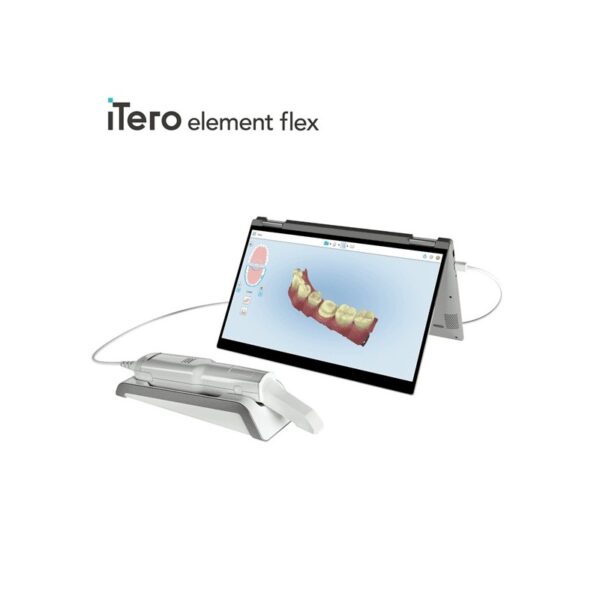
minimal collateral damage. In this treatment mode, the laser in continuous wave mode converts light energy to thermal power at the tip. Laser energy is adjusted automatically in real time to maintain constant tip temperature. The result is extremely consistent and reliable cutting conditions, regardless of speed of movement, tissue type, etc. | The 3Shape D710 is optimized for scanning both the impression and gypsum models and enables high throughput for both advanced and standard indications. These innovative scanners are so easy to use that staff training is barely required. Item fixation is fast, and the scan starts with a click on the program. | iTero Element Flex is a system allowing for quick and easy transfer between offices, enabling GPs and orthodontists the capacity to perform scans that are full-arch beyond the practice. iTero Element Flex Features- -Compact footprint for transportability and convenience
- -Custom-designed carrying case for the ultimate in mobility
- -Enhanced color for stunning and precise imaging
- -Perform crisp, full-color, high-definition 3D scans in as little as 60 seconds*
- -Wand touchpad is as intuitive and easy as gesturing on your smartphone
| The DWX-51D 5-Axis Dental Milling Machine is designed for effortless production of dental prosthetics. Built for precision, error-free milling, you don’t need any machine expertise to operate it. With touch-button controls and automated milling features, the production of high-quality bridges, crowns, inlays, onlays, abutments and other restorations out of 98 mm discs and blocks has been made virtually foolproof. |
| Content | 3Shape Trios Cart T12a Impression 3D Intraoral Scanner3Shape TRIOS is a next-generation intraoral impression solution that is fast, accurate and easy to use. TRIOS is built on 3Shape’s Ultrafast Optical Sectioning™ technology and its features include high accuracy capture, spray- and powder-free scanning, clinical scan validation, intuitive Smart-Touch user interface, and more. TRIOS is optimized for a wide range of indications.TRIOS scanner benefits and features:
-Up to 1000 3D pictures for true geometries
-Spray-free for optimal accuracy and comfort
-Designed for high-speed impression capture
-Ergonomic grip for perfect control
-Autoclaveable scanner tip
-Scanning has never been easier. No need to hold the scanner at a specific distance or angle for focus. Dentists or assistants can even rest the scanner on the teeth for support as they scan.TRIOS cart benefits and features
-Live 3D visualization
-Easy-to-use touch screen
-Sleek design
-Unique motion sensor interface
-Mobility and Wi-Fi
-Easy-to-clean
-General benefits of digital impression takingDENTISTS:
-Less adjustment and grinding during seating
-Improved accuracy and clinical results
-Faster than traditional impression taking
-Reduced need for retakes
-No impression materials and mess
-Cost savings related to materials and shippingPATIENTS : 3Shape Trios Cart T12a Impression 3D Intraoral Scanner
-Quick and comfortable experience
-Better restoration fits and minimal grinding
-Improved clinical results
-Reduced number of appointments due to fewer retakes
-Reduced over-all chair-time3.5 Tips to Obtaining a Good Scan
PREPARATION
1. Turn on the cart or PC in advance to allow the system to heat up. See section Heating and
Mounting the Scanner Tip, step 1. Allow the system to warm up for about 10 minutes prior to use. If
using the heater, the final temperature is reached when the light goes out.
2. Retract the gingiva around the preparation for the preparation to stand out clearly.
3. Make sure the scanner tip is warm to avoid condensation on the mirror. See section Heating
and Mounting the Scanner Tip, step 5.
SCANNING
1. Dry the teeth lightly using compressed air. Be sure to reach the narrow regions between teeth.
Consider using a saliva ejector and/or tampons.
2. Get a good start:
• Start at preparation (or 1st molar if antagonist).
• Wait for about 5 scanner "clicks" before proceeding (helps build up a good starting point).
• Complete preparation including preparation line.
• Scan neighboring teeth: Occlusion, lingual/palatinal side, buccal/labial side.
3. Keep scanner head at 0-5mm from the teeth, it is OK to touch the teeth occasionally.
4. Move the scanner slowly and smoothly, you should hear a more rapid clicking sound.
41
5. Keep lips, cheeks, and tongue out of the scanner’s view:
• Use your finger or a dental mirror to create space between the teeth, lips and cheeks.
• Use a lip-and-cheek-retractor to keep lips and cheeks away.
• Be careful not to scan your own or assistant’s fingers.
• If you get lips, cheeks or tongue in the scan, make sure to delete it all, especially where they have
contact with the teeth (no surfaces should stick out from the teeth).
6. Keep focus on:
• Option 1 - Look at the teeth while scanning and listen to the "clicks". If it stops clicking/capturing,
carefully move back to the area marked on the screen.
• Option 2 - Look at the 2D image at the lower right corner. What you see here is what you scan.
Avoid lips, cheeks and the tongue to get an easy scan.
7. When scanning is complete, inspect the result by rotating the scan.
The important areas are:
• Preparation line (avoid interference from gingiva, saliva, blood).
• Contact points.
• Occlusal surfaces.
• If an important area is missing, simply touch this area on the model, and re-start scanning from
this point.
8. Bite Scan:
• Start from the second molar or at canine if you make an anterior scan.
• While centering the 2D image on occlusion plane, slowly move the scanner tip in straight mesial
direction with equal coverage of the upper and lower teeth.
• Scan 4 teeth for optimal alignment. This should take no more than 5 seconds.
9. Important for good colors:
• Avoid the light from the dentist chair lamp pointing directly into the patient's mouth. | Roland DWX-42W Wet Dental Milling Machine
The DWX-42W enables wet milling of popular glass-ceramic composite resins with high precision and accuracy. High-Speed Production with proprietary DGSHAPE spindle. Expanded 6-tool Automatic Tool Changer for uninterrupted milling. LAN capable for network and hardware connection and communication. VPanel user interface for easy monitoring of milling jobs and tools.The DGSHAPE DWX-42W enables wet milling of popular glass ceramic and composite resins with high precision and accuracy.- High speed production with proprietary DGSHAPE spindle
- Expanded 6-tool Automatic Tool Changer for uninterrupted milling
- LAN capable for easy connectivity
- Included VPanel for easy monitoring of milling jobs and tools
DWX-42W Roland DWX-42W Wet Dental Milling Machine| Millable material | Glass ceramics, Composite resin, PMMA | | Loadable workpiece shape | Width | Maximum 40 mm | | Depth | Maximum 20 mm | | Height | Maximum 20 mm | | Operating speed | 0.24 to 70.9 in./min. (6 to 1,800 mm/min.) | | Spindle speed | 15,000 to 60,000 rpm | | Rotary axis travel angle | A axis | ±360° | | Number of burs housed | 6 | | Attachable bur | Shank diameter | 3 mm, dedicated milling bur | | Compatible compressed air | Control Pressure | 0.3 MPA or more | | Air Capacity | 39 L/min or more | | Interface | USB, Ethernet (10 BASE-T/100 BASE-TX automatic switching) | | Control command set | RML-1, NC code | | Power requirements | AC 100 to 240 V ± 10%, 50/60 Hz (overvoltage category II, IEC 60664-1), 2.1 A | | Power consumption | Approximately 190 W | | Operating noise | During operation | 70 dB(A) or less (when not cutting) | | During standby | 48 dB(A) or less | | External dimensions | Width x Depth x Height | 19.0 x 22.0 x 23.6 in. (482 x 560 x 600 mm) | | Weight | 135 lbs. (61 kg) | | Installation environment | Indoor use, Altitude | Up to 6,562 ft. (2,000m) | | Temperature | 41 to 82 °F (5 to 28°C) | | Humidity | 35 to 80%RH (no condensation) | | Ambient pollution degree | 2 (as specified by IEC 60664-1) | | Short-term temporary overvoltage | 1,440 V | | Long-term temporary overvoltage | 490 V | | Included items | Power cord, USB cable, Roland DG Software Package CD, setup guide, drain hoses, dedicated milling burs (4), detection pin, dummy pin, rotary axis correction jig, ATC magazine correction jig and screw, hexagonal screwdriver, hexagonal wrench, measuring cup, mounting screws (4), milling bur removal jig, coolant tank, waste receptacle, filters (2), regulator with stay and screws (2), maintenance kit, daily maintenance card, 6 mm air hose, coolant additive, MillBox CAM software, Ethernet cable |
| Biolase Epic Pro Dental Soft Tissue LaserThe Epic Pro, which offers the most laser power of any diode laser in dentistry, is the first
product to be introduced resulting from BIOLASE’s strategic development agreement
with IPG Medical. The newest addition to the Epic family of dental soft-tissue lasers, Epic
Pro features several new innovations that are industry-firsts: - A new super pulse technology for more precise, enhanced laser tissue cutting
- Real-time automatic power control to enhance speed and consistency when performing surgery with pre-programed tip temperature
- Pre-initiated, bendable, disposable tips with new smart tip technology to ensure tip performance and quality
Automatic Power Control: Epic Pro cuts four times faster1 than a classic diode laser with
minimal collateral damage. In this treatment mode, the laser in continuous wave mode converts light energy to thermal power at the tip. Laser energy is adjusted automatically in real time to maintain constant tip temperature. The result is extremely consistent and reliable cutting conditions, regardless of speed of movement, tissue type, etc. Super Thermal Pulse: Epic Pro can achieve ten times the peak power of a standard diode (and up to three times that of the closest competitor) laser in short micro-pulses for the highest cutting efficiency and safety. In this treatment mode, the laser converts light energy to thermal power, which it emits as thermal power pulses, (i.e. multiple bursts of high power). Each of these thermal bursts cuts tissue highly efficiently. When the laser is activated, power bursts are emitted with a preset pulse width (duration), while maintaining a precise thermal level at the tip. The laser is powered on only about 3-5% of the time, giving tissue ample time to relax between pulses; creating a safer and gentler experience for patients. 
The Only Laser with Automatic Power ControlEpic Pro is the ONLY FDA-cleared laser with Automatic Power Control, an exclusive innovation from BIOLASE that enables the operator to lase with confidence and speed. 
Enhanced Clinical ApplicationsEpic Pro is the professional’s choice for managing soft tissue cases. With over 20 clinical presets, multiple treatment modes, and an advanced mode for expert users, Epic Pro provides unparalleled consistency and predictability. Unlike traditional diodes, Epic Pro moves quickly and with little snag-and-drag resistance. 
Greater Precision and ComfortEpic Pro brings more precision and comfort than traditional diodes due to innovations such as Super Thermal Pulse mode, which can pulse energy as quickly as ten-millionths of a second, resulting in efficient clinical cutting with less thermal damage than normal diode lasers. 
Introducing Smart Tip TechnologyEpic Pro uses durable new tip technology, available in uninitiated and pre-initiated formats depending on your clinical needs. Epic Pro tips work hand in hand with the laser’s Smart Tip technology to prompt you when a fresh tip is needed. 
With Epic Pro, ‘You Have to See It to Believe It’If you are a current diode laser or CO2 laser user, you have to see Epic Pro cut tissue live and compare to your current laser experience. When current Epic Pro customers were first shown Epic Pro, their response? “You have to see it cut to understand how much faster it is.” Fill out the contact form on this page to request a live demonstration for Epic Pro in your clinic.Technical Specifications Biolase Epic Pro Dental Soft Tissue Laser| Dimension | 7.25in (W) x 4.5in (L) x 6.5in (H) (18.4cm x 11.4cm x 16.5cm) | | Weight | 4 lbs (1.8 kg) | | Operating Voltage | 100V – 240V at 1.2A/0.5A | | Frequency | 50/60 Hz | | Main Control | Power Switch | | Remote Interruption | Remote Interlock | | Disable Control | Emergency Stop Button | | DC Power Supply Module | 12V DC, 5A | | Laser Classification | Class IV (4) | | Medium | Semi-conductor diode | | Wavelength | 940nm ± 20nm | | Power Modes | Continuous, Pulse Modulation | | Fiber Tip Diameter | 300µm, 400µm | | Pulse Duration | 10µm-100ms | | Pulse Interval | 0.01ms – 20ms | | Pulse Repetition Rate | Up to 20kHz (for reference) | | NOHD | 4.77 meters | | Beam Divergence | 0.22 | | Standard Fiber Cable Length | 6 feet (1.8 meters) |
| 3shape D710 Dental Scanner3Shape D710 Scanner series can scan gypsum and impression versions. The series scanners can integrate into the clinic with minimum staff training. The scanners provide greater practice productivity, a comprehensive list of signals, and the most extensive 3D scans.Where flexibility and productivity are the key standards 3Shape chain scanners are for medium to large labs.The 3Shape D710 is optimized for scanning both the impression and gypsum models and enables high throughput for both advanced and standard indications. These innovative scanners are so easy to use that staff training is barely required. Item fixation is fast, and the scan starts with a click on the program.3SHAPE D710 For Sale3Shape D700 Scanner is both a scanner and impression scanner in 1 unit. It utilizes three measurement movement and two cameras a laser and creates another pass to especially hone. Just one device can be scanned by the apparatus in under 30 seconds and a whole model in about a minute with a degree of accuracy of 20 microns.Features:
-3-axis motion system
-Red-laser Tech
-Gypsum Version scanning
-Impression scanning Alternative
-Multi-die scanningBenefits:
-Easy operation, extreme Precision, and Rapid Scan
-Enables impressions, deep inlays, and Complete undercuts to scan Efficiently
-Supply labs Using ultra-efficient batches and multi-case processingHigh-speed scanning
The D710 is optimized for scanning gypsum and impression versions and enables high throughput for both advanced and standard indications3Shape – leading impression scanning technologies
3Shape’s patented adaptive scanning technology, combined with the scanner’s 3-axis motion and 2 cameras with reduced angle, facilitate the unique impression scanning capability.Adaptive scanning intelligently detects incomplete areas and automatically builds
adaptive scan sequences for capturing full object geometry. | iTero Element Flex Intraoral Scanner
iTero Element Flex is a system allowing for quick and easy transfer between offices, enabling GPs and orthodontists the capacity to perform scans that are full-arch beyond the practice.The iTero Element Flex wand-only configuration is a portable scanner for transport from office to office, enabling doctors to leverage the power of chairside visualization. It is ideal for practices with multiple locations who want a scanner that’s convenient and easy to transport. Working using notebooks that are compatible, professionals are now able to scan everywhere, even at the smallest of operatories. The Element Flex contains a custom-designed carrying case.The Element Flex, which is the choice includes a custom-designed carrying case, and allows for connectivity. Every scanner maintains the same capabilities as its predecessor.Initially, intraoral scanning wands considered as difficult to use, and were bulky. Therefore, when it came time to make a purchasing decision clinicians chosen to forego it. Now, there are options provided by a vast assortment.With the launch of this Element Flex, scans can be carried out directly onto notebooks, making scanning that was intraoral more mobile than ever before. However, that’s not the only invention in IOS scanning. The most recent release from 3shape, the TRIOS MOVE, offers a wireless scanning wand along with an arm and swiveling screen which makes it possible for clinicians to readily show patients the process, as well as the treatment planning.The iTero Element Flex system is delivered as a laptop-based workstation for performing oral scans from the office of the doctor. This operation manual describes how to boot and shut down the machine to Deal with cable and the, and also to clean the scanning device and replace its sleevesThe iTero Element Flex system provides an intuitive user interface for performing digital scans for Indices or use. The physician is directed by means of text and visual aid via the arrangement. The notebook’s touch screen and also the wand buttons are used to respond to display instructions.Benefits of this iTero Element Flex system
The Element Flex system that is iTero Offers significant advantages over present methods that are crown-production, such as higher precision that is crown-production scanning, and instant feedback through the
Scanning procedureStreamlined Workflows with Full-Color Scans
Like most iTero Element scanners, iTero Element two and iTero Element Flex are designed to operate with present iTero orthodontic and restorative workflows, such as laboratory workflows, custom made models, open STL export, custom implant abutment and chairside milling partners. Sharp, full-color 3D scans that may be taken in as few as 60 seconds4 are generated by all of iTero Element scanners.iTero Element Flex Features iTero Element Flex Intraoral Scanner- -Compact footprint for transportability and convenience
- -Custom-designed carrying case for the ultimate in mobility
- -Enhanced color for stunning and precise imaging
- -Perform crisp, full-color, high-definition 3D scans in as little as 60 seconds*
- -Wand touchpad is as intuitive and easy as gesturing on your smartphone
| Roland DWX-51D Dental Milling Unit
Roland DWX-51D Integrated HD Mill Package
DWX-51D 5-Axis Dental Mill
High Definition Custom CAM Strategy SUM3D
Nabertherm High Speed Auto Cool Zi Furnace
Quatro IVAC Mill Suction
Integration Package for Implant Abutments
Integration Package for up to 60mm disc sizes
Integration Package for HD High Detail End Mills
Start Up Package for Milling Materials
Top To Bottom Mill Training by the Industry Experts
Equipment Set up, IT and Networking Included
Mill Contingency and Loaner ProgramBuilt-to-Last
For thirty years, Roland DG has been the trusted provider of milling machines that are built to last. The DWX-51D 5-Axis Dental Milling Machine is no exception. After extensive research in which lab technicians were asked what they needed in a production mill, the DWX-51D was developed to enhance user experience, maximize ease-of-use and improve output quality. Built with a simple and modern design, the DWX-51D looks as effortless as it operates.Features
5-axis simultaneous operation for non-stop precision milling
Sturdy and efficient ball screw-driven system
New C-clamp for easy adjustment and alignment
10-station Automatic Tool Changer (ATC) for continuous milling
Powerful vacuum and anti-static ionizer for clean calibration and dust reductionThe DWX-51D is designed for effortless, precision production of dental prosthetics fromcopings, crowns and bridges to inlays, onlays and abutments, etc. With a host of automated features and a clean, stable work environment, the DWX-51D is the perfect solution for labs wanting to increase production or those looking to get into digital milling for the first time.Built-for-You.Built-to-Last.For thirty years, Roland DG has been the trusted provider of milling machines that are built to last. The DWX-51D 5-Axis Dental Milling Machine is no exception. After extensive research in which lab technicians were asked what they needed in a production mill, the DWX-51D was developed to enhance user experience, maximize ease-of-use and improve output quality. Built with a simple and modern design, the DWX-51D looks as effortless as it operates. Distinguishing Features Roland DWX-51D Dental Milling Unit- 5-axis simultaneous milling for precision milling
- Steady and efficient ball screw-driven operation
- New C-shape clamp for easy adjustment and alignment
- 10-station Automatic Tool Changer (ATC) for continuous milling
- Powerful vacuum and anti-static ionizer for clean calibration and dust reduction
Ultimate Convenience and Ease-of-Use- A variety of new features ensure continuous, user-friendly milling, including
- Sturdy frame ensures stability, while slim design fits nearly any lab space
- Easy access tool drawer properly stores and protects tools
- Color-coded LED status lights signal current job progress
- Virtual Machine Panel (VPanel) allows users to configure settings from their computer, send CAM data to the DWX-51D for production, and track milling progress
- Easily accessible cutting area for simple tool replacement and cleaning
|




Reviews
There are no reviews yet.