| Description | BRAND NEW 3Shape Trios Cart T12A dental impression intraoral 3D scanner, it is new in the original crate with all accessories including scanner, wand and tips and has never been used. | The 3Shape D710 is optimized for scanning both the impression and gypsum models and enables high throughput for both advanced and standard indications. These innovative scanners are so easy to use that staff training is barely required. Item fixation is fast, and the scan starts with a click on the program. | A true open architecture system, the compact DWX-50 integrates with industry standard 3D scanners, computers and all popular CAD/CAM software to provide a very cost-effective production solution. Advanced communications tools and operating features allow the DWX-50 to mill unattended while providing confidence in the finished product to the lab technician. | Automatic Power Control: Epic Pro cuts four times faster1 than a classic diode laser with
minimal collateral damage. In this treatment mode, the laser in continuous wave mode converts light energy to thermal power at the tip. Laser energy is adjusted automatically in real time to maintain constant tip temperature. The result is extremely consistent and reliable cutting conditions, regardless of speed of movement, tissue type, etc. | 3Shape TRIOS MOVE is the ultimate patient/dentist communication tool. Show patients their digital scans and dynamic treatment information close-up and create greater opportunities for treatment dialogue and joint decision-making. The ergonomic and lightweight design of TRIOS MOVE allows you to always position the screen in the right place and enjoy superior user experience. | Automatic Positioning
With Quick Denta, setting up a file for 3D printing is no longer a manual process. It automatically adjusts 3D data to produce the most efficient and stable position on the printer’s work surface. Theoptimum angle of orientation can also be automatically saved as a preset value and configured for each type of model being made- eliminating the need to reset values each time.It really is that simple. Once a user imports an STL 3D file, Quick Denta software not only detects and heals errors but also does all the complex digital set-up for you. |
| Content | 3Shape Trios Cart T12a Impression 3D Intraoral Scanner3Shape TRIOS is a next-generation intraoral impression solution that is fast, accurate and easy to use. TRIOS is built on 3Shape’s Ultrafast Optical Sectioning™ technology and its features include high accuracy capture, spray- and powder-free scanning, clinical scan validation, intuitive Smart-Touch user interface, and more. TRIOS is optimized for a wide range of indications.TRIOS scanner benefits and features:
-Up to 1000 3D pictures for true geometries
-Spray-free for optimal accuracy and comfort
-Designed for high-speed impression capture
-Ergonomic grip for perfect control
-Autoclaveable scanner tip
-Scanning has never been easier. No need to hold the scanner at a specific distance or angle for focus. Dentists or assistants can even rest the scanner on the teeth for support as they scan.TRIOS cart benefits and features
-Live 3D visualization
-Easy-to-use touch screen
-Sleek design
-Unique motion sensor interface
-Mobility and Wi-Fi
-Easy-to-clean
-General benefits of digital impression takingDENTISTS:
-Less adjustment and grinding during seating
-Improved accuracy and clinical results
-Faster than traditional impression taking
-Reduced need for retakes
-No impression materials and mess
-Cost savings related to materials and shippingPATIENTS : 3Shape Trios Cart T12a Impression 3D Intraoral Scanner
-Quick and comfortable experience
-Better restoration fits and minimal grinding
-Improved clinical results
-Reduced number of appointments due to fewer retakes
-Reduced over-all chair-time3.5 Tips to Obtaining a Good Scan
PREPARATION
1. Turn on the cart or PC in advance to allow the system to heat up. See section Heating and
Mounting the Scanner Tip, step 1. Allow the system to warm up for about 10 minutes prior to use. If
using the heater, the final temperature is reached when the light goes out.
2. Retract the gingiva around the preparation for the preparation to stand out clearly.
3. Make sure the scanner tip is warm to avoid condensation on the mirror. See section Heating
and Mounting the Scanner Tip, step 5.
SCANNING
1. Dry the teeth lightly using compressed air. Be sure to reach the narrow regions between teeth.
Consider using a saliva ejector and/or tampons.
2. Get a good start:
• Start at preparation (or 1st molar if antagonist).
• Wait for about 5 scanner "clicks" before proceeding (helps build up a good starting point).
• Complete preparation including preparation line.
• Scan neighboring teeth: Occlusion, lingual/palatinal side, buccal/labial side.
3. Keep scanner head at 0-5mm from the teeth, it is OK to touch the teeth occasionally.
4. Move the scanner slowly and smoothly, you should hear a more rapid clicking sound.
41
5. Keep lips, cheeks, and tongue out of the scanner’s view:
• Use your finger or a dental mirror to create space between the teeth, lips and cheeks.
• Use a lip-and-cheek-retractor to keep lips and cheeks away.
• Be careful not to scan your own or assistant’s fingers.
• If you get lips, cheeks or tongue in the scan, make sure to delete it all, especially where they have
contact with the teeth (no surfaces should stick out from the teeth).
6. Keep focus on:
• Option 1 - Look at the teeth while scanning and listen to the "clicks". If it stops clicking/capturing,
carefully move back to the area marked on the screen.
• Option 2 - Look at the 2D image at the lower right corner. What you see here is what you scan.
Avoid lips, cheeks and the tongue to get an easy scan.
7. When scanning is complete, inspect the result by rotating the scan.
The important areas are:
• Preparation line (avoid interference from gingiva, saliva, blood).
• Contact points.
• Occlusal surfaces.
• If an important area is missing, simply touch this area on the model, and re-start scanning from
this point.
8. Bite Scan:
• Start from the second molar or at canine if you make an anterior scan.
• While centering the 2D image on occlusion plane, slowly move the scanner tip in straight mesial
direction with equal coverage of the upper and lower teeth.
• Scan 4 teeth for optimal alignment. This should take no more than 5 seconds.
9. Important for good colors:
• Avoid the light from the dentist chair lamp pointing directly into the patient's mouth. | 3shape D710 Dental Scanner3Shape D710 Scanner series can scan gypsum and impression versions. The series scanners can integrate into the clinic with minimum staff training. The scanners provide greater practice productivity, a comprehensive list of signals, and the most extensive 3D scans.Where flexibility and productivity are the key standards 3Shape chain scanners are for medium to large labs.The 3Shape D710 is optimized for scanning both the impression and gypsum models and enables high throughput for both advanced and standard indications. These innovative scanners are so easy to use that staff training is barely required. Item fixation is fast, and the scan starts with a click on the program.3SHAPE D710 For Sale3Shape D700 Scanner is both a scanner and impression scanner in 1 unit. It utilizes three measurement movement and two cameras a laser and creates another pass to especially hone. Just one device can be scanned by the apparatus in under 30 seconds and a whole model in about a minute with a degree of accuracy of 20 microns.Features:
-3-axis motion system
-Red-laser Tech
-Gypsum Version scanning
-Impression scanning Alternative
-Multi-die scanningBenefits:
-Easy operation, extreme Precision, and Rapid Scan
-Enables impressions, deep inlays, and Complete undercuts to scan Efficiently
-Supply labs Using ultra-efficient batches and multi-case processingHigh-speed scanning
The D710 is optimized for scanning gypsum and impression versions and enables high throughput for both advanced and standard indications3Shape – leading impression scanning technologies
3Shape’s patented adaptive scanning technology, combined with the scanner’s 3-axis motion and 2 cameras with reduced angle, facilitate the unique impression scanning capability.Adaptive scanning intelligently detects incomplete areas and automatically builds
adaptive scan sequences for capturing full object geometry. | Roland DWX-50 5-Axis Dental Milling Machine
The compact DWX-50 combines 5-axis simultaneous machining capability and a five-station automatic tool changer to deliver advanced features at a very affordable price point. Designed specifically for dental labs and technicians, the user-friendly DWX-50 allows for clean, quiet operation and the quality production of complex dental arches, abutments, bridges, copings and crowns from zirconia, wax and PMMA. Equipped with an integrated air blower and dust collection system, the DWX-50 ensures protection of moving parts while maintaining a clean, safe environment. Built on open technology, the DWX-50 supports a wide range of industry standard CAD/CAM software and tools, allowing for easy integration with popular commercially available dental prosthetic production solutions.5-axis simultaneous machiningCapable of 5-axis simultaneous machining, the DWX-50 supports the production of high-quality dental prosthetics at an affordable price point. The DWX-50 is designed to mill on X, Y and Z axes, rotating blocks and discs of material 360 degrees in both clockwise and counterclockwise movements, as well as tilting materials forward and backward 20 degrees to support complex cuts.Five-station automatic tool charger Roland DWX-50 5-Axis Dental Milling MachineThe five-station Automatic Tool Changer (ATC) with a tool length sensor enables the user to run multiple tools for one job or an entire disc unattended. Instead of inspecting finished pieces to determine if everything was milled correctly, the integrated tool diagnostics feature will notify users if a tool was broken prior to completion, resulting in reduced time and wasted materials.Taking control of prosthesis productionWith its unmatched ease of use and short learning time, the DWX-50 provides a cost-effective solution that is ideal for dental labs wishing to take control of the production process while avoiding the long lead times and costs associated with outsourcing.A true open architecture system, the compact DWX-50 integrates with industry standard 3D scanners, computers and all popular CAD/CAM software to provide a very cost-effective production solution. Advanced communications tools and operating features allow the DWX-50 to mill unattended while providing confidence in the finished product to the lab technician. | Biolase Epic Pro Dental Soft Tissue LaserThe Epic Pro, which offers the most laser power of any diode laser in dentistry, is the first
product to be introduced resulting from BIOLASE’s strategic development agreement
with IPG Medical. The newest addition to the Epic family of dental soft-tissue lasers, Epic
Pro features several new innovations that are industry-firsts: - A new super pulse technology for more precise, enhanced laser tissue cutting
- Real-time automatic power control to enhance speed and consistency when performing surgery with pre-programed tip temperature
- Pre-initiated, bendable, disposable tips with new smart tip technology to ensure tip performance and quality
Automatic Power Control: Epic Pro cuts four times faster1 than a classic diode laser with
minimal collateral damage. In this treatment mode, the laser in continuous wave mode converts light energy to thermal power at the tip. Laser energy is adjusted automatically in real time to maintain constant tip temperature. The result is extremely consistent and reliable cutting conditions, regardless of speed of movement, tissue type, etc. Super Thermal Pulse: Epic Pro can achieve ten times the peak power of a standard diode (and up to three times that of the closest competitor) laser in short micro-pulses for the highest cutting efficiency and safety. In this treatment mode, the laser converts light energy to thermal power, which it emits as thermal power pulses, (i.e. multiple bursts of high power). Each of these thermal bursts cuts tissue highly efficiently. When the laser is activated, power bursts are emitted with a preset pulse width (duration), while maintaining a precise thermal level at the tip. The laser is powered on only about 3-5% of the time, giving tissue ample time to relax between pulses; creating a safer and gentler experience for patients. 
The Only Laser with Automatic Power ControlEpic Pro is the ONLY FDA-cleared laser with Automatic Power Control, an exclusive innovation from BIOLASE that enables the operator to lase with confidence and speed. 
Enhanced Clinical ApplicationsEpic Pro is the professional’s choice for managing soft tissue cases. With over 20 clinical presets, multiple treatment modes, and an advanced mode for expert users, Epic Pro provides unparalleled consistency and predictability. Unlike traditional diodes, Epic Pro moves quickly and with little snag-and-drag resistance. 
Greater Precision and ComfortEpic Pro brings more precision and comfort than traditional diodes due to innovations such as Super Thermal Pulse mode, which can pulse energy as quickly as ten-millionths of a second, resulting in efficient clinical cutting with less thermal damage than normal diode lasers. 
Introducing Smart Tip TechnologyEpic Pro uses durable new tip technology, available in uninitiated and pre-initiated formats depending on your clinical needs. Epic Pro tips work hand in hand with the laser’s Smart Tip technology to prompt you when a fresh tip is needed. 
With Epic Pro, ‘You Have to See It to Believe It’If you are a current diode laser or CO2 laser user, you have to see Epic Pro cut tissue live and compare to your current laser experience. When current Epic Pro customers were first shown Epic Pro, their response? “You have to see it cut to understand how much faster it is.” Fill out the contact form on this page to request a live demonstration for Epic Pro in your clinic.Technical Specifications Biolase Epic Pro Dental Soft Tissue Laser| Dimension | 7.25in (W) x 4.5in (L) x 6.5in (H) (18.4cm x 11.4cm x 16.5cm) | | Weight | 4 lbs (1.8 kg) | | Operating Voltage | 100V – 240V at 1.2A/0.5A | | Frequency | 50/60 Hz | | Main Control | Power Switch | | Remote Interruption | Remote Interlock | | Disable Control | Emergency Stop Button | | DC Power Supply Module | 12V DC, 5A | | Laser Classification | Class IV (4) | | Medium | Semi-conductor diode | | Wavelength | 940nm ± 20nm | | Power Modes | Continuous, Pulse Modulation | | Fiber Tip Diameter | 300µm, 400µm | | Pulse Duration | 10µm-100ms | | Pulse Interval | 0.01ms – 20ms | | Pulse Repetition Rate | Up to 20kHz (for reference) | | NOHD | 4.77 meters | | Beam Divergence | 0.22 | | Standard Fiber Cable Length | 6 feet (1.8 meters) |
| 3Shape TRIOS MOVE Intraoral Scanning Setup3Shape TRIOS MOVE is the ultimate patient/dentist communication tool. Show patients their digital scans and dynamic treatment information close-up and create greater opportunities for treatment dialogue and joint decision-making. The ergonomic and lightweight design of TRIOS MOVE allows you to always position the screen in the right place and enjoy superior user experience. Introducing 3Shape TRIOS MOVE
 3Shape spoke to more than a hundred dentists and identified their biggest problem; having the screen in the right place to show patients their teeth and the treatment needed. We used this insight to create an ergonomic solution that ensures the screen is always in the right place to engage, excite and drive treatment acceptance with patients
The brand new hardware setup placed the 3Shape TRIOS 3 scanner, monitor, and PC on the lightweight, fully-adjustable, ergonomic 3Shape TRIOS MOVE. TRIOS MOVE’s mobility enables doctors to always position the screen in the right place to provide a superior experience for both dentists and patients. TRIOS MOVE is perfectly balanced and can be rolled effortlessly from operatory to operatory.All TRIOS 3 intraoral scanners, including the new 3Shape TRIOS 3 Wireless model, work seamlessly with TRIOS MOVE. The amazing TRIOS 3 scanners improve patient experience through remarkable scanning speed, and documented accuracy. Thanks to TRIOS MOVE, the digital impressions in realistic colors can easily be shown to your patients to engage and excite them about their treatment options. Use 3Shape TRIOS apps to give your patients insights into their dental health and proposed treatment plans.Provide better preventative care with 3Shape TRIOS Patient Monitoring*
Compare a patient’s scans between visits to monitor changes in their dental status, and identify a timely and effective care plan. Share the insights with your patient to gain acceptance for the treatment they really need. Show patients their future smile with 3Shape TRIOS Smile Design
Simply take a photo of your patient’s face, and easily create their new beautiful teeth in minutes. Share the photo-realistic image with your patient to excite them and advance treatment acceptance. Grow orthodontic treatments with 3Shape TRIOS Treatment Simulator*
Scan your patient and show their present dentition compared to the final results of orthodontic treatment to gain case approval. The best solution for the patient and the best satisfaction for the patient
We spoke to hundreds of dentists and discovered that they needed an easy way to get the screen positioned in the right place to share intraoral scans and images with patients. This is important, as seeing is believing and patients trust a dentist they believe in.With this insight, TRIOS MOVE was born, allowing you to easily share your digital scans, images, and treatment plan with patients. This helps patients picture their final results and ultimately, advance case acceptance.The new 3Shape TRIOS MOVE now places the 3Shape TRIOS intraoral scanner, monitor and PC on the lightweight, fully-adjustable, ergonomic 3Shape TRIOS MOVE. The mobility of the 3Shape TRIOS MOVE enables doctors to always position the screen in the right place. This provides a superior experience for both the orthodontist and patient and makes it easy to share dynamic treatment information close-up with patients to advance treatment dialogue and acceptance. 3Shape TRIOS MOVE is perfectly-balanced and can be rolled effortlessly.Professionals using the 3Shape TRIOS MOVE with TRIOS 3 Wireless additionally benefit from complete freedom of movement because there are no connecting cables between the wand and hardware. Features 3Shape TRIOS MOVE Intraoral Scanning Setup- 13.3″ Full HD touch LCD screen
- Adjustable arm & swiveling screen
- Powerful custom PC designed for scanning
- Apps designed to excite
- Four wheels with integrated brakes
- The perfect size for bringing in front of a patient or when working with up close.
Show scans easily, boost involvementOne of the challenges of working with intraoral scans is in organizing the physical space: how to position your screen in the right place to not only prepare and scan but also share your work? To help you solve this, we developed a TRIOS MOVE. It allows you to move your screen with digital scans, images, and simulated expected treatment outcomes to where the patient sits. This helps them picture their final results and ultimately, advance case acceptance. On top of that, it is more ergonomic for dentists Superior scanning technology, always where you need itAll TRIOS 3 intraoral scanners, including the new 3Shape TRIOS 3 Wireless model work seamlessly with TRIOS MOVE. The amazing TRIOS 3 scanners improve patient experience through remarkable scanning speed, and documented accuracy. Thanks to TRIOS MOVE, the digital impressions in realistic colors can easily be shown to your patients to engage and excite them about their treatment options. Our flexible TRIOS setup solution comes in two sizes: 15.6″ (MOVE+) and 13.3″ (MOVE). Both come with a stylus touch pen and a powerful 1TB PC, specially designed for scanning. They can be purchased in combination with TRIOS 3 Basic, TRIOS 3 and TRIOS 4. - TRIOS 3 Wireless scanner wand
- Charger incl. power cord
- Wall mount kit for the charger
- 3x batteries
- 5x TRIOS 3 scanner tips
- TRIOS 3 Protection tip
- TRIOS 3 Calibration tip
- TRIOS 3 Color Calibration kit
- TRIOS MOVE incl. power cord
- HEX S10 key (for foot assembly)
- Screwdrivers TX6 and TX8
- Ethernet cable
- 2x Fuses
- USB Dongle with software
- Documentation
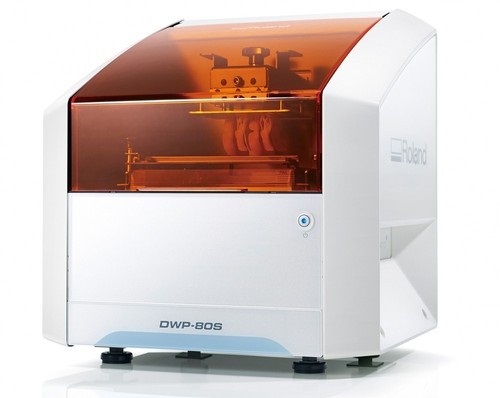
Also available as a stand-alone accessory for all existing TRIOS 3 users. Can be used as a second scanning station or replacement for a PC/CARTCompatible with TRIOS 3 Mono, TRIOS 3 & TRIOS 3 Wireless in both, Pen or Handle grip | Roland DWP-80S Dental 3D Printer
Key software features
With Quick Denta, setting up a file for 3D printing is no longer a manual process. It automatically adjusts 3D data to produce the most efficient and stable position on the printer’s work surface. The optimum angle of orientation can also be automatically saved as a preset value and configured for each type of model being made- eliminating the need to reset values each time.Automatic Support Generation
Quick Denta simplifies the complex process of model support creation by automatically generating support structures with a single click.Error Detection and 3D Mesh Healing
An optional feature allows Quick Denta to automatically detect and repair minor errors during the STL importing process, without the need to return to the CAD software.Cost-Effective Resin Calculation
Quick Denta provides accurate, timesaving and cost-effective production by calculating the exact amount of resin needed for each job.Specs Roland DWP-80S Dental 3D Printer| Applications | Custom trays, base plates, and frameworks | | Build technology | Layered projection system | | Build size | 3.15 (W) x 3.15 (D) x 3.15 (H) in.
(80 (W) × 80 (D) ×80 (H) mm)
(The maximum amount of use per job is 300g(0.66 lb.)) | | Light source | UV-LED (Ultraviolet light-emitting diode) | | Machine Power Supply | DC 24 V、0.8 A | | Dedicated AC adapter | AC 100 to 240V ± 10%、50 / 60 Hz | | Power consumption | 20 W | | During standby | 49 dB (A) or less | | External dimensions | 16.93 (W) x 14.37 (D) x 17.72 (H) in.
(430 (W) × 365 (D) × 450 (H) mm) | | Interface | USB | | Noise During
operation | 55 dB (A) or less | | Noise Power off | 49 dB (A) or less | | External dimensions | 16.93 (W) x 14.37 (D) x 17.72 (H) in.
(430 (W) × 365 (D) × 450 (H) mm) | | Weight | 24 kg (53 lb.) | | Interface | USB | | Installation Environment During Operation | Temperature: 68 to 86°F (20 to 30°C),
Humidity: 35 to 80% RH (no condensation) | | Power off | Temperature: 41 to 95°F (5 to 40°C),
Humidity: 20 to 80% RH (no condensation) | | Included items | AC adapter, power cord, USB cable, liquid material vat, printing/cleaning tools (Metallic spatula, plastic spatula, tweezers, washing container x 2, hexagonal wrench, rubber gloves, work tray, etc.), Read First (booklet), Roland DG Software Package CD, etc. |
|




Reviews
There are no reviews yet.