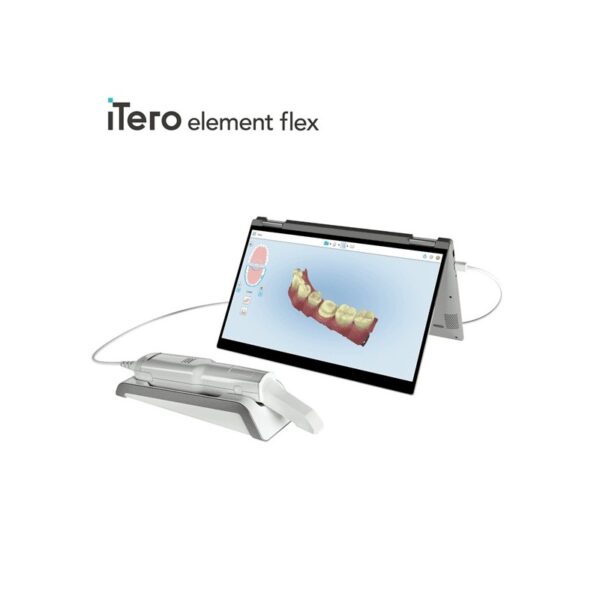
| Description | BRAND NEW 3Shape Trios Cart T12A dental impression intraoral 3D scanner, it is new in the original crate with all accessories including scanner, wand and tips and has never been used. | The 3Shape D710 is optimized for scanning both the impression and gypsum models and enables high throughput for both advanced and standard indications. These innovative scanners are so easy to use that staff training is barely required. Item fixation is fast, and the scan starts with a click on the program. | By Sirona has remained the preferred CAD/CAM technology of dentists worldwide for the fabrication of all-ceramic dental restorations in a single treatment appointment. CEREC is proven by hundreds of clinical studies and is offered by thousands of dentists to millions of patients around the world each year. It also has the broadest restorative range of any dental CAD/CAM system on the market. Proven performance, unrivalled success, and unequalled capabilities have made CEREC the number one dental CAD/CAM choice for over 30 years. | iTero Element Flex is a system allowing for quick and easy transfer between offices, enabling GPs and orthodontists the capacity to perform scans that are full-arch beyond the practice. iTero Element Flex Features- -Compact footprint for transportability and convenience
- -Custom-designed carrying case for the ultimate in mobility
- -Enhanced color for stunning and precise imaging
- -Perform crisp, full-color, high-definition 3D scans in as little as 60 seconds*
- -Wand touchpad is as intuitive and easy as gesturing on your smartphone
| The affordable Gendex 9200 DDE dental radiography system offers standard panoramic and cephalometric x-ray projections, as well as a wide range of advanced programs to support most dental imaging and exams. | The industry’s most cost-effective and user-friendly dental mill, the DWX-4 produces single crowns, copings, bridges and hybrid abutments with precision and ease. The DWX-4 is the ideal device for labs just getting into digital milling or labs that need a second device for urgent jobs. With the DWX-4 dental milling system, you can quickly and economically mill on-demand in a wide variety materials, including the latest hybrid ceramics. |
| Content | 3Shape Trios Cart T12a Impression 3D Intraoral Scanner3Shape TRIOS is a next-generation intraoral impression solution that is fast, accurate and easy to use. TRIOS is built on 3Shape’s Ultrafast Optical Sectioning™ technology and its features include high accuracy capture, spray- and powder-free scanning, clinical scan validation, intuitive Smart-Touch user interface, and more. TRIOS is optimized for a wide range of indications.TRIOS scanner benefits and features:
-Up to 1000 3D pictures for true geometries
-Spray-free for optimal accuracy and comfort
-Designed for high-speed impression capture
-Ergonomic grip for perfect control
-Autoclaveable scanner tip
-Scanning has never been easier. No need to hold the scanner at a specific distance or angle for focus. Dentists or assistants can even rest the scanner on the teeth for support as they scan.TRIOS cart benefits and features
-Live 3D visualization
-Easy-to-use touch screen
-Sleek design
-Unique motion sensor interface
-Mobility and Wi-Fi
-Easy-to-clean
-General benefits of digital impression takingDENTISTS:
-Less adjustment and grinding during seating
-Improved accuracy and clinical results
-Faster than traditional impression taking
-Reduced need for retakes
-No impression materials and mess
-Cost savings related to materials and shippingPATIENTS : 3Shape Trios Cart T12a Impression 3D Intraoral Scanner
-Quick and comfortable experience
-Better restoration fits and minimal grinding
-Improved clinical results
-Reduced number of appointments due to fewer retakes
-Reduced over-all chair-time3.5 Tips to Obtaining a Good Scan
PREPARATION
1. Turn on the cart or PC in advance to allow the system to heat up. See section Heating and
Mounting the Scanner Tip, step 1. Allow the system to warm up for about 10 minutes prior to use. If
using the heater, the final temperature is reached when the light goes out.
2. Retract the gingiva around the preparation for the preparation to stand out clearly.
3. Make sure the scanner tip is warm to avoid condensation on the mirror. See section Heating
and Mounting the Scanner Tip, step 5.
SCANNING
1. Dry the teeth lightly using compressed air. Be sure to reach the narrow regions between teeth.
Consider using a saliva ejector and/or tampons.
2. Get a good start:
• Start at preparation (or 1st molar if antagonist).
• Wait for about 5 scanner "clicks" before proceeding (helps build up a good starting point).
• Complete preparation including preparation line.
• Scan neighboring teeth: Occlusion, lingual/palatinal side, buccal/labial side.
3. Keep scanner head at 0-5mm from the teeth, it is OK to touch the teeth occasionally.
4. Move the scanner slowly and smoothly, you should hear a more rapid clicking sound.
41
5. Keep lips, cheeks, and tongue out of the scanner’s view:
• Use your finger or a dental mirror to create space between the teeth, lips and cheeks.
• Use a lip-and-cheek-retractor to keep lips and cheeks away.
• Be careful not to scan your own or assistant’s fingers.
• If you get lips, cheeks or tongue in the scan, make sure to delete it all, especially where they have
contact with the teeth (no surfaces should stick out from the teeth).
6. Keep focus on:
• Option 1 - Look at the teeth while scanning and listen to the "clicks". If it stops clicking/capturing,
carefully move back to the area marked on the screen.
• Option 2 - Look at the 2D image at the lower right corner. What you see here is what you scan.
Avoid lips, cheeks and the tongue to get an easy scan.
7. When scanning is complete, inspect the result by rotating the scan.
The important areas are:
• Preparation line (avoid interference from gingiva, saliva, blood).
• Contact points.
• Occlusal surfaces.
• If an important area is missing, simply touch this area on the model, and re-start scanning from
this point.
8. Bite Scan:
• Start from the second molar or at canine if you make an anterior scan.
• While centering the 2D image on occlusion plane, slowly move the scanner tip in straight mesial
direction with equal coverage of the upper and lower teeth.
• Scan 4 teeth for optimal alignment. This should take no more than 5 seconds.
9. Important for good colors:
• Avoid the light from the dentist chair lamp pointing directly into the patient's mouth. | 3shape D710 Dental Scanner3Shape D710 Scanner series can scan gypsum and impression versions. The series scanners can integrate into the clinic with minimum staff training. The scanners provide greater practice productivity, a comprehensive list of signals, and the most extensive 3D scans.Where flexibility and productivity are the key standards 3Shape chain scanners are for medium to large labs.The 3Shape D710 is optimized for scanning both the impression and gypsum models and enables high throughput for both advanced and standard indications. These innovative scanners are so easy to use that staff training is barely required. Item fixation is fast, and the scan starts with a click on the program.3SHAPE D710 For Sale3Shape D700 Scanner is both a scanner and impression scanner in 1 unit. It utilizes three measurement movement and two cameras a laser and creates another pass to especially hone. Just one device can be scanned by the apparatus in under 30 seconds and a whole model in about a minute with a degree of accuracy of 20 microns.Features:
-3-axis motion system
-Red-laser Tech
-Gypsum Version scanning
-Impression scanning Alternative
-Multi-die scanningBenefits:
-Easy operation, extreme Precision, and Rapid Scan
-Enables impressions, deep inlays, and Complete undercuts to scan Efficiently
-Supply labs Using ultra-efficient batches and multi-case processingHigh-speed scanning
The D710 is optimized for scanning gypsum and impression versions and enables high throughput for both advanced and standard indications3Shape – leading impression scanning technologies
3Shape’s patented adaptive scanning technology, combined with the scanner’s 3-axis motion and 2 cameras with reduced angle, facilitate the unique impression scanning capability.Adaptive scanning intelligently detects incomplete areas and automatically builds
adaptive scan sequences for capturing full object geometry. | SIRONA Cerec Omnicam+MCXL Milling
Single Appointment Dental Care
Most dental restorative methods require more than one visit to the dentist. This means that on the first visit, you get an injection of anaesthesia, your tooth prepared, an impression taken, and a temporary restoration put on your tooth. You make a second appointment for a couple of weeks later, get another injection, have the temporary pried off (if it hasn’t fallen off already), and have a permanent restoration put on. With CEREC, the procedure is done in a single appointment, start to finish. No temporary restorations. Now with CEREC Omnicam,MC XL Inlab milling unit and sinter and crystallisation ovens, 3-4 unit bridges can be fabricated in a day.Finest Dental Materials
A CEREC tooth restoration isn’t just convenient, it is also healthy. Many years ago, dentists had few options to repair decayed and damaged teeth other than amalgam, gold, and other metals. With CEREC, your dentist can use strong, tooth coloured ceramic materials to restore your teeth to their natural strength, beauty, and function. These materials closely match the composition of natural tooth structure. The materials are chemically bonded to your tooth, so your dentist can save as much healthy tooth tissue as possible while providing you with a dental restoration that strengthens your tooth. Using metal free materials that are the closest to your natural enamel, CEREC gives you the highest quality restorative care.Smile Enhancement SIRONA Cerec Omnicam+MCXL Milling
We use CEREC for more than just crowns. CEREC Omnicam and the MC XL inlab milling unit is capable of producing any single tooth restoration, implant abutments and up to 9 unit bridges. Chipped or discoloured front teeth can be repaired with beautiful CEREC porcelain anterior crowns or veneers. Your smile makes a lasting first impression. Enhance it with CEREC.Your dentist is in complete control of the final result
Since the crown, inlay, onlay or veneer is designed and fabricated from start to finish by your dentist, he has total control over how it will look and fit.No temporary restorations
With Cerec your restorations are placed in a single appointment. If you have lab made veneers you would require temporary veneers during the wait whilst your new teeth are being made by the technician. These have been known to fall off and cause problems. This step is eliminated with CEREC restorations.Crystallisation, characterisation and glaze ovens
In certain circumstances it may be necessary to customise your restorations to blend in with your natural neighbouring teeth. This is accomplished by adding colouring stains to your restoration and firing it in an oven before the final glazing is done.
Glazing gives the restoration a very smooth and shiny surface texture, enhancing optimum oral hygiene.
Sinter ovens are used to harden and bake zirconium materials for implant abutments and bridge frameworks. | iTero Element Flex Intraoral Scanner
iTero Element Flex is a system allowing for quick and easy transfer between offices, enabling GPs and orthodontists the capacity to perform scans that are full-arch beyond the practice.The iTero Element Flex wand-only configuration is a portable scanner for transport from office to office, enabling doctors to leverage the power of chairside visualization. It is ideal for practices with multiple locations who want a scanner that’s convenient and easy to transport. Working using notebooks that are compatible, professionals are now able to scan everywhere, even at the smallest of operatories. The Element Flex contains a custom-designed carrying case.The Element Flex, which is the choice includes a custom-designed carrying case, and allows for connectivity. Every scanner maintains the same capabilities as its predecessor.Initially, intraoral scanning wands considered as difficult to use, and were bulky. Therefore, when it came time to make a purchasing decision clinicians chosen to forego it. Now, there are options provided by a vast assortment.With the launch of this Element Flex, scans can be carried out directly onto notebooks, making scanning that was intraoral more mobile than ever before. However, that’s not the only invention in IOS scanning. The most recent release from 3shape, the TRIOS MOVE, offers a wireless scanning wand along with an arm and swiveling screen which makes it possible for clinicians to readily show patients the process, as well as the treatment planning.The iTero Element Flex system is delivered as a laptop-based workstation for performing oral scans from the office of the doctor. This operation manual describes how to boot and shut down the machine to Deal with cable and the, and also to clean the scanning device and replace its sleevesThe iTero Element Flex system provides an intuitive user interface for performing digital scans for Indices or use. The physician is directed by means of text and visual aid via the arrangement. The notebook’s touch screen and also the wand buttons are used to respond to display instructions.Benefits of this iTero Element Flex system
The Element Flex system that is iTero Offers significant advantages over present methods that are crown-production, such as higher precision that is crown-production scanning, and instant feedback through the
Scanning procedureStreamlined Workflows with Full-Color Scans
Like most iTero Element scanners, iTero Element two and iTero Element Flex are designed to operate with present iTero orthodontic and restorative workflows, such as laboratory workflows, custom made models, open STL export, custom implant abutment and chairside milling partners. Sharp, full-color 3D scans that may be taken in as few as 60 seconds4 are generated by all of iTero Element scanners.iTero Element Flex Features iTero Element Flex Intraoral Scanner- -Compact footprint for transportability and convenience
- -Custom-designed carrying case for the ultimate in mobility
- -Enhanced color for stunning and precise imaging
- -Perform crisp, full-color, high-definition 3D scans in as little as 60 seconds*
- -Wand touchpad is as intuitive and easy as gesturing on your smartphone
| Gendex Orthoralix 9200 DDE Digital Cephalometric + Panoramic X Ray
The versatile Orthoralix 9200 system offers standard panoramic projections, as well as a full array of advanced programs to satisfy the demanding needs of dental specialists. Plus, with both ?lm-based and direct digital models and the optional cephalometric arm, the capabilities of the 9200 can expand with your practice.Discover all of the benefits and options this imaging system has to offer.Wide Range of Projections – The Orthoralix 9200 offers 10 standard projections, with the ability to add 5 Cephalometric projections and the Transcan tomography projection to satisfy the needs of today’s dental specialists. Its intuitive control panel and easy-to-read display simplifies the process of selecting projections. Plus, with the precision of morphology following and multi-motorized arm rotation, the 9200 excels at focal trough reconstruction.- 10 standard imaging projections and 6 additional with optional upgrades
- Meets the demands of today’s orthodontists, oral and maxillofacial surgeons, and other specialists
Advanced Image Quality – Three technical factor setting modes are available to ensure complete flexibility and quality control. Manual mode for total operation control, Preset mode where the operator can customize settings, and Automatic Exposure Control (AEC) mode. With AEC, the 9200 automatically raises or lowers the kV setting based on measurements of bone size and density.- Triple laser beam guide system and motorized column for simple, accurate patient positioning
- Automatic Exposure Control (AEC) to ensure optimum image contrast and balance
- Real-time image reconstruction with the direct digital model
Gendex Orthoralix 9200 DDE Digital Cephalometric + Panoramic X Ray
Expand Your Capabilities – Utilizing the latest in CCD sensor technology and built-in LAN connectivity, the 9200 DDE model allows clinicians to digitally capture x-ray images and share them with any computer connected to the network for maximum productivity. With the option to add a Cephalometric arm, the Transcan cross-sectional tomography projection, and convert to direct digital technology, the 9200 is one of the most expandable panoramic systems available.- Direct digital model with the latest CCD sensor technology and direct LAN connectivity
- Optional Cephalometric arm attachment
- Optional Transcan implantology projection for transverse cross-sections of upper and lower jaw
Gendex Orthoralix 9200 DDE Digital Cephalometric + Panoramic X Ray| Power Supply | 115-250 VAC ± 10% | | Frequency | 50/60 Hz ± 2 Hz | | Maximum Line Power Rating | 10 A at 250 V, 20 A at 115 V | | Anode Voltage | 60 – 84 kV, in 2 kV steps | | Anode Current | 3 – 15 mA, in 1 mA steps | | Exposure Time | 12 s for standard pan, 0.16 – 2.5 s for Cephalometric | | Duty Cycle | 1:20 at full power operation | | Focal Spot | 0.5 mm, IEC 336 (1993) | | Vertical Reach | 39′ to 71′ (100 to 180 cm) from ?oor to occll plane | | Weight | 410 lbs (115 kg), 467 lbs (212 kg) with Ceph arm | | Active Area CCD Sensor | 147 x 6 mm (Standard Pan), 220 x 6 mm (Ceph) | | Image Size | 1536 x 2725 pixels (Standard Pan), 2304 x 2529 pixels (Ceph – Maximum) | | Minimum PC Requirements | Pentium® II CPU, 400 MHz, 256 MB RAM | | Required Operating System | Microsoft® Windows 98®/ Windows 2000®/ Windows XP® |
| Roland DWX-4 Dental Milling Unit
Digital dental technologies are transforming every aspect of the dental industry, making it easier than ever to produce precise crowns, copings and bridges. The latest technological advancements in scanning, CAD/CAM software and CNC milling allow digital dental labs to deliver custom production with speed and precision and enjoy optimal accuracy and repeatability.The industry’s most user-friendly desktop milling solution, the Roland DWX-4 compact dental mill, is at the forefront of this technological revolution. With the DWX-4, you can mill a single crown or small bridge quickly and economically. Affordably priced, the DWX-4 is ideal for any lab just getting started in digital dentistry or those labs with scanners who no longer wish to outsource production. It’s also the perfect addition to labs that need a second device for urgent jobs. With the DWX-4, these labs can mill a single crown or bridge on demand, without tying up their larger production mills.This affordable, precise 4-axis desktop mill is an ideal choice for labs just getting started in digital dentistry or for those that want to perform smaller, time-urgent jobs (like a single crown or small bridge) without tying up their larger production mills.- Compact design is ideally suited for all lab environments
- 2-station automatic tool changer
- 4-axis simultaneous lead/worm screw driven machining
- Tool diagnostics with tool life management
- Air blower to aid with difficult-to-mill materials
- Negative ion generator for neutralizing static electricity
- Multicast capability for connecting up to four DWX dental mills to one computer
- Color-coded LED light signals machine status
- Automatic calibration
- E-mail notification system
- Dust collection system with airflow sensor
- Virtual panel ensures easy operation
- G-code compatible
- Compatible with industry-standard software
- Open architecture for easy integration into a complete production solution
- CAM software included
The industry’s most cost-effective and user-friendly dental mill, the DWX-4 produces single crowns, copings, bridges and hybrid abutments with precision and ease. The DWX-4 is the ideal device for labs just getting into digital milling or labs that need a second device for urgent jobs. With the DWX-4 dental milling system, you can quickly and economically mill on-demand in a wide variety materials, including the latest hybrid ceramics. |




Reviews
There are no reviews yet.