| Description | Automatic Positioning
With Quick Denta, setting up a file for 3D printing is no longer a manual process. It automatically adjusts 3D data to produce the most efficient and stable position on the printer’s work surface. Theoptimum angle of orientation can also be automatically saved as a preset value and configured for each type of model being made- eliminating the need to reset values each time.It really is that simple. Once a user imports an STL 3D file, Quick Denta software not only detects and heals errors but also does all the complex digital set-up for you. | Benefits:- Faster Scan Speed
- Superb Image Quality
- Light Guidance System
- Portable for Easy Sharing
- Lightweight Hand Piece
| The 3Shape D710 is optimized for scanning both the impression and gypsum models and enables high throughput for both advanced and standard indications. These innovative scanners are so easy to use that staff training is barely required. Item fixation is fast, and the scan starts with a click on the program. | 3Shape TRIOS MOVE is the ultimate patient/dentist communication tool. Show patients their digital scans and dynamic treatment information close-up and create greater opportunities for treatment dialogue and joint decision-making. The ergonomic and lightweight design of TRIOS MOVE allows you to always position the screen in the right place and enjoy superior user experience. | iTero Element 2 Intraoral Scanner includes an ergonomic, based cradle and delivers imaging precision in a compact footprint using tools that are strong.Together, we can streamline your workflow.- Restorative and orthodontic workflows
- Optimized Invisalign connectivity
- Visualization tools
- Chairside milling integration
| Medit i700 makes the scanning experience a comfortable one for both the dentist and patient. Medit i700 is a fully open-source intraoral scanner, compatible with Medit’s Link software, as well as software from other CAD/CAM providers. |
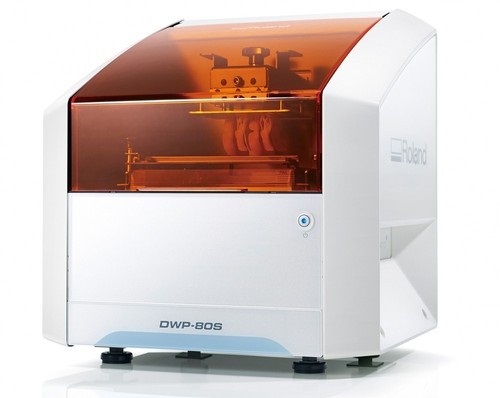
| Content | Roland DWP-80S Dental 3D Printer
Key software features
With Quick Denta, setting up a file for 3D printing is no longer a manual process. It automatically adjusts 3D data to produce the most efficient and stable position on the printer’s work surface. The optimum angle of orientation can also be automatically saved as a preset value and configured for each type of model being made- eliminating the need to reset values each time.Automatic Support Generation
Quick Denta simplifies the complex process of model support creation by automatically generating support structures with a single click.Error Detection and 3D Mesh Healing
An optional feature allows Quick Denta to automatically detect and repair minor errors during the STL importing process, without the need to return to the CAD software.Cost-Effective Resin Calculation
Quick Denta provides accurate, timesaving and cost-effective production by calculating the exact amount of resin needed for each job.Specs Roland DWP-80S Dental 3D Printer| Applications | Custom trays, base plates, and frameworks | | Build technology | Layered projection system | | Build size | 3.15 (W) x 3.15 (D) x 3.15 (H) in.
(80 (W) × 80 (D) ×80 (H) mm)
(The maximum amount of use per job is 300g(0.66 lb.)) | | Light source | UV-LED (Ultraviolet light-emitting diode) | | Machine Power Supply | DC 24 V、0.8 A | | Dedicated AC adapter | AC 100 to 240V ± 10%、50 / 60 Hz | | Power consumption | 20 W | | During standby | 49 dB (A) or less | | External dimensions | 16.93 (W) x 14.37 (D) x 17.72 (H) in.
(430 (W) × 365 (D) × 450 (H) mm) | | Interface | USB | | Noise During
operation | 55 dB (A) or less | | Noise Power off | 49 dB (A) or less | | External dimensions | 16.93 (W) x 14.37 (D) x 17.72 (H) in.
(430 (W) × 365 (D) × 450 (H) mm) | | Weight | 24 kg (53 lb.) | | Interface | USB | | Installation Environment During Operation | Temperature: 68 to 86°F (20 to 30°C),
Humidity: 35 to 80% RH (no condensation) | | Power off | Temperature: 41 to 95°F (5 to 40°C),
Humidity: 20 to 80% RH (no condensation) | | Included items | AC adapter, power cord, USB cable, liquid material vat, printing/cleaning tools (Metallic spatula, plastic spatula, tweezers, washing container x 2, hexagonal wrench, rubber gloves, work tray, etc.), Read First (booklet), Roland DG Software Package CD, etc. |
| Carestream CS 3600 Intraoral ScannerAcquire true color:With the CS 3600 Intraoral Scanner, practitioners can access 2D and 3D images that can be used with CS Restore software to design restorations within their practice. Colored 3D scans allow practitioners to easily define the margin lines and identify the differences between natural tooth structure and existing restorations. This makes restoration planning more accurate for practitioners.No external heater, powder or trolley system needed:The CS 3600 does not require you to spray powder of liquid over the patient’s teeth or gingival tissue before scanning. It features high-angulation scanning of up to 45 degrees and to a depth from -2 to +13m.Features a unique light guidance systemYet another feature of the CS 3600 that assists it in the capture of the data during the image acquisition process. This feature allows the user to place more focus on the patient’s mouth rather than the monitor.This device is easily shared:The CS 3600 can be easily shared between operatories because there is no heavy trolley to push around. Additionally, the intraoral scanner connects via USB 2 cable* to any PC workstation or laptop. * Windows 7, 32-bit minimum; 64-bit recommendedEasy to use and hold:The CS 3600’s sleek, lightweight design (295 grams) makes it comfortable and easy for users to navigate the intraoral scanner around patients’ mouths, especially during full arch acquisitions.Benefits:Carestream CS 3600 Intraoral Scanner- Faster Scan Speed
- Superb Image Quality
- Light Guidance System
- Portable for Easy Sharing
- Lightweight Hand Piece
- Features
- High Speed Continuous Scanning
- Fast, Simple and Smooth user experience
- Freefill Missing Scan Data at your Leisure
- Scan History allows you to remove excess scanned tissue for more refined final digital impression
- Three Workflows
- user friendly interface
- Autoclavable reusable tips in two interchangeable styles
- Accurate full 3D HD Color scanning
| 3shape D710 Dental Scanner3Shape D710 Scanner series can scan gypsum and impression versions. The series scanners can integrate into the clinic with minimum staff training. The scanners provide greater practice productivity, a comprehensive list of signals, and the most extensive 3D scans.Where flexibility and productivity are the key standards 3Shape chain scanners are for medium to large labs.The 3Shape D710 is optimized for scanning both the impression and gypsum models and enables high throughput for both advanced and standard indications. These innovative scanners are so easy to use that staff training is barely required. Item fixation is fast, and the scan starts with a click on the program.3SHAPE D710 For Sale3Shape D700 Scanner is both a scanner and impression scanner in 1 unit. It utilizes three measurement movement and two cameras a laser and creates another pass to especially hone. Just one device can be scanned by the apparatus in under 30 seconds and a whole model in about a minute with a degree of accuracy of 20 microns.Features:
-3-axis motion system
-Red-laser Tech
-Gypsum Version scanning
-Impression scanning Alternative
-Multi-die scanningBenefits:
-Easy operation, extreme Precision, and Rapid Scan
-Enables impressions, deep inlays, and Complete undercuts to scan Efficiently
-Supply labs Using ultra-efficient batches and multi-case processingHigh-speed scanning
The D710 is optimized for scanning gypsum and impression versions and enables high throughput for both advanced and standard indications3Shape – leading impression scanning technologies
3Shape’s patented adaptive scanning technology, combined with the scanner’s 3-axis motion and 2 cameras with reduced angle, facilitate the unique impression scanning capability.Adaptive scanning intelligently detects incomplete areas and automatically builds
adaptive scan sequences for capturing full object geometry. | 3Shape TRIOS MOVE Intraoral Scanning Setup3Shape TRIOS MOVE is the ultimate patient/dentist communication tool. Show patients their digital scans and dynamic treatment information close-up and create greater opportunities for treatment dialogue and joint decision-making. The ergonomic and lightweight design of TRIOS MOVE allows you to always position the screen in the right place and enjoy superior user experience. Introducing 3Shape TRIOS MOVE
 3Shape spoke to more than a hundred dentists and identified their biggest problem; having the screen in the right place to show patients their teeth and the treatment needed. We used this insight to create an ergonomic solution that ensures the screen is always in the right place to engage, excite and drive treatment acceptance with patients
The brand new hardware setup placed the 3Shape TRIOS 3 scanner, monitor, and PC on the lightweight, fully-adjustable, ergonomic 3Shape TRIOS MOVE. TRIOS MOVE’s mobility enables doctors to always position the screen in the right place to provide a superior experience for both dentists and patients. TRIOS MOVE is perfectly balanced and can be rolled effortlessly from operatory to operatory.All TRIOS 3 intraoral scanners, including the new 3Shape TRIOS 3 Wireless model, work seamlessly with TRIOS MOVE. The amazing TRIOS 3 scanners improve patient experience through remarkable scanning speed, and documented accuracy. Thanks to TRIOS MOVE, the digital impressions in realistic colors can easily be shown to your patients to engage and excite them about their treatment options. Use 3Shape TRIOS apps to give your patients insights into their dental health and proposed treatment plans.Provide better preventative care with 3Shape TRIOS Patient Monitoring*
Compare a patient’s scans between visits to monitor changes in their dental status, and identify a timely and effective care plan. Share the insights with your patient to gain acceptance for the treatment they really need. Show patients their future smile with 3Shape TRIOS Smile Design
Simply take a photo of your patient’s face, and easily create their new beautiful teeth in minutes. Share the photo-realistic image with your patient to excite them and advance treatment acceptance. Grow orthodontic treatments with 3Shape TRIOS Treatment Simulator*
Scan your patient and show their present dentition compared to the final results of orthodontic treatment to gain case approval. The best solution for the patient and the best satisfaction for the patient
We spoke to hundreds of dentists and discovered that they needed an easy way to get the screen positioned in the right place to share intraoral scans and images with patients. This is important, as seeing is believing and patients trust a dentist they believe in.With this insight, TRIOS MOVE was born, allowing you to easily share your digital scans, images, and treatment plan with patients. This helps patients picture their final results and ultimately, advance case acceptance.The new 3Shape TRIOS MOVE now places the 3Shape TRIOS intraoral scanner, monitor and PC on the lightweight, fully-adjustable, ergonomic 3Shape TRIOS MOVE. The mobility of the 3Shape TRIOS MOVE enables doctors to always position the screen in the right place. This provides a superior experience for both the orthodontist and patient and makes it easy to share dynamic treatment information close-up with patients to advance treatment dialogue and acceptance. 3Shape TRIOS MOVE is perfectly-balanced and can be rolled effortlessly.Professionals using the 3Shape TRIOS MOVE with TRIOS 3 Wireless additionally benefit from complete freedom of movement because there are no connecting cables between the wand and hardware. Features 3Shape TRIOS MOVE Intraoral Scanning Setup- 13.3″ Full HD touch LCD screen
- Adjustable arm & swiveling screen
- Powerful custom PC designed for scanning
- Apps designed to excite
- Four wheels with integrated brakes
- The perfect size for bringing in front of a patient or when working with up close.
Show scans easily, boost involvementOne of the challenges of working with intraoral scans is in organizing the physical space: how to position your screen in the right place to not only prepare and scan but also share your work? To help you solve this, we developed a TRIOS MOVE. It allows you to move your screen with digital scans, images, and simulated expected treatment outcomes to where the patient sits. This helps them picture their final results and ultimately, advance case acceptance. On top of that, it is more ergonomic for dentists Superior scanning technology, always where you need itAll TRIOS 3 intraoral scanners, including the new 3Shape TRIOS 3 Wireless model work seamlessly with TRIOS MOVE. The amazing TRIOS 3 scanners improve patient experience through remarkable scanning speed, and documented accuracy. Thanks to TRIOS MOVE, the digital impressions in realistic colors can easily be shown to your patients to engage and excite them about their treatment options. Our flexible TRIOS setup solution comes in two sizes: 15.6″ (MOVE+) and 13.3″ (MOVE). Both come with a stylus touch pen and a powerful 1TB PC, specially designed for scanning. They can be purchased in combination with TRIOS 3 Basic, TRIOS 3 and TRIOS 4. - TRIOS 3 Wireless scanner wand
- Charger incl. power cord
- Wall mount kit for the charger
- 3x batteries
- 5x TRIOS 3 scanner tips
- TRIOS 3 Protection tip
- TRIOS 3 Calibration tip
- TRIOS 3 Color Calibration kit
- TRIOS MOVE incl. power cord
- HEX S10 key (for foot assembly)
- Screwdrivers TX6 and TX8
- Ethernet cable
- 2x Fuses
- USB Dongle with software
- Documentation
Also available as a stand-alone accessory for all existing TRIOS 3 users. Can be used as a second scanning station or replacement for a PC/CARTCompatible with TRIOS 3 Mono, TRIOS 3 & TRIOS 3 Wireless in both, Pen or Handle grip | iTero Element 2 Intraoral Scanner
iTero Element 2 Intraoral Scanner delivers imaging precision in a compact footprint using tools that are strong.An intuitive user interface is provided by the Element two system for performing scans for Orthodontic use or Indices. The doctor is guided by means of text assistance and visual via the arrangement. Wand buttons and the touch screen are used to respond to display instructions.A scan feature that preserves natural occlusion whilst getting detailed registration is offered by the iTero Element.The iTero Element 2 was created for better functionality with 2x and 25% quicker scanning processing period compared to this iTero Element.The iTero Element 2 includes a 21.5-inch screen and 16:9 widescreen viewing format. It has an integrated lithium-ion battery, which allows without the need to reboot or to plug in for power for transfer between operatories. The iTero Element 2 includes an ergonomic, based cradle.Like most Element scanners, both Element Flex and the Element two are made to operate with existing restorative and corrective workflows, such as open STL export, custom made models, laboratory workflows, custom implant abutment, and chairside milling partners. According to the company, all iTero Element scanners create full-color 3D scans.Element 2 and Element Flex scanners are now available in the United States and the vast majority of European nations. They are available in Asia Pacific markets and are pending acceptance in Canada. The Element scanner that is iTero will last to be available in most markets.** iTero Element 2 BENEFITS :iTero TimeLapse Technology:
Compare historical and current scans and quantify important oral changes over time – helping your patient reach care decisions in a more engaging and informed way.Invisalign® Outcome Simulator:
Engage patients and increase conversion by showing patients the actual potential benefits of Invisalign treatment.3D Invisalign Progress Assessment Feature:
Compare a patient’s new scan with a precise stage of their Invisalign treatment plan.Real-time 3D Visualizations:
Help patients understand oral concerns by sharing a visualization right at chairside.Vibrant Color Scanning:
Realistic color images make it easier to distinguish between gingival and dental tissue for more precise clinical evaluations.High-Definition Touchscreen Interface:
Scanned images appear instantly with crisp definition on the 19-inch, high-definition, multi-touch-capable display. The display also works with latex, vinyl and nitrile gloves.Certified Connectivity Workflow:
Designed to connect to restorative and orthodontic labs, third-party treatment planning, custom implant abutment, chairside milling and lab CAD/CAM systems.Together, we can streamline your workflow.- Restorative and orthodontic workflows
- Optimized Invisalign connectivity
- Visualization tools
- Chairside milling integration
- – Maximum height: 51.8″
- – Weight with wheel stand: 55.1 lbs.
- – Dimensions including rotation (W x D x H): 24.6″ x 23.4″ x 51.8″
- – Operating power: 100-240VAC – 50/60 Hz – 350VA (max)
- – Storage/transportation temperature: 23° to 122°F
- – Installation: Wheel stand with scanner wand
- – Monitor: 19″ touchscreen monitor
- – Scanner: Confocal Imaging Scanner emits red laser light (680 nm Class 1) as well as white LED emissions
- – Wireless LAN: LAN card provides local network communications with wireless connectivity
| Medit i700 intraoral scanner
The new medit i700 intraoral scanner is smaller, lighter and 2X faster than its predecessor. Summary of improvements:Hardware- Twice as fast as i500/ more vivid lifelike colors
- 18% smaller
- 12.5% lighter
- UVC light to disinfect camera internals
- Scanning area was 14×13 now 15×13
- Accuracy twice as good for full arch
- Room to room mobility with usb 3 cable connection
- 180-degree rotation on tip
- 45-degree mirror angle vs 40 – distal second molars
- Just plug right into computer for power and usb
- 100 uses for the tips autoclave vs 50
- Scans up to 70 frames per second (i500 30 frames per second)
- Remote control button – switch between scan stages / rotate without having to go back to keyboard
- Vibration when break continuity with scan
- Coverage of internal hardware
Software- Create master model from scan segments – 5 separate boxes will stitch together in segments
- Multiple bites
- Faster time to process scan
- Ortho module auto tooth segmentation
Other- Scan and produce open source .STL, .OBJ, .PLY files
- Normally delivers within 5-7 business days
- One year manufacturer warranty included (additional 2 year manufacturer warranty can be purchased at check out – Just remember, your assistant is not going to tell you s/he dropped the camera at month 13. S/He will tell you “the camera just stopped working!”)
- Includes Membership to CAD-Ray.com
- Includes Level 2 Training: two day hands-on training in Heidelberg (valid for 12 months after purchase, non-transferable)
- Includes initial remote training session
- Instructional videos to get started right away
- Peer to peer online support and private discussion forum
- Unlimited remote and phone support
- Satisfaction guarantee with return policy
- 10% restocking fee within 30 days
Full Service PackageIncludes Remote TrainingIncludes Unlimited Remote and Phone Support |



Reviews
There are no reviews yet.