| Description | Automatic Positioning
With Quick Denta, setting up a file for 3D printing is no longer a manual process. It automatically adjusts 3D data to produce the most efficient and stable position on the printer’s work surface. Theoptimum angle of orientation can also be automatically saved as a preset value and configured for each type of model being made- eliminating the need to reset values each time.It really is that simple. Once a user imports an STL 3D file, Quick Denta software not only detects and heals errors but also does all the complex digital set-up for you. | The ultimate in ease, material flexibility and unattended production, the DWX-52DC dental milling machine is designed to greatly expand your lab production and profit. Featuring a 6-slot Automatic Disc Changer, 15-station Automatic Tool Changer and other automated features, it gives users of all skill levels an exceptionally powerful, efficient and affordable dental restoration solution. | The affordable Gendex 9200 DDE dental radiography system offers standard panoramic and cephalometric x-ray projections, as well as a wide range of advanced programs to support most dental imaging and exams. | By Sirona has remained the preferred CAD/CAM technology of dentists worldwide for the fabrication of all-ceramic dental restorations in a single treatment appointment. CEREC is proven by hundreds of clinical studies and is offered by thousands of dentists to millions of patients around the world each year. It also has the broadest restorative range of any dental CAD/CAM system on the market. Proven performance, unrivalled success, and unequalled capabilities have made CEREC the number one dental CAD/CAM choice for over 30 years. | Benefits:- Faster Scan Speed
- Superb Image Quality
- Light Guidance System
- Portable for Easy Sharing
- Lightweight Hand Piece
| The i500 intraoral scanner, exemplifies three qualities:
Value, Efficiency, and ProductivityPerfect software and hardware combination:
Value, Efficiency, and ProductivityOne Software to connect them all |
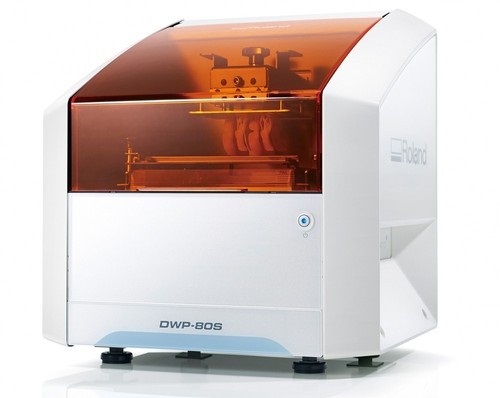
| Content | Roland DWP-80S Dental 3D Printer
Key software features
With Quick Denta, setting up a file for 3D printing is no longer a manual process. It automatically adjusts 3D data to produce the most efficient and stable position on the printer’s work surface. The optimum angle of orientation can also be automatically saved as a preset value and configured for each type of model being made- eliminating the need to reset values each time.Automatic Support Generation
Quick Denta simplifies the complex process of model support creation by automatically generating support structures with a single click.Error Detection and 3D Mesh Healing
An optional feature allows Quick Denta to automatically detect and repair minor errors during the STL importing process, without the need to return to the CAD software.Cost-Effective Resin Calculation
Quick Denta provides accurate, timesaving and cost-effective production by calculating the exact amount of resin needed for each job.Specs Roland DWP-80S Dental 3D Printer| Applications | Custom trays, base plates, and frameworks | | Build technology | Layered projection system | | Build size | 3.15 (W) x 3.15 (D) x 3.15 (H) in.
(80 (W) × 80 (D) ×80 (H) mm)
(The maximum amount of use per job is 300g(0.66 lb.)) | | Light source | UV-LED (Ultraviolet light-emitting diode) | | Machine Power Supply | DC 24 V、0.8 A | | Dedicated AC adapter | AC 100 to 240V ± 10%、50 / 60 Hz | | Power consumption | 20 W | | During standby | 49 dB (A) or less | | External dimensions | 16.93 (W) x 14.37 (D) x 17.72 (H) in.
(430 (W) × 365 (D) × 450 (H) mm) | | Interface | USB | | Noise During
operation | 55 dB (A) or less | | Noise Power off | 49 dB (A) or less | | External dimensions | 16.93 (W) x 14.37 (D) x 17.72 (H) in.
(430 (W) × 365 (D) × 450 (H) mm) | | Weight | 24 kg (53 lb.) | | Interface | USB | | Installation Environment During Operation | Temperature: 68 to 86°F (20 to 30°C),
Humidity: 35 to 80% RH (no condensation) | | Power off | Temperature: 41 to 95°F (5 to 40°C),
Humidity: 20 to 80% RH (no condensation) | | Included items | AC adapter, power cord, USB cable, liquid material vat, printing/cleaning tools (Metallic spatula, plastic spatula, tweezers, washing container x 2, hexagonal wrench, rubber gloves, work tray, etc.), Read First (booklet), Roland DG Software Package CD, etc. |
| Roland DWX-52DC Dental Milling UnitDWX-52DC
| 5-Axis (Control XYZAB simultaneously) | Milling method:Dry mill | Cuttable material:Zirconia, Wax, PMMA, Composite resin, PEEK, Gypsum | | DWX-52DC | | Cuttable material | Zirconia, Wax, PMMA, Composite resin, PEEK, Gypsum, Fiber reinforced resin, CoCr sinter metal | | Loadable workpiece shape | Step section: | 98.5 mm (diameter), height 10 mm | | Body section: | 95 mm (diameter), height max. 35 mm
Pin diameter: 6 mm | | Pin diameter: | 6 mm | | Loadable workpiece weight | Up to 850 g | | Number of adapters housed | 6 | | Operating speed | XYZ axis: | 0.24 to 70.9 in./min.(6 to 1,800 mm/min.) | | Spindle motor | Brushless DC Motor | | Spindle speed | 6,000 to 30,000 rpm | | Rotary axis travel angle | A: | ±360° | | B: | ±30° | | Number of burs housed | 15 | | Attachable bur | Shank diameter: | 4 mm | | Length: | 40 to 55 mm | | Compatible compressed air | 0.2 MPa | | Interface | USB | | Control command set | RML-1, NC code | | Power requirements | AC 100 V to 240 V ±10%, 50/60 Hz, 2.0 A
(overvoltage category II, IEC60664-1) | | Power consumption | Approx. 200 W | | Operating noise | During operation: | 70 dB (A) or less (when not cutting), | | During standby: | 45 dB (A) or less | | External dimensions | Width x Depth x Height: | 34.6 x 26.0 x 23.6 in. (880 x 660 x 600 mm) | | Weight: | 105 kg (231.5 lbs.) |
The ultimate in ease, material flexibility and unattended production, the DWX-52DC dental milling machine is designed to greatly expand your lab production and profit. Featuring a 6-slot Automatic Disc Changer, 15-station Automatic Tool Changer and other automated features, it gives users of all skill levels an exceptionally powerful, efficient and affordable dental restoration solution. | Gendex Orthoralix 9200 DDE Digital Cephalometric + Panoramic X Ray
The versatile Orthoralix 9200 system offers standard panoramic projections, as well as a full array of advanced programs to satisfy the demanding needs of dental specialists. Plus, with both ?lm-based and direct digital models and the optional cephalometric arm, the capabilities of the 9200 can expand with your practice.Discover all of the benefits and options this imaging system has to offer.Wide Range of Projections – The Orthoralix 9200 offers 10 standard projections, with the ability to add 5 Cephalometric projections and the Transcan tomography projection to satisfy the needs of today’s dental specialists. Its intuitive control panel and easy-to-read display simplifies the process of selecting projections. Plus, with the precision of morphology following and multi-motorized arm rotation, the 9200 excels at focal trough reconstruction.- 10 standard imaging projections and 6 additional with optional upgrades
- Meets the demands of today’s orthodontists, oral and maxillofacial surgeons, and other specialists
Advanced Image Quality – Three technical factor setting modes are available to ensure complete flexibility and quality control. Manual mode for total operation control, Preset mode where the operator can customize settings, and Automatic Exposure Control (AEC) mode. With AEC, the 9200 automatically raises or lowers the kV setting based on measurements of bone size and density.- Triple laser beam guide system and motorized column for simple, accurate patient positioning
- Automatic Exposure Control (AEC) to ensure optimum image contrast and balance
- Real-time image reconstruction with the direct digital model
Gendex Orthoralix 9200 DDE Digital Cephalometric + Panoramic X Ray
Expand Your Capabilities – Utilizing the latest in CCD sensor technology and built-in LAN connectivity, the 9200 DDE model allows clinicians to digitally capture x-ray images and share them with any computer connected to the network for maximum productivity. With the option to add a Cephalometric arm, the Transcan cross-sectional tomography projection, and convert to direct digital technology, the 9200 is one of the most expandable panoramic systems available.- Direct digital model with the latest CCD sensor technology and direct LAN connectivity
- Optional Cephalometric arm attachment
- Optional Transcan implantology projection for transverse cross-sections of upper and lower jaw
Gendex Orthoralix 9200 DDE Digital Cephalometric + Panoramic X Ray| Power Supply | 115-250 VAC ± 10% | | Frequency | 50/60 Hz ± 2 Hz | | Maximum Line Power Rating | 10 A at 250 V, 20 A at 115 V | | Anode Voltage | 60 – 84 kV, in 2 kV steps | | Anode Current | 3 – 15 mA, in 1 mA steps | | Exposure Time | 12 s for standard pan, 0.16 – 2.5 s for Cephalometric | | Duty Cycle | 1:20 at full power operation | | Focal Spot | 0.5 mm, IEC 336 (1993) | | Vertical Reach | 39′ to 71′ (100 to 180 cm) from ?oor to occll plane | | Weight | 410 lbs (115 kg), 467 lbs (212 kg) with Ceph arm | | Active Area CCD Sensor | 147 x 6 mm (Standard Pan), 220 x 6 mm (Ceph) | | Image Size | 1536 x 2725 pixels (Standard Pan), 2304 x 2529 pixels (Ceph – Maximum) | | Minimum PC Requirements | Pentium® II CPU, 400 MHz, 256 MB RAM | | Required Operating System | Microsoft® Windows 98®/ Windows 2000®/ Windows XP® |
| SIRONA Cerec Omnicam+MCXL Milling
Single Appointment Dental Care
Most dental restorative methods require more than one visit to the dentist. This means that on the first visit, you get an injection of anaesthesia, your tooth prepared, an impression taken, and a temporary restoration put on your tooth. You make a second appointment for a couple of weeks later, get another injection, have the temporary pried off (if it hasn’t fallen off already), and have a permanent restoration put on. With CEREC, the procedure is done in a single appointment, start to finish. No temporary restorations. Now with CEREC Omnicam,MC XL Inlab milling unit and sinter and crystallisation ovens, 3-4 unit bridges can be fabricated in a day.Finest Dental Materials
A CEREC tooth restoration isn’t just convenient, it is also healthy. Many years ago, dentists had few options to repair decayed and damaged teeth other than amalgam, gold, and other metals. With CEREC, your dentist can use strong, tooth coloured ceramic materials to restore your teeth to their natural strength, beauty, and function. These materials closely match the composition of natural tooth structure. The materials are chemically bonded to your tooth, so your dentist can save as much healthy tooth tissue as possible while providing you with a dental restoration that strengthens your tooth. Using metal free materials that are the closest to your natural enamel, CEREC gives you the highest quality restorative care.Smile Enhancement SIRONA Cerec Omnicam+MCXL Milling
We use CEREC for more than just crowns. CEREC Omnicam and the MC XL inlab milling unit is capable of producing any single tooth restoration, implant abutments and up to 9 unit bridges. Chipped or discoloured front teeth can be repaired with beautiful CEREC porcelain anterior crowns or veneers. Your smile makes a lasting first impression. Enhance it with CEREC.Your dentist is in complete control of the final result
Since the crown, inlay, onlay or veneer is designed and fabricated from start to finish by your dentist, he has total control over how it will look and fit.No temporary restorations
With Cerec your restorations are placed in a single appointment. If you have lab made veneers you would require temporary veneers during the wait whilst your new teeth are being made by the technician. These have been known to fall off and cause problems. This step is eliminated with CEREC restorations.Crystallisation, characterisation and glaze ovens
In certain circumstances it may be necessary to customise your restorations to blend in with your natural neighbouring teeth. This is accomplished by adding colouring stains to your restoration and firing it in an oven before the final glazing is done.
Glazing gives the restoration a very smooth and shiny surface texture, enhancing optimum oral hygiene.
Sinter ovens are used to harden and bake zirconium materials for implant abutments and bridge frameworks. | Carestream CS 3600 Intraoral ScannerAcquire true color:With the CS 3600 Intraoral Scanner, practitioners can access 2D and 3D images that can be used with CS Restore software to design restorations within their practice. Colored 3D scans allow practitioners to easily define the margin lines and identify the differences between natural tooth structure and existing restorations. This makes restoration planning more accurate for practitioners.No external heater, powder or trolley system needed:The CS 3600 does not require you to spray powder of liquid over the patient’s teeth or gingival tissue before scanning. It features high-angulation scanning of up to 45 degrees and to a depth from -2 to +13m.Features a unique light guidance systemYet another feature of the CS 3600 that assists it in the capture of the data during the image acquisition process. This feature allows the user to place more focus on the patient’s mouth rather than the monitor.This device is easily shared:The CS 3600 can be easily shared between operatories because there is no heavy trolley to push around. Additionally, the intraoral scanner connects via USB 2 cable* to any PC workstation or laptop. * Windows 7, 32-bit minimum; 64-bit recommendedEasy to use and hold:The CS 3600’s sleek, lightweight design (295 grams) makes it comfortable and easy for users to navigate the intraoral scanner around patients’ mouths, especially during full arch acquisitions.Benefits:Carestream CS 3600 Intraoral Scanner- Faster Scan Speed
- Superb Image Quality
- Light Guidance System
- Portable for Easy Sharing
- Lightweight Hand Piece
- Features
- High Speed Continuous Scanning
- Fast, Simple and Smooth user experience
- Freefill Missing Scan Data at your Leisure
- Scan History allows you to remove excess scanned tissue for more refined final digital impression
- Three Workflows
- user friendly interface
- Autoclavable reusable tips in two interchangeable styles
- Accurate full 3D HD Color scanning
| Medit i500 Intraoral ScannerOur Intraoral Scanner Delivers: Value, Efficiency, and Productivity
Together, these three qualities make it easy to incorporate our intraoral scanner into your workflow. Designed with quality in mind, we created the i500 to add value to your practice. Regardless of specialization the i500 ensures that professional needs are met, workflows are optimized, and flexibility is guaranteed.High ROI
An unparalleled performance combined with a competitive price delivers exceptionally fast return on investmentFlexibility
An open system for integrated CAD/CAM workflow allows for the export of STL files for easy file transfer and thus optimized collaborationImpressive Speed
Intelligent scan-detecting algorithm with two high-speed cameras for quick and efficient intraoral scanningPowderless
No need for powder in most regular cases, allowing for a seamless scanning process and increased patient comfortHigh Accuracy
Single crown* :Trueness (Accuracy) = 5.1 μm (±0.49 μm)
Precision (Consistency) = 3.2 μm (±0.74 μm)*Single crown accuracy test was conducted by Medit according to the methods in “Evaluation of the Accuracy of Six Intraoral Scanning Devices: An in-vitro Investigation. ADA Professional Product”
SPECIFICATION | Tip | 18 x 15.2 mm (WxH) | | Overall handpiece length | 266 mm | | Weight | 276g | | Imaging technology | 3D-in-motion video technology | | Color | 3D full color streaming capture | | Connectivity | USB 3.0 | | Scanning FOV | 14 x 13 mm |
The Medit i500 intraoral scanner delivers efficiency, productivity, and affordability.This scanner has been designed with quality in mind to add value to your practice. With its fast speed and powderless system, it allows for a smoother, more efficient scanning experience.The Medit Link software and hardware with workflow management and communication software will enhance and support your everyday CAD performance. Completed with integrated cloud storage and open data architecture. - Scanning for iOS in real time
- High-speed continuous scanning
- Color structure of the surface in the resolution of Full HD 3D
- Quick scan
- Natural color transfer
- Capturing UHD images (SR virtual viewer)
- Real-time 3D visualization (15 FPS 3D Data)
- Without using a spray
- Diagnostic image 2D
- Open file format (.stl)
- Scanner with the smallest size of the scanning module
|



Reviews
There are no reviews yet.