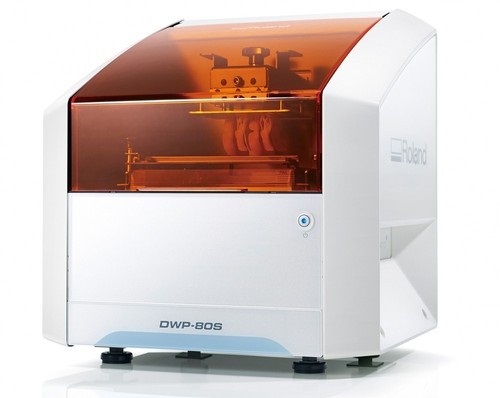
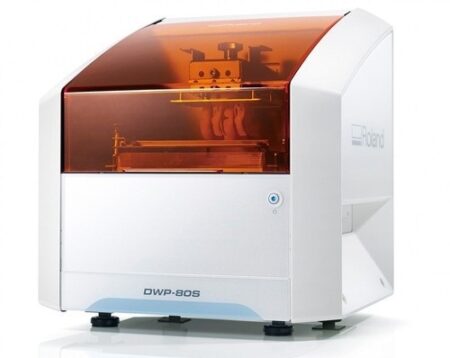
| Content | Roland DWP-80S Dental 3D Printer
Key software features
With Quick Denta, setting up a file for 3D printing is no longer a manual process. It automatically adjusts 3D data to produce the most efficient and stable position on the printer’s work surface. The optimum angle of orientation can also be automatically saved as a preset value and configured for each type of model being made- eliminating the need to reset values each time.Automatic Support Generation
Quick Denta simplifies the complex process of model support creation by automatically generating support structures with a single click.Error Detection and 3D Mesh Healing
An optional feature allows Quick Denta to automatically detect and repair minor errors during the STL importing process, without the need to return to the CAD software.Cost-Effective Resin Calculation
Quick Denta provides accurate, timesaving and cost-effective production by calculating the exact amount of resin needed for each job.Specs Roland DWP-80S Dental 3D Printer| Applications | Custom trays, base plates, and frameworks | | Build technology | Layered projection system | | Build size | 3.15 (W) x 3.15 (D) x 3.15 (H) in.
(80 (W) × 80 (D) ×80 (H) mm)
(The maximum amount of use per job is 300g(0.66 lb.)) | | Light source | UV-LED (Ultraviolet light-emitting diode) | | Machine Power Supply | DC 24 V、0.8 A | | Dedicated AC adapter | AC 100 to 240V ± 10%、50 / 60 Hz | | Power consumption | 20 W | | During standby | 49 dB (A) or less | | External dimensions | 16.93 (W) x 14.37 (D) x 17.72 (H) in.
(430 (W) × 365 (D) × 450 (H) mm) | | Interface | USB | | Noise During
operation | 55 dB (A) or less | | Noise Power off | 49 dB (A) or less | | External dimensions | 16.93 (W) x 14.37 (D) x 17.72 (H) in.
(430 (W) × 365 (D) × 450 (H) mm) | | Weight | 24 kg (53 lb.) | | Interface | USB | | Installation Environment During Operation | Temperature: 68 to 86°F (20 to 30°C),
Humidity: 35 to 80% RH (no condensation) | | Power off | Temperature: 41 to 95°F (5 to 40°C),
Humidity: 20 to 80% RH (no condensation) | | Included items | AC adapter, power cord, USB cable, liquid material vat, printing/cleaning tools (Metallic spatula, plastic spatula, tweezers, washing container x 2, hexagonal wrench, rubber gloves, work tray, etc.), Read First (booklet), Roland DG Software Package CD, etc. |
| Gendex Orthoralix 9200 DDE Digital Cephalometric + Panoramic X Ray
The versatile Orthoralix 9200 system offers standard panoramic projections, as well as a full array of advanced programs to satisfy the demanding needs of dental specialists. Plus, with both ?lm-based and direct digital models and the optional cephalometric arm, the capabilities of the 9200 can expand with your practice.Discover all of the benefits and options this imaging system has to offer.Wide Range of Projections – The Orthoralix 9200 offers 10 standard projections, with the ability to add 5 Cephalometric projections and the Transcan tomography projection to satisfy the needs of today’s dental specialists. Its intuitive control panel and easy-to-read display simplifies the process of selecting projections. Plus, with the precision of morphology following and multi-motorized arm rotation, the 9200 excels at focal trough reconstruction.- 10 standard imaging projections and 6 additional with optional upgrades
- Meets the demands of today’s orthodontists, oral and maxillofacial surgeons, and other specialists
Advanced Image Quality – Three technical factor setting modes are available to ensure complete flexibility and quality control. Manual mode for total operation control, Preset mode where the operator can customize settings, and Automatic Exposure Control (AEC) mode. With AEC, the 9200 automatically raises or lowers the kV setting based on measurements of bone size and density.- Triple laser beam guide system and motorized column for simple, accurate patient positioning
- Automatic Exposure Control (AEC) to ensure optimum image contrast and balance
- Real-time image reconstruction with the direct digital model
Gendex Orthoralix 9200 DDE Digital Cephalometric + Panoramic X Ray
Expand Your Capabilities – Utilizing the latest in CCD sensor technology and built-in LAN connectivity, the 9200 DDE model allows clinicians to digitally capture x-ray images and share them with any computer connected to the network for maximum productivity. With the option to add a Cephalometric arm, the Transcan cross-sectional tomography projection, and convert to direct digital technology, the 9200 is one of the most expandable panoramic systems available.- Direct digital model with the latest CCD sensor technology and direct LAN connectivity
- Optional Cephalometric arm attachment
- Optional Transcan implantology projection for transverse cross-sections of upper and lower jaw
Gendex Orthoralix 9200 DDE Digital Cephalometric + Panoramic X Ray| Power Supply | 115-250 VAC ± 10% | | Frequency | 50/60 Hz ± 2 Hz | | Maximum Line Power Rating | 10 A at 250 V, 20 A at 115 V | | Anode Voltage | 60 – 84 kV, in 2 kV steps | | Anode Current | 3 – 15 mA, in 1 mA steps | | Exposure Time | 12 s for standard pan, 0.16 – 2.5 s for Cephalometric | | Duty Cycle | 1:20 at full power operation | | Focal Spot | 0.5 mm, IEC 336 (1993) | | Vertical Reach | 39′ to 71′ (100 to 180 cm) from ?oor to occll plane | | Weight | 410 lbs (115 kg), 467 lbs (212 kg) with Ceph arm | | Active Area CCD Sensor | 147 x 6 mm (Standard Pan), 220 x 6 mm (Ceph) | | Image Size | 1536 x 2725 pixels (Standard Pan), 2304 x 2529 pixels (Ceph – Maximum) | | Minimum PC Requirements | Pentium® II CPU, 400 MHz, 256 MB RAM | | Required Operating System | Microsoft® Windows 98®/ Windows 2000®/ Windows XP® |
| Carestream CS 3800 Dental Intraoral Scanner
With CS 3800, the time has come to restore your liberty.The CS 3800 offers dental practitioners a whole new experience in acquiring impressions: freedom. Freedom from cables, freedom to pursue their preferred workflow, freedom to pay only for what they use, and freedom to interact with their partners, how they prefer, when they prefer. And, as the result of a renewed collaboration with Studio F. A. Porsche, the CS 3800 displays a timeless, ergonomic design that ensures a high-performance scanning experience.Benefits at a glance Carestream CS 3800 Dental Intraoral Scanner- High-performance wireless intraoral scanner for optimal mobility and seamless user experience
- One of the lightest and most compact intraoral scanners of the market
- Faster and smoother scanning thanks to a larger and broader field of view and a deeper field of view
- Full control of intraoral capabilities right on the handpiece
- Ergonomic design by Studio F. A. Porsche
A renewed feat with Studio F. A. PorscheThe CS 3800 intraoral scanner is the result of an ongoing collaboration with Studio F. A. PorscheThis time, the design firm moved towards the idea of designing the scanner with optimal comfort based on the morphology of the human hand combined with fluid and organic lines. The handpiece is thus refined to fit naturally in the palm of the hand, no matter the grip.Dedicated WiFi ensures continuous and efficient scanningThe CS 3800 uses dedicated point-to-point WiFi access that instantly receives data transferred from the handpiece to the computer. It’s as easy as plugging in a WiFi dongle. Once connected, it’s immediately ready to receive a signal from the handpiece: the pairing maintains a robust and stable transmission band for a continuous and efficient scanning procedure.Powered by CS ScanFlowCS ScanFlow software is the acquisition software paired with the CS 3800. Free yourself from imposed procedures: there is no need to choose a workflow when starting to scan – simply grab the handpiece and scan, then decide later which indication to apply to the data set. A four-step process keeps you on track from beginning to end. | Roland DWX-42W Wet Dental Milling Machine
The DWX-42W enables wet milling of popular glass-ceramic composite resins with high precision and accuracy. High-Speed Production with proprietary DGSHAPE spindle. Expanded 6-tool Automatic Tool Changer for uninterrupted milling. LAN capable for network and hardware connection and communication. VPanel user interface for easy monitoring of milling jobs and tools.The DGSHAPE DWX-42W enables wet milling of popular glass ceramic and composite resins with high precision and accuracy.- High speed production with proprietary DGSHAPE spindle
- Expanded 6-tool Automatic Tool Changer for uninterrupted milling
- LAN capable for easy connectivity
- Included VPanel for easy monitoring of milling jobs and tools
DWX-42W Roland DWX-42W Wet Dental Milling Machine| Millable material | Glass ceramics, Composite resin, PMMA | | Loadable workpiece shape | Width | Maximum 40 mm | | Depth | Maximum 20 mm | | Height | Maximum 20 mm | | Operating speed | 0.24 to 70.9 in./min. (6 to 1,800 mm/min.) | | Spindle speed | 15,000 to 60,000 rpm | | Rotary axis travel angle | A axis | ±360° | | Number of burs housed | 6 | | Attachable bur | Shank diameter | 3 mm, dedicated milling bur | | Compatible compressed air | Control Pressure | 0.3 MPA or more | | Air Capacity | 39 L/min or more | | Interface | USB, Ethernet (10 BASE-T/100 BASE-TX automatic switching) | | Control command set | RML-1, NC code | | Power requirements | AC 100 to 240 V ± 10%, 50/60 Hz (overvoltage category II, IEC 60664-1), 2.1 A | | Power consumption | Approximately 190 W | | Operating noise | During operation | 70 dB(A) or less (when not cutting) | | During standby | 48 dB(A) or less | | External dimensions | Width x Depth x Height | 19.0 x 22.0 x 23.6 in. (482 x 560 x 600 mm) | | Weight | 135 lbs. (61 kg) | | Installation environment | Indoor use, Altitude | Up to 6,562 ft. (2,000m) | | Temperature | 41 to 82 °F (5 to 28°C) | | Humidity | 35 to 80%RH (no condensation) | | Ambient pollution degree | 2 (as specified by IEC 60664-1) | | Short-term temporary overvoltage | 1,440 V | | Long-term temporary overvoltage | 490 V | | Included items | Power cord, USB cable, Roland DG Software Package CD, setup guide, drain hoses, dedicated milling burs (4), detection pin, dummy pin, rotary axis correction jig, ATC magazine correction jig and screw, hexagonal screwdriver, hexagonal wrench, measuring cup, mounting screws (4), milling bur removal jig, coolant tank, waste receptacle, filters (2), regulator with stay and screws (2), maintenance kit, daily maintenance card, 6 mm air hose, coolant additive, MillBox CAM software, Ethernet cable |
| 3Shape Trios Cart T12a Impression 3D Intraoral Scanner3Shape TRIOS is a next-generation intraoral impression solution that is fast, accurate and easy to use. TRIOS is built on 3Shape’s Ultrafast Optical Sectioning™ technology and its features include high accuracy capture, spray- and powder-free scanning, clinical scan validation, intuitive Smart-Touch user interface, and more. TRIOS is optimized for a wide range of indications.TRIOS scanner benefits and features:
-Up to 1000 3D pictures for true geometries
-Spray-free for optimal accuracy and comfort
-Designed for high-speed impression capture
-Ergonomic grip for perfect control
-Autoclaveable scanner tip
-Scanning has never been easier. No need to hold the scanner at a specific distance or angle for focus. Dentists or assistants can even rest the scanner on the teeth for support as they scan.TRIOS cart benefits and features
-Live 3D visualization
-Easy-to-use touch screen
-Sleek design
-Unique motion sensor interface
-Mobility and Wi-Fi
-Easy-to-clean
-General benefits of digital impression takingDENTISTS:
-Less adjustment and grinding during seating
-Improved accuracy and clinical results
-Faster than traditional impression taking
-Reduced need for retakes
-No impression materials and mess
-Cost savings related to materials and shippingPATIENTS : 3Shape Trios Cart T12a Impression 3D Intraoral Scanner
-Quick and comfortable experience
-Better restoration fits and minimal grinding
-Improved clinical results
-Reduced number of appointments due to fewer retakes
-Reduced over-all chair-time3.5 Tips to Obtaining a Good Scan
PREPARATION
1. Turn on the cart or PC in advance to allow the system to heat up. See section Heating and
Mounting the Scanner Tip, step 1. Allow the system to warm up for about 10 minutes prior to use. If
using the heater, the final temperature is reached when the light goes out.
2. Retract the gingiva around the preparation for the preparation to stand out clearly.
3. Make sure the scanner tip is warm to avoid condensation on the mirror. See section Heating
and Mounting the Scanner Tip, step 5.
SCANNING
1. Dry the teeth lightly using compressed air. Be sure to reach the narrow regions between teeth.
Consider using a saliva ejector and/or tampons.
2. Get a good start:
• Start at preparation (or 1st molar if antagonist).
• Wait for about 5 scanner "clicks" before proceeding (helps build up a good starting point).
• Complete preparation including preparation line.
• Scan neighboring teeth: Occlusion, lingual/palatinal side, buccal/labial side.
3. Keep scanner head at 0-5mm from the teeth, it is OK to touch the teeth occasionally.
4. Move the scanner slowly and smoothly, you should hear a more rapid clicking sound.
41
5. Keep lips, cheeks, and tongue out of the scanner’s view:
• Use your finger or a dental mirror to create space between the teeth, lips and cheeks.
• Use a lip-and-cheek-retractor to keep lips and cheeks away.
• Be careful not to scan your own or assistant’s fingers.
• If you get lips, cheeks or tongue in the scan, make sure to delete it all, especially where they have
contact with the teeth (no surfaces should stick out from the teeth).
6. Keep focus on:
• Option 1 - Look at the teeth while scanning and listen to the "clicks". If it stops clicking/capturing,
carefully move back to the area marked on the screen.
• Option 2 - Look at the 2D image at the lower right corner. What you see here is what you scan.
Avoid lips, cheeks and the tongue to get an easy scan.
7. When scanning is complete, inspect the result by rotating the scan.
The important areas are:
• Preparation line (avoid interference from gingiva, saliva, blood).
• Contact points.
• Occlusal surfaces.
• If an important area is missing, simply touch this area on the model, and re-start scanning from
this point.
8. Bite Scan:
• Start from the second molar or at canine if you make an anterior scan.
• While centering the 2D image on occlusion plane, slowly move the scanner tip in straight mesial
direction with equal coverage of the upper and lower teeth.
• Scan 4 teeth for optimal alignment. This should take no more than 5 seconds.
9. Important for good colors:
• Avoid the light from the dentist chair lamp pointing directly into the patient's mouth. | 3Shape TRIOS MOVE Intraoral Scanning Setup3Shape TRIOS MOVE is the ultimate patient/dentist communication tool. Show patients their digital scans and dynamic treatment information close-up and create greater opportunities for treatment dialogue and joint decision-making. The ergonomic and lightweight design of TRIOS MOVE allows you to always position the screen in the right place and enjoy superior user experience. Introducing 3Shape TRIOS MOVE
 3Shape spoke to more than a hundred dentists and identified their biggest problem; having the screen in the right place to show patients their teeth and the treatment needed. We used this insight to create an ergonomic solution that ensures the screen is always in the right place to engage, excite and drive treatment acceptance with patients
The brand new hardware setup placed the 3Shape TRIOS 3 scanner, monitor, and PC on the lightweight, fully-adjustable, ergonomic 3Shape TRIOS MOVE. TRIOS MOVE’s mobility enables doctors to always position the screen in the right place to provide a superior experience for both dentists and patients. TRIOS MOVE is perfectly balanced and can be rolled effortlessly from operatory to operatory.All TRIOS 3 intraoral scanners, including the new 3Shape TRIOS 3 Wireless model, work seamlessly with TRIOS MOVE. The amazing TRIOS 3 scanners improve patient experience through remarkable scanning speed, and documented accuracy. Thanks to TRIOS MOVE, the digital impressions in realistic colors can easily be shown to your patients to engage and excite them about their treatment options. Use 3Shape TRIOS apps to give your patients insights into their dental health and proposed treatment plans.Provide better preventative care with 3Shape TRIOS Patient Monitoring*
Compare a patient’s scans between visits to monitor changes in their dental status, and identify a timely and effective care plan. Share the insights with your patient to gain acceptance for the treatment they really need. Show patients their future smile with 3Shape TRIOS Smile Design
Simply take a photo of your patient’s face, and easily create their new beautiful teeth in minutes. Share the photo-realistic image with your patient to excite them and advance treatment acceptance. Grow orthodontic treatments with 3Shape TRIOS Treatment Simulator*
Scan your patient and show their present dentition compared to the final results of orthodontic treatment to gain case approval. The best solution for the patient and the best satisfaction for the patient
We spoke to hundreds of dentists and discovered that they needed an easy way to get the screen positioned in the right place to share intraoral scans and images with patients. This is important, as seeing is believing and patients trust a dentist they believe in.With this insight, TRIOS MOVE was born, allowing you to easily share your digital scans, images, and treatment plan with patients. This helps patients picture their final results and ultimately, advance case acceptance.The new 3Shape TRIOS MOVE now places the 3Shape TRIOS intraoral scanner, monitor and PC on the lightweight, fully-adjustable, ergonomic 3Shape TRIOS MOVE. The mobility of the 3Shape TRIOS MOVE enables doctors to always position the screen in the right place. This provides a superior experience for both the orthodontist and patient and makes it easy to share dynamic treatment information close-up with patients to advance treatment dialogue and acceptance. 3Shape TRIOS MOVE is perfectly-balanced and can be rolled effortlessly.Professionals using the 3Shape TRIOS MOVE with TRIOS 3 Wireless additionally benefit from complete freedom of movement because there are no connecting cables between the wand and hardware. Features 3Shape TRIOS MOVE Intraoral Scanning Setup- 13.3″ Full HD touch LCD screen
- Adjustable arm & swiveling screen
- Powerful custom PC designed for scanning
- Apps designed to excite
- Four wheels with integrated brakes
- The perfect size for bringing in front of a patient or when working with up close.
Show scans easily, boost involvementOne of the challenges of working with intraoral scans is in organizing the physical space: how to position your screen in the right place to not only prepare and scan but also share your work? To help you solve this, we developed a TRIOS MOVE. It allows you to move your screen with digital scans, images, and simulated expected treatment outcomes to where the patient sits. This helps them picture their final results and ultimately, advance case acceptance. On top of that, it is more ergonomic for dentists Superior scanning technology, always where you need itAll TRIOS 3 intraoral scanners, including the new 3Shape TRIOS 3 Wireless model work seamlessly with TRIOS MOVE. The amazing TRIOS 3 scanners improve patient experience through remarkable scanning speed, and documented accuracy. Thanks to TRIOS MOVE, the digital impressions in realistic colors can easily be shown to your patients to engage and excite them about their treatment options. Our flexible TRIOS setup solution comes in two sizes: 15.6″ (MOVE+) and 13.3″ (MOVE). Both come with a stylus touch pen and a powerful 1TB PC, specially designed for scanning. They can be purchased in combination with TRIOS 3 Basic, TRIOS 3 and TRIOS 4. - TRIOS 3 Wireless scanner wand
- Charger incl. power cord
- Wall mount kit for the charger
- 3x batteries
- 5x TRIOS 3 scanner tips
- TRIOS 3 Protection tip
- TRIOS 3 Calibration tip
- TRIOS 3 Color Calibration kit
- TRIOS MOVE incl. power cord
- HEX S10 key (for foot assembly)
- Screwdrivers TX6 and TX8
- Ethernet cable
- 2x Fuses
- USB Dongle with software
- Documentation
Also available as a stand-alone accessory for all existing TRIOS 3 users. Can be used as a second scanning station or replacement for a PC/CARTCompatible with TRIOS 3 Mono, TRIOS 3 & TRIOS 3 Wireless in both, Pen or Handle grip |



Reviews
There are no reviews yet.