| Description | Automatic Positioning
With Quick Denta, setting up a file for 3D printing is no longer a manual process. It automatically adjusts 3D data to produce the most efficient and stable position on the printer’s work surface. Theoptimum angle of orientation can also be automatically saved as a preset value and configured for each type of model being made- eliminating the need to reset values each time.It really is that simple. Once a user imports an STL 3D file, Quick Denta software not only detects and heals errors but also does all the complex digital set-up for you. | Benefits:- Faster Scan Speed
- Superb Image Quality
- Light Guidance System
- Portable for Easy Sharing
- Lightweight Hand Piece
| The DWX-51D 5-Axis Dental Milling Machine is designed for effortless production of dental prosthetics. Built for precision, error-free milling, you don’t need any machine expertise to operate it. With touch-button controls and automated milling features, the production of high-quality bridges, crowns, inlays, onlays, abutments and other restorations out of 98 mm discs and blocks has been made virtually foolproof. | TRIOS MOVE makes it simple to show digital impressions to your patients in order to explain their treatment plans and improve communication. The system features the same scanning technology as the TRIOS 3, including the option of a wireless model, and can capture full-color digital impressions, provide shade matching and more quickly and easily. As an open system, it can send digital impressions to almost any dental CAD/CAM software platform for the fabrication of almost any fixed, removable or orthodontic solution. | A true open architecture system, the compact DWX-50 integrates with industry standard 3D scanners, computers and all popular CAD/CAM software to provide a very cost-effective production solution. Advanced communications tools and operating features allow the DWX-50 to mill unattended while providing confidence in the finished product to the lab technician. | The i500 intraoral scanner, exemplifies three qualities:
Value, Efficiency, and ProductivityPerfect software and hardware combination:
Value, Efficiency, and ProductivityOne Software to connect them all |
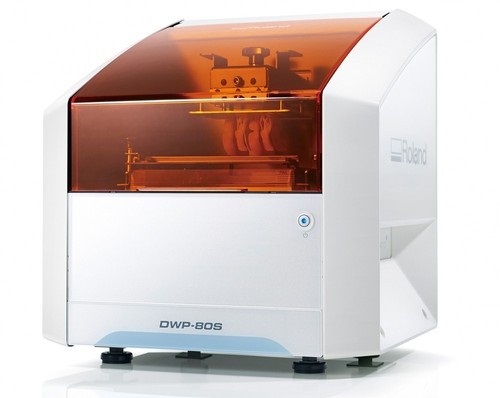
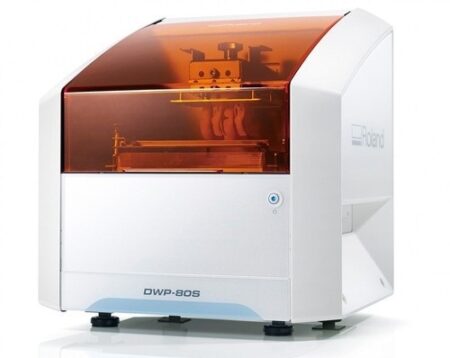
| Content | Roland DWP-80S Dental 3D Printer
Key software features
With Quick Denta, setting up a file for 3D printing is no longer a manual process. It automatically adjusts 3D data to produce the most efficient and stable position on the printer’s work surface. The optimum angle of orientation can also be automatically saved as a preset value and configured for each type of model being made- eliminating the need to reset values each time.Automatic Support Generation
Quick Denta simplifies the complex process of model support creation by automatically generating support structures with a single click.Error Detection and 3D Mesh Healing
An optional feature allows Quick Denta to automatically detect and repair minor errors during the STL importing process, without the need to return to the CAD software.Cost-Effective Resin Calculation
Quick Denta provides accurate, timesaving and cost-effective production by calculating the exact amount of resin needed for each job.Specs Roland DWP-80S Dental 3D Printer| Applications | Custom trays, base plates, and frameworks | | Build technology | Layered projection system | | Build size | 3.15 (W) x 3.15 (D) x 3.15 (H) in.
(80 (W) × 80 (D) ×80 (H) mm)
(The maximum amount of use per job is 300g(0.66 lb.)) | | Light source | UV-LED (Ultraviolet light-emitting diode) | | Machine Power Supply | DC 24 V、0.8 A | | Dedicated AC adapter | AC 100 to 240V ± 10%、50 / 60 Hz | | Power consumption | 20 W | | During standby | 49 dB (A) or less | | External dimensions | 16.93 (W) x 14.37 (D) x 17.72 (H) in.
(430 (W) × 365 (D) × 450 (H) mm) | | Interface | USB | | Noise During
operation | 55 dB (A) or less | | Noise Power off | 49 dB (A) or less | | External dimensions | 16.93 (W) x 14.37 (D) x 17.72 (H) in.
(430 (W) × 365 (D) × 450 (H) mm) | | Weight | 24 kg (53 lb.) | | Interface | USB | | Installation Environment During Operation | Temperature: 68 to 86°F (20 to 30°C),
Humidity: 35 to 80% RH (no condensation) | | Power off | Temperature: 41 to 95°F (5 to 40°C),
Humidity: 20 to 80% RH (no condensation) | | Included items | AC adapter, power cord, USB cable, liquid material vat, printing/cleaning tools (Metallic spatula, plastic spatula, tweezers, washing container x 2, hexagonal wrench, rubber gloves, work tray, etc.), Read First (booklet), Roland DG Software Package CD, etc. |
| Carestream CS 3600 Intraoral ScannerAcquire true color:With the CS 3600 Intraoral Scanner, practitioners can access 2D and 3D images that can be used with CS Restore software to design restorations within their practice. Colored 3D scans allow practitioners to easily define the margin lines and identify the differences between natural tooth structure and existing restorations. This makes restoration planning more accurate for practitioners.No external heater, powder or trolley system needed:The CS 3600 does not require you to spray powder of liquid over the patient’s teeth or gingival tissue before scanning. It features high-angulation scanning of up to 45 degrees and to a depth from -2 to +13m.Features a unique light guidance systemYet another feature of the CS 3600 that assists it in the capture of the data during the image acquisition process. This feature allows the user to place more focus on the patient’s mouth rather than the monitor.This device is easily shared:The CS 3600 can be easily shared between operatories because there is no heavy trolley to push around. Additionally, the intraoral scanner connects via USB 2 cable* to any PC workstation or laptop. * Windows 7, 32-bit minimum; 64-bit recommendedEasy to use and hold:The CS 3600’s sleek, lightweight design (295 grams) makes it comfortable and easy for users to navigate the intraoral scanner around patients’ mouths, especially during full arch acquisitions.Benefits:Carestream CS 3600 Intraoral Scanner- Faster Scan Speed
- Superb Image Quality
- Light Guidance System
- Portable for Easy Sharing
- Lightweight Hand Piece
- Features
- High Speed Continuous Scanning
- Fast, Simple and Smooth user experience
- Freefill Missing Scan Data at your Leisure
- Scan History allows you to remove excess scanned tissue for more refined final digital impression
- Three Workflows
- user friendly interface
- Autoclavable reusable tips in two interchangeable styles
- Accurate full 3D HD Color scanning
| Roland DWX-51D Dental Milling Unit
Roland DWX-51D Integrated HD Mill Package
DWX-51D 5-Axis Dental Mill
High Definition Custom CAM Strategy SUM3D
Nabertherm High Speed Auto Cool Zi Furnace
Quatro IVAC Mill Suction
Integration Package for Implant Abutments
Integration Package for up to 60mm disc sizes
Integration Package for HD High Detail End Mills
Start Up Package for Milling Materials
Top To Bottom Mill Training by the Industry Experts
Equipment Set up, IT and Networking Included
Mill Contingency and Loaner ProgramBuilt-to-Last
For thirty years, Roland DG has been the trusted provider of milling machines that are built to last. The DWX-51D 5-Axis Dental Milling Machine is no exception. After extensive research in which lab technicians were asked what they needed in a production mill, the DWX-51D was developed to enhance user experience, maximize ease-of-use and improve output quality. Built with a simple and modern design, the DWX-51D looks as effortless as it operates.Features
5-axis simultaneous operation for non-stop precision milling
Sturdy and efficient ball screw-driven system
New C-clamp for easy adjustment and alignment
10-station Automatic Tool Changer (ATC) for continuous milling
Powerful vacuum and anti-static ionizer for clean calibration and dust reductionThe DWX-51D is designed for effortless, precision production of dental prosthetics fromcopings, crowns and bridges to inlays, onlays and abutments, etc. With a host of automated features and a clean, stable work environment, the DWX-51D is the perfect solution for labs wanting to increase production or those looking to get into digital milling for the first time.Built-for-You.Built-to-Last.For thirty years, Roland DG has been the trusted provider of milling machines that are built to last. The DWX-51D 5-Axis Dental Milling Machine is no exception. After extensive research in which lab technicians were asked what they needed in a production mill, the DWX-51D was developed to enhance user experience, maximize ease-of-use and improve output quality. Built with a simple and modern design, the DWX-51D looks as effortless as it operates. Distinguishing Features Roland DWX-51D Dental Milling Unit- 5-axis simultaneous milling for precision milling
- Steady and efficient ball screw-driven operation
- New C-shape clamp for easy adjustment and alignment
- 10-station Automatic Tool Changer (ATC) for continuous milling
- Powerful vacuum and anti-static ionizer for clean calibration and dust reduction
Ultimate Convenience and Ease-of-Use- A variety of new features ensure continuous, user-friendly milling, including
- Sturdy frame ensures stability, while slim design fits nearly any lab space
- Easy access tool drawer properly stores and protects tools
- Color-coded LED status lights signal current job progress
- Virtual Machine Panel (VPanel) allows users to configure settings from their computer, send CAM data to the DWX-51D for production, and track milling progress
- Easily accessible cutting area for simple tool replacement and cleaning
| 3Shape TRIOS 3 Wireless Move Pen GripTRIOS is the world’s first intraoral scanner to offer a wireless option. 3Shape TRIOS 3 Wireless gives you the freedom to perform digital scans unrestricted by wires, optimizing comfort for both you and your patientsThe new 3Shape TRIOS MOVE is the ultimate patient/dentist communication tool. Show patients their digital scans and dynamic treatment information close-up, and create greater opportunities for treatment dialogue and joint decision-making.The ergonomic and lightweight design of TRIOS MOVE allows you to always position the screen in the right place, and enjoy superior user experience.Features of TRIOS MOVE;-13.3″ HD LCD Touchscreen – The perfect size when having it in front of a patient or working with up closeAdjustable arm- Bring the screen directly in front of the patient to involve them in the scanning process and the treatment planningPowerful custom PC designed for scanning – Specifically designed for use with all TRIOS 3 scanners to give a fast and smooth scan experience straight out of the boxFour wheels with integrated brakes – It is now very easy to move around the chair and from chair to chairEnhance comfort with wireless innovation.TRIOS is the world’s first intraoral scanner to offer a wireless option. 3Shape TRIOS 3 Wireless gives you the freedom to perform digital scans unrestricted by wires, optimizing comfort for both you and your patientsThe new 3Shape TRIOS MOVE is the ultimate patient/dentist communication tool. Show patients their digital scans and dynamic treatment information close-up, and create greater opportunities for treatment dialogue and joint decision-making.The ergonomic and lightweight design of TRIOS MOVE allows you to always position the screen in the right place, and enjoy superior user experience.Features of TRIOS MOVE : 3Shape TRIOS 3 Wireless Move Pen Grip 13.3" HD LCD Touchscreen - The perfect size when having it in front of a patient or working with up closeAdjustable arm- Bring the screen directly in front of the patient to involve them in the scanning process and the treatment planningPowerful custom PC designed for scanning - Specifically designed for use with all TRIOS 3 scanners to give a fast and smooth scan experience straight out of the boxFour wheels with integrated brakes - It is now very easy to move around the chair and from chair to chair. | Roland DWX-50 5-Axis Dental Milling Machine
The compact DWX-50 combines 5-axis simultaneous machining capability and a five-station automatic tool changer to deliver advanced features at a very affordable price point. Designed specifically for dental labs and technicians, the user-friendly DWX-50 allows for clean, quiet operation and the quality production of complex dental arches, abutments, bridges, copings and crowns from zirconia, wax and PMMA. Equipped with an integrated air blower and dust collection system, the DWX-50 ensures protection of moving parts while maintaining a clean, safe environment. Built on open technology, the DWX-50 supports a wide range of industry standard CAD/CAM software and tools, allowing for easy integration with popular commercially available dental prosthetic production solutions.5-axis simultaneous machiningCapable of 5-axis simultaneous machining, the DWX-50 supports the production of high-quality dental prosthetics at an affordable price point. The DWX-50 is designed to mill on X, Y and Z axes, rotating blocks and discs of material 360 degrees in both clockwise and counterclockwise movements, as well as tilting materials forward and backward 20 degrees to support complex cuts.Five-station automatic tool charger Roland DWX-50 5-Axis Dental Milling MachineThe five-station Automatic Tool Changer (ATC) with a tool length sensor enables the user to run multiple tools for one job or an entire disc unattended. Instead of inspecting finished pieces to determine if everything was milled correctly, the integrated tool diagnostics feature will notify users if a tool was broken prior to completion, resulting in reduced time and wasted materials.Taking control of prosthesis productionWith its unmatched ease of use and short learning time, the DWX-50 provides a cost-effective solution that is ideal for dental labs wishing to take control of the production process while avoiding the long lead times and costs associated with outsourcing.A true open architecture system, the compact DWX-50 integrates with industry standard 3D scanners, computers and all popular CAD/CAM software to provide a very cost-effective production solution. Advanced communications tools and operating features allow the DWX-50 to mill unattended while providing confidence in the finished product to the lab technician. | Medit i500 Intraoral ScannerOur Intraoral Scanner Delivers: Value, Efficiency, and Productivity
Together, these three qualities make it easy to incorporate our intraoral scanner into your workflow. Designed with quality in mind, we created the i500 to add value to your practice. Regardless of specialization the i500 ensures that professional needs are met, workflows are optimized, and flexibility is guaranteed.High ROI
An unparalleled performance combined with a competitive price delivers exceptionally fast return on investmentFlexibility
An open system for integrated CAD/CAM workflow allows for the export of STL files for easy file transfer and thus optimized collaborationImpressive Speed
Intelligent scan-detecting algorithm with two high-speed cameras for quick and efficient intraoral scanningPowderless
No need for powder in most regular cases, allowing for a seamless scanning process and increased patient comfortHigh Accuracy
Single crown* :Trueness (Accuracy) = 5.1 μm (±0.49 μm)
Precision (Consistency) = 3.2 μm (±0.74 μm)*Single crown accuracy test was conducted by Medit according to the methods in “Evaluation of the Accuracy of Six Intraoral Scanning Devices: An in-vitro Investigation. ADA Professional Product”
SPECIFICATION | Tip | 18 x 15.2 mm (WxH) | | Overall handpiece length | 266 mm | | Weight | 276g | | Imaging technology | 3D-in-motion video technology | | Color | 3D full color streaming capture | | Connectivity | USB 3.0 | | Scanning FOV | 14 x 13 mm |
The Medit i500 intraoral scanner delivers efficiency, productivity, and affordability.This scanner has been designed with quality in mind to add value to your practice. With its fast speed and powderless system, it allows for a smoother, more efficient scanning experience.The Medit Link software and hardware with workflow management and communication software will enhance and support your everyday CAD performance. Completed with integrated cloud storage and open data architecture. - Scanning for iOS in real time
- High-speed continuous scanning
- Color structure of the surface in the resolution of Full HD 3D
- Quick scan
- Natural color transfer
- Capturing UHD images (SR virtual viewer)
- Real-time 3D visualization (15 FPS 3D Data)
- Without using a spray
- Diagnostic image 2D
- Open file format (.stl)
- Scanner with the smallest size of the scanning module
|



Reviews
There are no reviews yet.