| Description | Automatic Positioning
With Quick Denta, setting up a file for 3D printing is no longer a manual process. It automatically adjusts 3D data to produce the most efficient and stable position on the printer’s work surface. Theoptimum angle of orientation can also be automatically saved as a preset value and configured for each type of model being made- eliminating the need to reset values each time.It really is that simple. Once a user imports an STL 3D file, Quick Denta software not only detects and heals errors but also does all the complex digital set-up for you. | With the intraoral scanner dwio the canadian company Dental Wings presented at the IDS a really revolutionary approach in the field of intraoral scanner. The digitally interested users will have noticed the similarity of the dwio with the Steinbichler intraoral scanner which was launched at the IDS 2 years before. In fact, the dwio intraoral scanner represents a further development. | New Carestream Dental Intraoral Scanner Announced – the CS 3800A wireless intraoral scanner with high-performance experience | The DWX-51D 5-Axis Dental Milling Machine is designed for effortless production of dental prosthetics. Built for precision, error-free milling, you don’t need any machine expertise to operate it. With touch-button controls and automated milling features, the production of high-quality bridges, crowns, inlays, onlays, abutments and other restorations out of 98 mm discs and blocks has been made virtually foolproof. | The iTero Element Scanner is a digital impression system that eliminates the need for messy putty in your mouth.Improving iTero Intraoral ScannersWhile it’s already a leader in dental technology, iTero is constantly refining its intraoral scanning options. Its Element Itraoral Scanner, introduced in March 2015, captures 6,000 frames per second, up to 20 times faster than its predecessor. Its wand is also smaller and lighter, with in-built controls for more intuitive operation. Intraoral scanners from iTero are renowned for their accuracy, but the increased capture speed improves the company’s already impressive statistics. | The DWX-4W goes beyond dry milling and is the epitome of wet grinding technology. It uses 4-axis simultaneous movements to wet grind precision inlays, onlays, crowns, veneers and short-span bridges from glass ceramic and composite resins. |
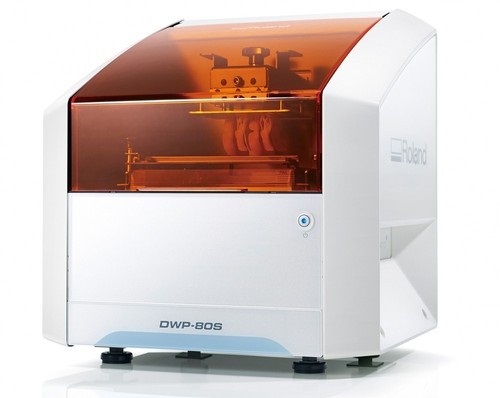
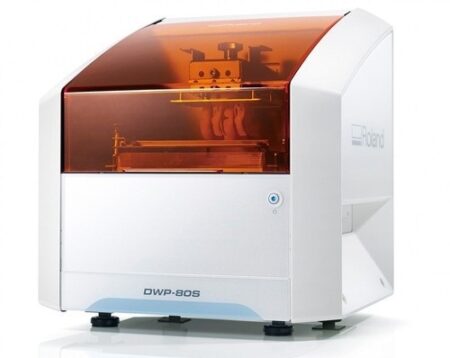
| Content | Roland DWP-80S Dental 3D Printer
Key software features
With Quick Denta, setting up a file for 3D printing is no longer a manual process. It automatically adjusts 3D data to produce the most efficient and stable position on the printer’s work surface. The optimum angle of orientation can also be automatically saved as a preset value and configured for each type of model being made- eliminating the need to reset values each time.Automatic Support Generation
Quick Denta simplifies the complex process of model support creation by automatically generating support structures with a single click.Error Detection and 3D Mesh Healing
An optional feature allows Quick Denta to automatically detect and repair minor errors during the STL importing process, without the need to return to the CAD software.Cost-Effective Resin Calculation
Quick Denta provides accurate, timesaving and cost-effective production by calculating the exact amount of resin needed for each job.Specs Roland DWP-80S Dental 3D Printer| Applications | Custom trays, base plates, and frameworks | | Build technology | Layered projection system | | Build size | 3.15 (W) x 3.15 (D) x 3.15 (H) in.
(80 (W) × 80 (D) ×80 (H) mm)
(The maximum amount of use per job is 300g(0.66 lb.)) | | Light source | UV-LED (Ultraviolet light-emitting diode) | | Machine Power Supply | DC 24 V、0.8 A | | Dedicated AC adapter | AC 100 to 240V ± 10%、50 / 60 Hz | | Power consumption | 20 W | | During standby | 49 dB (A) or less | | External dimensions | 16.93 (W) x 14.37 (D) x 17.72 (H) in.
(430 (W) × 365 (D) × 450 (H) mm) | | Interface | USB | | Noise During
operation | 55 dB (A) or less | | Noise Power off | 49 dB (A) or less | | External dimensions | 16.93 (W) x 14.37 (D) x 17.72 (H) in.
(430 (W) × 365 (D) × 450 (H) mm) | | Weight | 24 kg (53 lb.) | | Interface | USB | | Installation Environment During Operation | Temperature: 68 to 86°F (20 to 30°C),
Humidity: 35 to 80% RH (no condensation) | | Power off | Temperature: 41 to 95°F (5 to 40°C),
Humidity: 20 to 80% RH (no condensation) | | Included items | AC adapter, power cord, USB cable, liquid material vat, printing/cleaning tools (Metallic spatula, plastic spatula, tweezers, washing container x 2, hexagonal wrench, rubber gloves, work tray, etc.), Read First (booklet), Roland DG Software Package CD, etc. |
| Dwio Intraoral Scanner Dental WingsIntraoral scanner
Based on a novel and incredibly compact 3D capture technique called Multiscan Imaging, the Dental Wings intraoral scanner allows dentists to take digital impressions in a natural, fluid manner. Its remarkably small handpiece, gesture control, and easy maintenance make it a compelling digital impression option for clinicians.Design approach: the patient first
The intraoral scanner was designed to address the needs of dental professionals looking for an intuitive technology for capturing digital impressions. With the overall objective to help dentists focus on the patient rather than the technology, the Dental Wings intraoral scanner offers:– A remarkably small handpiece very similar in size, shape, and weight to existing dental handpieces. Its familiar shape allows to assume a natural position relative to the patient.
– Visual and auditive feedback — a luminescent ring and audible signals indicate when data is being successfully captured, allowing the user to focus in the mouth rather than on the screen.
– Easy maintenance of the lightweight all-metal handpiece that has no moving parts, no complex illumination or cooling system.
– Motion control technology for a no-touch operation of the system while the user has gloves on.Scanning technology Dwio Intraoral Scanner Dental Wings
Five miniaturized 3D scanners in the handpiece tip directly view the teeth and soft tissue from multiple orientations simultaneously, capturing even the most difficult to see areas of preparations with minimal effort by the user.Open workflows
The intraoral scanner is a dedicated “scan only” chairside system with multiple options for the design and fabrication steps. Captured data is seamlessly transmitted to in-office or remote systems via DWOS Connect for prosthesis design and production. Users of Dental Wings’ simple to use yet powerful DWOS CAD suite of design applications, as well as other open dental CAD software, are able to import the scan data directly. | Carestream CS 3800 Dental Intraoral Scanner
With CS 3800, the time has come to restore your liberty.The CS 3800 offers dental practitioners a whole new experience in acquiring impressions: freedom. Freedom from cables, freedom to pursue their preferred workflow, freedom to pay only for what they use, and freedom to interact with their partners, how they prefer, when they prefer. And, as the result of a renewed collaboration with Studio F. A. Porsche, the CS 3800 displays a timeless, ergonomic design that ensures a high-performance scanning experience.Benefits at a glance Carestream CS 3800 Dental Intraoral Scanner- High-performance wireless intraoral scanner for optimal mobility and seamless user experience
- One of the lightest and most compact intraoral scanners of the market
- Faster and smoother scanning thanks to a larger and broader field of view and a deeper field of view
- Full control of intraoral capabilities right on the handpiece
- Ergonomic design by Studio F. A. Porsche
A renewed feat with Studio F. A. PorscheThe CS 3800 intraoral scanner is the result of an ongoing collaboration with Studio F. A. PorscheThis time, the design firm moved towards the idea of designing the scanner with optimal comfort based on the morphology of the human hand combined with fluid and organic lines. The handpiece is thus refined to fit naturally in the palm of the hand, no matter the grip.Dedicated WiFi ensures continuous and efficient scanningThe CS 3800 uses dedicated point-to-point WiFi access that instantly receives data transferred from the handpiece to the computer. It’s as easy as plugging in a WiFi dongle. Once connected, it’s immediately ready to receive a signal from the handpiece: the pairing maintains a robust and stable transmission band for a continuous and efficient scanning procedure.Powered by CS ScanFlowCS ScanFlow software is the acquisition software paired with the CS 3800. Free yourself from imposed procedures: there is no need to choose a workflow when starting to scan – simply grab the handpiece and scan, then decide later which indication to apply to the data set. A four-step process keeps you on track from beginning to end. | Roland DWX-51D Dental Milling Unit
Roland DWX-51D Integrated HD Mill Package
DWX-51D 5-Axis Dental Mill
High Definition Custom CAM Strategy SUM3D
Nabertherm High Speed Auto Cool Zi Furnace
Quatro IVAC Mill Suction
Integration Package for Implant Abutments
Integration Package for up to 60mm disc sizes
Integration Package for HD High Detail End Mills
Start Up Package for Milling Materials
Top To Bottom Mill Training by the Industry Experts
Equipment Set up, IT and Networking Included
Mill Contingency and Loaner ProgramBuilt-to-Last
For thirty years, Roland DG has been the trusted provider of milling machines that are built to last. The DWX-51D 5-Axis Dental Milling Machine is no exception. After extensive research in which lab technicians were asked what they needed in a production mill, the DWX-51D was developed to enhance user experience, maximize ease-of-use and improve output quality. Built with a simple and modern design, the DWX-51D looks as effortless as it operates.Features
5-axis simultaneous operation for non-stop precision milling
Sturdy and efficient ball screw-driven system
New C-clamp for easy adjustment and alignment
10-station Automatic Tool Changer (ATC) for continuous milling
Powerful vacuum and anti-static ionizer for clean calibration and dust reductionThe DWX-51D is designed for effortless, precision production of dental prosthetics fromcopings, crowns and bridges to inlays, onlays and abutments, etc. With a host of automated features and a clean, stable work environment, the DWX-51D is the perfect solution for labs wanting to increase production or those looking to get into digital milling for the first time.Built-for-You.Built-to-Last.For thirty years, Roland DG has been the trusted provider of milling machines that are built to last. The DWX-51D 5-Axis Dental Milling Machine is no exception. After extensive research in which lab technicians were asked what they needed in a production mill, the DWX-51D was developed to enhance user experience, maximize ease-of-use and improve output quality. Built with a simple and modern design, the DWX-51D looks as effortless as it operates. Distinguishing Features Roland DWX-51D Dental Milling Unit- 5-axis simultaneous milling for precision milling
- Steady and efficient ball screw-driven operation
- New C-shape clamp for easy adjustment and alignment
- 10-station Automatic Tool Changer (ATC) for continuous milling
- Powerful vacuum and anti-static ionizer for clean calibration and dust reduction
Ultimate Convenience and Ease-of-Use- A variety of new features ensure continuous, user-friendly milling, including
- Sturdy frame ensures stability, while slim design fits nearly any lab space
- Easy access tool drawer properly stores and protects tools
- Color-coded LED status lights signal current job progress
- Virtual Machine Panel (VPanel) allows users to configure settings from their computer, send CAM data to the DWX-51D for production, and track milling progress
- Easily accessible cutting area for simple tool replacement and cleaning
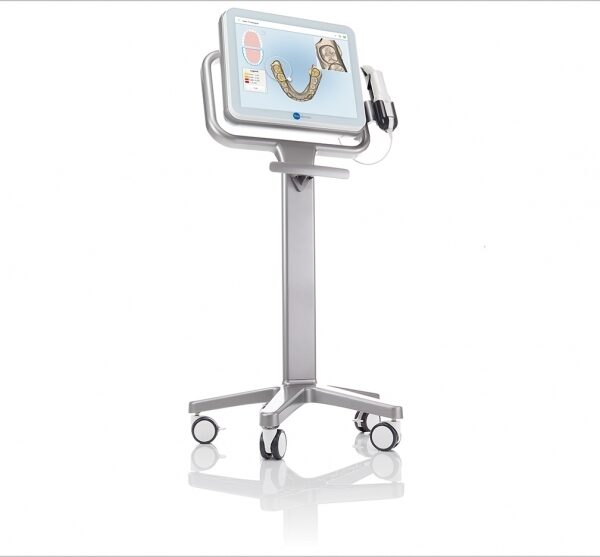
| iTero Element Intraoral Scanner
What Are iTero Intraoral Scanners?Intraoral scanners from iTero scan the mouths of patients, capturing images to create three-dimensional dental images in minutes. Intraoral scanners are simple to use and can be operated by one person. Their user-friendly nature helps dental professionals get the best results. The scans they produce are also more detailed than the traditional two-dimensional images they replace.Intraoral digital scans help dental professionals create accurate physical dental models for restorative work, including crowns, veneers, and implants. They also help orthodontists diagnose orthodontic problems and develop the best treatment plans.The company’s digital ecosystem software works seamlessly with its intraoral scanners, improving workflow for dental professionals working on orthodontic and restorative cases. However, unlike many early intraoral scanners, they are open systems. This feature gives dental professionals more flexibility about how they use their digital scan files. Intraoral digital scans from iTero scanners can be easily shared with other dental professionals and third-party providers such as Invisalign. When all relevant parties have the scans, they can communicate better to improve patient outcomes.What iTero Intraoral Scanners DoIntraoral scanners feature a wand, which the dental professional moves around a patient’s mouth. In the latest versions, the wand captures thousands of frames per second which are pieced together to create a three-dimensional visualisation of the patient’s mouth. The wands on iTero intraoral scanners are smaller than early intraoral scanners, allowing them to scan molars in the back of the mouth which were traditionally difficult to reach. Dental professionals using small wands also aren’t limited by how wide their patients can open their mouths. The small wands are also less likely to make patients gag than older forms of scanning technology.Intraoral scanners also have screens which display the digital dental images as they’re captured in real time. The screens show whether the scan is good or not before it’s saved and submitted to the lab. This feature can be a real time-saver for dental professionals who, in the past, could receive word from the lab two or three weeks later that their scans were inadequate. By providing immediate feedback, intraoral scanners can save dental professionals and patients time and frustration.Unlike many intraoral scanners, patients don’t need to cover their teeth in titanium dioxide powder before an iTero intraoral scan. This benefit further improves the scanning process for dental patients.How Intraoral Scanners Make Invisalign Orthodontics Easier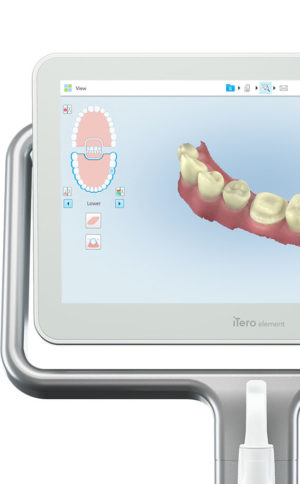 Invisalign clear aligners are one of the most popular teeth-straightening aids used today as they’re effective, removable, and virtually undetectable. Unlike many intraoral scanners, iTero intraoral scanners have open architecture which makes them compatible with the Invisalign system, including its Invisalign Outcome Simulator. Orthodontists can scan their patients’ mouths with an iTero intraoral scanner, then show them how their Invisalign treatment will look. This technology improves the patient experience because patients can know what to expect and feel more confident in their diagnosis and treatment plan. It also makes the ClinCheck setup three times faster.After setup, speed is still on the iTero intraoral scanners’ side. iTero states ClinCheck treatment plans submitted with its scans are usually posted to the Invisalign Doctor Site three times faster than traditional polyvinyl siloxane scans. As a result, your Invisalign aligners are created and posted back to your orthodontist sooner so that you can start treatment faster. Since the iTero intraoral scanning system is open, orthodontists can also send the scan files to any laboratory of their choosing for the creation of a retainer, which reinforces your treatment after the Invisalign process, and other dental tools.Orthodontists can also create better Invisalign treatment plans for their patients using iTero intraoral scans. Align Technology research shows orthodontists who use the scans have 10 times fewer rejections and seven times fewer issues with the fit of the Invisalign aligners. These results may be because iTero intraoral scanners can help orthodontists track their patients’ progress. Regular scans throughout Invisalign treatment can help orthodontists compare expected outcomes with results. If results aren’t as expected, orthodontists can use the scans to educate their patients about their treatment and the importance of complying with their recommendations.Improving iTero Intraoral Scanners iTero Element Intraoral ScannerWhile it’s already a leader in dental technology, iTero is constantly refining its intraoral scanning options. Its Element Itraoral Scanner, introduced in March 2015, captures 6,000 frames per second, up to 20 times faster than its predecessor. Its wand is also smaller and lighter, with in-built controls for more intuitive operation. Intraoral scanners from iTero are renowned for their accuracy, but the increased capture speed improves the company’s already impressive statistics. Invisalign clear aligners are one of the most popular teeth-straightening aids used today as they’re effective, removable, and virtually undetectable. Unlike many intraoral scanners, iTero intraoral scanners have open architecture which makes them compatible with the Invisalign system, including its Invisalign Outcome Simulator. Orthodontists can scan their patients’ mouths with an iTero intraoral scanner, then show them how their Invisalign treatment will look. This technology improves the patient experience because patients can know what to expect and feel more confident in their diagnosis and treatment plan. It also makes the ClinCheck setup three times faster.After setup, speed is still on the iTero intraoral scanners’ side. iTero states ClinCheck treatment plans submitted with its scans are usually posted to the Invisalign Doctor Site three times faster than traditional polyvinyl siloxane scans. As a result, your Invisalign aligners are created and posted back to your orthodontist sooner so that you can start treatment faster. Since the iTero intraoral scanning system is open, orthodontists can also send the scan files to any laboratory of their choosing for the creation of a retainer, which reinforces your treatment after the Invisalign process, and other dental tools.Orthodontists can also create better Invisalign treatment plans for their patients using iTero intraoral scans. Align Technology research shows orthodontists who use the scans have 10 times fewer rejections and seven times fewer issues with the fit of the Invisalign aligners. These results may be because iTero intraoral scanners can help orthodontists track their patients’ progress. Regular scans throughout Invisalign treatment can help orthodontists compare expected outcomes with results. If results aren’t as expected, orthodontists can use the scans to educate their patients about their treatment and the importance of complying with their recommendations.Improving iTero Intraoral Scanners iTero Element Intraoral ScannerWhile it’s already a leader in dental technology, iTero is constantly refining its intraoral scanning options. Its Element Itraoral Scanner, introduced in March 2015, captures 6,000 frames per second, up to 20 times faster than its predecessor. Its wand is also smaller and lighter, with in-built controls for more intuitive operation. Intraoral scanners from iTero are renowned for their accuracy, but the increased capture speed improves the company’s already impressive statistics. | Roland DWX-4W Dental Milling Unit
Reliable High PerformanceIn addition to milling on X, Y and Z axes, the DWX-4W rotates pin-type blocks 360 degrees on a fourth axis (A axis) to support undercuts. The ball screw-driven 4-axis control allows for smooth, high-precision machining. The DWX-4W’s high-performance 60,000-RPM Jaeger spindle is known for its reliability and supports precision milling of glass ceramics and composite resin. With its multi-pin clamp, the DWX-4W is a wet dental milling machine that can mill up to three different pin-type materials continuously in one operation. As a result, prosthetics for up to three different patients can be produced in a single production run, saving time, labour and costs.- Simultaneous 4-axis machining
- 4-state Automatic Tool Changer (ATC)
- 60,000 RPM Jaeger DentaDrive Spindle
- CAM software bundled
- Virtual Machine Panel (VPanel)
- Fully-integrated water and coolant filtration system
- Coolant leakage & flow monitoring sensors
- Tool life monitoring
- Mail notification system
Summary Roland DWX-4W Dental Milling Unit• Maximum Convenience
• Virtual Machine Panel
• Progress and Error Alerts for Error-Free Milling
• Coolant Compartment and Water Filtration
• Clean Cutting Area for Precision Milling
• Economical Open Architecture
• CAM Software Included
• Growth Potential
• Peace of MindThe DWX-4W’s high-performance 60 000 RPM Jaeger DentaDrive spindle supports precision milling. It’s equipped to mil pin-type blocks, including glass ceramics and composite resin – acclaimed in the industry for their superior strength and aesthetics. materials can be finished with a short finishing tome, dramatically reducing labour and production time.In addition to milling on X, Y and Z axes, the DWX-4W rotates pin-type blocks 360 degrees on a fourth axis (A axis) to support undercuts, the rigid ball screw-driven 4-axis control allows for smooth, high-precision machining. With its multi-pin clamp, it can mil up to three different pin-type materials continuously, enabling production three different patient prosthetics in a single production run. it also features an Automatic Tool Changer (ATC) that auto-changes grinding burs without interrupting the production process. |





Reviews
There are no reviews yet.