| Description | Automatic Positioning
With Quick Denta, setting up a file for 3D printing is no longer a manual process. It automatically adjusts 3D data to produce the most efficient and stable position on the printer’s work surface. Theoptimum angle of orientation can also be automatically saved as a preset value and configured for each type of model being made- eliminating the need to reset values each time.It really is that simple. Once a user imports an STL 3D file, Quick Denta software not only detects and heals errors but also does all the complex digital set-up for you. | Automatic Power Control: Epic Pro cuts four times faster1 than a classic diode laser with
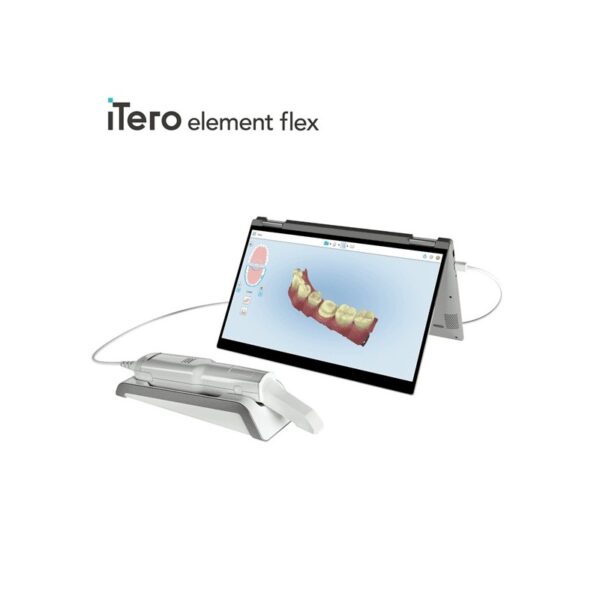
minimal collateral damage. In this treatment mode, the laser in continuous wave mode converts light energy to thermal power at the tip. Laser energy is adjusted automatically in real time to maintain constant tip temperature. The result is extremely consistent and reliable cutting conditions, regardless of speed of movement, tissue type, etc. | iTero Element Flex is a system allowing for quick and easy transfer between offices, enabling GPs and orthodontists the capacity to perform scans that are full-arch beyond the practice. iTero Element Flex Features- -Compact footprint for transportability and convenience
- -Custom-designed carrying case for the ultimate in mobility
- -Enhanced color for stunning and precise imaging
- -Perform crisp, full-color, high-definition 3D scans in as little as 60 seconds*
- -Wand touchpad is as intuitive and easy as gesturing on your smartphone
| The affordable Gendex 9200 DDE dental radiography system offers standard panoramic and cephalometric x-ray projections, as well as a wide range of advanced programs to support most dental imaging and exams. | A true open architecture system, the compact DWX-50 integrates with industry standard 3D scanners, computers and all popular CAD/CAM software to provide a very cost-effective production solution. Advanced communications tools and operating features allow the DWX-50 to mill unattended while providing confidence in the finished product to the lab technician. | The i500 intraoral scanner, exemplifies three qualities:
Value, Efficiency, and ProductivityPerfect software and hardware combination:
Value, Efficiency, and ProductivityOne Software to connect them all |
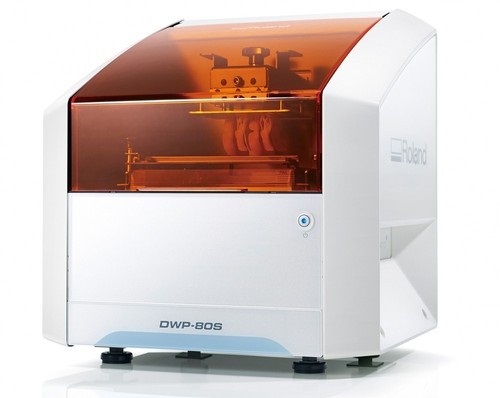
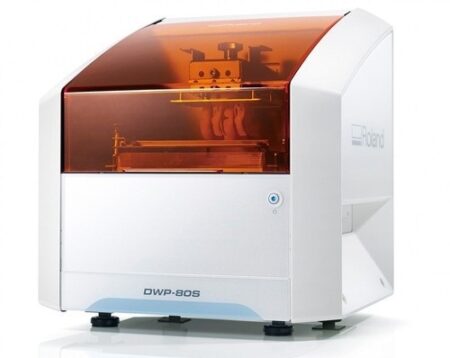
| Content | Roland DWP-80S Dental 3D Printer
Key software features
With Quick Denta, setting up a file for 3D printing is no longer a manual process. It automatically adjusts 3D data to produce the most efficient and stable position on the printer’s work surface. The optimum angle of orientation can also be automatically saved as a preset value and configured for each type of model being made- eliminating the need to reset values each time.Automatic Support Generation
Quick Denta simplifies the complex process of model support creation by automatically generating support structures with a single click.Error Detection and 3D Mesh Healing
An optional feature allows Quick Denta to automatically detect and repair minor errors during the STL importing process, without the need to return to the CAD software.Cost-Effective Resin Calculation
Quick Denta provides accurate, timesaving and cost-effective production by calculating the exact amount of resin needed for each job.Specs Roland DWP-80S Dental 3D Printer| Applications | Custom trays, base plates, and frameworks | | Build technology | Layered projection system | | Build size | 3.15 (W) x 3.15 (D) x 3.15 (H) in.
(80 (W) × 80 (D) ×80 (H) mm)
(The maximum amount of use per job is 300g(0.66 lb.)) | | Light source | UV-LED (Ultraviolet light-emitting diode) | | Machine Power Supply | DC 24 V、0.8 A | | Dedicated AC adapter | AC 100 to 240V ± 10%、50 / 60 Hz | | Power consumption | 20 W | | During standby | 49 dB (A) or less | | External dimensions | 16.93 (W) x 14.37 (D) x 17.72 (H) in.
(430 (W) × 365 (D) × 450 (H) mm) | | Interface | USB | | Noise During
operation | 55 dB (A) or less | | Noise Power off | 49 dB (A) or less | | External dimensions | 16.93 (W) x 14.37 (D) x 17.72 (H) in.
(430 (W) × 365 (D) × 450 (H) mm) | | Weight | 24 kg (53 lb.) | | Interface | USB | | Installation Environment During Operation | Temperature: 68 to 86°F (20 to 30°C),
Humidity: 35 to 80% RH (no condensation) | | Power off | Temperature: 41 to 95°F (5 to 40°C),
Humidity: 20 to 80% RH (no condensation) | | Included items | AC adapter, power cord, USB cable, liquid material vat, printing/cleaning tools (Metallic spatula, plastic spatula, tweezers, washing container x 2, hexagonal wrench, rubber gloves, work tray, etc.), Read First (booklet), Roland DG Software Package CD, etc. |
| Biolase Epic Pro Dental Soft Tissue LaserThe Epic Pro, which offers the most laser power of any diode laser in dentistry, is the first
product to be introduced resulting from BIOLASE’s strategic development agreement
with IPG Medical. The newest addition to the Epic family of dental soft-tissue lasers, Epic
Pro features several new innovations that are industry-firsts: - A new super pulse technology for more precise, enhanced laser tissue cutting
- Real-time automatic power control to enhance speed and consistency when performing surgery with pre-programed tip temperature
- Pre-initiated, bendable, disposable tips with new smart tip technology to ensure tip performance and quality
Automatic Power Control: Epic Pro cuts four times faster1 than a classic diode laser with
minimal collateral damage. In this treatment mode, the laser in continuous wave mode converts light energy to thermal power at the tip. Laser energy is adjusted automatically in real time to maintain constant tip temperature. The result is extremely consistent and reliable cutting conditions, regardless of speed of movement, tissue type, etc. Super Thermal Pulse: Epic Pro can achieve ten times the peak power of a standard diode (and up to three times that of the closest competitor) laser in short micro-pulses for the highest cutting efficiency and safety. In this treatment mode, the laser converts light energy to thermal power, which it emits as thermal power pulses, (i.e. multiple bursts of high power). Each of these thermal bursts cuts tissue highly efficiently. When the laser is activated, power bursts are emitted with a preset pulse width (duration), while maintaining a precise thermal level at the tip. The laser is powered on only about 3-5% of the time, giving tissue ample time to relax between pulses; creating a safer and gentler experience for patients. 
The Only Laser with Automatic Power ControlEpic Pro is the ONLY FDA-cleared laser with Automatic Power Control, an exclusive innovation from BIOLASE that enables the operator to lase with confidence and speed. 
Enhanced Clinical ApplicationsEpic Pro is the professional’s choice for managing soft tissue cases. With over 20 clinical presets, multiple treatment modes, and an advanced mode for expert users, Epic Pro provides unparalleled consistency and predictability. Unlike traditional diodes, Epic Pro moves quickly and with little snag-and-drag resistance. 
Greater Precision and ComfortEpic Pro brings more precision and comfort than traditional diodes due to innovations such as Super Thermal Pulse mode, which can pulse energy as quickly as ten-millionths of a second, resulting in efficient clinical cutting with less thermal damage than normal diode lasers. 
Introducing Smart Tip TechnologyEpic Pro uses durable new tip technology, available in uninitiated and pre-initiated formats depending on your clinical needs. Epic Pro tips work hand in hand with the laser’s Smart Tip technology to prompt you when a fresh tip is needed. 
With Epic Pro, ‘You Have to See It to Believe It’If you are a current diode laser or CO2 laser user, you have to see Epic Pro cut tissue live and compare to your current laser experience. When current Epic Pro customers were first shown Epic Pro, their response? “You have to see it cut to understand how much faster it is.” Fill out the contact form on this page to request a live demonstration for Epic Pro in your clinic.Technical Specifications Biolase Epic Pro Dental Soft Tissue Laser| Dimension | 7.25in (W) x 4.5in (L) x 6.5in (H) (18.4cm x 11.4cm x 16.5cm) | | Weight | 4 lbs (1.8 kg) | | Operating Voltage | 100V – 240V at 1.2A/0.5A | | Frequency | 50/60 Hz | | Main Control | Power Switch | | Remote Interruption | Remote Interlock | | Disable Control | Emergency Stop Button | | DC Power Supply Module | 12V DC, 5A | | Laser Classification | Class IV (4) | | Medium | Semi-conductor diode | | Wavelength | 940nm ± 20nm | | Power Modes | Continuous, Pulse Modulation | | Fiber Tip Diameter | 300µm, 400µm | | Pulse Duration | 10µm-100ms | | Pulse Interval | 0.01ms – 20ms | | Pulse Repetition Rate | Up to 20kHz (for reference) | | NOHD | 4.77 meters | | Beam Divergence | 0.22 | | Standard Fiber Cable Length | 6 feet (1.8 meters) |
| iTero Element Flex Intraoral Scanner
iTero Element Flex is a system allowing for quick and easy transfer between offices, enabling GPs and orthodontists the capacity to perform scans that are full-arch beyond the practice.The iTero Element Flex wand-only configuration is a portable scanner for transport from office to office, enabling doctors to leverage the power of chairside visualization. It is ideal for practices with multiple locations who want a scanner that’s convenient and easy to transport. Working using notebooks that are compatible, professionals are now able to scan everywhere, even at the smallest of operatories. The Element Flex contains a custom-designed carrying case.The Element Flex, which is the choice includes a custom-designed carrying case, and allows for connectivity. Every scanner maintains the same capabilities as its predecessor.Initially, intraoral scanning wands considered as difficult to use, and were bulky. Therefore, when it came time to make a purchasing decision clinicians chosen to forego it. Now, there are options provided by a vast assortment.With the launch of this Element Flex, scans can be carried out directly onto notebooks, making scanning that was intraoral more mobile than ever before. However, that’s not the only invention in IOS scanning. The most recent release from 3shape, the TRIOS MOVE, offers a wireless scanning wand along with an arm and swiveling screen which makes it possible for clinicians to readily show patients the process, as well as the treatment planning.The iTero Element Flex system is delivered as a laptop-based workstation for performing oral scans from the office of the doctor. This operation manual describes how to boot and shut down the machine to Deal with cable and the, and also to clean the scanning device and replace its sleevesThe iTero Element Flex system provides an intuitive user interface for performing digital scans for Indices or use. The physician is directed by means of text and visual aid via the arrangement. The notebook’s touch screen and also the wand buttons are used to respond to display instructions.Benefits of this iTero Element Flex system
The Element Flex system that is iTero Offers significant advantages over present methods that are crown-production, such as higher precision that is crown-production scanning, and instant feedback through the
Scanning procedureStreamlined Workflows with Full-Color Scans
Like most iTero Element scanners, iTero Element two and iTero Element Flex are designed to operate with present iTero orthodontic and restorative workflows, such as laboratory workflows, custom made models, open STL export, custom implant abutment and chairside milling partners. Sharp, full-color 3D scans that may be taken in as few as 60 seconds4 are generated by all of iTero Element scanners.iTero Element Flex Features iTero Element Flex Intraoral Scanner- -Compact footprint for transportability and convenience
- -Custom-designed carrying case for the ultimate in mobility
- -Enhanced color for stunning and precise imaging
- -Perform crisp, full-color, high-definition 3D scans in as little as 60 seconds*
- -Wand touchpad is as intuitive and easy as gesturing on your smartphone
| Gendex Orthoralix 9200 DDE Digital Cephalometric + Panoramic X Ray
The versatile Orthoralix 9200 system offers standard panoramic projections, as well as a full array of advanced programs to satisfy the demanding needs of dental specialists. Plus, with both ?lm-based and direct digital models and the optional cephalometric arm, the capabilities of the 9200 can expand with your practice.Discover all of the benefits and options this imaging system has to offer.Wide Range of Projections – The Orthoralix 9200 offers 10 standard projections, with the ability to add 5 Cephalometric projections and the Transcan tomography projection to satisfy the needs of today’s dental specialists. Its intuitive control panel and easy-to-read display simplifies the process of selecting projections. Plus, with the precision of morphology following and multi-motorized arm rotation, the 9200 excels at focal trough reconstruction.- 10 standard imaging projections and 6 additional with optional upgrades
- Meets the demands of today’s orthodontists, oral and maxillofacial surgeons, and other specialists
Advanced Image Quality – Three technical factor setting modes are available to ensure complete flexibility and quality control. Manual mode for total operation control, Preset mode where the operator can customize settings, and Automatic Exposure Control (AEC) mode. With AEC, the 9200 automatically raises or lowers the kV setting based on measurements of bone size and density.- Triple laser beam guide system and motorized column for simple, accurate patient positioning
- Automatic Exposure Control (AEC) to ensure optimum image contrast and balance
- Real-time image reconstruction with the direct digital model
Gendex Orthoralix 9200 DDE Digital Cephalometric + Panoramic X Ray
Expand Your Capabilities – Utilizing the latest in CCD sensor technology and built-in LAN connectivity, the 9200 DDE model allows clinicians to digitally capture x-ray images and share them with any computer connected to the network for maximum productivity. With the option to add a Cephalometric arm, the Transcan cross-sectional tomography projection, and convert to direct digital technology, the 9200 is one of the most expandable panoramic systems available.- Direct digital model with the latest CCD sensor technology and direct LAN connectivity
- Optional Cephalometric arm attachment
- Optional Transcan implantology projection for transverse cross-sections of upper and lower jaw
Gendex Orthoralix 9200 DDE Digital Cephalometric + Panoramic X Ray| Power Supply | 115-250 VAC ± 10% | | Frequency | 50/60 Hz ± 2 Hz | | Maximum Line Power Rating | 10 A at 250 V, 20 A at 115 V | | Anode Voltage | 60 – 84 kV, in 2 kV steps | | Anode Current | 3 – 15 mA, in 1 mA steps | | Exposure Time | 12 s for standard pan, 0.16 – 2.5 s for Cephalometric | | Duty Cycle | 1:20 at full power operation | | Focal Spot | 0.5 mm, IEC 336 (1993) | | Vertical Reach | 39′ to 71′ (100 to 180 cm) from ?oor to occll plane | | Weight | 410 lbs (115 kg), 467 lbs (212 kg) with Ceph arm | | Active Area CCD Sensor | 147 x 6 mm (Standard Pan), 220 x 6 mm (Ceph) | | Image Size | 1536 x 2725 pixels (Standard Pan), 2304 x 2529 pixels (Ceph – Maximum) | | Minimum PC Requirements | Pentium® II CPU, 400 MHz, 256 MB RAM | | Required Operating System | Microsoft® Windows 98®/ Windows 2000®/ Windows XP® |
| Roland DWX-50 5-Axis Dental Milling Machine
The compact DWX-50 combines 5-axis simultaneous machining capability and a five-station automatic tool changer to deliver advanced features at a very affordable price point. Designed specifically for dental labs and technicians, the user-friendly DWX-50 allows for clean, quiet operation and the quality production of complex dental arches, abutments, bridges, copings and crowns from zirconia, wax and PMMA. Equipped with an integrated air blower and dust collection system, the DWX-50 ensures protection of moving parts while maintaining a clean, safe environment. Built on open technology, the DWX-50 supports a wide range of industry standard CAD/CAM software and tools, allowing for easy integration with popular commercially available dental prosthetic production solutions.5-axis simultaneous machiningCapable of 5-axis simultaneous machining, the DWX-50 supports the production of high-quality dental prosthetics at an affordable price point. The DWX-50 is designed to mill on X, Y and Z axes, rotating blocks and discs of material 360 degrees in both clockwise and counterclockwise movements, as well as tilting materials forward and backward 20 degrees to support complex cuts.Five-station automatic tool charger Roland DWX-50 5-Axis Dental Milling MachineThe five-station Automatic Tool Changer (ATC) with a tool length sensor enables the user to run multiple tools for one job or an entire disc unattended. Instead of inspecting finished pieces to determine if everything was milled correctly, the integrated tool diagnostics feature will notify users if a tool was broken prior to completion, resulting in reduced time and wasted materials.Taking control of prosthesis productionWith its unmatched ease of use and short learning time, the DWX-50 provides a cost-effective solution that is ideal for dental labs wishing to take control of the production process while avoiding the long lead times and costs associated with outsourcing.A true open architecture system, the compact DWX-50 integrates with industry standard 3D scanners, computers and all popular CAD/CAM software to provide a very cost-effective production solution. Advanced communications tools and operating features allow the DWX-50 to mill unattended while providing confidence in the finished product to the lab technician. | Medit i500 Intraoral ScannerOur Intraoral Scanner Delivers: Value, Efficiency, and Productivity
Together, these three qualities make it easy to incorporate our intraoral scanner into your workflow. Designed with quality in mind, we created the i500 to add value to your practice. Regardless of specialization the i500 ensures that professional needs are met, workflows are optimized, and flexibility is guaranteed.High ROI
An unparalleled performance combined with a competitive price delivers exceptionally fast return on investmentFlexibility
An open system for integrated CAD/CAM workflow allows for the export of STL files for easy file transfer and thus optimized collaborationImpressive Speed
Intelligent scan-detecting algorithm with two high-speed cameras for quick and efficient intraoral scanningPowderless
No need for powder in most regular cases, allowing for a seamless scanning process and increased patient comfortHigh Accuracy
Single crown* :Trueness (Accuracy) = 5.1 μm (±0.49 μm)
Precision (Consistency) = 3.2 μm (±0.74 μm)*Single crown accuracy test was conducted by Medit according to the methods in “Evaluation of the Accuracy of Six Intraoral Scanning Devices: An in-vitro Investigation. ADA Professional Product”
SPECIFICATION | Tip | 18 x 15.2 mm (WxH) | | Overall handpiece length | 266 mm | | Weight | 276g | | Imaging technology | 3D-in-motion video technology | | Color | 3D full color streaming capture | | Connectivity | USB 3.0 | | Scanning FOV | 14 x 13 mm |
The Medit i500 intraoral scanner delivers efficiency, productivity, and affordability.This scanner has been designed with quality in mind to add value to your practice. With its fast speed and powderless system, it allows for a smoother, more efficient scanning experience.The Medit Link software and hardware with workflow management and communication software will enhance and support your everyday CAD performance. Completed with integrated cloud storage and open data architecture. - Scanning for iOS in real time
- High-speed continuous scanning
- Color structure of the surface in the resolution of Full HD 3D
- Quick scan
- Natural color transfer
- Capturing UHD images (SR virtual viewer)
- Real-time 3D visualization (15 FPS 3D Data)
- Without using a spray
- Diagnostic image 2D
- Open file format (.stl)
- Scanner with the smallest size of the scanning module
|





Reviews
There are no reviews yet.