View cart “Dentsply Sirona CEREC Primemill For Sale” has been added to your cart.
-54%
Availability: In Stock
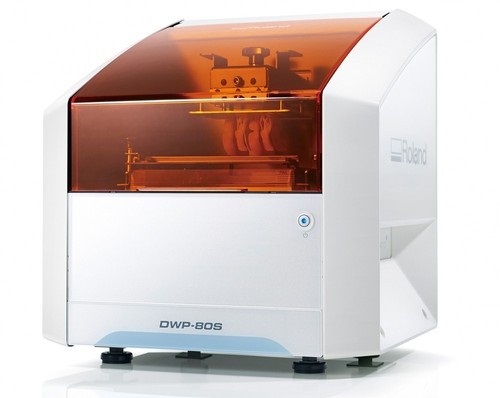
Roland DWP-80S Dental 3D Printer For Sale
$7,850.00$3,650.00
Automatic Positioning
With Quick Denta, setting up a file for 3D printing is no longer a manual process. It automatically adjusts 3D data to produce the most efficient and stable position on the printer’s work surface. Theoptimum angle of orientation can also be automatically saved as a preset value and configured for each type of model being made- eliminating the need to reset values each time.
It really is that simple. Once a user imports an STL 3D file, Quick Denta software not only detects and heals errors but also does all the complex digital set-up for you.
Other people want this. 15 people have this in their carts right now.
With Quick Denta, setting up a file for 3D printing is no longer a manual process. It automatically adjusts 3D data to produce the most efficient and stable position on the printer’s work surface. The optimum angle of orientation can also be automatically saved as a preset value and configured for each type of model being made- eliminating the need to reset values each time.
Automatic Support Generation
Quick Denta simplifies the complex process of model support creation by automatically generating support structures with a single click.
Error Detection and 3D Mesh Healing
An optional feature allows Quick Denta to automatically detect and repair minor errors during the STL importing process, without the need to return to the CAD software.
Cost-Effective Resin Calculation
Quick Denta provides accurate, timesaving and cost-effective production by calculating the exact amount of resin needed for each job.
Specs Roland DWP-80S Dental 3D Printer
Applications
Custom trays, base plates, and frameworks
Build technology
Layered projection system
Build size
3.15 (W) x 3.15 (D) x 3.15 (H) in.
(80 (W) × 80 (D) ×80 (H) mm)
(The maximum amount of use per job is 300g(0.66 lb.))
Light source
UV-LED (Ultraviolet light-emitting diode)
Machine Power Supply
DC 24 V、0.8 A
Dedicated AC adapter
AC 100 to 240V ± 10%、50 / 60 Hz
Power consumption
20 W
During standby
49 dB (A) or less
External dimensions
16.93 (W) x 14.37 (D) x 17.72 (H) in.
(430 (W) × 365 (D) × 450 (H) mm)
Interface
USB
Noise During
operation
55 dB (A) or less
Noise Power off
49 dB (A) or less
External dimensions
16.93 (W) x 14.37 (D) x 17.72 (H) in.
(430 (W) × 365 (D) × 450 (H) mm)
Weight
24 kg (53 lb.)
Interface
USB
Installation Environment During Operation
Temperature: 68 to 86°F (20 to 30°C),
Humidity: 35 to 80% RH (no condensation)
Power off
Temperature: 41 to 95°F (5 to 40°C),
Humidity: 20 to 80% RH (no condensation)
Included items
AC adapter, power cord, USB cable, liquid material vat, printing/cleaning tools (Metallic spatula, plastic spatula, tweezers, washing container x 2, hexagonal wrench, rubber gloves, work tray, etc.), Read First (booklet), Roland DG Software Package CD, etc.
Reviews (0)
Reviews
There are no reviews yet.
Be the first to review “Roland DWP-80S Dental 3D Printer For Sale” Cancel reply
With Quick Denta, setting up a file for 3D printing is no longer a manual process. It automatically adjusts 3D data to produce the most efficient and stable position on the printer’s work surface. Theoptimum angle of orientation can also be automatically saved as a preset value and configured for each type of model being made- eliminating the need to reset values each time.
It really is that simple. Once a user imports an STL 3D file, Quick Denta software not only detects and heals errors but also does all the complex digital set-up for you.
Intelligent Machine. Effortless Production. Superior Results.
The DGSHAPE DWX-42W enables wet milling of popular glass ceramic and composite resins with high precision and accuracy.
High speed production with proprietary DGSHAPE spindle
Expanded 6-tool Automatic Tool Changer for uninterrupted milling
LAN capable for easy connectivity
Included VPanel for easy monitoring of milling jobs and tools
Milling Unit:• Choose from CEREC MC, CEREC MC X or CEREC MC XL
• Get access to the entire range of chairside treatment with up to 40 mm block size, including bridges and abutments
• Create fully anatomic, precise treatments quickly
• CEREC Guide 2 surgical guide
• Dry mill ready
• Includes CEREC software
A true open architecture system, the compact DWX-50 integrates with industry standard 3D scanners, computers and all popular CAD/CAM software to provide a very cost-effective production solution. Advanced communications tools and operating features allow the DWX-50 to mill unattended while providing confidence in the finished product to the lab technician.
The industry’s most cost-effective and user-friendly dental mill, the DWX-4 produces single crowns, copings, bridges and hybrid abutments with precision and ease. The DWX-4 is the ideal device for labs just getting into digital milling or labs that need a second device for urgent jobs. With the DWX-4 dental milling system, you can quickly and economically mill on-demand in a wide variety materials, including the latest hybrid ceramics.
iTero Element 2 Intraoral Scanner includes an ergonomic, based cradle and delivers imaging precision in a compact footprint using tools that are strong.Together, we can streamline your workflow.
With Quick Denta, setting up a file for 3D printing is no longer a manual process. It automatically adjusts 3D data to produce the most efficient and stable position on the printer’s work surface. The optimum angle of orientation can also be automatically saved as a preset value and configured for each type of model being made- eliminating the need to reset values each time.
Automatic Support Generation
Quick Denta simplifies the complex process of model support creation by automatically generating support structures with a single click.
Error Detection and 3D Mesh Healing
An optional feature allows Quick Denta to automatically detect and repair minor errors during the STL importing process, without the need to return to the CAD software.
Cost-Effective Resin Calculation
Quick Denta provides accurate, timesaving and cost-effective production by calculating the exact amount of resin needed for each job.
Specs Roland DWP-80S Dental 3D Printer
Applications
Custom trays, base plates, and frameworks
Build technology
Layered projection system
Build size
3.15 (W) x 3.15 (D) x 3.15 (H) in.
(80 (W) × 80 (D) ×80 (H) mm)
(The maximum amount of use per job is 300g(0.66 lb.))
Light source
UV-LED (Ultraviolet light-emitting diode)
Machine Power Supply
DC 24 V、0.8 A
Dedicated AC adapter
AC 100 to 240V ± 10%、50 / 60 Hz
Power consumption
20 W
During standby
49 dB (A) or less
External dimensions
16.93 (W) x 14.37 (D) x 17.72 (H) in.
(430 (W) × 365 (D) × 450 (H) mm)
Interface
USB
Noise During
operation
55 dB (A) or less
Noise Power off
49 dB (A) or less
External dimensions
16.93 (W) x 14.37 (D) x 17.72 (H) in.
(430 (W) × 365 (D) × 450 (H) mm)
Weight
24 kg (53 lb.)
Interface
USB
Installation Environment During Operation
Temperature: 68 to 86°F (20 to 30°C),
Humidity: 35 to 80% RH (no condensation)
Power off
Temperature: 41 to 95°F (5 to 40°C),
Humidity: 20 to 80% RH (no condensation)
Included items
AC adapter, power cord, USB cable, liquid material vat, printing/cleaning tools (Metallic spatula, plastic spatula, tweezers, washing container x 2, hexagonal wrench, rubber gloves, work tray, etc.), Read First (booklet), Roland DG Software Package CD, etc.
The DWX-42W enables wet milling of popular glass-ceramic composite resins with high precision and accuracy. High-Speed Production with proprietary DGSHAPE spindle. Expanded 6-tool Automatic Tool Changer for uninterrupted milling. LAN capable for network and hardware connection and communication. VPanel user interface for easy monitoring of milling jobs and tools.The DGSHAPE DWX-42W enables wet milling of popular glass ceramic and composite resins with high precision and accuracy.
High speed production with proprietary DGSHAPE spindle
Expanded 6-tool Automatic Tool Changer for uninterrupted milling
LAN capable for easy connectivity
Included VPanel for easy monitoring of milling jobs and tools
AC 100 to 240 V ± 10%, 50/60 Hz (overvoltage category II, IEC 60664-1), 2.1 A
Power consumption
Approximately 190 W
Operating noise
During operation
70 dB(A) or less (when not cutting)
During standby
48 dB(A) or less
External dimensions
Width x Depth x Height
19.0 x 22.0 x 23.6 in. (482 x 560 x 600 mm)
Weight
135 lbs. (61 kg)
Installation environment
Indoor use, Altitude
Up to 6,562 ft. (2,000m)
Temperature
41 to 82 °F (5 to 28°C)
Humidity
35 to 80%RH (no condensation)
Ambient pollution degree
2 (as specified by IEC 60664-1)
Short-term temporary overvoltage
1,440 V
Long-term temporary overvoltage
490 V
Included items
Power cord, USB cable, Roland DG Software Package CD, setup guide, drain hoses, dedicated milling burs (4), detection pin, dummy pin, rotary axis correction jig, ATC magazine correction jig and screw, hexagonal screwdriver, hexagonal wrench, measuring cup, mounting screws (4), milling bur removal jig, coolant tank, waste receptacle, filters (2), regulator with stay and screws (2), maintenance kit, daily maintenance card, 6 mm air hose, coolant additive, MillBox CAM software, Ethernet cable
CEREC Primescan AC Intraoral scanner
Cerec Primescan from Dentsply Sirona is the most advanced digital scanner on the market. It’s providing a level of accuracy never before seen in dentistry. At the peak of innovation, it is widening the gap between those with and without digital dentistry. The Prime Scan is the fastest most accurate intraoral scanner to date. With new scanning technology, it is the ultimate in scanning. Prime Scan and CEREC 5.0 combinations are greatly reduced because more data allows many applications to become automated.For more than 30 years, CEREC® has provided technological precision, superior design and excellent performance to thousands of practices. Now, experience a brand-new fully integrated solution with CEREC Primescan AC. Acquire precise digital impressions with Primescan, design your proposal on the Primescan AC using the intelligent software, then produce precise, smooth restorations with your choice of milling unit. Find the next level of productivity and patient care – it’s all here.How Does CEREC Primescan Work?
CEREC Primescan is an alternative to traditional intraoral dental impressions, which use a putty-like substance to take physical impressions of your teeth. This method does not allow for digital assessment of your mouth, and some patients find it the process of physical impressions to be uncomfortable.CEREC Primescan uses a wand-like device, loaded with powerful imaging sensors which can capture more than 50,000 images of your mouth per second. These images are quickly stitched and compiled into a 3D image of your teeth, jaw, gums, and mouth, and displayed on a high-definition screen for immediate assessment by our doctors.Using this sensor, our doctors can image your entire mouth up to 20mm in depth, including gums, blood, and bone structures, quickly and accurately. The Primescan software (as compared to the Omnicam) creates high-resolution 3D models to assess your oral health and create the very best crowns, implants, removable prosthesis, restorations, and even 3D prints. With just a few quick sweeps of the CEREC Primescan device, we’ll be able to generate an in-depth, modifiable 3D image of your mouth in minutes.The Benefits of CEREC Primescan:
An excellent choice for outstanding results: Primescan is your perfect starting point in digital dentistry. No matter how you would like to design your workflows, Primescan is the enabler for efficient digital workflows – both chairside in your practice and with your preferred partners.Well designed and perfectly compatible: Along with the high-performance intraoral scanner comes the new Acquisition Center. Together, they form a highly effective and most comfortable system – meeting your needs with two individual software configurations:So, why is CEREC Primescan such a big deal? Here are just a few improvements to this sophisticated system:Shorter wait times – We can quickly image your mouth without waiting for dental impressions to set, allowing us to treat each patient more quickly and effectively. A full jaw impression only takes 2 minutes. This adds up to less time spent in the dental chair.Real-time image processing – Our dentists can quickly adjust and modify scanned images using filters and other tools, leading to more accurate diagnostics and better overall patient outcomes.Extremely versatile – CEREC Primescan can be used for almost any dental procedure. From implant dentistry to the creation of CEREC same-day crowns, the straightening of teeth, whitening, development of dentures and partial dentures.CEREC Primescan AC with CEREC Software Sirona Advantages:
Enables all kinds of treatment, from a single tooth to full arch
With Primescan intraoral scanning is now more accurate, faster and easier
Allows an efficient workflow, both chairside and with preferred partners
Along with the high-performance intraoral scanner comes the new Acquisition Center, together forming an effective and most comfortable system, meeting your needs with two individual software configurations: Primescan AC with Connect Software (supports the connection to established partners workflows) and CEREC Primescan AC with CEREC Software (ideal for cabinets)
Smart Pixel Sensor technology – allows superior precision and excellent detail reproduction, processes more than 1 million 3D points per second, producing photorealistic and highly accurate data
Due to its ability to scan at an incredible data density, it delivers complete 3D structures of everything in its field of view
Its dynamic depth scan technology enables perfect sharpness and outstanding precision, even at a measuring depth up to 20 mm
Easy to use
Easy scanning of all dental materials and hard to access areas
Allows you to start scanning right away
Self-heating for fog-free scanning
The increased field of view visualizes larger areas with fewer sweeps and immediate precision
Faster scanning with a smooth scan flow
Consolidating more than 50.000 images per second and fast processing of exactly the data the software needs Easy capturing and quicker processing of more data in higher resolution
Complete 3D-scan models are displayed immediately, no matter how fast you scan
Accelerate your workflow: Due to seamless, validated and open data transfer options, labs and other third parties are supplied with high-resolution models at an instant
3 different sleeves (disposable and stainless steel, with sapphire glass or autoclavable)
Acquisition Center – Smart features and greater comfort: intuitive use via movable 16:9 touchscreen and touchpad for perfect ergonomics
Kinematics for perfect ergonomic positioning
Smart Hygiene concept for fast and easy disinfection
Full mobility with more than 60-min. battery buffer
CEREC Primescan AC with CEREC Software – complete chairside system, which offers flexible data export options, with automatized workflow thanks to Artificial Intelligence and touch-enabled and intuitive user interface
Milling Unit:• Choose from CEREC MC, CEREC MC X or CEREC MC XL
• Get access to the entire range of chairside treatment with up to 40 mm block size, including bridges and abutments
• Create fully anatomic, precise treatments quickly
• CEREC Guide 2 surgical guide
• Dry mill ready
• Includes CEREC softwareStriking in every detail: The new Acquisition CenterThe new Acquisition Center is a work station designed for modern dentistry and with the dentist in mind. It comes with a touchpad and a 16:9 wide-format movable touchscreen, offering you a highly intuitive and ergonomic work platform.Your benefits at a glance:
Touchscreen & Touchpad for most comfortable, intuitive use
Kinematics for perfect ergonomic positioning
Smart Hygiene concept for fast and easy disinfection
Mobility concept for full mobility with more than 60-min. battery buffer
The best choice for your practice: Take digital impressions and continue working with your trusted partners or enjoy the benefits of complete chairside workflows.Primescan meets your needs with two individual software configurations:Primescan AC with Connect Software:
Supports data transfer options to your preferred partners
Secure and encrypted data transfer through Connect Case Center Inbox
Easy upgradability to full chairside workflow
Touch-enabled and intuitive user interface
CEREC Primescan AC with CEREC Software:
Supports full chairside workflows for single-visit dentistry
Flexible data export options
Automatized workflow thanks to Artifical Intelligence
Touch-enabled and intuitive user interface
Technical Data:CEREC Primescan AC Intraoral scanner
CAD system for high-precision intraoral optical impressions
High-resolution, heated intraoral 3D scanner
Integrated image processing
High processing power due to state-of-the-art processor
Trackball or touchpad
Hand and foot controlled enter keys
Ethernet port and WLAN
USB interfaces
The high-resolution 3D intraoral scanner allows image acquisition with the image control inside the scanner, the image data transfer is made through USB 2.0 interface
21.5″ inch TFT LED flat-screen display, HD resolution: 1920 x 1080 pixels
Mobile housing, with no water or air connection required
Voltage: 100 – 240 VAC/50-60Hz
Nominal current: 5.0 – 2.1 A
Type of protection against electric shock: Class I device
The compact DWX-50 combines 5-axis simultaneous machining capability and a five-station automatic tool changer to deliver advanced features at a very affordable price point. Designed specifically for dental labs and technicians, the user-friendly DWX-50 allows for clean, quiet operation and the quality production of complex dental arches, abutments, bridges, copings and crowns from zirconia, wax and PMMA. Equipped with an integrated air blower and dust collection system, the DWX-50 ensures protection of moving parts while maintaining a clean, safe environment. Built on open technology, the DWX-50 supports a wide range of industry standard CAD/CAM software and tools, allowing for easy integration with popular commercially available dental prosthetic production solutions.5-axis simultaneous machiningCapable of 5-axis simultaneous machining, the DWX-50 supports the production of high-quality dental prosthetics at an affordable price point. The DWX-50 is designed to mill on X, Y and Z axes, rotating blocks and discs of material 360 degrees in both clockwise and counterclockwise movements, as well as tilting materials forward and backward 20 degrees to support complex cuts.Five-station automatic tool charger Roland DWX-50 5-Axis Dental Milling MachineThe five-station Automatic Tool Changer (ATC) with a tool length sensor enables the user to run multiple tools for one job or an entire disc unattended. Instead of inspecting finished pieces to determine if everything was milled correctly, the integrated tool diagnostics feature will notify users if a tool was broken prior to completion, resulting in reduced time and wasted materials.Taking control of prosthesis productionWith its unmatched ease of use and short learning time, the DWX-50 provides a cost-effective solution that is ideal for dental labs wishing to take control of the production process while avoiding the long lead times and costs associated with outsourcing.A true open architecture system, the compact DWX-50 integrates with industry standard 3D scanners, computers and all popular CAD/CAM software to provide a very cost-effective production solution. Advanced communications tools and operating features allow the DWX-50 to mill unattended while providing confidence in the finished product to the lab technician.
Digital dental technologies are transforming every aspect of the dental industry, making it easier than ever to produce precise crowns, copings and bridges. The latest technological advancements in scanning, CAD/CAM software and CNC milling allow digital dental labs to deliver custom production with speed and precision and enjoy optimal accuracy and repeatability.The industry’s most user-friendly desktop milling solution, the Roland DWX-4 compact dental mill, is at the forefront of this technological revolution. With the DWX-4, you can mill a single crown or small bridge quickly and economically. Affordably priced, the DWX-4 is ideal for any lab just getting started in digital dentistry or those labs with scanners who no longer wish to outsource production. It’s also the perfect addition to labs that need a second device for urgent jobs. With the DWX-4, these labs can mill a single crown or bridge on demand, without tying up their larger production mills.This affordable, precise 4-axis desktop mill is an ideal choice for labs just getting started in digital dentistry or for those that want to perform smaller, time-urgent jobs (like a single crown or small bridge) without tying up their larger production mills.
Features and Benefits:Roland DWX-4 Dental Milling Unit
Compact design is ideally suited for all lab environments
Air blower to aid with difficult-to-mill materials
Negative ion generator for neutralizing static electricity
Multicast capability for connecting up to four DWX dental mills to one computer
Color-coded LED light signals machine status
Automatic calibration
E-mail notification system
Dust collection system with airflow sensor
Virtual panel ensures easy operation
G-code compatible
Compatible with industry-standard software
Open architecture for easy integration into a complete production solution
CAM software included
The industry’s most cost-effective and user-friendly dental mill, the DWX-4 produces single crowns, copings, bridges and hybrid abutments with precision and ease. The DWX-4 is the ideal device for labs just getting into digital milling or labs that need a second device for urgent jobs. With the DWX-4 dental milling system, you can quickly and economically mill on-demand in a wide variety materials, including the latest hybrid ceramics.
iTero Element 2 Intraoral Scanner
iTero Element 2 Intraoral Scanner delivers imaging precision in a compact footprint using tools that are strong.An intuitive user interface is provided by the Element two system for performing scans for Orthodontic use or Indices. The doctor is guided by means of text assistance and visual via the arrangement. Wand buttons and the touch screen are used to respond to display instructions.A scan feature that preserves natural occlusion whilst getting detailed registration is offered by the iTero Element.The iTero Element 2 was created for better functionality with 2x and 25% quicker scanning processing period compared to this iTero Element.The iTero Element 2 includes a 21.5-inch screen and 16:9 widescreen viewing format. It has an integrated lithium-ion battery, which allows without the need to reboot or to plug in for power for transfer between operatories. The iTero Element 2 includes an ergonomic, based cradle.Like most Element scanners, both Element Flex and the Element two are made to operate with existing restorative and corrective workflows, such as open STL export, custom made models, laboratory workflows, custom implant abutment, and chairside milling partners. According to the company, all iTero Element scanners create full-color 3D scans.Element 2 and Element Flex scanners are now available in the United States and the vast majority of European nations. They are available in Asia Pacific markets and are pending acceptance in Canada. The Element scanner that is iTero will last to be available in most markets.** iTero Element 2 BENEFITS :iTero TimeLapse Technology:
Compare historical and current scans and quantify important oral changes over time – helping your patient reach care decisions in a more engaging and informed way.Invisalign® Outcome Simulator:
Engage patients and increase conversion by showing patients the actual potential benefits of Invisalign treatment.3D Invisalign Progress Assessment Feature:
Compare a patient’s new scan with a precise stage of their Invisalign treatment plan.Real-time 3D Visualizations:
Help patients understand oral concerns by sharing a visualization right at chairside.Vibrant Color Scanning:
Realistic color images make it easier to distinguish between gingival and dental tissue for more precise clinical evaluations.High-Definition Touchscreen Interface:
Scanned images appear instantly with crisp definition on the 19-inch, high-definition, multi-touch-capable display. The display also works with latex, vinyl and nitrile gloves.Certified Connectivity Workflow:
Designed to connect to restorative and orthodontic labs, third-party treatment planning, custom implant abutment, chairside milling and lab CAD/CAM systems.
Together, we can streamline your workflow.
Restorative and orthodontic workflows
Optimized Invisalign connectivity
Visualization tools
Chairside milling integration
** iTero Element 2 Specifications:
– Maximum height: 51.8″
– Weight with wheel stand: 55.1 lbs.
– Dimensions including rotation (W x D x H): 24.6″ x 23.4″ x 51.8″



 An excellent choice for outstanding results: Primescan is your perfect starting point in digital dentistry. No matter how you would like to design your workflows, Primescan is the enabler for efficient digital workflows – both chairside in your practice and with your preferred partners.Well designed and perfectly compatible: Along with the high-performance intraoral scanner comes the new Acquisition Center. Together, they form a highly effective and most comfortable system – meeting your needs with two individual software configurations:So, why is CEREC Primescan such a big deal? Here are just a few improvements to this sophisticated system:Shorter wait times – We can quickly image your mouth without waiting for dental impressions to set, allowing us to treat each patient more quickly and effectively. A full jaw impression only takes 2 minutes. This adds up to less time spent in the dental chair.Real-time image processing – Our dentists can quickly adjust and modify scanned images using filters and other tools, leading to more accurate diagnostics and better overall patient outcomes.Extremely versatile – CEREC Primescan can be used for almost any dental procedure. From implant dentistry to the creation of CEREC same-day crowns, the straightening of teeth, whitening, development of dentures and partial dentures.CEREC Primescan AC with CEREC Software Sirona Advantages:
 The new Acquisition Center is a work station designed for modern dentistry and with the dentist in mind. It comes with a touchpad and a 16:9 wide-format movable touchscreen, offering you a highly intuitive and ergonomic work platform.Your benefits at a glance:


Reviews
There are no reviews yet.