| Description | Automatic Positioning
With Quick Denta, setting up a file for 3D printing is no longer a manual process. It automatically adjusts 3D data to produce the most efficient and stable position on the printer’s work surface. Theoptimum angle of orientation can also be automatically saved as a preset value and configured for each type of model being made- eliminating the need to reset values each time.It really is that simple. Once a user imports an STL 3D file, Quick Denta software not only detects and heals errors but also does all the complex digital set-up for you. | The iTero Element Scanner is a digital impression system that eliminates the need for messy putty in your mouth.Improving iTero Intraoral ScannersWhile it’s already a leader in dental technology, iTero is constantly refining its intraoral scanning options. Its Element Itraoral Scanner, introduced in March 2015, captures 6,000 frames per second, up to 20 times faster than its predecessor. Its wand is also smaller and lighter, with in-built controls for more intuitive operation. Intraoral scanners from iTero are renowned for their accuracy, but the increased capture speed improves the company’s already impressive statistics. | iTero Element 2 Intraoral Scanner includes an ergonomic, based cradle and delivers imaging precision in a compact footprint using tools that are strong.Together, we can streamline your workflow.- Restorative and orthodontic workflows
- Optimized Invisalign connectivity
- Visualization tools
- Chairside milling integration
| The DWX-51D 5-Axis Dental Milling Machine is designed for effortless production of dental prosthetics. Built for precision, error-free milling, you don’t need any machine expertise to operate it. With touch-button controls and automated milling features, the production of high-quality bridges, crowns, inlays, onlays, abutments and other restorations out of 98 mm discs and blocks has been made virtually foolproof. | TRIOS MOVE makes it simple to show digital impressions to your patients in order to explain their treatment plans and improve communication. The system features the same scanning technology as the TRIOS 3, including the option of a wireless model, and can capture full-color digital impressions, provide shade matching and more quickly and easily. As an open system, it can send digital impressions to almost any dental CAD/CAM software platform for the fabrication of almost any fixed, removable or orthodontic solution. | CEREC now provides a completely new process to dental practices: by combining the new CEREC SpeedFire furnace and CEREC Zirconia material, dentists can now deliver full contour crowns and small bridges made of the full-strength high-quality zirconium oxide in their own practice while the patient waits. |
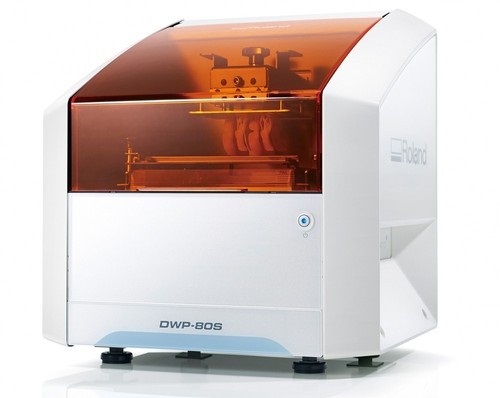
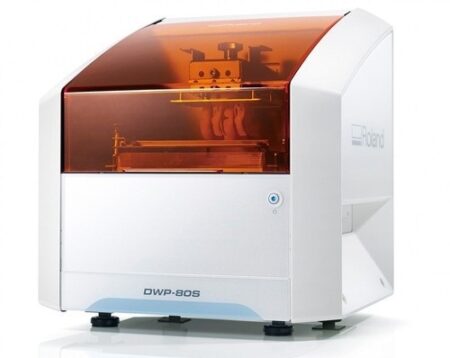
| Content | Roland DWP-80S Dental 3D Printer
Key software features
With Quick Denta, setting up a file for 3D printing is no longer a manual process. It automatically adjusts 3D data to produce the most efficient and stable position on the printer’s work surface. The optimum angle of orientation can also be automatically saved as a preset value and configured for each type of model being made- eliminating the need to reset values each time.Automatic Support Generation
Quick Denta simplifies the complex process of model support creation by automatically generating support structures with a single click.Error Detection and 3D Mesh Healing
An optional feature allows Quick Denta to automatically detect and repair minor errors during the STL importing process, without the need to return to the CAD software.Cost-Effective Resin Calculation
Quick Denta provides accurate, timesaving and cost-effective production by calculating the exact amount of resin needed for each job.Specs Roland DWP-80S Dental 3D Printer| Applications | Custom trays, base plates, and frameworks | | Build technology | Layered projection system | | Build size | 3.15 (W) x 3.15 (D) x 3.15 (H) in.
(80 (W) × 80 (D) ×80 (H) mm)
(The maximum amount of use per job is 300g(0.66 lb.)) | | Light source | UV-LED (Ultraviolet light-emitting diode) | | Machine Power Supply | DC 24 V、0.8 A | | Dedicated AC adapter | AC 100 to 240V ± 10%、50 / 60 Hz | | Power consumption | 20 W | | During standby | 49 dB (A) or less | | External dimensions | 16.93 (W) x 14.37 (D) x 17.72 (H) in.
(430 (W) × 365 (D) × 450 (H) mm) | | Interface | USB | | Noise During
operation | 55 dB (A) or less | | Noise Power off | 49 dB (A) or less | | External dimensions | 16.93 (W) x 14.37 (D) x 17.72 (H) in.
(430 (W) × 365 (D) × 450 (H) mm) | | Weight | 24 kg (53 lb.) | | Interface | USB | | Installation Environment During Operation | Temperature: 68 to 86°F (20 to 30°C),
Humidity: 35 to 80% RH (no condensation) | | Power off | Temperature: 41 to 95°F (5 to 40°C),
Humidity: 20 to 80% RH (no condensation) | | Included items | AC adapter, power cord, USB cable, liquid material vat, printing/cleaning tools (Metallic spatula, plastic spatula, tweezers, washing container x 2, hexagonal wrench, rubber gloves, work tray, etc.), Read First (booklet), Roland DG Software Package CD, etc. |
| iTero Element Intraoral Scanner
What Are iTero Intraoral Scanners?Intraoral scanners from iTero scan the mouths of patients, capturing images to create three-dimensional dental images in minutes. Intraoral scanners are simple to use and can be operated by one person. Their user-friendly nature helps dental professionals get the best results. The scans they produce are also more detailed than the traditional two-dimensional images they replace.Intraoral digital scans help dental professionals create accurate physical dental models for restorative work, including crowns, veneers, and implants. They also help orthodontists diagnose orthodontic problems and develop the best treatment plans.The company’s digital ecosystem software works seamlessly with its intraoral scanners, improving workflow for dental professionals working on orthodontic and restorative cases. However, unlike many early intraoral scanners, they are open systems. This feature gives dental professionals more flexibility about how they use their digital scan files. Intraoral digital scans from iTero scanners can be easily shared with other dental professionals and third-party providers such as Invisalign. When all relevant parties have the scans, they can communicate better to improve patient outcomes.What iTero Intraoral Scanners DoIntraoral scanners feature a wand, which the dental professional moves around a patient’s mouth. In the latest versions, the wand captures thousands of frames per second which are pieced together to create a three-dimensional visualisation of the patient’s mouth. The wands on iTero intraoral scanners are smaller than early intraoral scanners, allowing them to scan molars in the back of the mouth which were traditionally difficult to reach. Dental professionals using small wands also aren’t limited by how wide their patients can open their mouths. The small wands are also less likely to make patients gag than older forms of scanning technology.Intraoral scanners also have screens which display the digital dental images as they’re captured in real time. The screens show whether the scan is good or not before it’s saved and submitted to the lab. This feature can be a real time-saver for dental professionals who, in the past, could receive word from the lab two or three weeks later that their scans were inadequate. By providing immediate feedback, intraoral scanners can save dental professionals and patients time and frustration.Unlike many intraoral scanners, patients don’t need to cover their teeth in titanium dioxide powder before an iTero intraoral scan. This benefit further improves the scanning process for dental patients.How Intraoral Scanners Make Invisalign Orthodontics Easier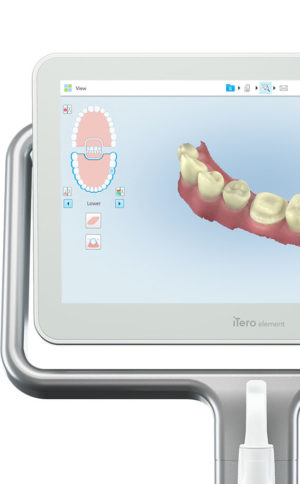 Invisalign clear aligners are one of the most popular teeth-straightening aids used today as they’re effective, removable, and virtually undetectable. Unlike many intraoral scanners, iTero intraoral scanners have open architecture which makes them compatible with the Invisalign system, including its Invisalign Outcome Simulator. Orthodontists can scan their patients’ mouths with an iTero intraoral scanner, then show them how their Invisalign treatment will look. This technology improves the patient experience because patients can know what to expect and feel more confident in their diagnosis and treatment plan. It also makes the ClinCheck setup three times faster.After setup, speed is still on the iTero intraoral scanners’ side. iTero states ClinCheck treatment plans submitted with its scans are usually posted to the Invisalign Doctor Site three times faster than traditional polyvinyl siloxane scans. As a result, your Invisalign aligners are created and posted back to your orthodontist sooner so that you can start treatment faster. Since the iTero intraoral scanning system is open, orthodontists can also send the scan files to any laboratory of their choosing for the creation of a retainer, which reinforces your treatment after the Invisalign process, and other dental tools.Orthodontists can also create better Invisalign treatment plans for their patients using iTero intraoral scans. Align Technology research shows orthodontists who use the scans have 10 times fewer rejections and seven times fewer issues with the fit of the Invisalign aligners. These results may be because iTero intraoral scanners can help orthodontists track their patients’ progress. Regular scans throughout Invisalign treatment can help orthodontists compare expected outcomes with results. If results aren’t as expected, orthodontists can use the scans to educate their patients about their treatment and the importance of complying with their recommendations.Improving iTero Intraoral Scanners iTero Element Intraoral ScannerWhile it’s already a leader in dental technology, iTero is constantly refining its intraoral scanning options. Its Element Itraoral Scanner, introduced in March 2015, captures 6,000 frames per second, up to 20 times faster than its predecessor. Its wand is also smaller and lighter, with in-built controls for more intuitive operation. Intraoral scanners from iTero are renowned for their accuracy, but the increased capture speed improves the company’s already impressive statistics. Invisalign clear aligners are one of the most popular teeth-straightening aids used today as they’re effective, removable, and virtually undetectable. Unlike many intraoral scanners, iTero intraoral scanners have open architecture which makes them compatible with the Invisalign system, including its Invisalign Outcome Simulator. Orthodontists can scan their patients’ mouths with an iTero intraoral scanner, then show them how their Invisalign treatment will look. This technology improves the patient experience because patients can know what to expect and feel more confident in their diagnosis and treatment plan. It also makes the ClinCheck setup three times faster.After setup, speed is still on the iTero intraoral scanners’ side. iTero states ClinCheck treatment plans submitted with its scans are usually posted to the Invisalign Doctor Site three times faster than traditional polyvinyl siloxane scans. As a result, your Invisalign aligners are created and posted back to your orthodontist sooner so that you can start treatment faster. Since the iTero intraoral scanning system is open, orthodontists can also send the scan files to any laboratory of their choosing for the creation of a retainer, which reinforces your treatment after the Invisalign process, and other dental tools.Orthodontists can also create better Invisalign treatment plans for their patients using iTero intraoral scans. Align Technology research shows orthodontists who use the scans have 10 times fewer rejections and seven times fewer issues with the fit of the Invisalign aligners. These results may be because iTero intraoral scanners can help orthodontists track their patients’ progress. Regular scans throughout Invisalign treatment can help orthodontists compare expected outcomes with results. If results aren’t as expected, orthodontists can use the scans to educate their patients about their treatment and the importance of complying with their recommendations.Improving iTero Intraoral Scanners iTero Element Intraoral ScannerWhile it’s already a leader in dental technology, iTero is constantly refining its intraoral scanning options. Its Element Itraoral Scanner, introduced in March 2015, captures 6,000 frames per second, up to 20 times faster than its predecessor. Its wand is also smaller and lighter, with in-built controls for more intuitive operation. Intraoral scanners from iTero are renowned for their accuracy, but the increased capture speed improves the company’s already impressive statistics. | iTero Element 2 Intraoral Scanner
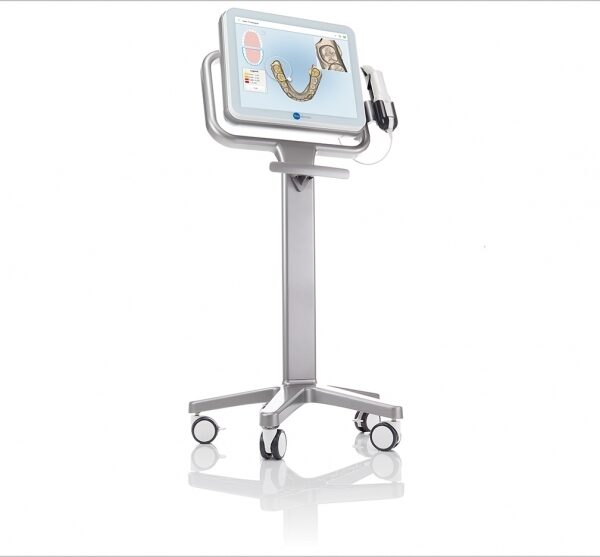
iTero Element 2 Intraoral Scanner delivers imaging precision in a compact footprint using tools that are strong.An intuitive user interface is provided by the Element two system for performing scans for Orthodontic use or Indices. The doctor is guided by means of text assistance and visual via the arrangement. Wand buttons and the touch screen are used to respond to display instructions.A scan feature that preserves natural occlusion whilst getting detailed registration is offered by the iTero Element.The iTero Element 2 was created for better functionality with 2x and 25% quicker scanning processing period compared to this iTero Element.The iTero Element 2 includes a 21.5-inch screen and 16:9 widescreen viewing format. It has an integrated lithium-ion battery, which allows without the need to reboot or to plug in for power for transfer between operatories. The iTero Element 2 includes an ergonomic, based cradle.Like most Element scanners, both Element Flex and the Element two are made to operate with existing restorative and corrective workflows, such as open STL export, custom made models, laboratory workflows, custom implant abutment, and chairside milling partners. According to the company, all iTero Element scanners create full-color 3D scans.Element 2 and Element Flex scanners are now available in the United States and the vast majority of European nations. They are available in Asia Pacific markets and are pending acceptance in Canada. The Element scanner that is iTero will last to be available in most markets.** iTero Element 2 BENEFITS :iTero TimeLapse Technology:
Compare historical and current scans and quantify important oral changes over time – helping your patient reach care decisions in a more engaging and informed way.Invisalign® Outcome Simulator:
Engage patients and increase conversion by showing patients the actual potential benefits of Invisalign treatment.3D Invisalign Progress Assessment Feature:
Compare a patient’s new scan with a precise stage of their Invisalign treatment plan.Real-time 3D Visualizations:
Help patients understand oral concerns by sharing a visualization right at chairside.Vibrant Color Scanning:
Realistic color images make it easier to distinguish between gingival and dental tissue for more precise clinical evaluations.High-Definition Touchscreen Interface:
Scanned images appear instantly with crisp definition on the 19-inch, high-definition, multi-touch-capable display. The display also works with latex, vinyl and nitrile gloves.Certified Connectivity Workflow:
Designed to connect to restorative and orthodontic labs, third-party treatment planning, custom implant abutment, chairside milling and lab CAD/CAM systems.Together, we can streamline your workflow.- Restorative and orthodontic workflows
- Optimized Invisalign connectivity
- Visualization tools
- Chairside milling integration
- – Maximum height: 51.8″
- – Weight with wheel stand: 55.1 lbs.
- – Dimensions including rotation (W x D x H): 24.6″ x 23.4″ x 51.8″
- – Operating power: 100-240VAC – 50/60 Hz – 350VA (max)
- – Storage/transportation temperature: 23° to 122°F
- – Installation: Wheel stand with scanner wand
- – Monitor: 19″ touchscreen monitor
- – Scanner: Confocal Imaging Scanner emits red laser light (680 nm Class 1) as well as white LED emissions
- – Wireless LAN: LAN card provides local network communications with wireless connectivity
| Roland DWX-51D Dental Milling Unit
Roland DWX-51D Integrated HD Mill Package
DWX-51D 5-Axis Dental Mill
High Definition Custom CAM Strategy SUM3D
Nabertherm High Speed Auto Cool Zi Furnace
Quatro IVAC Mill Suction
Integration Package for Implant Abutments
Integration Package for up to 60mm disc sizes
Integration Package for HD High Detail End Mills
Start Up Package for Milling Materials
Top To Bottom Mill Training by the Industry Experts
Equipment Set up, IT and Networking Included
Mill Contingency and Loaner ProgramBuilt-to-Last
For thirty years, Roland DG has been the trusted provider of milling machines that are built to last. The DWX-51D 5-Axis Dental Milling Machine is no exception. After extensive research in which lab technicians were asked what they needed in a production mill, the DWX-51D was developed to enhance user experience, maximize ease-of-use and improve output quality. Built with a simple and modern design, the DWX-51D looks as effortless as it operates.Features
5-axis simultaneous operation for non-stop precision milling
Sturdy and efficient ball screw-driven system
New C-clamp for easy adjustment and alignment
10-station Automatic Tool Changer (ATC) for continuous milling
Powerful vacuum and anti-static ionizer for clean calibration and dust reductionThe DWX-51D is designed for effortless, precision production of dental prosthetics fromcopings, crowns and bridges to inlays, onlays and abutments, etc. With a host of automated features and a clean, stable work environment, the DWX-51D is the perfect solution for labs wanting to increase production or those looking to get into digital milling for the first time.Built-for-You.Built-to-Last.For thirty years, Roland DG has been the trusted provider of milling machines that are built to last. The DWX-51D 5-Axis Dental Milling Machine is no exception. After extensive research in which lab technicians were asked what they needed in a production mill, the DWX-51D was developed to enhance user experience, maximize ease-of-use and improve output quality. Built with a simple and modern design, the DWX-51D looks as effortless as it operates. Distinguishing Features Roland DWX-51D Dental Milling Unit- 5-axis simultaneous milling for precision milling
- Steady and efficient ball screw-driven operation
- New C-shape clamp for easy adjustment and alignment
- 10-station Automatic Tool Changer (ATC) for continuous milling
- Powerful vacuum and anti-static ionizer for clean calibration and dust reduction
Ultimate Convenience and Ease-of-Use- A variety of new features ensure continuous, user-friendly milling, including
- Sturdy frame ensures stability, while slim design fits nearly any lab space
- Easy access tool drawer properly stores and protects tools
- Color-coded LED status lights signal current job progress
- Virtual Machine Panel (VPanel) allows users to configure settings from their computer, send CAM data to the DWX-51D for production, and track milling progress
- Easily accessible cutting area for simple tool replacement and cleaning
| 3Shape TRIOS 3 Wireless Move Pen GripTRIOS is the world’s first intraoral scanner to offer a wireless option. 3Shape TRIOS 3 Wireless gives you the freedom to perform digital scans unrestricted by wires, optimizing comfort for both you and your patientsThe new 3Shape TRIOS MOVE is the ultimate patient/dentist communication tool. Show patients their digital scans and dynamic treatment information close-up, and create greater opportunities for treatment dialogue and joint decision-making.The ergonomic and lightweight design of TRIOS MOVE allows you to always position the screen in the right place, and enjoy superior user experience.Features of TRIOS MOVE;-13.3″ HD LCD Touchscreen – The perfect size when having it in front of a patient or working with up closeAdjustable arm- Bring the screen directly in front of the patient to involve them in the scanning process and the treatment planningPowerful custom PC designed for scanning – Specifically designed for use with all TRIOS 3 scanners to give a fast and smooth scan experience straight out of the boxFour wheels with integrated brakes – It is now very easy to move around the chair and from chair to chairEnhance comfort with wireless innovation.TRIOS is the world’s first intraoral scanner to offer a wireless option. 3Shape TRIOS 3 Wireless gives you the freedom to perform digital scans unrestricted by wires, optimizing comfort for both you and your patientsThe new 3Shape TRIOS MOVE is the ultimate patient/dentist communication tool. Show patients their digital scans and dynamic treatment information close-up, and create greater opportunities for treatment dialogue and joint decision-making.The ergonomic and lightweight design of TRIOS MOVE allows you to always position the screen in the right place, and enjoy superior user experience.Features of TRIOS MOVE : 3Shape TRIOS 3 Wireless Move Pen Grip 13.3" HD LCD Touchscreen - The perfect size when having it in front of a patient or working with up closeAdjustable arm- Bring the screen directly in front of the patient to involve them in the scanning process and the treatment planningPowerful custom PC designed for scanning - Specifically designed for use with all TRIOS 3 scanners to give a fast and smooth scan experience straight out of the boxFour wheels with integrated brakes - It is now very easy to move around the chair and from chair to chair. | Sirona CEREC Zirconia SpeedFire Milling Unit
High strength, short manufacturing process
The greatest benefit of CEREC Zirconia is the high flexural strength of the material. It is suitable for individual crowns as well as small bridges and can be processed in thin wall thicknesses. Since these restorations are manufactured in monolithic form, there is no risk of chipping. Another benefit for dentists is that zirconium oxide can be cemented conventionally.CEREC Zirconia is a pre-shaded translucent zirconium oxide available in 10 shades on the basis of the VITA Classic Shade Guide®. The material is milled in an enlarged form and then densely sintered to its final size in the new sintering furnace CEREC Speed-Fire. The oversized milling facilitates a new level of milling accuracy leading to superb, precisely fitting restorations. The sintering process takes just 10-15 minutes for crowns and 25 minutes for bridges. The subsequent glaze firing gives the restoration a high gloss finish.The short process to produce CEREC Zirconia restorations is both convenient and economical. With this market launch, all CEREC milling/grinding units now provide wet and dry milling. Dry milling reduces the overall processing time for zirconia and, combined with the world’s fastest sintering cycles, enables the chairside procedure.The workflow is easy to learn since the CEREC Software 4.4.1 guides the dentist through the entire process, and even sends the sintering and glazing information to the furnace. No programming of the furnace is required – it is all handled automatically by the software. A high-performance material and a specially tailored workflow ensure a simple process and high-quality treatment.
CEREC meets patients’ needsSirona CEREC Zirconia SpeedFire Milling UnitEighty three percent of patients in a recent survey said they prefer single visit dentistry to traditional treatment. The majority said they would even be willing to pay more for single visit dentistry. Two thirds indicated they’d be happy to travel further than they currently do, in order to receive treatment in one session. Another two thirds said they would even be prepared to change their dentist. The advantages of single visit dentistry are obvious: Patients avoid impression material, receive fewer anesthetics and don’t need a temporary. Reducing the number of visits, injections and making the overall prosthetic procedure more comfortable influences patients to opt for treatment with CEREC.In addition to CEREC Zirconia, many other high-performance materials can be processed with CEREC. The range of materials with CEREC also expands clinical indications since the dentist can easily select the material suited for each indication.
Investment for a successful futureThere have always been good reasons to start using digital dentistry with CEREC. CEREC Zirconia completes the range of indications for chairside application for nearly
every situation, thus giving dentists greater choice and allowing them to increase the value of their practice’s offering.It is obvious that advanced technologies in automobiles, computers and smartphones make our daily lives easier. CEREC is also a technology that further develops a dental practice and can make it well positioned for the future. Especially now, as the system is highly flexible, it enables dentists to expand their offering in implant dentistry and orthodontics. |





Reviews
There are no reviews yet.