View cart “Biolase Waterlase MDX All Tissue Laser For Sale” has been added to your cart.
-32%
Availability: In Stock
Gendex Orthoralix 9200 DDE Digital
$15,280.00$10,370.00
The affordable Gendex 9200 DDE dental radiography system offers standard panoramic and cephalometric x-ray projections, as well as a wide range of advanced programs to support most dental imaging and exams.
Other people want this. 15 people have this in their carts right now.
Gendex Orthoralix 9200 DDE Digital Cephalometric + Panoramic X Ray
The versatile Orthoralix 9200 system offers standard panoramic projections, as well as a full array of advanced programs to satisfy the demanding needs of dental specialists. Plus, with both ?lm-based and direct digital models and the optional cephalometric arm, the capabilities of the 9200 can expand with your practice.
Discover all of the benefits and options this imaging system has to offer.
Wide Range of Projections – The Orthoralix 9200 offers 10 standard projections, with the ability to add 5 Cephalometric projections and the Transcan tomography projection to satisfy the needs of today’s dental specialists. Its intuitive control panel and easy-to-read display simplifies the process of selecting projections. Plus, with the precision of morphology following and multi-motorized arm rotation, the 9200 excels at focal trough reconstruction.
10 standard imaging projections and 6 additional with optional upgrades
Meets the demands of today’s orthodontists, oral and maxillofacial surgeons, and other specialists
Advanced Image Quality – Three technical factor setting modes are available to ensure complete flexibility and quality control. Manual mode for total operation control, Preset mode where the operator can customize settings, and Automatic Exposure Control (AEC) mode. With AEC, the 9200 automatically raises or lowers the kV setting based on measurements of bone size and density.
Triple laser beam guide system and motorized column for simple, accurate patient positioning
Automatic Exposure Control (AEC) to ensure optimum image contrast and balance
Real-time image reconstruction with the direct digital model
Gendex Orthoralix 9200 DDE Digital Cephalometric + Panoramic X Ray
Expand Your Capabilities – Utilizing the latest in CCD sensor technology and built-in LAN connectivity, the 9200 DDE model allows clinicians to digitally capture x-ray images and share them with any computer connected to the network for maximum productivity. With the option to add a Cephalometric arm, the Transcan cross-sectional tomography projection, and convert to direct digital technology, the 9200 is one of the most expandable panoramic systems available.
Direct digital model with the latest CCD sensor technology and direct LAN connectivity
Optional Cephalometric arm attachment
Optional Transcan implantology projection for transverse cross-sections of upper and lower jaw
Gendex Orthoralix 9200 DDE Digital Cephalometric + Panoramic X Ray
Power Supply
115-250 VAC ± 10%
Frequency
50/60 Hz ± 2 Hz
Maximum Line Power Rating
10 A at 250 V, 20 A at 115 V
Anode Voltage
60 – 84 kV, in 2 kV steps
Anode Current
3 – 15 mA, in 1 mA steps
Exposure Time
12 s for standard pan, 0.16 – 2.5 s for Cephalometric
Duty Cycle
1:20 at full power operation
Focal Spot
0.5 mm, IEC 336 (1993)
Vertical Reach
39′ to 71′ (100 to 180 cm) from ?oor to occll plane
Weight
410 lbs (115 kg), 467 lbs (212 kg) with Ceph arm
Active Area CCD Sensor
147 x 6 mm (Standard Pan), 220 x 6 mm (Ceph)
Image Size
1536 x 2725 pixels (Standard Pan), 2304 x 2529 pixels (Ceph – Maximum)
Minimum PC Requirements
Pentium® II CPU, 400 MHz, 256 MB RAM
Required Operating System
Microsoft® Windows 98®/ Windows 2000®/ Windows XP®
Reviews (0)
Reviews
There are no reviews yet.
Be the first to review “Gendex Orthoralix 9200 DDE Digital” Cancel reply
The affordable Gendex 9200 DDE dental radiography system offers standard panoramic and cephalometric x-ray projections, as well as a wide range of advanced programs to support most dental imaging and exams.
Milling Unit:• Choose from CEREC MC, CEREC MC X or CEREC MC XL
• Get access to the entire range of chairside treatment with up to 40 mm block size, including bridges and abutments
• Create fully anatomic, precise treatments quickly
• CEREC Guide 2 surgical guide
• Dry mill ready
• Includes CEREC software
The CS 3500 features a unique light guidance system that captures .STL data files during the image acquisition process. [I place a scan body abutment on the implant before the scanning process.] Scans acquired by the CS 3500 can be exported as open format .STL files and easily sent to the lab of your dentist’s choice to discuss making your new crown(s). Now your restorations are produced via the digital model utilizing CAD/CAM technology!
The Clio Digital X-ray Sensor is equipped with a patented, Kevlar reinforced cable to provide maximum durability. Unlike other products, the USB cable of the Clio is fully replaceable if damaged. Constructed with special shock absorbers inside the sensor housing to protect components from exterior damage, the Clio is also one of the few fully water submersible sensors, sealed with a unique rubber polymer interior housing.
Perform a 3D body scan in seconds using just a simple turntable and 3D camera. In only 35 seconds, we extract millions of measurements with 2mm accuracy and reconstruct your body in 3D.
As one of the most user-friendly Cone Beam Computed Tomography (CBCT) systems on the market, the 9000 3D Extraoral Imaging System offers several versatile solutions for your extraoral imaging needs. Combining focused-field 3D technology with dedicated panoramic imaging, this affordable 2-in-1 unit delivers the best of both worlds, offering the highest resolution and the lowest radiation dose.
Content
Gendex Orthoralix 9200 DDE Digital Cephalometric + Panoramic X Ray
The versatile Orthoralix 9200 system offers standard panoramic projections, as well as a full array of advanced programs to satisfy the demanding needs of dental specialists. Plus, with both ?lm-based and direct digital models and the optional cephalometric arm, the capabilities of the 9200 can expand with your practice.Discover all of the benefits and options this imaging system has to offer.Wide Range of Projections – The Orthoralix 9200 offers 10 standard projections, with the ability to add 5 Cephalometric projections and the Transcan tomography projection to satisfy the needs of today’s dental specialists. Its intuitive control panel and easy-to-read display simplifies the process of selecting projections. Plus, with the precision of morphology following and multi-motorized arm rotation, the 9200 excels at focal trough reconstruction.
10 standard imaging projections and 6 additional with optional upgrades
Meets the demands of today’s orthodontists, oral and maxillofacial surgeons, and other specialists
Advanced Image Quality – Three technical factor setting modes are available to ensure complete flexibility and quality control. Manual mode for total operation control, Preset mode where the operator can customize settings, and Automatic Exposure Control (AEC) mode. With AEC, the 9200 automatically raises or lowers the kV setting based on measurements of bone size and density.
Triple laser beam guide system and motorized column for simple, accurate patient positioning
Automatic Exposure Control (AEC) to ensure optimum image contrast and balance
Real-time image reconstruction with the direct digital model
Gendex Orthoralix 9200 DDE Digital Cephalometric + Panoramic X Ray
Expand Your Capabilities – Utilizing the latest in CCD sensor technology and built-in LAN connectivity, the 9200 DDE model allows clinicians to digitally capture x-ray images and share them with any computer connected to the network for maximum productivity. With the option to add a Cephalometric arm, the Transcan cross-sectional tomography projection, and convert to direct digital technology, the 9200 is one of the most expandable panoramic systems available.
Direct digital model with the latest CCD sensor technology and direct LAN connectivity
Optional Cephalometric arm attachment
Optional Transcan implantology projection for transverse cross-sections of upper and lower jaw
Gendex Orthoralix 9200 DDE Digital Cephalometric + Panoramic X Ray
Power Supply
115-250 VAC ± 10%
Frequency
50/60 Hz ± 2 Hz
Maximum Line Power Rating
10 A at 250 V, 20 A at 115 V
Anode Voltage
60 – 84 kV, in 2 kV steps
Anode Current
3 – 15 mA, in 1 mA steps
Exposure Time
12 s for standard pan, 0.16 – 2.5 s for Cephalometric
Duty Cycle
1:20 at full power operation
Focal Spot
0.5 mm, IEC 336 (1993)
Vertical Reach
39′ to 71′ (100 to 180 cm) from ?oor to occll plane
Weight
410 lbs (115 kg), 467 lbs (212 kg) with Ceph arm
Active Area CCD Sensor
147 x 6 mm (Standard Pan), 220 x 6 mm (Ceph)
Image Size
1536 x 2725 pixels (Standard Pan), 2304 x 2529 pixels (Ceph – Maximum)
Minimum PC Requirements
Pentium® II CPU, 400 MHz, 256 MB RAM
Required Operating System
Microsoft® Windows 98®/ Windows 2000®/ Windows XP®
CEREC Primescan AC Intraoral scanner
Cerec Primescan from Dentsply Sirona is the most advanced digital scanner on the market. It’s providing a level of accuracy never before seen in dentistry. At the peak of innovation, it is widening the gap between those with and without digital dentistry. The Prime Scan is the fastest most accurate intraoral scanner to date. With new scanning technology, it is the ultimate in scanning. Prime Scan and CEREC 5.0 combinations are greatly reduced because more data allows many applications to become automated.For more than 30 years, CEREC® has provided technological precision, superior design and excellent performance to thousands of practices. Now, experience a brand-new fully integrated solution with CEREC Primescan AC. Acquire precise digital impressions with Primescan, design your proposal on the Primescan AC using the intelligent software, then produce precise, smooth restorations with your choice of milling unit. Find the next level of productivity and patient care – it’s all here.How Does CEREC Primescan Work?
CEREC Primescan is an alternative to traditional intraoral dental impressions, which use a putty-like substance to take physical impressions of your teeth. This method does not allow for digital assessment of your mouth, and some patients find it the process of physical impressions to be uncomfortable.CEREC Primescan uses a wand-like device, loaded with powerful imaging sensors which can capture more than 50,000 images of your mouth per second. These images are quickly stitched and compiled into a 3D image of your teeth, jaw, gums, and mouth, and displayed on a high-definition screen for immediate assessment by our doctors.Using this sensor, our doctors can image your entire mouth up to 20mm in depth, including gums, blood, and bone structures, quickly and accurately. The Primescan software (as compared to the Omnicam) creates high-resolution 3D models to assess your oral health and create the very best crowns, implants, removable prosthesis, restorations, and even 3D prints. With just a few quick sweeps of the CEREC Primescan device, we’ll be able to generate an in-depth, modifiable 3D image of your mouth in minutes.The Benefits of CEREC Primescan:
An excellent choice for outstanding results: Primescan is your perfect starting point in digital dentistry. No matter how you would like to design your workflows, Primescan is the enabler for efficient digital workflows – both chairside in your practice and with your preferred partners.Well designed and perfectly compatible: Along with the high-performance intraoral scanner comes the new Acquisition Center. Together, they form a highly effective and most comfortable system – meeting your needs with two individual software configurations:So, why is CEREC Primescan such a big deal? Here are just a few improvements to this sophisticated system:Shorter wait times – We can quickly image your mouth without waiting for dental impressions to set, allowing us to treat each patient more quickly and effectively. A full jaw impression only takes 2 minutes. This adds up to less time spent in the dental chair.Real-time image processing – Our dentists can quickly adjust and modify scanned images using filters and other tools, leading to more accurate diagnostics and better overall patient outcomes.Extremely versatile – CEREC Primescan can be used for almost any dental procedure. From implant dentistry to the creation of CEREC same-day crowns, the straightening of teeth, whitening, development of dentures and partial dentures.CEREC Primescan AC with CEREC Software Sirona Advantages:
Enables all kinds of treatment, from a single tooth to full arch
With Primescan intraoral scanning is now more accurate, faster and easier
Allows an efficient workflow, both chairside and with preferred partners
Along with the high-performance intraoral scanner comes the new Acquisition Center, together forming an effective and most comfortable system, meeting your needs with two individual software configurations: Primescan AC with Connect Software (supports the connection to established partners workflows) and CEREC Primescan AC with CEREC Software (ideal for cabinets)
Smart Pixel Sensor technology – allows superior precision and excellent detail reproduction, processes more than 1 million 3D points per second, producing photorealistic and highly accurate data
Due to its ability to scan at an incredible data density, it delivers complete 3D structures of everything in its field of view
Its dynamic depth scan technology enables perfect sharpness and outstanding precision, even at a measuring depth up to 20 mm
Easy to use
Easy scanning of all dental materials and hard to access areas
Allows you to start scanning right away
Self-heating for fog-free scanning
The increased field of view visualizes larger areas with fewer sweeps and immediate precision
Faster scanning with a smooth scan flow
Consolidating more than 50.000 images per second and fast processing of exactly the data the software needs Easy capturing and quicker processing of more data in higher resolution
Complete 3D-scan models are displayed immediately, no matter how fast you scan
Accelerate your workflow: Due to seamless, validated and open data transfer options, labs and other third parties are supplied with high-resolution models at an instant
3 different sleeves (disposable and stainless steel, with sapphire glass or autoclavable)
Acquisition Center – Smart features and greater comfort: intuitive use via movable 16:9 touchscreen and touchpad for perfect ergonomics
Kinematics for perfect ergonomic positioning
Smart Hygiene concept for fast and easy disinfection
Full mobility with more than 60-min. battery buffer
CEREC Primescan AC with CEREC Software – complete chairside system, which offers flexible data export options, with automatized workflow thanks to Artificial Intelligence and touch-enabled and intuitive user interface
Milling Unit:• Choose from CEREC MC, CEREC MC X or CEREC MC XL
• Get access to the entire range of chairside treatment with up to 40 mm block size, including bridges and abutments
• Create fully anatomic, precise treatments quickly
• CEREC Guide 2 surgical guide
• Dry mill ready
• Includes CEREC softwareStriking in every detail: The new Acquisition CenterThe new Acquisition Center is a work station designed for modern dentistry and with the dentist in mind. It comes with a touchpad and a 16:9 wide-format movable touchscreen, offering you a highly intuitive and ergonomic work platform.Your benefits at a glance:
Touchscreen & Touchpad for most comfortable, intuitive use
Kinematics for perfect ergonomic positioning
Smart Hygiene concept for fast and easy disinfection
Mobility concept for full mobility with more than 60-min. battery buffer
The best choice for your practice: Take digital impressions and continue working with your trusted partners or enjoy the benefits of complete chairside workflows.Primescan meets your needs with two individual software configurations:Primescan AC with Connect Software:
Supports data transfer options to your preferred partners
Secure and encrypted data transfer through Connect Case Center Inbox
Easy upgradability to full chairside workflow
Touch-enabled and intuitive user interface
CEREC Primescan AC with CEREC Software:
Supports full chairside workflows for single-visit dentistry
Flexible data export options
Automatized workflow thanks to Artifical Intelligence
Touch-enabled and intuitive user interface
Technical Data:CEREC Primescan AC Intraoral scanner
CAD system for high-precision intraoral optical impressions
High-resolution, heated intraoral 3D scanner
Integrated image processing
High processing power due to state-of-the-art processor
Trackball or touchpad
Hand and foot controlled enter keys
Ethernet port and WLAN
USB interfaces
The high-resolution 3D intraoral scanner allows image acquisition with the image control inside the scanner, the image data transfer is made through USB 2.0 interface
21.5″ inch TFT LED flat-screen display, HD resolution: 1920 x 1080 pixels
Mobile housing, with no water or air connection required
Voltage: 100 – 240 VAC/50-60Hz
Nominal current: 5.0 – 2.1 A
Type of protection against electric shock: Class I device
Waterproof: no
Degree of contamination: 2
Installation category: II
Operating mode: continuous
Dimensions W x H x D: 408 (537) x 1190 x 443mm
Total weight: 38kg
Weight without monitor and battery: 31kg
Weight without battery: 36kg
PC components:
Processor: Intel
RAM: 32GB RAM
Hard disks: 1x PCIe SSD + 1x SATA HDD
Network card: Ethernet 10/100/1000MBit/s
Operating system: Windows 10, 64 bit
Installation OS: pre-installed, from the factory
Transportation and storage conditions:
Temperature: -25°C – + 60°C
Relative humidity: 10% – 75%
Air pressure: 700hPa – 1060hPa
Operating conditions:
Temperature: 10°C – 35°C
Relative humidity: 30% – 85%, no condensation
Air pressure: 700hPa – 1060hPa
Operating altitude: up to 3000m
Delivery form:
CEREC Primescan AC with CEREC Software – 1 piece
CARESTREAM CS3500 INTRAORAL DIGITAL SCANNERThe CS 3500 intraoral scanner includes a light guidance system that aides in the capture of the data during the image acquisition process, allowing the user to place more focus on the patient’s mouth rather than the monitor.The end result is a highly precise digital impression of your patients’ mouth in a matter of minutes.The CS 3500 was introduced as part of the CS Solutions portfolio, a unique open CAD/CAM system. This open system gives users the option to either use images captured by the scanner to design and mill crowns in-house or share digital impression files with preferred labs to create restorations or orthodontic appliances.Features of Carestream CS3500 Intraoral Digital Scanner :– High angulation scanning
– Unique light guidance system
– Direct USB connection
– Disposable and autoclavable tips
– Virtually automatic bite registration
– 1024×768 image resolutionFacts Carestream CS 3500 Intraoral Scanner– Handheld and truly portable requiring no trolley and can be plugged into any computer via USB cable
– No traditional impression material or powder required
– Easy to use with a light guidance system that tells you when a scan is successful
– Compact ergonomic shape and slim scanner headBenefits of Carestream CS3500 Intraoral Digital Scanner :– Can quickly acquire a full arch of information
– Eliminates the need to painstakingly maneuver the scanner head in patients’ mouths
– Compatible with open system CAD software like Dental Wings, 3Shape, and Exocad
– Comfortable and easy for users to navigate around patients’ mouths, especially during full arch acquisitionsWith the CS 3500 intraoral scanner, practitioners can easily acquire precise true color, 2D and 3D digital impressions. The CS 3500 works as part of the integrated CS Solutions CAD/CAM restoration portfolio, or a standalone solution in a practice’s restorative workflow. Requiring no external heater or trolley system, the CS 3500 features high-angulation scanning of up to 45 degrees and to a depth from -2 to +13mm. Additionally, the CS 3500 features a unique light guidance system that aids in the capture of the data during the image acquisition process.The Carestream CS3500 Intraoral Digital Scanner also offers unique dedicated scanning workflows for both implant-borne prosthetic planning and orthodontic digital models and appliance fabrication.* Laptop Acquisition Computer and/or Carestream Software and License available for an additional charge.Features:CARESTREAM CS3500 INTRAORAL DIGITAL SCANNER
Faster Scan Speed
Superb Digital Impressions
Light Guidance System
Portable for Easy Sharing
Lightweight Handpiece
Disposable and Autoclavable Tips
Flexible Open System
Dedicated Scanning Implant Workflow
SOTA Clio Digital X-Ray Sensor Size 2
SOTA Clio Digital X-Ray Sensor Size 2The Clio Digital Dental X-Ray Sensors have Next Generation CMOS technology, fiber optic sensors create 20+ actual line pairs per mm (26.3 theoretical line pairs per mm).With our Cliosoft Imaging Software, we can gaurantee our Clio Digital Dental X-Ray images match up or surpass any competing system. We make this promise based on feedback from actual dentists.Rounded edges allow for maximum patient comfort. Ideal intraoral sensor width and thinness in two sizes for pedo and adult.The Clio Digital X-Ray Sensors maximize image area ratio, minimizing cutoff space to mimic the size of traditional x-ray film. Next Generation CMOS technology fiber optic sensors create 20+ actual line pairs per mm (26.3 theoretical). With our user-friendly, tablet and PC-ready cliosoft Digitial Imaging Software, we guarantee the highest quality images in the industry.Features:– All new Direct Integration Technology
– Thin sensor hardware with rounded corners for maximum comfort
– Direct USB cable with no docking station
– Repairable USB cable for longevity of sensors
– Fiber optic plate sensors for low-noise ratio
– Largest active area for maximum coverage
– Fully waterproof sensor head with sealed cable and housing design
– USB connector: USB 2.0, USB 3.0
– Sensor Technology
– Next Generation CMOS Fiber optic Sensors
– Maximum Gray Levels – 4096 (12-bit)Specifications:– External Dimensions: 30.49 x 42.80 mm
– Active Area: 25.99 x 36.02 mm
– Sensor Plate Thickness: 5.41 mm
– Sensor Cable Length: 3 meters
– Image Resolution: 26.3 lp/mm theoretical 20 lp/mm actual
– Image Size: 1896 x 1368 pixels
– Image Pixel Size: 19×19 microns
The Clio Digital X-ray Sensor is equipped with a patented, Kevlar reinforced cable to provide maximum durability. Unlike other products, the USB cable of the Clio is fully replaceable if damaged. Constructed with special shock absorbers inside the sensor housing to protect components from exterior damage, the Clio is also one of the few fully water submersible sensors, sealed with a unique rubber polymer interior housing.
Styku 3D Body scanner
Styku 3D is a professional, full-body 3D scanner. It is a high-precision measurement tool able to scan people in just 30 seconds. It uses Infrared Depth Sensor technology for high-resolution scanning results. It is composed of an automatic turntable and a sensor tower. Its small footprint and aluminum structure make it easy to move and reposition.This powerful scanner is simple and convenient to use. It can capture the full body of a person in three dimensions. The person only has to stand on the rotating plate for 30 seconds holding the pose. The scanner is able to extract millions of data points in no time thanks to the efficient Microsoft Kinect v2 3D camera. It lets you perform complete body scans, view 3D models, extract exact body measurements, track posture changes, and more. After generating the 3D avatar, the advanced scanning and feature recognition technology automatically detects specific landmarks, which are used to extract accurate data related to the volume, circumference, and surface of each body area.Styku is mainly used for fitness and professional health purposes. It consents to view and analyze the body shape, measurements, and other health indicators. It allows tracking the evolution of the body shape or posture of a person through several measurements. Find out more reading our complete review.Styku is often used to track body changes. For example, it is generally adopted by people who want to capture and compare before and after images of themselves in order to analyze their physical evolution.Specifications:
Scan accuracy
Scan volume
Scanner controls
What’s in the box
Look and feel
Price
Scan accuracyStyku 3D body scanner is a professional, full-body 3D scanner. It features a depth data resolution of ~2mm (.08in). It grants a torso measurement precision of +- 2.5-5mm (.1-.2in) and can perform a complete scan in 30/40 seconds. It is engineered with advanced feature recognition and a 3D visualization system for automatic detection of landmark points and measurement extraction. It is capable of stitching more than 600 surfaces to create a three-dimensional avatar in seconds. The Kinect v2 3D camera has a depth image resolution of 512 x 424 pixels.Scan volumeIt features a minimum scanning area of 8.4 x 5.5 ft ( 251 x 168 cm). It works at a recommended distance of the sensor tower from the turntable of 46 inches (117 cm). It requires a minimum clearance of 21 inches (53 cm) around the turntable. In case of white walls or glossy surfaces, it might require more clearance.Scanner controlsThe scanner is controlled via an external computer.The proprietary Styku intuitive, multi-platform software allows performing a complete scan and all the measurements with ease. The generated avatar can be rotated, panned, and zoomed to evaluate each body part in detail. The collected data are strictly private. You can decide who can view them by setting appropriate export and sharing options. The software is compatible with Windows 10 and is optimized for touchscreens.
What’s in the box
Essential parts required to operate the Styku 3D body scanner
Rotating platform (max. weight 250kg)
Sensor tower
Microsoft Kinect v2 3D camera
Aluminum enclosure and stand to protect the 3D Camera
All the necessary cables
For some items, package content may change. In case of any questions, please get in touch.
Look and feel
Styku 3D body scanner is available in white with red trims. Its stylish look makes it ideal for fitness clubs, gyms, healthcare facilities, and fashion companies.The scanner has an overall footprint of 101 x 66 inches ( 257cm x 168cm). The rotating platform measures 24 x 24 x 5 inches (66cm x 66cm x 12.5 cm) and weighs 23 lb (10.5 kg). It withstands a max load of 550 lb (250 kg). The sensor tower measures 10 x 10 x 46 inches ( 25.4 x 25.4 x 117 cm). It weighs 13 lb (6 kg).
Add cephalometric imaging abilities to your 9000 3D System for even more abilities. Through our revolutionary one-shot technology, cephalometric image acquisition takes less than a second—thereby reducing exposure time and the risk of retakes due to patient movement. With the 9000C 3D System, you can perform a wider range of diagnoses and treatments right in your office, rather than referring patients to imaging centers. Reduce multiple visits, prevent rescheduling issues, and enhance patient care with three versatile imaging abilities right at your fingertips: panoramic, cephalometric, and 3D imaging.Superb image quality, all three modalities


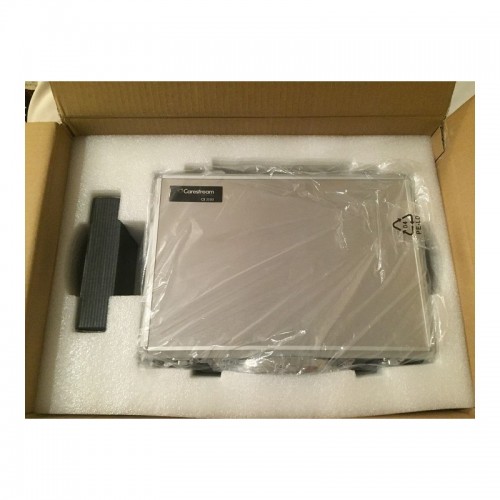


 An excellent choice for outstanding results: Primescan is your perfect starting point in digital dentistry. No matter how you would like to design your workflows, Primescan is the enabler for efficient digital workflows – both chairside in your practice and with your preferred partners.Well designed and perfectly compatible: Along with the high-performance intraoral scanner comes the new Acquisition Center. Together, they form a highly effective and most comfortable system – meeting your needs with two individual software configurations:So, why is CEREC Primescan such a big deal? Here are just a few improvements to this sophisticated system:Shorter wait times – We can quickly image your mouth without waiting for dental impressions to set, allowing us to treat each patient more quickly and effectively. A full jaw impression only takes 2 minutes. This adds up to less time spent in the dental chair.Real-time image processing – Our dentists can quickly adjust and modify scanned images using filters and other tools, leading to more accurate diagnostics and better overall patient outcomes.Extremely versatile – CEREC Primescan can be used for almost any dental procedure. From implant dentistry to the creation of CEREC same-day crowns, the straightening of teeth, whitening, development of dentures and partial dentures.CEREC Primescan AC with CEREC Software Sirona Advantages:
 The new Acquisition Center is a work station designed for modern dentistry and with the dentist in mind. It comes with a touchpad and a 16:9 wide-format movable touchscreen, offering you a highly intuitive and ergonomic work platform.Your benefits at a glance:
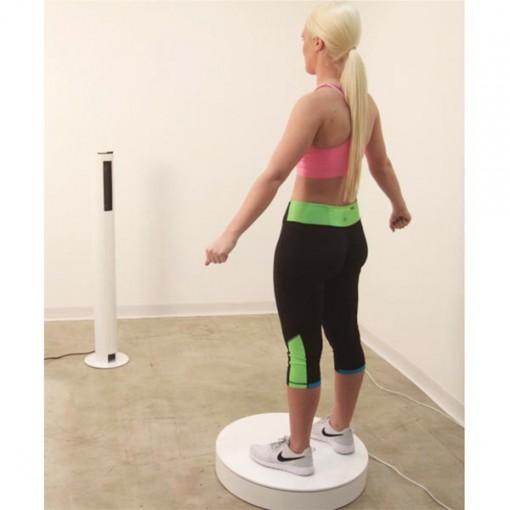 It features a minimum scanning area of 8.4 x 5.5 ft ( 251 x 168 cm). It works at a recommended distance of the sensor tower from the turntable of 46 inches (117 cm). It requires a minimum clearance of 21 inches (53 cm) around the turntable. In case of white walls or glossy surfaces, it might require more clearance.Scanner controlsThe scanner is controlled via an external computer.
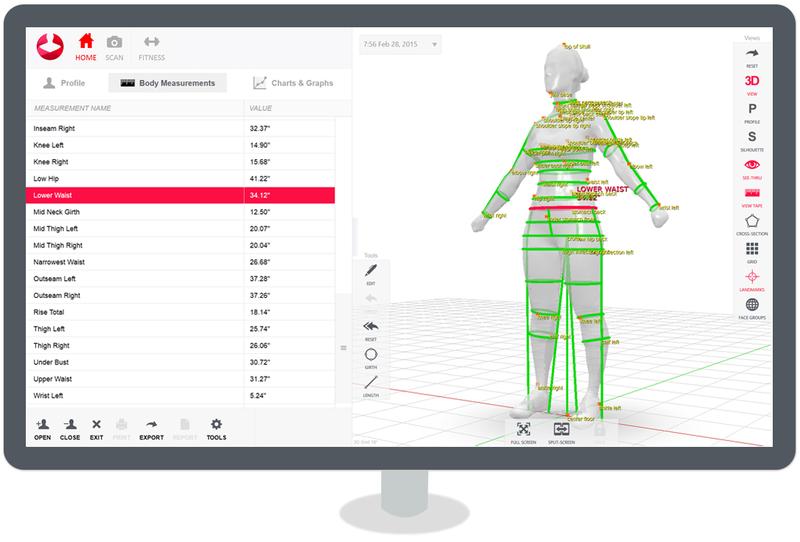 The proprietary Styku intuitive, multi-platform software allows performing a complete scan and all the measurements with ease. The generated avatar can be rotated, panned, and zoomed to evaluate each body part in detail. The collected data are strictly private. You can decide who can view them by setting appropriate export and sharing options. The software is compatible with Windows 10 and is optimized for touchscreens.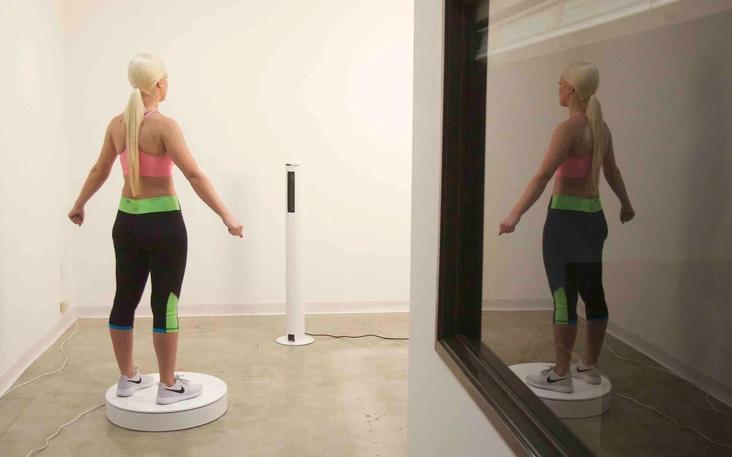
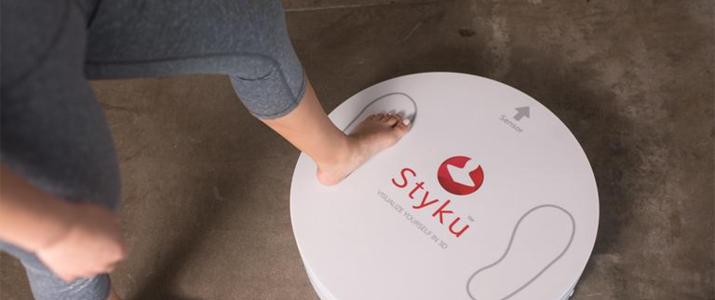 Styku 3D body scanner is available in white with red trims. Its stylish look makes it ideal for fitness clubs, gyms, healthcare facilities, and fashion companies.The scanner has an overall footprint of 101 x 66 inches ( 257cm x 168cm). The rotating platform measures 24 x 24 x 5 inches (66cm x 66cm x 12.5 cm) and weighs 23 lb (10.5 kg). It withstands a max load of 550 lb (250 kg). The sensor tower measures 10 x 10 x 46 inches ( 25.4 x 25.4 x 117 cm). It weighs 13 lb (6 kg).


Reviews
There are no reviews yet.