| Description | The affordable Gendex 9200 DDE dental radiography system offers standard panoramic and cephalometric x-ray projections, as well as a wide range of advanced programs to support most dental imaging and exams. | Dental System is a solution that lets you focus on craftsmanship and creativity while the software does the rest. No matter the size of your lab, our dental CAD/CAM software will enable you to become more productive and provide profitable services such as dentures, clear aligners, smile designs, surgical guides, splints and more. And it gives you free access to an open system of design services, libraries, as well as third-party intraoral scanners, mills and 3D printers. | TRIOS MOVE makes it simple to show digital impressions to your patients in order to explain their treatment plans and improve communication. The system features the same scanning technology as the TRIOS 3, including the option of a wireless model, and can capture full-color digital impressions, provide shade matching and more quickly and easily. As an open system, it can send digital impressions to almost any dental CAD/CAM software platform for the fabrication of almost any fixed, removable or orthodontic solution. | The Identica T300 dramatically improves the fundamental aspects of scanner performance and the latest software technology provides the clearest, sharpest data. Identica T300 is customized to deliver the finest data quality using its dual 2.0 MP cameras. Identica T300 will save valuable time and money by minimizing trial & error when adjusting restoration fits. | Are you paying too much for digital X-ray sensors and warranties? Consider QuickRay from Video Dental Concepts! A dental imaging leader and innovator since 1989, VDC has provided over 7,000 dental professionals with the best diagnostic imaging values and personalized support for over 20 years. | Includes Acquisition Computer. Monitor, keyboard and mouse are not included. |
| Content | Gendex Orthoralix 9200 DDE Digital Cephalometric + Panoramic X Ray
The versatile Orthoralix 9200 system offers standard panoramic projections, as well as a full array of advanced programs to satisfy the demanding needs of dental specialists. Plus, with both ?lm-based and direct digital models and the optional cephalometric arm, the capabilities of the 9200 can expand with your practice.Discover all of the benefits and options this imaging system has to offer.Wide Range of Projections – The Orthoralix 9200 offers 10 standard projections, with the ability to add 5 Cephalometric projections and the Transcan tomography projection to satisfy the needs of today’s dental specialists. Its intuitive control panel and easy-to-read display simplifies the process of selecting projections. Plus, with the precision of morphology following and multi-motorized arm rotation, the 9200 excels at focal trough reconstruction.- 10 standard imaging projections and 6 additional with optional upgrades
- Meets the demands of today’s orthodontists, oral and maxillofacial surgeons, and other specialists
Advanced Image Quality – Three technical factor setting modes are available to ensure complete flexibility and quality control. Manual mode for total operation control, Preset mode where the operator can customize settings, and Automatic Exposure Control (AEC) mode. With AEC, the 9200 automatically raises or lowers the kV setting based on measurements of bone size and density.- Triple laser beam guide system and motorized column for simple, accurate patient positioning
- Automatic Exposure Control (AEC) to ensure optimum image contrast and balance
- Real-time image reconstruction with the direct digital model
Gendex Orthoralix 9200 DDE Digital Cephalometric + Panoramic X Ray
Expand Your Capabilities – Utilizing the latest in CCD sensor technology and built-in LAN connectivity, the 9200 DDE model allows clinicians to digitally capture x-ray images and share them with any computer connected to the network for maximum productivity. With the option to add a Cephalometric arm, the Transcan cross-sectional tomography projection, and convert to direct digital technology, the 9200 is one of the most expandable panoramic systems available.- Direct digital model with the latest CCD sensor technology and direct LAN connectivity
- Optional Cephalometric arm attachment
- Optional Transcan implantology projection for transverse cross-sections of upper and lower jaw
Gendex Orthoralix 9200 DDE Digital Cephalometric + Panoramic X Ray| Power Supply | 115-250 VAC ± 10% | | Frequency | 50/60 Hz ± 2 Hz | | Maximum Line Power Rating | 10 A at 250 V, 20 A at 115 V | | Anode Voltage | 60 – 84 kV, in 2 kV steps | | Anode Current | 3 – 15 mA, in 1 mA steps | | Exposure Time | 12 s for standard pan, 0.16 – 2.5 s for Cephalometric | | Duty Cycle | 1:20 at full power operation | | Focal Spot | 0.5 mm, IEC 336 (1993) | | Vertical Reach | 39′ to 71′ (100 to 180 cm) from ?oor to occll plane | | Weight | 410 lbs (115 kg), 467 lbs (212 kg) with Ceph arm | | Active Area CCD Sensor | 147 x 6 mm (Standard Pan), 220 x 6 mm (Ceph) | | Image Size | 1536 x 2725 pixels (Standard Pan), 2304 x 2529 pixels (Ceph – Maximum) | | Minimum PC Requirements | Pentium® II CPU, 400 MHz, 256 MB RAM | | Required Operating System | Microsoft® Windows 98®/ Windows 2000®/ Windows XP® |
| 3SHAPE D850 DENTAL SCANNER
3SHAPE D850 DENTAL SCANNER is now also equipped with a blue LED light, increased internal volume and an integrated multi-die function. Particularly suited to implant-borne dentures thanks to high precision. As the D850 supports the scanning of textures, the model surface is recorded in high detail.Implant bar accuracy
The successor to the D800 is now also equipped with a blue LED light, increased internal volume and an integrated multi-die function. Particularly suited to implant-borne dentures thanks to high precision. As the D850 supports the scanning of textures, the model surface is recorded in high detail.– 2 x 5 MP cameras, blue LED
– Accuracy: 7 µm (ISO) / 8 µm (implant bar)
– Die scan time: 25 sec.
– Full arch scan time: 55 sec.
– Texture scanning
– Extended interior and multi-die scanning3Shape D850 dental scannerDetails - 2 x 5.0 megapixels, blue LED
- Scanaccuracy: 7 µm (ISO)
- Scan time – full jaw: 55 sec.
Extent of delivery inclusive - High-Performance-PC incl. Monitor, Mouse, Keyboard
- 1 x Scanner calibration object
- 3 x Scanner interface plates
- 1 x Scan Fix putty
CAD software package - Dental Designer – Premium
- Dental Manager & Dental Manager Inbox
- TRIOS Inbox
Dental System is a solution that lets you focus on craftsmanship and creativity while the software does the rest. No matter the size of your lab, our dental CAD/CAM software will enable you to become more productive and provide profitable services such as dentures, clear aligners, smile designs, surgical guides, splints and more. And it gives you free access to an open system of design services, libraries, as well as third-party intraoral scanners, mills and 3D printers.HIGHLIGHTS OF DENTAL SYSTEMEven faster for large system setupsFor large system setups, Dental System is now up to 10 times faster than before to start new cases, re-open previously designed cases and import and export material settings. Downloading cases is done in the background, to free your workstation for other tasks. And our new guide helps you with setting up a client-server system for optimal productivity.Even faster for large system setupsFor large system setups, Dental System is now up to 10 times faster than before to start new cases, re-open previously designed cases and import and export material settings. Downloading cases is done in the background, to free your workstation for other tasks. And our new guide helps you with setting up a client-server system for optimal productivity.- Design & produce dentures easily
Get access to the market’s most advanced denture software. Design digital dentures and connect with major libraries and manufacturers in a single smooth workflow.- Fast & intuitive splint design
This is what you have been waiting for: a fast and intuitive CAD software that makes it both easy and productive for labs to create splints, night guards and protectors*.
Let the system automatically create design proposals of single crowns and copings for your gypsum cases. Then use powerful tools to inspect and correct the design if needed during any step in the workflow.Dental System is designed by dental technicians for dental technicians to cost-effectively deliver the highest quality and largest selection of prosthetics to lab customers.Automated workflows for design proposalsLet the system automatically create design proposals of single crowns and copings for gypsum cases and use powerful tools to inspect and correct only when needed. The automated workflows boost productivity and give you more time to focus on the more complex and profitable cases.New fast and intuitive splint softwareOur completely new 3Shape Splint Studio* allows labs to easily produce splints, night guards, protectors and similar dental appliances with just a few clicks. Efficient digital design and manufacturing of splints gives you an attractive opportunity to add a new and highly profitable service to your offeringFit designs with true dynamic occlusion3Shape TRIOS intraoral scans come to the lab with recorded data showing the real patient specific motion. This makes it possible for dental technicians to fit designs according to the true dynamic occlusion and give patients highly functional restorations. | 3Shape TRIOS 3 Wireless Move Pen GripTRIOS is the world’s first intraoral scanner to offer a wireless option. 3Shape TRIOS 3 Wireless gives you the freedom to perform digital scans unrestricted by wires, optimizing comfort for both you and your patientsThe new 3Shape TRIOS MOVE is the ultimate patient/dentist communication tool. Show patients their digital scans and dynamic treatment information close-up, and create greater opportunities for treatment dialogue and joint decision-making.The ergonomic and lightweight design of TRIOS MOVE allows you to always position the screen in the right place, and enjoy superior user experience.Features of TRIOS MOVE;-13.3″ HD LCD Touchscreen – The perfect size when having it in front of a patient or working with up closeAdjustable arm- Bring the screen directly in front of the patient to involve them in the scanning process and the treatment planningPowerful custom PC designed for scanning – Specifically designed for use with all TRIOS 3 scanners to give a fast and smooth scan experience straight out of the boxFour wheels with integrated brakes – It is now very easy to move around the chair and from chair to chairEnhance comfort with wireless innovation.TRIOS is the world’s first intraoral scanner to offer a wireless option. 3Shape TRIOS 3 Wireless gives you the freedom to perform digital scans unrestricted by wires, optimizing comfort for both you and your patientsThe new 3Shape TRIOS MOVE is the ultimate patient/dentist communication tool. Show patients their digital scans and dynamic treatment information close-up, and create greater opportunities for treatment dialogue and joint decision-making.The ergonomic and lightweight design of TRIOS MOVE allows you to always position the screen in the right place, and enjoy superior user experience.Features of TRIOS MOVE : 3Shape TRIOS 3 Wireless Move Pen Grip 13.3" HD LCD Touchscreen - The perfect size when having it in front of a patient or working with up closeAdjustable arm- Bring the screen directly in front of the patient to involve them in the scanning process and the treatment planningPowerful custom PC designed for scanning - Specifically designed for use with all TRIOS 3 scanners to give a fast and smooth scan experience straight out of the boxFour wheels with integrated brakes - It is now very easy to move around the chair and from chair to chair. | Medit Identica T300 Dental 3D Scanner
Identica T300 to meet all of your needs. With powerful scan engine and affordable pricing, the new Identica T300 is a perfect fit for both performance enthusiasts and entry level users. Its evolutionary design and high tech features will help your lab rediscover productivity. Bundled colLab 2017 scan software makes scan data processing easy and efficient.Quality & affordability- 2.0 MP cameras, Blue LED
- Accuracy : 7 μm (ISO)
- Full arch scan time 24 sec
- 2-Axis Manual
Identica T300 dramatically improves the most important aspects of scanner performance. The latest software technology provides you with the cleanest and sharpest data. T300 is specially designed to bring out the finest data quality using its 2.0 MP cameras. T300 will save your precious time and money by minimizing trial & error to adjust restoration fits.Identica T300 is an upgrade version of Identica Blue, provided at lowest pricing. Giving better value for the affordable scanner users. Identica T300 has enhanced data quality compared to Identica Blue.Introducing the Next Generation of 3D Dental Scanners: Our T-Series Medit represents the apex in 3D dental scanning. With unsurpassed speed, accuracy, and reliability, Medit helps you rediscover your productivity. The T-Series’ new powerful scan engine and affordable pricing are the perfect fit for performance enthusiasts and entry-level users, helping your lab rediscovering productivity thanks to its convenient design and high-tech features. Medit T300 is the latest Medit scanner with an enhanced SW scan. It uses Blue Light technology, which enables quick scanning and provides excellent precision (7μm).The program is user-friendly, because it takes you through simple and fast individual steps, from inserting the model into the scanner to exporting the file to the CAD design program. FEATURES:Medit Identica T300 Dental 3D Scanner- Scanned printing: 2 manual axes.
- Touch sensor: no.
- Full arcade scan speed: 24 ´´
- Resolution of the camera: 2 x 2 MP camera.
- Scan volume: 90 x 72 x 60 mm.
- Scanning principle: Optical change phase.
- Dimensions: 290 x 290 x 340 mm.
- Weight: 12Kg.
- Light source: Blue LED.
- Connectivity: Type USB 3.0 B.
- Power: 100- 240 vac, 50-60 HZ.
- Warranty: 2 years.
ADVANCED DATA PROCESSING AND HIGHER RESOLUTION DUAL CAMERAS The Identica T300 dramatically improves the fundamental aspects of scanner performance and the latest software technology provides the clearest, sharpest data. Identica T300 is customized to deliver the finest data quality using its dual 2.0 MP cameras. Identica T300 will save valuable time and money by minimizing trial & error when adjusting restoration fits. | QuickRay USB Size 1 And 2 X-Ray Sensor
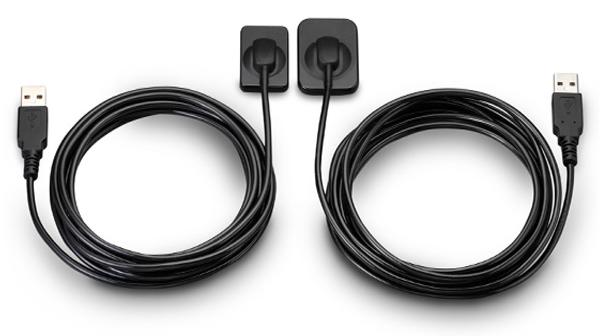
QuickRay USB is a breakthrough in digital X-rays. The embedded electronics are located in the sensor case so there is no interface box! Simply connect the sensor cable via its USB connector to your computer and go! QuickRay USB is currently compatible with these Apteryx based software systems: XVa3, XVLite, Cliniview, Clinitouch, XDR Imaging, MPDX-DMD, Lightyear, DentiMax, ProfSuni, Dr. Suni, Sigma, AFP Digital and Belmont.Great value QuickRay USB digital X-ray sensors connect directly to USB— no interface box needed!Are you paying too much for digital X-ray sensors and warranties? Consider QuickRay from Video Dental Concepts! A dental imaging leader and innovator since 1989, VDC has provided over 7,000 dental professionals with the best diagnostic imaging values and personalized support for over 20 years.QuickRay USB Size 1 And 2 X-Ray Sensor For SaleQuickRay USB is a breakthrough in digital X-rays. The embedded electronics are located in the sensor case so there is no interface box! Simply connect the sensor cable via its USB connector to your computer and go! QuickRay USB is currently compatible with these Apteryx based software systems: XVa3, XVLite, Cliniview, Clinitouch, XDR Imaging, MPDX-DMD, Lightyear, DentiMax, ProfSuni, Dr. Suni, Sigma, AFP Digital and Belmont.The QuickRay sensor gives you the highest resolution and clarity! The thin (less than 1/4″) intraoral sensors include a CMOS image sensor chip, CsI Scintillator, electronic circuits, shielding foils and shock absorbers. Tough polyamide housings have durable replaceable polyurethane cables with ergonomically placed connectors. Their rounded corners and smooth edges optimize patient comfort.
And QuickRay is the fastest sensor on the market! View X-rays in USB 2.0 High Speed Mode in only 3 seconds. Operate in USB 2.0 Full Speed Mode, if necessary.Every sensor is covered by the VDC two year warranty with no annual fees. Technical support is available for an additional fee on an annual basis. Optional pro rata warranty is available from VDC after purchase. All VDC products are FDA registered. | Planmeca Promax Dimax 3 Digital Panoramic X RayPlanmeca ProMax offers a variety of imaging modalities in one intelligent X-ray unit.- Panoramic radiography for general diagnostics of the tooth arch and the jaw.
- Advanced panoramic radiography for specific diagnostics of the tooth arch, jaw maxillary sinuses and TMJ.
- Optional dental tomographic slices for detailed morphologic diagnostics of facial bones.
- Rotational freedom – the SCARA arm can produce any rotation pattern. Network Connectivity.
- Graphical user interface.
- Advanced collimation.
- Upgradable software.
- Dimax 3 Sensor
Planmeca is well-known for producing high-quality dental X-ray machines. With the Planmeca ProMax S3 pan-ceph with the DIMAX3, or previous generation 14-bit sensor, now orthodontists can add premium Planmeca imaging to their practices for a fraction of the price of new Planmeca dental equipment. Delivering standard and advanced 2D panoramic and cephalometric X-ray images, this versatile Planmeca X-ray machine can also be upgraded to medium field of view (8 x 8 cm) cone beam through the manufacturer, increasing your initial return on investment.PANORAMIC Planmeca Promax Dimax 3 Digital Panoramic X RayPlanmeca ProMax S3 includes the following panorex programs: standard, pediatric, lateral double TMJ, PA double TMJ, and PA rotational sinus. Optional advanced panorex programs include: horizontal segmenting, orthogonal, interproximal angulation, bitewings, lateral-PA double TMJ, PA multi-angle TMJ, lateral multi-angle TMJ, non-rotational sinus, and more.BITEWING PROGRAMWith the optional Planmeca extraoral bitewings program, you can replace conventional intraoral bitewing dental radiographs for sensitive patients with a fast and efficient alternative. (NOTE: Subject to availabilitySCARA TECHNOLOGYWith its advanced, exclusive robotic SCARA (Selectively Compliant Articulated Robot Arm) technology, the Planmeca ProMax S3 is triple-jointed to deliver precise, complex movements for optimized rotational maxillofacial digital denPEDO-FRIENDLYPlanmeca ProMax dental X-ray machines feature a pre-set "child" mode to reduce exposure area and minimize patient dose to help protect your smallest patients.tal X-ray radiography.DIMAX4 SENSORThis Planmeca ProMax dental X-ray machine includes the latest 16-bit DIMAX4 sensor, capturing the highest quality dental panoramic X-rays at up to 30-50% the price of new panoramic dental equipment. |




Reviews
There are no reviews yet.