| Description | The inEos X5 can be used to scan impressions and models of all or part of the jaw manually or automatically. The new operating concept increases flexibility for the dental technician so that the scanning process can be optimally integrated into the workflow of the laboratory. While the manual scanning mode saves time for simpler operations, the fully automatic scanning mode has its benefits especially with regard to extensive operations | Sirona Galileos Dental Cone Beam Imaging System The system captures images using the lowest possible radiation dose and is designed to provide high-quality images for implant planning, treatment guide design, jaw function analysis and more. | VersatilityWelcome to a world where you‘re spoiled for choice! The new CEREC Primemill combines wet and dry milling and wet grinding. No matter the indication, with CEREC Primemill you can select from a broad range of material options from validated partners providing the flexibility and predictability you need to offer patients the best possible treatment. | BRAND NEW 3Shape Trios Cart T12A dental impression intraoral 3D scanner, it is new in the original crate with all accessories including scanner, wand and tips and has never been used. | The iTero Element Scanner is a digital impression system that eliminates the need for messy putty in your mouth.Improving iTero Intraoral ScannersWhile it’s already a leader in dental technology, iTero is constantly refining its intraoral scanning options. Its Element Itraoral Scanner, introduced in March 2015, captures 6,000 frames per second, up to 20 times faster than its predecessor. Its wand is also smaller and lighter, with in-built controls for more intuitive operation. Intraoral scanners from iTero are renowned for their accuracy, but the increased capture speed improves the company’s already impressive statistics. | The new highly accurate 0.5 mm milling tool reliably delivers first class clinical results. Switch to Extra Fine milling mode for a higher level of detail with occlusal fissures and interdental areas on bridges. |
| Content | Sirona InLab InEos X5 Scanner
High-tech camera with many advantagesLike its predecessor inEos Blue, the fast scanning speed of the inEos X5 is unsurpassed. The large image field allows the camera to capture four to five teeth per image and an entire jaw with a total of five images. This is how it digitalizes one single crown in less than ten seconds, a three-unit bridge construction in only 30 seconds, as well as an entire jaw in less than one minute. A completely new optical system is used for the scan, which is based on the digital pattern projection: The considerably improved accuracy of less than 12 µm and the camera’s autofocus guarantee high-quality scan data that is also suitable for procedures that require the highest degree of accuracy, such as the most demanding implant operations. Due to the camera’s greater depth of definition, the inEos X5 can also capture the entire jaw including the palate, which makes it possible to create a digital construction of model casting works.Improved handling for new and experienced usersWith an innovative five-axis technology including rotation arm and intelligent scan planning, the inEos X5 positions and captures models with all indications automatically. This standardizes the images, eliminates user error and speeds up the imaging process. That means that new users in particular can digitalize traditional procedures without requiring significant training. Altogether, the inEos X5 stands out due to its easy handling: The large and open operating area allows all standard articulators to be positioned as well as quick access to the model. With the universal model and impression tray holder, all conventional model support and split cast systems, as well as impression trays in all sizes, can also be used. The multi-die scanning offers advantages in cases where the proximal contacts cannot be seen well and in the fabrication of frameworks and copings for single restorations. With this function, up to four prepared stumps can be positioned in a special holder and digitalized at the same time.
The inEos X5 has been available at retailers since May 2013. The list price including PC and inLab software as well as the OPEN inEos interface is EUR 19,990.Overview of new inEos X5 features:Sirona InLab InEos X5 Scanner- A combination of manual and fully automatic operation
- High accuracy
- Time savings and improved workflow due to the five-axis technology and autofocus
- Large scan field and good depth of definition
- Multi-die scanning for up to four individual stumps
- Universal model and articulator holders
- Easy handling
| SIRONA GALILEOS COMFORT PLUS
GALILEOS Comfort Plus is an advanced CBCT that provides seamless work flow integration. With an optional HD mode and a 14 second scan, the GALIELOS offers clinicians and specialists numerous options for diagnosis, treatment and patient consultation with superior image quailtiy and low radiation dose. It includes Integrated Implantology and FaceScan, which helps patients better understand and accept treatment recommendations. SICAT Function enables diagnosis and treatment of TMD, and SICAT Air (coming soon) software allows you to anyalze airways.Features:High-Quality Images:
This dental imaging system is able to position itsef and capture a superior quality of images with each scan, ultimately ensuring that you are receiving the detailed images you need, every time.Panoramic:
This imaging system provides crisp panoramic images to your practice with sensors built for high-quality 2D images. With multiple modes, it’s meant to give you the images you need.3D Conebeam:
Equipped with a high-quality, 3D sensor, this machine is capable of producing crisp and detailed representations of what you need to see. It’s cross-sectional images provide you with the high precision you need.Medium Field of View:
The 15×12 cm field of view option on this machine function allows for the versatility of a standard field of view.Sirona Galileos Dental Cone Beam Imaging System /Full Complete System Software and Hardware :
– Phantom
– Workstation
– Display Monitor
– Software
– ManualsAccessories
– 3D
– Galileos Comfort includes the following 3D views: pan with 3D slice navigation, TSA, axial, sagittal, coronal, 3D model, implant alignment and one-click op reports.
– MEDIUM FOV
– The system’s ellipsoid field of of view (15 x 12 cm) captures the complete dentition, as well as the ascending rami and sinus regions.
– ADJUSTABLE FOV
– Adjustable collimation can save time and reduce patient exposure by allowing you to scan only the regions of interest.
– STANDING DESIGN
– The unit features standing, face-to-face image programming as well as a patented head positioner, ensuring patient comfort and proper positioning.Sirona Galileos Comfort PlusCompact Model D3437Approximately 1100 CT images takenOperating PC includedFOV of the Gallileos Compact is 12×12 cmCrystal Clear 3D/CT imagesSeamless Cerec Integration | Dentsply Sirona CEREC PrimemillSpeedEngineered for speed and precision, the new CEREC Primemill inherits the proven strength of its predecessor and raises its powerful performance to entirely new heights.You can now mill zirconia restorations in Super Fast milling mode in around 5 minutes, cutting processing times by more than half. The improved grinding mode for high quality glass ceramics also grinds the material faster than ever before. The result? Satisfied patients and high productivity.QualityA combination of new electronics, software, motors and mechanical components contributes to finer resolution and enhanced dynamics. This results in outstanding restoration margins and surface details – for extremely precise results.The new highly accurate 0.5 mm milling tool reliably delivers first class clinical results. Switch to Extra Fine milling mode for a higher level of detail with occlusal fissures and interdental areas on bridges.Versatility Dentsply Sirona CEREC PrimemillWelcome to a world where you‘re spoiled for choice! The new CEREC Primemill combines wet and dry milling and wet grinding. No matter the indication, with CEREC Primemill you can select from a broad range of material options from validated partners providing the flexibility and predictability you need to offer patients the best possible treatment.Choose from the full spectrum of machining options, including dry and wet milled zirconia, or wet grinding of glass and hybrid ceramics.ConvenienceThe new 7” touch interface with user guidance guides operators step-by-step through the workflow, key maintenance procedures and other routine tasks, so you can delegate milling with complete peace-of-mind. The integrated block scanner is a time-saving new feature that automatically scans material blocks with compatible data matrix codes and records the information, including type, size, color and zirconia enlargement factor. All CEREC Primemill tools are fitted with a color-coded RFID chip that is read by the RFID tool reader, feeding into the tool status display, alerting the user if a tool needs replacing. This ensures all tools are performing at optimal levels. A LED light strip indicates unit status and milling and grinding progress.The all-new CERECThe latest generation of our CEREC system sets new standards so you can offer your patients an unmatched combination of single-visit dentistry and excellent quality.A unique solutionThe CEREC system comprises world-class components that interact perfectly ensuring seamless workflows. With CEREC Primescan, CEREC Software 5 and CEREC Primemill, digital chairside dentistry is faster, easier and more reliable than ever before.Outstanding resultsAfter 35 years of continuous optimization, CEREC gives you the options you need to treat multiple indications with the confidence that comes from outstanding results.
Designed to stand out – and fit inThe new CEREC Primemill does not just communicate seamlessly with other CEREC devices, but its sleek design is also the perfect match – and the ideal look for a progressive dental practice. | 3Shape Trios Cart T12a Impression 3D Intraoral Scanner3Shape TRIOS is a next-generation intraoral impression solution that is fast, accurate and easy to use. TRIOS is built on 3Shape’s Ultrafast Optical Sectioning™ technology and its features include high accuracy capture, spray- and powder-free scanning, clinical scan validation, intuitive Smart-Touch user interface, and more. TRIOS is optimized for a wide range of indications.TRIOS scanner benefits and features:
-Up to 1000 3D pictures for true geometries
-Spray-free for optimal accuracy and comfort
-Designed for high-speed impression capture
-Ergonomic grip for perfect control
-Autoclaveable scanner tip
-Scanning has never been easier. No need to hold the scanner at a specific distance or angle for focus. Dentists or assistants can even rest the scanner on the teeth for support as they scan.TRIOS cart benefits and features
-Live 3D visualization
-Easy-to-use touch screen
-Sleek design
-Unique motion sensor interface
-Mobility and Wi-Fi
-Easy-to-clean
-General benefits of digital impression takingDENTISTS:
-Less adjustment and grinding during seating
-Improved accuracy and clinical results
-Faster than traditional impression taking
-Reduced need for retakes
-No impression materials and mess
-Cost savings related to materials and shippingPATIENTS : 3Shape Trios Cart T12a Impression 3D Intraoral Scanner
-Quick and comfortable experience
-Better restoration fits and minimal grinding
-Improved clinical results
-Reduced number of appointments due to fewer retakes
-Reduced over-all chair-time3.5 Tips to Obtaining a Good Scan
PREPARATION
1. Turn on the cart or PC in advance to allow the system to heat up. See section Heating and
Mounting the Scanner Tip, step 1. Allow the system to warm up for about 10 minutes prior to use. If
using the heater, the final temperature is reached when the light goes out.
2. Retract the gingiva around the preparation for the preparation to stand out clearly.
3. Make sure the scanner tip is warm to avoid condensation on the mirror. See section Heating
and Mounting the Scanner Tip, step 5.
SCANNING
1. Dry the teeth lightly using compressed air. Be sure to reach the narrow regions between teeth.
Consider using a saliva ejector and/or tampons.
2. Get a good start:
• Start at preparation (or 1st molar if antagonist).
• Wait for about 5 scanner "clicks" before proceeding (helps build up a good starting point).
• Complete preparation including preparation line.
• Scan neighboring teeth: Occlusion, lingual/palatinal side, buccal/labial side.
3. Keep scanner head at 0-5mm from the teeth, it is OK to touch the teeth occasionally.
4. Move the scanner slowly and smoothly, you should hear a more rapid clicking sound.
41
5. Keep lips, cheeks, and tongue out of the scanner’s view:
• Use your finger or a dental mirror to create space between the teeth, lips and cheeks.
• Use a lip-and-cheek-retractor to keep lips and cheeks away.
• Be careful not to scan your own or assistant’s fingers.
• If you get lips, cheeks or tongue in the scan, make sure to delete it all, especially where they have
contact with the teeth (no surfaces should stick out from the teeth).
6. Keep focus on:
• Option 1 - Look at the teeth while scanning and listen to the "clicks". If it stops clicking/capturing,
carefully move back to the area marked on the screen.
• Option 2 - Look at the 2D image at the lower right corner. What you see here is what you scan.
Avoid lips, cheeks and the tongue to get an easy scan.
7. When scanning is complete, inspect the result by rotating the scan.
The important areas are:
• Preparation line (avoid interference from gingiva, saliva, blood).
• Contact points.
• Occlusal surfaces.
• If an important area is missing, simply touch this area on the model, and re-start scanning from
this point.
8. Bite Scan:
• Start from the second molar or at canine if you make an anterior scan.
• While centering the 2D image on occlusion plane, slowly move the scanner tip in straight mesial
direction with equal coverage of the upper and lower teeth.
• Scan 4 teeth for optimal alignment. This should take no more than 5 seconds.
9. Important for good colors:
• Avoid the light from the dentist chair lamp pointing directly into the patient's mouth. | iTero Element Intraoral Scanner
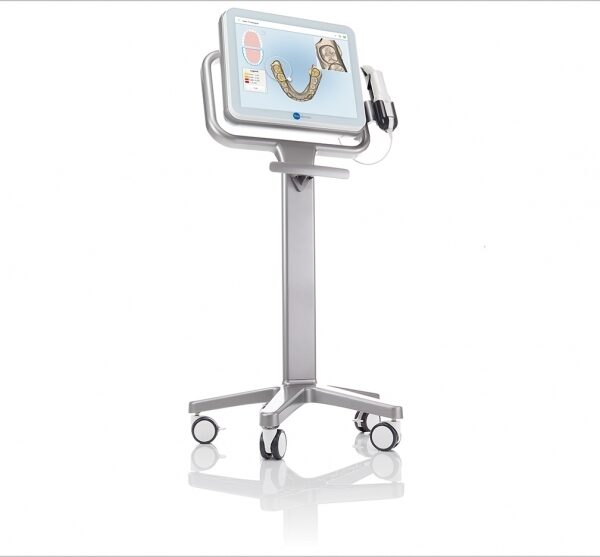
What Are iTero Intraoral Scanners?Intraoral scanners from iTero scan the mouths of patients, capturing images to create three-dimensional dental images in minutes. Intraoral scanners are simple to use and can be operated by one person. Their user-friendly nature helps dental professionals get the best results. The scans they produce are also more detailed than the traditional two-dimensional images they replace.Intraoral digital scans help dental professionals create accurate physical dental models for restorative work, including crowns, veneers, and implants. They also help orthodontists diagnose orthodontic problems and develop the best treatment plans.The company’s digital ecosystem software works seamlessly with its intraoral scanners, improving workflow for dental professionals working on orthodontic and restorative cases. However, unlike many early intraoral scanners, they are open systems. This feature gives dental professionals more flexibility about how they use their digital scan files. Intraoral digital scans from iTero scanners can be easily shared with other dental professionals and third-party providers such as Invisalign. When all relevant parties have the scans, they can communicate better to improve patient outcomes.What iTero Intraoral Scanners DoIntraoral scanners feature a wand, which the dental professional moves around a patient’s mouth. In the latest versions, the wand captures thousands of frames per second which are pieced together to create a three-dimensional visualisation of the patient’s mouth. The wands on iTero intraoral scanners are smaller than early intraoral scanners, allowing them to scan molars in the back of the mouth which were traditionally difficult to reach. Dental professionals using small wands also aren’t limited by how wide their patients can open their mouths. The small wands are also less likely to make patients gag than older forms of scanning technology.Intraoral scanners also have screens which display the digital dental images as they’re captured in real time. The screens show whether the scan is good or not before it’s saved and submitted to the lab. This feature can be a real time-saver for dental professionals who, in the past, could receive word from the lab two or three weeks later that their scans were inadequate. By providing immediate feedback, intraoral scanners can save dental professionals and patients time and frustration.Unlike many intraoral scanners, patients don’t need to cover their teeth in titanium dioxide powder before an iTero intraoral scan. This benefit further improves the scanning process for dental patients.How Intraoral Scanners Make Invisalign Orthodontics Easier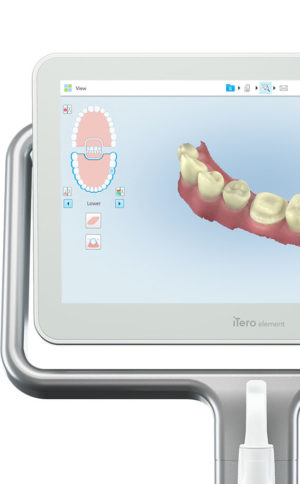 Invisalign clear aligners are one of the most popular teeth-straightening aids used today as they’re effective, removable, and virtually undetectable. Unlike many intraoral scanners, iTero intraoral scanners have open architecture which makes them compatible with the Invisalign system, including its Invisalign Outcome Simulator. Orthodontists can scan their patients’ mouths with an iTero intraoral scanner, then show them how their Invisalign treatment will look. This technology improves the patient experience because patients can know what to expect and feel more confident in their diagnosis and treatment plan. It also makes the ClinCheck setup three times faster.After setup, speed is still on the iTero intraoral scanners’ side. iTero states ClinCheck treatment plans submitted with its scans are usually posted to the Invisalign Doctor Site three times faster than traditional polyvinyl siloxane scans. As a result, your Invisalign aligners are created and posted back to your orthodontist sooner so that you can start treatment faster. Since the iTero intraoral scanning system is open, orthodontists can also send the scan files to any laboratory of their choosing for the creation of a retainer, which reinforces your treatment after the Invisalign process, and other dental tools.Orthodontists can also create better Invisalign treatment plans for their patients using iTero intraoral scans. Align Technology research shows orthodontists who use the scans have 10 times fewer rejections and seven times fewer issues with the fit of the Invisalign aligners. These results may be because iTero intraoral scanners can help orthodontists track their patients’ progress. Regular scans throughout Invisalign treatment can help orthodontists compare expected outcomes with results. If results aren’t as expected, orthodontists can use the scans to educate their patients about their treatment and the importance of complying with their recommendations.Improving iTero Intraoral Scanners iTero Element Intraoral ScannerWhile it’s already a leader in dental technology, iTero is constantly refining its intraoral scanning options. Its Element Itraoral Scanner, introduced in March 2015, captures 6,000 frames per second, up to 20 times faster than its predecessor. Its wand is also smaller and lighter, with in-built controls for more intuitive operation. Intraoral scanners from iTero are renowned for their accuracy, but the increased capture speed improves the company’s already impressive statistics. Invisalign clear aligners are one of the most popular teeth-straightening aids used today as they’re effective, removable, and virtually undetectable. Unlike many intraoral scanners, iTero intraoral scanners have open architecture which makes them compatible with the Invisalign system, including its Invisalign Outcome Simulator. Orthodontists can scan their patients’ mouths with an iTero intraoral scanner, then show them how their Invisalign treatment will look. This technology improves the patient experience because patients can know what to expect and feel more confident in their diagnosis and treatment plan. It also makes the ClinCheck setup three times faster.After setup, speed is still on the iTero intraoral scanners’ side. iTero states ClinCheck treatment plans submitted with its scans are usually posted to the Invisalign Doctor Site three times faster than traditional polyvinyl siloxane scans. As a result, your Invisalign aligners are created and posted back to your orthodontist sooner so that you can start treatment faster. Since the iTero intraoral scanning system is open, orthodontists can also send the scan files to any laboratory of their choosing for the creation of a retainer, which reinforces your treatment after the Invisalign process, and other dental tools.Orthodontists can also create better Invisalign treatment plans for their patients using iTero intraoral scans. Align Technology research shows orthodontists who use the scans have 10 times fewer rejections and seven times fewer issues with the fit of the Invisalign aligners. These results may be because iTero intraoral scanners can help orthodontists track their patients’ progress. Regular scans throughout Invisalign treatment can help orthodontists compare expected outcomes with results. If results aren’t as expected, orthodontists can use the scans to educate their patients about their treatment and the importance of complying with their recommendations.Improving iTero Intraoral Scanners iTero Element Intraoral ScannerWhile it’s already a leader in dental technology, iTero is constantly refining its intraoral scanning options. Its Element Itraoral Scanner, introduced in March 2015, captures 6,000 frames per second, up to 20 times faster than its predecessor. Its wand is also smaller and lighter, with in-built controls for more intuitive operation. Intraoral scanners from iTero are renowned for their accuracy, but the increased capture speed improves the company’s already impressive statistics. | DENTSPLY SIRONA CEREC PRIMEMILLSpeedEngineered for speed and precision, the new CEREC Primemill inherits the proven strength of its predecessor and raises its powerful performance to entirely new heights.You can now mill zirconia restorations in Super Fast milling mode in around 5 minutes, cutting processing times by more than half. The improved grinding mode for high quality glass ceramics also grinds the material faster than ever before. The result? Satisfied patients and high productivity.QualityDENTSPLY SIRONA CEREC PRIMEMILL A combination of new electronics, software, motors and mechanical components contributes to finer resolution and enhanced dynamics. This results in outstanding restoration margins and surface details – for extremely precise results.The new highly accurate 0.5 mm milling tool reliably delivers first class clinical results. Switch to Extra Fine milling mode for a higher level of detail with occlusal fissures and interdental areas on bridges.VersatilityDENTSPLY SIRONA CEREC PRIMEMILL Welcome to a world where you‘re spoiled for choice! The new CEREC Primemill combines wet and dry milling and wet grinding. No matter the indication, with CEREC Primemill you can select from a broad range of material options from validated partners providing the flexibility and predictability you need to offer patients the best possible treatment.Choose from the full spectrum of machining options, including dry and wet milled zirconia, or wet grinding of glass and hybrid ceramics.ConvenienceDENTSPLY SIRONA CEREC PRIMEMILL The new 7” touch interface with user guidance guides operators step-by-step through the workflow, key maintenance procedures and other routine tasks, so you can delegate milling with complete peace-of-mind. The integrated block scanner is a time-saving new feature that automatically scans material blocks with compatible data matrix codes and records the information, including type, size, color and zirconia enlargement factor. All CEREC Primemill tools are fitted with a color-coded RFID chip that is read by the RFID tool reader, feeding into the tool status display, alerting the user if a tool needs replacing. This ensures all tools are performing at optimal levels. A LED light strip indicates unit status and milling and grinding progress.The all-new CERECThe latest generation of our CEREC system sets new standards so you can offer your patients an unmatched combination of single-visit dentistry and excellent quality.A unique solutionThe CEREC system comprises world-class components that interact perfectly ensuring seamless workflows. With CEREC Primescan, CEREC Software 5 and CEREC Primemill, digital chairside dentistry is faster, easier and more reliable than ever before.Outstanding resultsAfter 35 years of continuous optimization, CEREC gives you the options you need to treat multiple indications with the confidence that comes from outstanding results.
Designed to stand out – and fit inThe new CEREC Primemill does not just communicate seamlessly with other CEREC devices, but its sleek design is also the perfect match – and the ideal look for a progressive dental practice. |




Reviews
There are no reviews yet.