| Description | The inEos X5 can be used to scan impressions and models of all or part of the jaw manually or automatically. The new operating concept increases flexibility for the dental technician so that the scanning process can be optimally integrated into the workflow of the laboratory. While the manual scanning mode saves time for simpler operations, the fully automatic scanning mode has its benefits especially with regard to extensive operations | Designed especially for general dentists, the Sirona Orthophos XG3 combines top-tier image quality and exceptional ease-of-use in an affordable, digital panoramic x-ray solution. | With the intraoral scanner dwio the canadian company Dental Wings presented at the IDS a really revolutionary approach in the field of intraoral scanner. The digitally interested users will have noticed the similarity of the dwio with the Steinbichler intraoral scanner which was launched at the IDS 2 years before. In fact, the dwio intraoral scanner represents a further development. | The APOLLO DI is our very latest camera. It impresses with its simple handling, small and lightweight camera and outstanding value for money. | The iTero Element Scanner is a digital impression system that eliminates the need for messy putty in your mouth.Improving iTero Intraoral ScannersWhile it’s already a leader in dental technology, iTero is constantly refining its intraoral scanning options. Its Element Itraoral Scanner, introduced in March 2015, captures 6,000 frames per second, up to 20 times faster than its predecessor. Its wand is also smaller and lighter, with in-built controls for more intuitive operation. Intraoral scanners from iTero are renowned for their accuracy, but the increased capture speed improves the company’s already impressive statistics. | Cost-effective production
The inLab software positions your zirconium oxide restorations optimally in the material block – for efficient use of blocks, attractive unit prices and the best possible machine utilization, e.g. by milling or grinding overnight.
Wet grinding of sintered NPM blocks
“inLab goes metal.” With the inLab MC XL and the new inCoris CC sintered metal blocks you can handle a complete spectrum of metal and ceramic materials. The unique wet grinding function rules out any health risks. |
| Content | Sirona InLab InEos X5 Scanner
High-tech camera with many advantagesLike its predecessor inEos Blue, the fast scanning speed of the inEos X5 is unsurpassed. The large image field allows the camera to capture four to five teeth per image and an entire jaw with a total of five images. This is how it digitalizes one single crown in less than ten seconds, a three-unit bridge construction in only 30 seconds, as well as an entire jaw in less than one minute. A completely new optical system is used for the scan, which is based on the digital pattern projection: The considerably improved accuracy of less than 12 µm and the camera’s autofocus guarantee high-quality scan data that is also suitable for procedures that require the highest degree of accuracy, such as the most demanding implant operations. Due to the camera’s greater depth of definition, the inEos X5 can also capture the entire jaw including the palate, which makes it possible to create a digital construction of model casting works.Improved handling for new and experienced usersWith an innovative five-axis technology including rotation arm and intelligent scan planning, the inEos X5 positions and captures models with all indications automatically. This standardizes the images, eliminates user error and speeds up the imaging process. That means that new users in particular can digitalize traditional procedures without requiring significant training. Altogether, the inEos X5 stands out due to its easy handling: The large and open operating area allows all standard articulators to be positioned as well as quick access to the model. With the universal model and impression tray holder, all conventional model support and split cast systems, as well as impression trays in all sizes, can also be used. The multi-die scanning offers advantages in cases where the proximal contacts cannot be seen well and in the fabrication of frameworks and copings for single restorations. With this function, up to four prepared stumps can be positioned in a special holder and digitalized at the same time.
The inEos X5 has been available at retailers since May 2013. The list price including PC and inLab software as well as the OPEN inEos interface is EUR 19,990.Overview of new inEos X5 features:Sirona InLab InEos X5 Scanner- A combination of manual and fully automatic operation
- High accuracy
- Time savings and improved workflow due to the five-axis technology and autofocus
- Large scan field and good depth of definition
- Multi-die scanning for up to four individual stumps
- Universal model and articulator holders
- Easy handling
| SIRONA XG3 Digital Panoramic X-Ray
The ORTHOPHOS XG 3 is designed for the general practice dentist who would like to work with a basic X-ray system. The XG 3 offers you an outstanding price-performance ratio and provides the following benefits:- High image quality
- Extremely simple operation
- Solid workmanship
Accurate positioningThe ORTHOPHOS XG 3 uses proven, logical Sirona principles for exceptional imaging:- Exact, immediate positioning of the anterior teeth in the focal layer
- Effective, comfortable patient stabilisation with forehead and temple supports to prevent motion blurring
Proven TechnologyThe advanced technology from the XG product family enables the ORTHOPHOS XG 3 to produce high quality diagnostic images.
The benefits include:- Specific focal layers and orbital paths for anatomically optimised exposures
- Very detailed display of the anterior tooth region through automatic kV adaption as X-ray beam passes through spinal region
- 16 bit image acquisition technology provides more gray scales
- SIDEXIS XG imaging software with useful analysis tools
Features:SIRONA XG3 Digital Panoramic X-Ray- High-quality, digital panoramic and TMJ imaging power with advanced patient communication tools
- Outstanding price-performance ratio for seamless transition from film to direct digital imaging
- Easy operation with the Multipad; effective, three-point patient stabilization for sharp images
- Direct network capability for exceptional connectivity
SIRONA ORTHOPHOS XG 3The horizontally and vertically reduced pediatric panoramic program offers outstanding image quality with the lowest dose. Ideal for practices that treat a lot of children. The unit’s easy operation and seamless integration into your practice’s daily routines will save you valuable time. The high image quality and proven Sidexis software guarantee that you will come to a safe diagnosis quickly and easily.Quality from the very startHigh quality. Durable. Safe: the Orthophos XG 3 X-ray unit is the perfect basic equipment for general dentists. The unit’s easy operation and seamless integration into your practice’s daily routines will save you valuable time. The high image quality and proven Sidexis software guarantees that you will reach a safe diagnosis quickly and easily.The positioning can be very easily reproduced since image parameters such as the bite block height are saved together with the image data. A bitewing program is available, which helps in special cases and patient situations where intraoral images cannot be used and a shorter panoramic program with a reduced dose, which is suitable for treating children, is also available. | Dwio Intraoral Scanner Dental WingsIntraoral scanner
Based on a novel and incredibly compact 3D capture technique called Multiscan Imaging, the Dental Wings intraoral scanner allows dentists to take digital impressions in a natural, fluid manner. Its remarkably small handpiece, gesture control, and easy maintenance make it a compelling digital impression option for clinicians.Design approach: the patient first
The intraoral scanner was designed to address the needs of dental professionals looking for an intuitive technology for capturing digital impressions. With the overall objective to help dentists focus on the patient rather than the technology, the Dental Wings intraoral scanner offers:– A remarkably small handpiece very similar in size, shape, and weight to existing dental handpieces. Its familiar shape allows to assume a natural position relative to the patient.
– Visual and auditive feedback — a luminescent ring and audible signals indicate when data is being successfully captured, allowing the user to focus in the mouth rather than on the screen.
– Easy maintenance of the lightweight all-metal handpiece that has no moving parts, no complex illumination or cooling system.
– Motion control technology for a no-touch operation of the system while the user has gloves on.Scanning technology Dwio Intraoral Scanner Dental Wings
Five miniaturized 3D scanners in the handpiece tip directly view the teeth and soft tissue from multiple orientations simultaneously, capturing even the most difficult to see areas of preparations with minimal effort by the user.Open workflows
The intraoral scanner is a dedicated “scan only” chairside system with multiple options for the design and fabrication steps. Captured data is seamlessly transmitted to in-office or remote systems via DWOS Connect for prosthesis design and production. Users of Dental Wings’ simple to use yet powerful DWOS CAD suite of design applications, as well as other open dental CAD software, are able to import the scan data directly. | Sirona Apollo DI Intra Oral Scanner
APOLLO DI:
The Sirona Apollo DI Intra Oral Scanner features easy handling, precise imaging, and the proven Sirona Connect workflow. The impression system includes an imaging unit, APOLLO Connect software, and the APOLLO DI intraoral
camera,with which users can make digital impressions of the clinical situation in a seamless workflow. To do this, a moisture-insensitive high-contrast spray is sprayed on the teeth very finely. Fine particles in the spray ensure high contrast and thus very precise images.The most cost-effective start to digital impression-taking.
APOLLO DI
APOLLO DI, the specially developed intraoral scanner for cost-efficient digital impressions.
Easy handling thanks to multitouch control
Small and lightweight camera
Export of scan-data in the laboratory
No follow-up costs
OPEN APOLLO DI*:
Export of digital impression data (captured with the APOLLO DI in the practice and received via the Sirona Connect Portal) in an open ST L format for processing in other CAD/CAM systems.Designed to provide an economical entry point into CAD/CAM dentistry, Sirona’s APOLLO DI digital impression system includes an imaging unit, APOLLO Connect software and the APOLLO DI intraoral camera.The system provides precise imaging with the use of a contrast spray, and digital impression data can be sent to dental labs via the Sirona Connect system where it can be turned into a digital restoration design in Sirona’s inLab software or compatible 3rd party software applications, according to a press release.The new APOLLO DI is a complement to the company’s existing CEREC Bluecam and CEREC Omnicam options which each use a different imaging technology, but send the digital impressions through the same workflow. APOLLO DI is designed for practices looking to take digital impressions but continue to work with a lab, while the Bluecam and Onmicam can each be purchased as stand-alone digital impression systems, or with a mill for complete chairside CAD/CAM dentistry. | iTero Element Intraoral Scanner
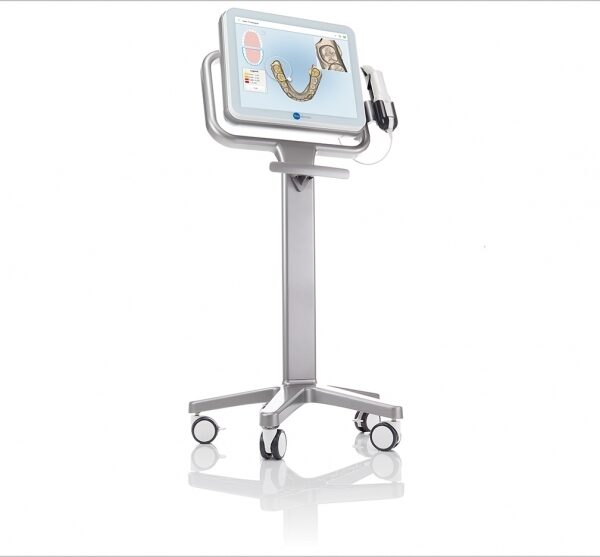
What Are iTero Intraoral Scanners?Intraoral scanners from iTero scan the mouths of patients, capturing images to create three-dimensional dental images in minutes. Intraoral scanners are simple to use and can be operated by one person. Their user-friendly nature helps dental professionals get the best results. The scans they produce are also more detailed than the traditional two-dimensional images they replace.Intraoral digital scans help dental professionals create accurate physical dental models for restorative work, including crowns, veneers, and implants. They also help orthodontists diagnose orthodontic problems and develop the best treatment plans.The company’s digital ecosystem software works seamlessly with its intraoral scanners, improving workflow for dental professionals working on orthodontic and restorative cases. However, unlike many early intraoral scanners, they are open systems. This feature gives dental professionals more flexibility about how they use their digital scan files. Intraoral digital scans from iTero scanners can be easily shared with other dental professionals and third-party providers such as Invisalign. When all relevant parties have the scans, they can communicate better to improve patient outcomes.What iTero Intraoral Scanners DoIntraoral scanners feature a wand, which the dental professional moves around a patient’s mouth. In the latest versions, the wand captures thousands of frames per second which are pieced together to create a three-dimensional visualisation of the patient’s mouth. The wands on iTero intraoral scanners are smaller than early intraoral scanners, allowing them to scan molars in the back of the mouth which were traditionally difficult to reach. Dental professionals using small wands also aren’t limited by how wide their patients can open their mouths. The small wands are also less likely to make patients gag than older forms of scanning technology.Intraoral scanners also have screens which display the digital dental images as they’re captured in real time. The screens show whether the scan is good or not before it’s saved and submitted to the lab. This feature can be a real time-saver for dental professionals who, in the past, could receive word from the lab two or three weeks later that their scans were inadequate. By providing immediate feedback, intraoral scanners can save dental professionals and patients time and frustration.Unlike many intraoral scanners, patients don’t need to cover their teeth in titanium dioxide powder before an iTero intraoral scan. This benefit further improves the scanning process for dental patients.How Intraoral Scanners Make Invisalign Orthodontics Easier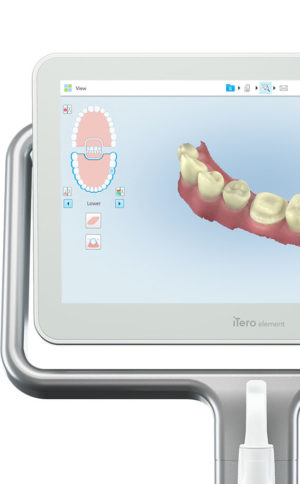 Invisalign clear aligners are one of the most popular teeth-straightening aids used today as they’re effective, removable, and virtually undetectable. Unlike many intraoral scanners, iTero intraoral scanners have open architecture which makes them compatible with the Invisalign system, including its Invisalign Outcome Simulator. Orthodontists can scan their patients’ mouths with an iTero intraoral scanner, then show them how their Invisalign treatment will look. This technology improves the patient experience because patients can know what to expect and feel more confident in their diagnosis and treatment plan. It also makes the ClinCheck setup three times faster.After setup, speed is still on the iTero intraoral scanners’ side. iTero states ClinCheck treatment plans submitted with its scans are usually posted to the Invisalign Doctor Site three times faster than traditional polyvinyl siloxane scans. As a result, your Invisalign aligners are created and posted back to your orthodontist sooner so that you can start treatment faster. Since the iTero intraoral scanning system is open, orthodontists can also send the scan files to any laboratory of their choosing for the creation of a retainer, which reinforces your treatment after the Invisalign process, and other dental tools.Orthodontists can also create better Invisalign treatment plans for their patients using iTero intraoral scans. Align Technology research shows orthodontists who use the scans have 10 times fewer rejections and seven times fewer issues with the fit of the Invisalign aligners. These results may be because iTero intraoral scanners can help orthodontists track their patients’ progress. Regular scans throughout Invisalign treatment can help orthodontists compare expected outcomes with results. If results aren’t as expected, orthodontists can use the scans to educate their patients about their treatment and the importance of complying with their recommendations.Improving iTero Intraoral Scanners iTero Element Intraoral ScannerWhile it’s already a leader in dental technology, iTero is constantly refining its intraoral scanning options. Its Element Itraoral Scanner, introduced in March 2015, captures 6,000 frames per second, up to 20 times faster than its predecessor. Its wand is also smaller and lighter, with in-built controls for more intuitive operation. Intraoral scanners from iTero are renowned for their accuracy, but the increased capture speed improves the company’s already impressive statistics. Invisalign clear aligners are one of the most popular teeth-straightening aids used today as they’re effective, removable, and virtually undetectable. Unlike many intraoral scanners, iTero intraoral scanners have open architecture which makes them compatible with the Invisalign system, including its Invisalign Outcome Simulator. Orthodontists can scan their patients’ mouths with an iTero intraoral scanner, then show them how their Invisalign treatment will look. This technology improves the patient experience because patients can know what to expect and feel more confident in their diagnosis and treatment plan. It also makes the ClinCheck setup three times faster.After setup, speed is still on the iTero intraoral scanners’ side. iTero states ClinCheck treatment plans submitted with its scans are usually posted to the Invisalign Doctor Site three times faster than traditional polyvinyl siloxane scans. As a result, your Invisalign aligners are created and posted back to your orthodontist sooner so that you can start treatment faster. Since the iTero intraoral scanning system is open, orthodontists can also send the scan files to any laboratory of their choosing for the creation of a retainer, which reinforces your treatment after the Invisalign process, and other dental tools.Orthodontists can also create better Invisalign treatment plans for their patients using iTero intraoral scans. Align Technology research shows orthodontists who use the scans have 10 times fewer rejections and seven times fewer issues with the fit of the Invisalign aligners. These results may be because iTero intraoral scanners can help orthodontists track their patients’ progress. Regular scans throughout Invisalign treatment can help orthodontists compare expected outcomes with results. If results aren’t as expected, orthodontists can use the scans to educate their patients about their treatment and the importance of complying with their recommendations.Improving iTero Intraoral Scanners iTero Element Intraoral ScannerWhile it’s already a leader in dental technology, iTero is constantly refining its intraoral scanning options. Its Element Itraoral Scanner, introduced in March 2015, captures 6,000 frames per second, up to 20 times faster than its predecessor. Its wand is also smaller and lighter, with in-built controls for more intuitive operation. Intraoral scanners from iTero are renowned for their accuracy, but the increased capture speed improves the company’s already impressive statistics. | Sirona Cerec InLab MCXL Milling Unit
The inLab MC XL milling and grinding unit opens up the widest possible range of production options for your dental laboratory. You profit from high speed and precision. You can switch from grinding to milling in just a few simple steps. And thanks to the large milling volume and broad spectrum of applications, you will reap substantial economic benefits.
inLab MC XL
Large range of materials:
Processing of zirconium oxide, resin, silicate ceramics and NP-metal
High-speed milling:
For example, a four-unit zirconium oxide bridge can be completed in just 40 minutes
Large milling capacity: For restorations consisting of up to 12 units and ceramic blocks measuring 85 x 40 x 22 mm
Four milling motors: Flexible selection of milling burs for different materials
Milling and grinding: For high precision regardless of the materialand indication
Milling* of zirconium oxide and polymers
In addition to grinding, you can also mill zirconium oxide and polymers on the inLab MC XL. You benefit from an enhanced initial fit and a faster production process.Flexible and efficient Sirona Cerec InLab MCXL Milling UnitinLab MC XL is the fast wet milling and grinding unit with many production options for your dental laboratory. You benefit from high speed and precision and can switch from grinding to milling in just a few steps. The large selection of materials and many uses give you particularly flexible and efficient production options. inLab high-speed grindingGlass- and hybrid ceramic restorations can be produced at a previously unachievable speed with simultaneous double four-axis processing. A fully contoured Celtra Duo crown takes less than 10 minutes. This is a key success factor for potential new business models that can call for providing digital impression orders within an hour. Precision processingThe inLab MC XL is characterized by precise wet machining. Especially when processing glass ceramics, the grinders used can be as small as 0.6 mm — for restorations with maximum detail in the occlusal and interproximal areas and at the preparation margin. Wide selection of materialsAs with all CAD/CAM production units from Dentsply Sirona, inLab MC XL lets you benefit from a the large selection of materials. Dentsply Sirona CAD/CAM materials and those of our material partners are optimally adapted for high-speed processing. |




Reviews
There are no reviews yet.