| Description | The affordable Gendex 9200 DDE dental radiography system offers standard panoramic and cephalometric x-ray projections, as well as a wide range of advanced programs to support most dental imaging and exams. | WaterLase iPlus includes the all-new SureFire™ delivery system, with redesigned optics that can more efficiently deliver precise amounts of Er,Cr:YSGG laser energy to cut enamel, dentin and bone. The SureFire delivery system is optimized to provide the dentist with more up time with a replaceable, disposable shield that protects the vital optical components in the fiber, resulting in greater dependability. | TRIOS MOVE makes it simple to show digital impressions to your patients in order to explain their treatment plans and improve communication. The system features the same scanning technology as the TRIOS 3, including the option of a wireless model, and can capture full-color digital impressions, provide shade matching and more quickly and easily. As an open system, it can send digital impressions to almost any dental CAD/CAM software platform for the fabrication of almost any fixed, removable or orthodontic solution. | Are you paying too much for digital X-ray sensors and warranties? Consider QuickRay from Video Dental Concepts! A dental imaging leader and innovator since 1989, VDC has provided over 7,000 dental professionals with the best diagnostic imaging values and personalized support for over 20 years. | The Identica T300 dramatically improves the fundamental aspects of scanner performance and the latest software technology provides the clearest, sharpest data. Identica T300 is customized to deliver the finest data quality using its dual 2.0 MP cameras. Identica T300 will save valuable time and money by minimizing trial & error when adjusting restoration fits. | The Clio Digital X-ray Sensor is equipped with a patented, Kevlar reinforced cable to provide maximum durability. Unlike other products, the USB cable of the Clio is fully replaceable if damaged. Constructed with special shock absorbers inside the sensor housing to protect components from exterior damage, the Clio is also one of the few fully water submersible sensors, sealed with a unique rubber polymer interior housing. |
| Content | Gendex Orthoralix 9200 DDE Digital Cephalometric + Panoramic X Ray
The versatile Orthoralix 9200 system offers standard panoramic projections, as well as a full array of advanced programs to satisfy the demanding needs of dental specialists. Plus, with both ?lm-based and direct digital models and the optional cephalometric arm, the capabilities of the 9200 can expand with your practice.Discover all of the benefits and options this imaging system has to offer.Wide Range of Projections – The Orthoralix 9200 offers 10 standard projections, with the ability to add 5 Cephalometric projections and the Transcan tomography projection to satisfy the needs of today’s dental specialists. Its intuitive control panel and easy-to-read display simplifies the process of selecting projections. Plus, with the precision of morphology following and multi-motorized arm rotation, the 9200 excels at focal trough reconstruction.- 10 standard imaging projections and 6 additional with optional upgrades
- Meets the demands of today’s orthodontists, oral and maxillofacial surgeons, and other specialists
Advanced Image Quality – Three technical factor setting modes are available to ensure complete flexibility and quality control. Manual mode for total operation control, Preset mode where the operator can customize settings, and Automatic Exposure Control (AEC) mode. With AEC, the 9200 automatically raises or lowers the kV setting based on measurements of bone size and density.- Triple laser beam guide system and motorized column for simple, accurate patient positioning
- Automatic Exposure Control (AEC) to ensure optimum image contrast and balance
- Real-time image reconstruction with the direct digital model
Gendex Orthoralix 9200 DDE Digital Cephalometric + Panoramic X Ray
Expand Your Capabilities – Utilizing the latest in CCD sensor technology and built-in LAN connectivity, the 9200 DDE model allows clinicians to digitally capture x-ray images and share them with any computer connected to the network for maximum productivity. With the option to add a Cephalometric arm, the Transcan cross-sectional tomography projection, and convert to direct digital technology, the 9200 is one of the most expandable panoramic systems available.- Direct digital model with the latest CCD sensor technology and direct LAN connectivity
- Optional Cephalometric arm attachment
- Optional Transcan implantology projection for transverse cross-sections of upper and lower jaw
Gendex Orthoralix 9200 DDE Digital Cephalometric + Panoramic X Ray| Power Supply | 115-250 VAC ± 10% | | Frequency | 50/60 Hz ± 2 Hz | | Maximum Line Power Rating | 10 A at 250 V, 20 A at 115 V | | Anode Voltage | 60 – 84 kV, in 2 kV steps | | Anode Current | 3 – 15 mA, in 1 mA steps | | Exposure Time | 12 s for standard pan, 0.16 – 2.5 s for Cephalometric | | Duty Cycle | 1:20 at full power operation | | Focal Spot | 0.5 mm, IEC 336 (1993) | | Vertical Reach | 39′ to 71′ (100 to 180 cm) from ?oor to occll plane | | Weight | 410 lbs (115 kg), 467 lbs (212 kg) with Ceph arm | | Active Area CCD Sensor | 147 x 6 mm (Standard Pan), 220 x 6 mm (Ceph) | | Image Size | 1536 x 2725 pixels (Standard Pan), 2304 x 2529 pixels (Ceph – Maximum) | | Minimum PC Requirements | Pentium® II CPU, 400 MHz, 256 MB RAM | | Required Operating System | Microsoft® Windows 98®/ Windows 2000®/ Windows XP® |
| Biolase Waterlase iplus LaserThe WaterLase iPlus all-tissue dental laser from the global leader in dental lasers is designed to deliver practice growth to dentists by offering an enhanced experience for patients, while raising the standard of overall reliability and quality for the #1-preferred all-tissue laser. Enhancing the patient experienceWaterLase iPlus is the latest addition to the WaterLase family, which has been striving to enhance the dental experience since 2001. With an estimated 27 million patients treated, more than 97% would recommend their WaterLase dentist to a friend – and WaterLase iPlus 2.0 offers a host of benefits that deliver an even better patient experience. Improvements to key components boost the availability of the laser when it’s needed most; and a new, minimally invasive laser therapy for periodontal disease offers dentists a clinical protocol that can generate excellent clinical outcomes and a vastly different type of patient experience versus traditional methods. SureFire Delivery System Biolase Waterlase iplus LaserWaterLase iPlus includes the all-new SureFire delivery system, with redesigned optics that can more efficiently deliver precise amounts of Er,Cr:YSGG laser energy to cut enamel, dentin and bone. The SureFire delivery system is optimized to provide the dentist with more up time with a replaceable, disposable shield that protects the vital optical components in the fiber, resulting in greater dependability. REPaiR for Reliably Treating PeriodontitisWaterLase iPlus offers new benefits to dentists and patients with the addition of REPaiR, the first Er,Cr:YSGG-based protocol for safe, effective treatment of moderate to severe periodontitis. It is an achievable, repeatable, minimally-invasive procedure that is less traumatic than traditional surgical techniques and delivers better and gentler experiences for patients. Clinically proven treatment for moderate to severe periodontitis Exclusive to WaterLase iPlus 2.0 Includes:Trunk Fiber 2 Hand Pieces (Turbo & Gold) Manual (DVD) Pair of Laser Goggles Air Line Power Cord Tip Cleaning Kit | 3Shape TRIOS 3 Wireless Move Pen GripTRIOS is the world’s first intraoral scanner to offer a wireless option. 3Shape TRIOS 3 Wireless gives you the freedom to perform digital scans unrestricted by wires, optimizing comfort for both you and your patientsThe new 3Shape TRIOS MOVE is the ultimate patient/dentist communication tool. Show patients their digital scans and dynamic treatment information close-up, and create greater opportunities for treatment dialogue and joint decision-making.The ergonomic and lightweight design of TRIOS MOVE allows you to always position the screen in the right place, and enjoy superior user experience.Features of TRIOS MOVE;-13.3″ HD LCD Touchscreen – The perfect size when having it in front of a patient or working with up closeAdjustable arm- Bring the screen directly in front of the patient to involve them in the scanning process and the treatment planningPowerful custom PC designed for scanning – Specifically designed for use with all TRIOS 3 scanners to give a fast and smooth scan experience straight out of the boxFour wheels with integrated brakes – It is now very easy to move around the chair and from chair to chairEnhance comfort with wireless innovation.TRIOS is the world’s first intraoral scanner to offer a wireless option. 3Shape TRIOS 3 Wireless gives you the freedom to perform digital scans unrestricted by wires, optimizing comfort for both you and your patientsThe new 3Shape TRIOS MOVE is the ultimate patient/dentist communication tool. Show patients their digital scans and dynamic treatment information close-up, and create greater opportunities for treatment dialogue and joint decision-making.The ergonomic and lightweight design of TRIOS MOVE allows you to always position the screen in the right place, and enjoy superior user experience.Features of TRIOS MOVE : 3Shape TRIOS 3 Wireless Move Pen Grip 13.3" HD LCD Touchscreen - The perfect size when having it in front of a patient or working with up closeAdjustable arm- Bring the screen directly in front of the patient to involve them in the scanning process and the treatment planningPowerful custom PC designed for scanning - Specifically designed for use with all TRIOS 3 scanners to give a fast and smooth scan experience straight out of the boxFour wheels with integrated brakes - It is now very easy to move around the chair and from chair to chair. | QuickRay USB Size 1 And 2 X-Ray Sensor
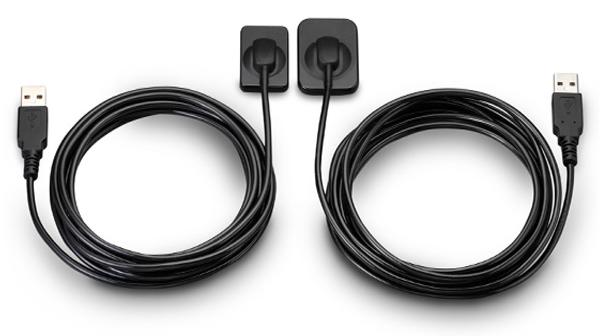
QuickRay USB is a breakthrough in digital X-rays. The embedded electronics are located in the sensor case so there is no interface box! Simply connect the sensor cable via its USB connector to your computer and go! QuickRay USB is currently compatible with these Apteryx based software systems: XVa3, XVLite, Cliniview, Clinitouch, XDR Imaging, MPDX-DMD, Lightyear, DentiMax, ProfSuni, Dr. Suni, Sigma, AFP Digital and Belmont.Great value QuickRay USB digital X-ray sensors connect directly to USB— no interface box needed!Are you paying too much for digital X-ray sensors and warranties? Consider QuickRay from Video Dental Concepts! A dental imaging leader and innovator since 1989, VDC has provided over 7,000 dental professionals with the best diagnostic imaging values and personalized support for over 20 years.QuickRay USB Size 1 And 2 X-Ray Sensor For SaleQuickRay USB is a breakthrough in digital X-rays. The embedded electronics are located in the sensor case so there is no interface box! Simply connect the sensor cable via its USB connector to your computer and go! QuickRay USB is currently compatible with these Apteryx based software systems: XVa3, XVLite, Cliniview, Clinitouch, XDR Imaging, MPDX-DMD, Lightyear, DentiMax, ProfSuni, Dr. Suni, Sigma, AFP Digital and Belmont.The QuickRay sensor gives you the highest resolution and clarity! The thin (less than 1/4″) intraoral sensors include a CMOS image sensor chip, CsI Scintillator, electronic circuits, shielding foils and shock absorbers. Tough polyamide housings have durable replaceable polyurethane cables with ergonomically placed connectors. Their rounded corners and smooth edges optimize patient comfort.
And QuickRay is the fastest sensor on the market! View X-rays in USB 2.0 High Speed Mode in only 3 seconds. Operate in USB 2.0 Full Speed Mode, if necessary.Every sensor is covered by the VDC two year warranty with no annual fees. Technical support is available for an additional fee on an annual basis. Optional pro rata warranty is available from VDC after purchase. All VDC products are FDA registered. | Medit Identica T300 Dental 3D Scanner
Identica T300 to meet all of your needs. With powerful scan engine and affordable pricing, the new Identica T300 is a perfect fit for both performance enthusiasts and entry level users. Its evolutionary design and high tech features will help your lab rediscover productivity. Bundled colLab 2017 scan software makes scan data processing easy and efficient.Quality & affordability- 2.0 MP cameras, Blue LED
- Accuracy : 7 μm (ISO)
- Full arch scan time 24 sec
- 2-Axis Manual
Identica T300 dramatically improves the most important aspects of scanner performance. The latest software technology provides you with the cleanest and sharpest data. T300 is specially designed to bring out the finest data quality using its 2.0 MP cameras. T300 will save your precious time and money by minimizing trial & error to adjust restoration fits.Identica T300 is an upgrade version of Identica Blue, provided at lowest pricing. Giving better value for the affordable scanner users. Identica T300 has enhanced data quality compared to Identica Blue.Introducing the Next Generation of 3D Dental Scanners: Our T-Series Medit represents the apex in 3D dental scanning. With unsurpassed speed, accuracy, and reliability, Medit helps you rediscover your productivity. The T-Series’ new powerful scan engine and affordable pricing are the perfect fit for performance enthusiasts and entry-level users, helping your lab rediscovering productivity thanks to its convenient design and high-tech features. Medit T300 is the latest Medit scanner with an enhanced SW scan. It uses Blue Light technology, which enables quick scanning and provides excellent precision (7μm).The program is user-friendly, because it takes you through simple and fast individual steps, from inserting the model into the scanner to exporting the file to the CAD design program. FEATURES:Medit Identica T300 Dental 3D Scanner- Scanned printing: 2 manual axes.
- Touch sensor: no.
- Full arcade scan speed: 24 ´´
- Resolution of the camera: 2 x 2 MP camera.
- Scan volume: 90 x 72 x 60 mm.
- Scanning principle: Optical change phase.
- Dimensions: 290 x 290 x 340 mm.
- Weight: 12Kg.
- Light source: Blue LED.
- Connectivity: Type USB 3.0 B.
- Power: 100- 240 vac, 50-60 HZ.
- Warranty: 2 years.
ADVANCED DATA PROCESSING AND HIGHER RESOLUTION DUAL CAMERAS The Identica T300 dramatically improves the fundamental aspects of scanner performance and the latest software technology provides the clearest, sharpest data. Identica T300 is customized to deliver the finest data quality using its dual 2.0 MP cameras. Identica T300 will save valuable time and money by minimizing trial & error when adjusting restoration fits. | SOTA Clio Digital X-Ray Sensor Size 2
SOTA Clio Digital X-Ray Sensor Size 2The Clio Digital Dental X-Ray Sensors have Next Generation CMOS technology, fiber optic sensors create 20+ actual line pairs per mm (26.3 theoretical line pairs per mm).With our Cliosoft Imaging Software, we can gaurantee our Clio Digital Dental X-Ray images match up or surpass any competing system. We make this promise based on feedback from actual dentists.Rounded edges allow for maximum patient comfort. Ideal intraoral sensor width and thinness in two sizes for pedo and adult.The Clio Digital X-Ray Sensors maximize image area ratio, minimizing cutoff space to mimic the size of traditional x-ray film. Next Generation CMOS technology fiber optic sensors create 20+ actual line pairs per mm (26.3 theoretical). With our user-friendly, tablet and PC-ready cliosoft Digitial Imaging Software, we guarantee the highest quality images in the industry.Features:– All new Direct Integration Technology
– Thin sensor hardware with rounded corners for maximum comfort
– Direct USB cable with no docking station
– Repairable USB cable for longevity of sensors
– Fiber optic plate sensors for low-noise ratio
– Largest active area for maximum coverage
– Fully waterproof sensor head with sealed cable and housing design
– USB connector: USB 2.0, USB 3.0
– Sensor Technology
– Next Generation CMOS Fiber optic Sensors
– Maximum Gray Levels – 4096 (12-bit)Specifications:– External Dimensions: 30.49 x 42.80 mm
– Active Area: 25.99 x 36.02 mm
– Sensor Plate Thickness: 5.41 mm
– Sensor Cable Length: 3 meters
– Image Resolution: 26.3 lp/mm theoretical 20 lp/mm actual
– Image Size: 1896 x 1368 pixels
– Image Pixel Size: 19×19 micronsThe Clio Digital X-ray Sensor is equipped with a patented, Kevlar reinforced cable to provide maximum durability. Unlike other products, the USB cable of the Clio is fully replaceable if damaged. Constructed with special shock absorbers inside the sensor housing to protect components from exterior damage, the Clio is also one of the few fully water submersible sensors, sealed with a unique rubber polymer interior housing. |




Reviews
There are no reviews yet.