View cart “iTero Element 2 Intraoral Scanner For Sale” has been added to your cart.
-42%
Availability: In Stock
Sirona InLab InEos X5 Scanner For Sale
$10,500.00$6,130.00
The inEos X5 can be used to scan impressions and models of all or part of the jaw manually or automatically. The new operating concept increases flexibility for the dental technician so that the scanning process can be optimally integrated into the workflow of the laboratory. While the manual scanning mode saves time for simpler operations, the fully automatic scanning mode has its benefits especially with regard to extensive operations
Other people want this. 15 people have this in their carts right now.
Like its predecessor inEos Blue, the fast scanning speed of the inEos X5 is unsurpassed. The large image field allows the camera to capture four to five teeth per image and an entire jaw with a total of five images. This is how it digitalizes one single crown in less than ten seconds, a three-unit bridge construction in only 30 seconds, as well as an entire jaw in less than one minute. A completely new optical system is used for the scan, which is based on the digital pattern projection: The considerably improved accuracy of less than 12 µm and the camera’s autofocus guarantee high-quality scan data that is also suitable for procedures that require the highest degree of accuracy, such as the most demanding implant operations. Due to the camera’s greater depth of definition, the inEos X5 can also capture the entire jaw including the palate, which makes it possible to create a digital construction of model casting works.
Improved handling for new and experienced users
With an innovative five-axis technology including rotation arm and intelligent scan planning, the inEos X5 positions and captures models with all indications automatically. This standardizes the images, eliminates user error and speeds up the imaging process. That means that new users in particular can digitalize traditional procedures without requiring significant training. Altogether, the inEos X5 stands out due to its easy handling: The large and open operating area allows all standard articulators to be positioned as well as quick access to the model. With the universal model and impression tray holder, all conventional model support and split cast systems, as well as impression trays in all sizes, can also be used. The multi-die scanning offers advantages in cases where the proximal contacts cannot be seen well and in the fabrication of frameworks and copings for single restorations. With this function, up to four prepared stumps can be positioned in a special holder and digitalized at the same time.
The inEos X5 has been available at retailers since May 2013. The list price including PC and inLab software as well as the OPEN inEos interface is EUR 19,990.
Overview of new inEos X5 features:Sirona InLab InEos X5 Scanner
A combination of manual and fully automatic operation
High accuracy
Time savings and improved workflow due to the five-axis technology and autofocus
Large scan field and good depth of definition
Multi-die scanning for up to four individual stumps
Universal model and articulator holders
Easy handling
Reviews (0)
Reviews
There are no reviews yet.
Be the first to review “Sirona InLab InEos X5 Scanner For Sale” Cancel reply
The inEos X5 can be used to scan impressions and models of all or part of the jaw manually or automatically. The new operating concept increases flexibility for the dental technician so that the scanning process can be optimally integrated into the workflow of the laboratory. While the manual scanning mode saves time for simpler operations, the fully automatic scanning mode has its benefits especially with regard to extensive operations
Medit i700 makes the scanning experience a comfortable one for both the dentist and patient. Medit i700 is a fully open-source intraoral scanner, compatible with Medit’s Link software, as well as software from other CAD/CAM providers.
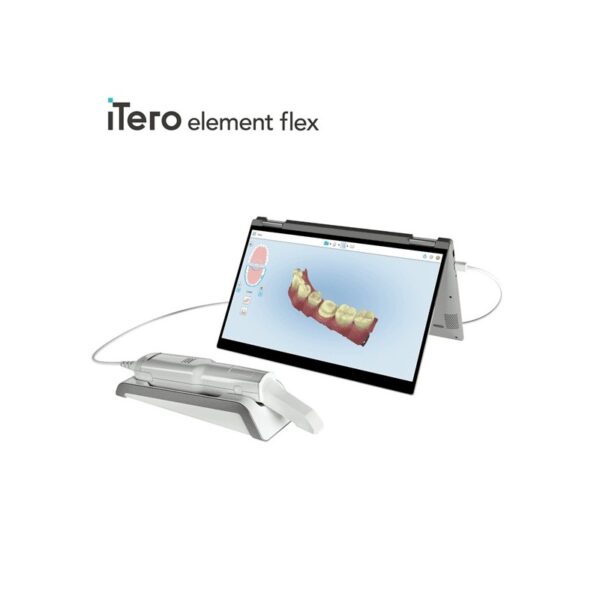
iTero Element Flex is a system allowing for quick and easy transfer between offices, enabling GPs and orthodontists the capacity to perform scans that are full-arch beyond the practice.iTero Element Flex Features
-Compact footprint for transportability and convenience
-Custom-designed carrying case for the ultimate in mobility
-Enhanced color for stunning and precise imaging
-Perform crisp, full-color, high-definition 3D scans in as little as 60 seconds*
-Wand touchpad is as intuitive and easy as gesturing on your smartphone
Milling Unit:• Choose from CEREC MC, CEREC MC X or CEREC MC XL
• Get access to the entire range of chairside treatment with up to 40 mm block size, including bridges and abutments
• Create fully anatomic, precise treatments quickly
• CEREC Guide 2 surgical guide
• Dry mill ready
• Includes CEREC software
BRAND NEW 3Shape Trios Cart T12A dental impression intraoral 3D scanner, it is new in the original crate with all accessories including scanner, wand and tips and has never been used.
TRIOS MOVE makes it simple to show digital impressions to your patients in order to explain their treatment plans and improve communication. The system features the same scanning technology as the TRIOS 3, including the option of a wireless model, and can capture full-color digital impressions, provide shade matching and more quickly and easily. As an open system, it can send digital impressions to almost any dental CAD/CAM software platform for the fabrication of almost any fixed, removable or orthodontic solution.
High-tech camera with many advantagesLike its predecessor inEos Blue, the fast scanning speed of the inEos X5 is unsurpassed. The large image field allows the camera to capture four to five teeth per image and an entire jaw with a total of five images. This is how it digitalizes one single crown in less than ten seconds, a three-unit bridge construction in only 30 seconds, as well as an entire jaw in less than one minute. A completely new optical system is used for the scan, which is based on the digital pattern projection: The considerably improved accuracy of less than 12 µm and the camera’s autofocus guarantee high-quality scan data that is also suitable for procedures that require the highest degree of accuracy, such as the most demanding implant operations. Due to the camera’s greater depth of definition, the inEos X5 can also capture the entire jaw including the palate, which makes it possible to create a digital construction of model casting works.Improved handling for new and experienced usersWith an innovative five-axis technology including rotation arm and intelligent scan planning, the inEos X5 positions and captures models with all indications automatically. This standardizes the images, eliminates user error and speeds up the imaging process. That means that new users in particular can digitalize traditional procedures without requiring significant training. Altogether, the inEos X5 stands out due to its easy handling: The large and open operating area allows all standard articulators to be positioned as well as quick access to the model. With the universal model and impression tray holder, all conventional model support and split cast systems, as well as impression trays in all sizes, can also be used. The multi-die scanning offers advantages in cases where the proximal contacts cannot be seen well and in the fabrication of frameworks and copings for single restorations. With this function, up to four prepared stumps can be positioned in a special holder and digitalized at the same time.
The inEos X5 has been available at retailers since May 2013. The list price including PC and inLab software as well as the OPEN inEos interface is EUR 19,990.Overview of new inEos X5 features:Sirona InLab InEos X5 Scanner
A combination of manual and fully automatic operation
High accuracy
Time savings and improved workflow due to the five-axis technology and autofocus
Large scan field and good depth of definition
Multi-die scanning for up to four individual stumps
Universal model and articulator holders
Easy handling
Medit i700 intraoral scanner
The new medit i700 intraoral scanner is smaller, lighter and 2X faster than its predecessor. Summary of improvements:Hardware
Twice as fast as i500/ more vivid lifelike colors
18% smaller
12.5% lighter
UVC light to disinfect camera internals
Scanning area was 14×13 now 15×13
Accuracy twice as good for full arch
Room to room mobility with usb 3 cable connection
180-degree rotation on tip
45-degree mirror angle vs 40 – distal second molars
Just plug right into computer for power and usb
100 uses for the tips autoclave vs 50
Scans up to 70 frames per second (i500 30 frames per second)
Remote control button – switch between scan stages / rotate without having to go back to keyboard
Vibration when break continuity with scan
Coverage of internal hardware
Software
Create master model from scan segments – 5 separate boxes will stitch together in segments
Multiple bites
Faster time to process scan
Ortho module auto tooth segmentation
Other
Scan and produce open source .STL, .OBJ, .PLY files
Normally delivers within 5-7 business days
One year manufacturer warranty included (additional 2 year manufacturer warranty can be purchased at check out – Just remember, your assistant is not going to tell you s/he dropped the camera at month 13. S/He will tell you “the camera just stopped working!”)
Includes Membership to CAD-Ray.com
Includes Level 2 Training: two day hands-on training in Heidelberg (valid for 12 months after purchase, non-transferable)
Includes initial remote training session
Instructional videos to get started right away
Peer to peer online support and private discussion forum
Unlimited remote and phone support
Satisfaction guarantee with return policy
10% restocking fee within 30 days
Full Service PackageIncludes Remote TrainingIncludes Unlimited Remote and Phone Support
iTero Element Flex Intraoral Scanner
iTero Element Flex is a system allowing for quick and easy transfer between offices, enabling GPs and orthodontists the capacity to perform scans that are full-arch beyond the practice.The iTero Element Flex wand-only configuration is a portable scanner for transport from office to office, enabling doctors to leverage the power of chairside visualization. It is ideal for practices with multiple locations who want a scanner that’s convenient and easy to transport. Working using notebooks that are compatible, professionals are now able to scan everywhere, even at the smallest of operatories. The Element Flex contains a custom-designed carrying case.The Element Flex, which is the choice includes a custom-designed carrying case, and allows for connectivity. Every scanner maintains the same capabilities as its predecessor.Initially, intraoral scanning wands considered as difficult to use, and were bulky. Therefore, when it came time to make a purchasing decision clinicians chosen to forego it. Now, there are options provided by a vast assortment.With the launch of this Element Flex, scans can be carried out directly onto notebooks, making scanning that was intraoral more mobile than ever before. However, that’s not the only invention in IOS scanning. The most recent release from 3shape, the TRIOS MOVE, offers a wireless scanning wand along with an arm and swiveling screen which makes it possible for clinicians to readily show patients the process, as well as the treatment planning.The iTero Element Flex system is delivered as a laptop-based workstation for performing oral scans from the office of the doctor. This operation manual describes how to boot and shut down the machine to Deal with cable and the, and also to clean the scanning device and replace its sleevesThe iTero Element Flex system provides an intuitive user interface for performing digital scans for Indices or use. The physician is directed by means of text and visual aid via the arrangement. The notebook’s touch screen and also the wand buttons are used to respond to display instructions.Benefits of this iTero Element Flex system
The Element Flex system that is iTero Offers significant advantages over present methods that are crown-production, such as higher precision that is crown-production scanning, and instant feedback through the
Scanning procedureStreamlined Workflows with Full-Color Scans
Like most iTero Element scanners, iTero Element two and iTero Element Flex are designed to operate with present iTero orthodontic and restorative workflows, such as laboratory workflows, custom made models, open STL export, custom implant abutment and chairside milling partners. Sharp, full-color 3D scans that may be taken in as few as 60 seconds4 are generated by all of iTero Element scanners.iTero Element Flex Features iTero Element Flex Intraoral Scanner
-Compact footprint for transportability and convenience
-Custom-designed carrying case for the ultimate in mobility
-Enhanced color for stunning and precise imaging
-Perform crisp, full-color, high-definition 3D scans in as little as 60 seconds*
-Wand touchpad is as intuitive and easy as gesturing on your smartphone
CEREC Primescan AC Intraoral scanner
Cerec Primescan from Dentsply Sirona is the most advanced digital scanner on the market. It’s providing a level of accuracy never before seen in dentistry. At the peak of innovation, it is widening the gap between those with and without digital dentistry. The Prime Scan is the fastest most accurate intraoral scanner to date. With new scanning technology, it is the ultimate in scanning. Prime Scan and CEREC 5.0 combinations are greatly reduced because more data allows many applications to become automated.For more than 30 years, CEREC® has provided technological precision, superior design and excellent performance to thousands of practices. Now, experience a brand-new fully integrated solution with CEREC Primescan AC. Acquire precise digital impressions with Primescan, design your proposal on the Primescan AC using the intelligent software, then produce precise, smooth restorations with your choice of milling unit. Find the next level of productivity and patient care – it’s all here.How Does CEREC Primescan Work?
CEREC Primescan is an alternative to traditional intraoral dental impressions, which use a putty-like substance to take physical impressions of your teeth. This method does not allow for digital assessment of your mouth, and some patients find it the process of physical impressions to be uncomfortable.CEREC Primescan uses a wand-like device, loaded with powerful imaging sensors which can capture more than 50,000 images of your mouth per second. These images are quickly stitched and compiled into a 3D image of your teeth, jaw, gums, and mouth, and displayed on a high-definition screen for immediate assessment by our doctors.Using this sensor, our doctors can image your entire mouth up to 20mm in depth, including gums, blood, and bone structures, quickly and accurately. The Primescan software (as compared to the Omnicam) creates high-resolution 3D models to assess your oral health and create the very best crowns, implants, removable prosthesis, restorations, and even 3D prints. With just a few quick sweeps of the CEREC Primescan device, we’ll be able to generate an in-depth, modifiable 3D image of your mouth in minutes.The Benefits of CEREC Primescan:
An excellent choice for outstanding results: Primescan is your perfect starting point in digital dentistry. No matter how you would like to design your workflows, Primescan is the enabler for efficient digital workflows – both chairside in your practice and with your preferred partners.Well designed and perfectly compatible: Along with the high-performance intraoral scanner comes the new Acquisition Center. Together, they form a highly effective and most comfortable system – meeting your needs with two individual software configurations:So, why is CEREC Primescan such a big deal? Here are just a few improvements to this sophisticated system:Shorter wait times – We can quickly image your mouth without waiting for dental impressions to set, allowing us to treat each patient more quickly and effectively. A full jaw impression only takes 2 minutes. This adds up to less time spent in the dental chair.Real-time image processing – Our dentists can quickly adjust and modify scanned images using filters and other tools, leading to more accurate diagnostics and better overall patient outcomes.Extremely versatile – CEREC Primescan can be used for almost any dental procedure. From implant dentistry to the creation of CEREC same-day crowns, the straightening of teeth, whitening, development of dentures and partial dentures.CEREC Primescan AC with CEREC Software Sirona Advantages:
Enables all kinds of treatment, from a single tooth to full arch
With Primescan intraoral scanning is now more accurate, faster and easier
Allows an efficient workflow, both chairside and with preferred partners
Along with the high-performance intraoral scanner comes the new Acquisition Center, together forming an effective and most comfortable system, meeting your needs with two individual software configurations: Primescan AC with Connect Software (supports the connection to established partners workflows) and CEREC Primescan AC with CEREC Software (ideal for cabinets)
Smart Pixel Sensor technology – allows superior precision and excellent detail reproduction, processes more than 1 million 3D points per second, producing photorealistic and highly accurate data
Due to its ability to scan at an incredible data density, it delivers complete 3D structures of everything in its field of view
Its dynamic depth scan technology enables perfect sharpness and outstanding precision, even at a measuring depth up to 20 mm
Easy to use
Easy scanning of all dental materials and hard to access areas
Allows you to start scanning right away
Self-heating for fog-free scanning
The increased field of view visualizes larger areas with fewer sweeps and immediate precision
Faster scanning with a smooth scan flow
Consolidating more than 50.000 images per second and fast processing of exactly the data the software needs Easy capturing and quicker processing of more data in higher resolution
Complete 3D-scan models are displayed immediately, no matter how fast you scan
Accelerate your workflow: Due to seamless, validated and open data transfer options, labs and other third parties are supplied with high-resolution models at an instant
3 different sleeves (disposable and stainless steel, with sapphire glass or autoclavable)
Acquisition Center – Smart features and greater comfort: intuitive use via movable 16:9 touchscreen and touchpad for perfect ergonomics
Kinematics for perfect ergonomic positioning
Smart Hygiene concept for fast and easy disinfection
Full mobility with more than 60-min. battery buffer
CEREC Primescan AC with CEREC Software – complete chairside system, which offers flexible data export options, with automatized workflow thanks to Artificial Intelligence and touch-enabled and intuitive user interface
Milling Unit:• Choose from CEREC MC, CEREC MC X or CEREC MC XL
• Get access to the entire range of chairside treatment with up to 40 mm block size, including bridges and abutments
• Create fully anatomic, precise treatments quickly
• CEREC Guide 2 surgical guide
• Dry mill ready
• Includes CEREC softwareStriking in every detail: The new Acquisition CenterThe new Acquisition Center is a work station designed for modern dentistry and with the dentist in mind. It comes with a touchpad and a 16:9 wide-format movable touchscreen, offering you a highly intuitive and ergonomic work platform.Your benefits at a glance:
Touchscreen & Touchpad for most comfortable, intuitive use
Kinematics for perfect ergonomic positioning
Smart Hygiene concept for fast and easy disinfection
Mobility concept for full mobility with more than 60-min. battery buffer
The best choice for your practice: Take digital impressions and continue working with your trusted partners or enjoy the benefits of complete chairside workflows.Primescan meets your needs with two individual software configurations:Primescan AC with Connect Software:
Supports data transfer options to your preferred partners
Secure and encrypted data transfer through Connect Case Center Inbox
Easy upgradability to full chairside workflow
Touch-enabled and intuitive user interface
CEREC Primescan AC with CEREC Software:
Supports full chairside workflows for single-visit dentistry
Flexible data export options
Automatized workflow thanks to Artifical Intelligence
Touch-enabled and intuitive user interface
Technical Data:CEREC Primescan AC Intraoral scanner
CAD system for high-precision intraoral optical impressions
High-resolution, heated intraoral 3D scanner
Integrated image processing
High processing power due to state-of-the-art processor
Trackball or touchpad
Hand and foot controlled enter keys
Ethernet port and WLAN
USB interfaces
The high-resolution 3D intraoral scanner allows image acquisition with the image control inside the scanner, the image data transfer is made through USB 2.0 interface
21.5″ inch TFT LED flat-screen display, HD resolution: 1920 x 1080 pixels
Mobile housing, with no water or air connection required
Voltage: 100 – 240 VAC/50-60Hz
Nominal current: 5.0 – 2.1 A
Type of protection against electric shock: Class I device
Waterproof: no
Degree of contamination: 2
Installation category: II
Operating mode: continuous
Dimensions W x H x D: 408 (537) x 1190 x 443mm
Total weight: 38kg
Weight without monitor and battery: 31kg
Weight without battery: 36kg
PC components:
Processor: Intel
RAM: 32GB RAM
Hard disks: 1x PCIe SSD + 1x SATA HDD
Network card: Ethernet 10/100/1000MBit/s
Operating system: Windows 10, 64 bit
Installation OS: pre-installed, from the factory
Transportation and storage conditions:
Temperature: -25°C – + 60°C
Relative humidity: 10% – 75%
Air pressure: 700hPa – 1060hPa
Operating conditions:
Temperature: 10°C – 35°C
Relative humidity: 30% – 85%, no condensation
Air pressure: 700hPa – 1060hPa
Operating altitude: up to 3000m
Delivery form:
CEREC Primescan AC with CEREC Software – 1 piece
3Shape Trios Cart T12a Impression 3D Intraoral Scanner3Shape TRIOS is a next-generation intraoral impression solution that is fast, accurate and easy to use. TRIOS is built on 3Shape’s Ultrafast Optical Sectioning™ technology and its features include high accuracy capture, spray- and powder-free scanning, clinical scan validation, intuitive Smart-Touch user interface, and more. TRIOS is optimized for a wide range of indications.TRIOS scanner benefits and features:
-Up to 1000 3D pictures for true geometries
-Spray-free for optimal accuracy and comfort
-Designed for high-speed impression capture
-Ergonomic grip for perfect control
-Autoclaveable scanner tip
-Scanning has never been easier. No need to hold the scanner at a specific distance or angle for focus. Dentists or assistants can even rest the scanner on the teeth for support as they scan.TRIOS cart benefits and features
-Live 3D visualization
-Easy-to-use touch screen
-Sleek design
-Unique motion sensor interface
-Mobility and Wi-Fi
-Easy-to-clean
-General benefits of digital impression takingDENTISTS:
-Less adjustment and grinding during seating
-Improved accuracy and clinical results
-Faster than traditional impression taking
-Reduced need for retakes
-No impression materials and mess
-Cost savings related to materials and shippingPATIENTS : 3Shape Trios Cart T12a Impression 3D Intraoral Scanner
-Quick and comfortable experience
-Better restoration fits and minimal grinding
-Improved clinical results
-Reduced number of appointments due to fewer retakes
-Reduced over-all chair-time3.5 Tips to Obtaining a Good Scan
PREPARATION
1. Turn on the cart or PC in advance to allow the system to heat up. See section Heating and
Mounting the Scanner Tip, step 1. Allow the system to warm up for about 10 minutes prior to use. If
using the heater, the final temperature is reached when the light goes out.
2. Retract the gingiva around the preparation for the preparation to stand out clearly.
3. Make sure the scanner tip is warm to avoid condensation on the mirror. See section Heating
and Mounting the Scanner Tip, step 5.
SCANNING
1. Dry the teeth lightly using compressed air. Be sure to reach the narrow regions between teeth.
Consider using a saliva ejector and/or tampons.
2. Get a good start:
• Start at preparation (or 1st molar if antagonist).
• Wait for about 5 scanner "clicks" before proceeding (helps build up a good starting point).
• Complete preparation including preparation line.
• Scan neighboring teeth: Occlusion, lingual/palatinal side, buccal/labial side.
3. Keep scanner head at 0-5mm from the teeth, it is OK to touch the teeth occasionally.
4. Move the scanner slowly and smoothly, you should hear a more rapid clicking sound.
41
5. Keep lips, cheeks, and tongue out of the scanner’s view:
• Use your finger or a dental mirror to create space between the teeth, lips and cheeks.
• Use a lip-and-cheek-retractor to keep lips and cheeks away.
• Be careful not to scan your own or assistant’s fingers.
• If you get lips, cheeks or tongue in the scan, make sure to delete it all, especially where they have
contact with the teeth (no surfaces should stick out from the teeth).
6. Keep focus on:
• Option 1 - Look at the teeth while scanning and listen to the "clicks". If it stops clicking/capturing,
carefully move back to the area marked on the screen.
• Option 2 - Look at the 2D image at the lower right corner. What you see here is what you scan.
Avoid lips, cheeks and the tongue to get an easy scan.
7. When scanning is complete, inspect the result by rotating the scan.
The important areas are:
• Preparation line (avoid interference from gingiva, saliva, blood).
• Contact points.
• Occlusal surfaces.
• If an important area is missing, simply touch this area on the model, and re-start scanning from
this point.
8. Bite Scan:
• Start from the second molar or at canine if you make an anterior scan.
• While centering the 2D image on occlusion plane, slowly move the scanner tip in straight mesial
direction with equal coverage of the upper and lower teeth.
• Scan 4 teeth for optimal alignment. This should take no more than 5 seconds.
9. Important for good colors:
• Avoid the light from the dentist chair lamp pointing directly into the patient's mouth.
3Shape TRIOS 3 Wireless Move Pen GripTRIOS is the world’s first intraoral scanner to offer a wireless option. 3Shape TRIOS 3 Wireless gives you the freedom to perform digital scans unrestricted by wires, optimizing comfort for both you and your patientsThe new 3Shape TRIOS MOVE is the ultimate patient/dentist communication tool. Show patients their digital scans and dynamic treatment information close-up, and create greater opportunities for treatment dialogue and joint decision-making.The ergonomic and lightweight design of TRIOS MOVE allows you to always position the screen in the right place, and enjoy superior user experience.Features of TRIOS MOVE;-13.3″ HD LCD Touchscreen – The perfect size when having it in front of a patient or working with up closeAdjustable arm- Bring the screen directly in front of the patient to involve them in the scanning process and the treatment planningPowerful custom PC designed for scanning – Specifically designed for use with all TRIOS 3 scanners to give a fast and smooth scan experience straight out of the boxFour wheels with integrated brakes – It is now very easy to move around the chair and from chair to chair
Enhance comfort with wireless innovation.TRIOS is the world’s first intraoral scanner to offer a wireless option. 3Shape TRIOS 3 Wireless gives you the freedom to perform digital scans unrestricted by wires, optimizing comfort for both you and your patientsThe new 3Shape TRIOS MOVE is the ultimate patient/dentist communication tool. Show patients their digital scans and dynamic treatment information close-up, and create greater opportunities for treatment dialogue and joint decision-making.The ergonomic and lightweight design of TRIOS MOVE allows you to always position the screen in the right place, and enjoy superior user experience.Features of TRIOS MOVE : 3Shape TRIOS 3 Wireless Move Pen Grip
13.3" HD LCD Touchscreen - The perfect size when having it in front of a patient or working with up closeAdjustable arm- Bring the screen directly in front of the patient to involve them in the scanning process and the treatment planningPowerful custom PC designed for scanning - Specifically designed for use with all TRIOS 3 scanners to give a fast and smooth scan experience straight out of the boxFour wheels with integrated brakes - It is now very easy to move around the chair and from chair to chair.




 An excellent choice for outstanding results: Primescan is your perfect starting point in digital dentistry. No matter how you would like to design your workflows, Primescan is the enabler for efficient digital workflows – both chairside in your practice and with your preferred partners.Well designed and perfectly compatible: Along with the high-performance intraoral scanner comes the new Acquisition Center. Together, they form a highly effective and most comfortable system – meeting your needs with two individual software configurations:So, why is CEREC Primescan such a big deal? Here are just a few improvements to this sophisticated system:Shorter wait times – We can quickly image your mouth without waiting for dental impressions to set, allowing us to treat each patient more quickly and effectively. A full jaw impression only takes 2 minutes. This adds up to less time spent in the dental chair.Real-time image processing – Our dentists can quickly adjust and modify scanned images using filters and other tools, leading to more accurate diagnostics and better overall patient outcomes.Extremely versatile – CEREC Primescan can be used for almost any dental procedure. From implant dentistry to the creation of CEREC same-day crowns, the straightening of teeth, whitening, development of dentures and partial dentures.CEREC Primescan AC with CEREC Software Sirona Advantages:
 The new Acquisition Center is a work station designed for modern dentistry and with the dentist in mind. It comes with a touchpad and a 16:9 wide-format movable touchscreen, offering you a highly intuitive and ergonomic work platform.Your benefits at a glance:


Reviews
There are no reviews yet.