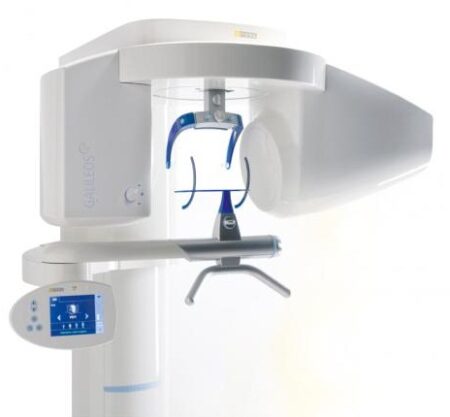
| Description | CEREC now provides a completely new process to dental practices: by combining the new CEREC SpeedFire furnace and CEREC Zirconia material, dentists can now deliver full contour crowns and small bridges made of the full-strength high-quality zirconium oxide in their own practice while the patient waits. | With the integrated FaceScanner in GALILEOS you can now record the facial surface parallel to the x-ray image. And that, as opposed to traditional face scanners without the use of lasers, which is therefore gentler on the patients. Thanks to the simultaneous x-ray image and surface depiction, the fully automated overlaying of the data is extremely precise. In addition, texture and coloring in the software allow for a particularly realistic depiction of the soft tissue proportions – an ideal tool for patient consultation! | iTero Element 2 Intraoral Scanner includes an ergonomic, based cradle and delivers imaging precision in a compact footprint using tools that are strong.Together, we can streamline your workflow.- Restorative and orthodontic workflows
- Optimized Invisalign connectivity
- Visualization tools
- Chairside milling integration
| The affordable Gendex 9200 DDE dental radiography system offers standard panoramic and cephalometric x-ray projections, as well as a wide range of advanced programs to support most dental imaging and exams. | Sirona offers your lab greater freedom in terms of indications, materials and for processing third-party CAD/CAM data. The open 5-axis milling and grinding machine inLab MC X5 is designed specifically to meet dental lab requirements for cost-efficient production today and in the future. | The 3Shape D710 is optimized for scanning both the impression and gypsum models and enables high throughput for both advanced and standard indications. These innovative scanners are so easy to use that staff training is barely required. Item fixation is fast, and the scan starts with a click on the program. |
| Content | Sirona CEREC Zirconia SpeedFire Milling Unit
High strength, short manufacturing process
The greatest benefit of CEREC Zirconia is the high flexural strength of the material. It is suitable for individual crowns as well as small bridges and can be processed in thin wall thicknesses. Since these restorations are manufactured in monolithic form, there is no risk of chipping. Another benefit for dentists is that zirconium oxide can be cemented conventionally.CEREC Zirconia is a pre-shaded translucent zirconium oxide available in 10 shades on the basis of the VITA Classic Shade Guide®. The material is milled in an enlarged form and then densely sintered to its final size in the new sintering furnace CEREC Speed-Fire. The oversized milling facilitates a new level of milling accuracy leading to superb, precisely fitting restorations. The sintering process takes just 10-15 minutes for crowns and 25 minutes for bridges. The subsequent glaze firing gives the restoration a high gloss finish.The short process to produce CEREC Zirconia restorations is both convenient and economical. With this market launch, all CEREC milling/grinding units now provide wet and dry milling. Dry milling reduces the overall processing time for zirconia and, combined with the world’s fastest sintering cycles, enables the chairside procedure.The workflow is easy to learn since the CEREC Software 4.4.1 guides the dentist through the entire process, and even sends the sintering and glazing information to the furnace. No programming of the furnace is required – it is all handled automatically by the software. A high-performance material and a specially tailored workflow ensure a simple process and high-quality treatment.
CEREC meets patients’ needsSirona CEREC Zirconia SpeedFire Milling UnitEighty three percent of patients in a recent survey said they prefer single visit dentistry to traditional treatment. The majority said they would even be willing to pay more for single visit dentistry. Two thirds indicated they’d be happy to travel further than they currently do, in order to receive treatment in one session. Another two thirds said they would even be prepared to change their dentist. The advantages of single visit dentistry are obvious: Patients avoid impression material, receive fewer anesthetics and don’t need a temporary. Reducing the number of visits, injections and making the overall prosthetic procedure more comfortable influences patients to opt for treatment with CEREC.In addition to CEREC Zirconia, many other high-performance materials can be processed with CEREC. The range of materials with CEREC also expands clinical indications since the dentist can easily select the material suited for each indication.
Investment for a successful futureThere have always been good reasons to start using digital dentistry with CEREC. CEREC Zirconia completes the range of indications for chairside application for nearly
every situation, thus giving dentists greater choice and allowing them to increase the value of their practice’s offering.It is obvious that advanced technologies in automobiles, computers and smartphones make our daily lives easier. CEREC is also a technology that further develops a dental practice and can make it well positioned for the future. Especially now, as the system is highly flexible, it enables dentists to expand their offering in implant dentistry and orthodontics. | Sirona GALILEOS Comfort/Compact| GALILEOS Comfort | GALILEOS Compact | | Oral and maxillofacial surgeons
Dental clinics
Private clinics
Orthodontists | General practioners
Dental implant practices
Oral surgeons |  |  | | Comparison Table of Galileos Comfort/ Compact & Orthophos XG 3D X-Ray systems | | Technical overview | GALILEOS Comfort | GALILEOS Compact | ORTHOPHOS
XG 3D | | Field of view | (15 x 15 x 15) cm³ | (12 x 15 x 15) cm³ | 8 cm x 8 cm (Ø x Höhe) | | 3D Resolution (isotropic voxel size) | 0.3/0.15 mm | 0.3 mm | 0,2 mm; 0,1 mm (available at the end of 201) | | Scan time / exposure time | 14 s / 2 – 6 s | 14 s / 2 – 6 s | 2–5 s | | Reconstruction time | 2.5 – 4.5 min | 4.5 min | 4,5 min | | Patient position | standing / seated | standing / seated | Standing/seated, chin rest/bite block, occlusal bite block for automatic patient positioning with 2D PAN images | | X-ray generator | | kV | 85 | 85 | 60–90 | | Effective dosage | 29 µSv / 68 µSv **
(21 mAs, 85 kV) | < 29 µSv / 68 µSv **
(21 mAs, 85 kV) | 43–175 μSv (Schulze)
(Standard: 100 μSv) | | Space requirements (minimum) | 1,6 x 1,6 x 2,25 m (d x w x h) | 1,6 x 1,6 x 2,25 m(d x w x h) | 1,5 m x 1,1 m x 2,25 m (Pan ), | | Space requirements (recommended) | >1,8 x 1,8 x 2,5 m (d x w x h) | 1,8 x 1,8 x 2,5 m (d x w x h) | 1,7 m x 1,3 m x 2,5 m (Pan ) | | User Interface | Full color touchscreen | Multipad | EasyPad | | Patient fixation | Occlusal bite block, forehead | Occlusal bite bock, forehead | | | Positioner | support, chin rest, head positioner *** | support, chin rest | | | Upgradable to Comfort version | |  | | | Optional floor stand | | | | | Wheelchair accessible | | | | | Remote control | | | | | Programs | | 150 µm resolution for close-up reconstruction | | | | | 300 µm resolution for standard volumes | | | | | High contrast mode for optimized hard tissue display | | | | | Views | PAN with 3D slice navigation | PAN with 3D slice navigation | Tiltable 2D slices, custom | | TSA, axial, sagittal, coronal, CEPH lat., CEPH pa/ap | TSA, axial, sagittal, coronal | 3D slicing, TSA, LSA, axial, sagittal, coronal | | 3D model, 1-click OP reports | 3D model, 1-click OP reports | 3D model, implant-oriented view, 1-Click OP reports |
With the integrated FaceScanner in GALILEOS you can now record the facial surface parallel to the x-ray image. And that, as opposed to traditional face scanners without the use of lasers, which is therefore gentler on the patients. Thanks to the simultaneous x-ray image and surface depiction, the fully automated overlaying of the data is extremely precise. In addition, texture and coloring in the software allow for a particularly realistic depiction of the soft tissue proportions – an ideal tool for patient consultation! |
| iTero Element 2 Intraoral Scanner
iTero Element 2 Intraoral Scanner delivers imaging precision in a compact footprint using tools that are strong.An intuitive user interface is provided by the Element two system for performing scans for Orthodontic use or Indices. The doctor is guided by means of text assistance and visual via the arrangement. Wand buttons and the touch screen are used to respond to display instructions.A scan feature that preserves natural occlusion whilst getting detailed registration is offered by the iTero Element.The iTero Element 2 was created for better functionality with 2x and 25% quicker scanning processing period compared to this iTero Element.The iTero Element 2 includes a 21.5-inch screen and 16:9 widescreen viewing format. It has an integrated lithium-ion battery, which allows without the need to reboot or to plug in for power for transfer between operatories. The iTero Element 2 includes an ergonomic, based cradle.Like most Element scanners, both Element Flex and the Element two are made to operate with existing restorative and corrective workflows, such as open STL export, custom made models, laboratory workflows, custom implant abutment, and chairside milling partners. According to the company, all iTero Element scanners create full-color 3D scans.Element 2 and Element Flex scanners are now available in the United States and the vast majority of European nations. They are available in Asia Pacific markets and are pending acceptance in Canada. The Element scanner that is iTero will last to be available in most markets.** iTero Element 2 BENEFITS :iTero TimeLapse Technology:
Compare historical and current scans and quantify important oral changes over time – helping your patient reach care decisions in a more engaging and informed way.Invisalign® Outcome Simulator:
Engage patients and increase conversion by showing patients the actual potential benefits of Invisalign treatment.3D Invisalign Progress Assessment Feature:
Compare a patient’s new scan with a precise stage of their Invisalign treatment plan.Real-time 3D Visualizations:
Help patients understand oral concerns by sharing a visualization right at chairside.Vibrant Color Scanning:
Realistic color images make it easier to distinguish between gingival and dental tissue for more precise clinical evaluations.High-Definition Touchscreen Interface:
Scanned images appear instantly with crisp definition on the 19-inch, high-definition, multi-touch-capable display. The display also works with latex, vinyl and nitrile gloves.Certified Connectivity Workflow:
Designed to connect to restorative and orthodontic labs, third-party treatment planning, custom implant abutment, chairside milling and lab CAD/CAM systems.Together, we can streamline your workflow.- Restorative and orthodontic workflows
- Optimized Invisalign connectivity
- Visualization tools
- Chairside milling integration
- – Maximum height: 51.8″
- – Weight with wheel stand: 55.1 lbs.
- – Dimensions including rotation (W x D x H): 24.6″ x 23.4″ x 51.8″
- – Operating power: 100-240VAC – 50/60 Hz – 350VA (max)
- – Storage/transportation temperature: 23° to 122°F
- – Installation: Wheel stand with scanner wand
- – Monitor: 19″ touchscreen monitor
- – Scanner: Confocal Imaging Scanner emits red laser light (680 nm Class 1) as well as white LED emissions
- – Wireless LAN: LAN card provides local network communications with wireless connectivity
| Gendex Orthoralix 9200 DDE Digital Cephalometric + Panoramic X Ray
The versatile Orthoralix 9200 system offers standard panoramic projections, as well as a full array of advanced programs to satisfy the demanding needs of dental specialists. Plus, with both ?lm-based and direct digital models and the optional cephalometric arm, the capabilities of the 9200 can expand with your practice.Discover all of the benefits and options this imaging system has to offer.Wide Range of Projections – The Orthoralix 9200 offers 10 standard projections, with the ability to add 5 Cephalometric projections and the Transcan tomography projection to satisfy the needs of today’s dental specialists. Its intuitive control panel and easy-to-read display simplifies the process of selecting projections. Plus, with the precision of morphology following and multi-motorized arm rotation, the 9200 excels at focal trough reconstruction.- 10 standard imaging projections and 6 additional with optional upgrades
- Meets the demands of today’s orthodontists, oral and maxillofacial surgeons, and other specialists
Advanced Image Quality – Three technical factor setting modes are available to ensure complete flexibility and quality control. Manual mode for total operation control, Preset mode where the operator can customize settings, and Automatic Exposure Control (AEC) mode. With AEC, the 9200 automatically raises or lowers the kV setting based on measurements of bone size and density.- Triple laser beam guide system and motorized column for simple, accurate patient positioning
- Automatic Exposure Control (AEC) to ensure optimum image contrast and balance
- Real-time image reconstruction with the direct digital model
Gendex Orthoralix 9200 DDE Digital Cephalometric + Panoramic X Ray
Expand Your Capabilities – Utilizing the latest in CCD sensor technology and built-in LAN connectivity, the 9200 DDE model allows clinicians to digitally capture x-ray images and share them with any computer connected to the network for maximum productivity. With the option to add a Cephalometric arm, the Transcan cross-sectional tomography projection, and convert to direct digital technology, the 9200 is one of the most expandable panoramic systems available.- Direct digital model with the latest CCD sensor technology and direct LAN connectivity
- Optional Cephalometric arm attachment
- Optional Transcan implantology projection for transverse cross-sections of upper and lower jaw
Gendex Orthoralix 9200 DDE Digital Cephalometric + Panoramic X Ray| Power Supply | 115-250 VAC ± 10% | | Frequency | 50/60 Hz ± 2 Hz | | Maximum Line Power Rating | 10 A at 250 V, 20 A at 115 V | | Anode Voltage | 60 – 84 kV, in 2 kV steps | | Anode Current | 3 – 15 mA, in 1 mA steps | | Exposure Time | 12 s for standard pan, 0.16 – 2.5 s for Cephalometric | | Duty Cycle | 1:20 at full power operation | | Focal Spot | 0.5 mm, IEC 336 (1993) | | Vertical Reach | 39′ to 71′ (100 to 180 cm) from ?oor to occll plane | | Weight | 410 lbs (115 kg), 467 lbs (212 kg) with Ceph arm | | Active Area CCD Sensor | 147 x 6 mm (Standard Pan), 220 x 6 mm (Ceph) | | Image Size | 1536 x 2725 pixels (Standard Pan), 2304 x 2529 pixels (Ceph – Maximum) | | Minimum PC Requirements | Pentium® II CPU, 400 MHz, 256 MB RAM | | Required Operating System | Microsoft® Windows 98®/ Windows 2000®/ Windows XP® |
|
The new freedom in detailEvery aspect of inLab MC X5 has been designed to address the CAD/CAM needs encountered in dental labs. Intensive technical and technological exchange with many dental technicians has led to the creation of a production machine fulfilling practically all requirements. For the reliable, independent production of dental prostheses.OpeninLab MC X5 is an open production unit. It is the perfect complement to the inLab components inEos X5 and inLab software, but it can also be used to process other STL restoration data. 1 With its own CAM module, the machine can be connected to a wide range of other CAD systems at no additional cost. DesignThe new inLab MC X5 has more than just outstanding functionality and simple operation: its extremely stable construction and modern design are also highly attractive. Its compact, elegant shape will be a real eye catcher in your lab and complements perfectly the award-winning inEos X5 extraoral scanner.Great variety of materialsinLab MC X5 is designed as a universal production unit for processing zirconium oxide, polymers, composites, wax, titanium and metals 2 as well as glass and hybrid ceramics. inLab MC X5 can be used for wet, dry, or dry/wet combination production during the same machining operation depending on material and indication.Sirona has drawn upon its 30 years of experience in the wet processing of glass ceramics to create the ultimate machine for the wet grinding of fully anatomical restorations from high-strength monolithic materials.Switching between wet and dry production e.g. from glass ceramics to zirconium oxide is fast and uncomplicated.inLab MC X5 – efficient and flexible inLab MC X5 is a universal 5-axis production unit for wet and dry production of blocks and disks. It was designed to meet dental requirements in labs and focus on economic and effective production processes.You benefit from a wide range of materials and can select from the high-quality materials of Dentsply Sirona and its CAD/CAM material partners for which the production processes of inLab MC X5 are optimized. | 3shape D710 Dental Scanner3Shape D710 Scanner series can scan gypsum and impression versions. The series scanners can integrate into the clinic with minimum staff training. The scanners provide greater practice productivity, a comprehensive list of signals, and the most extensive 3D scans.Where flexibility and productivity are the key standards 3Shape chain scanners are for medium to large labs.The 3Shape D710 is optimized for scanning both the impression and gypsum models and enables high throughput for both advanced and standard indications. These innovative scanners are so easy to use that staff training is barely required. Item fixation is fast, and the scan starts with a click on the program.3SHAPE D710 For Sale3Shape D700 Scanner is both a scanner and impression scanner in 1 unit. It utilizes three measurement movement and two cameras a laser and creates another pass to especially hone. Just one device can be scanned by the apparatus in under 30 seconds and a whole model in about a minute with a degree of accuracy of 20 microns.Features:
-3-axis motion system
-Red-laser Tech
-Gypsum Version scanning
-Impression scanning Alternative
-Multi-die scanningBenefits:
-Easy operation, extreme Precision, and Rapid Scan
-Enables impressions, deep inlays, and Complete undercuts to scan Efficiently
-Supply labs Using ultra-efficient batches and multi-case processingHigh-speed scanning
The D710 is optimized for scanning gypsum and impression versions and enables high throughput for both advanced and standard indications3Shape – leading impression scanning technologies
3Shape’s patented adaptive scanning technology, combined with the scanner’s 3-axis motion and 2 cameras with reduced angle, facilitate the unique impression scanning capability.Adaptive scanning intelligently detects incomplete areas and automatically builds
adaptive scan sequences for capturing full object geometry. |



Reviews
There are no reviews yet.