| Description | CEREC now provides a completely new process to dental practices: by combining the new CEREC SpeedFire furnace and CEREC Zirconia material, dentists can now deliver full contour crowns and small bridges made of the full-strength high-quality zirconium oxide in their own practice while the patient waits. | Automatic Power Control: Epic Pro cuts four times faster1 than a classic diode laser with
minimal collateral damage. In this treatment mode, the laser in continuous wave mode converts light energy to thermal power at the tip. Laser energy is adjusted automatically in real time to maintain constant tip temperature. The result is extremely consistent and reliable cutting conditions, regardless of speed of movement, tissue type, etc. | Medit i700 makes the scanning experience a comfortable one for both the dentist and patient. Medit i700 is a fully open-source intraoral scanner, compatible with Medit’s Link software, as well as software from other CAD/CAM providers. | The iTero Element Scanner is a digital impression system that eliminates the need for messy putty in your mouth.Improving iTero Intraoral ScannersWhile it’s already a leader in dental technology, iTero is constantly refining its intraoral scanning options. Its Element Itraoral Scanner, introduced in March 2015, captures 6,000 frames per second, up to 20 times faster than its predecessor. Its wand is also smaller and lighter, with in-built controls for more intuitive operation. Intraoral scanners from iTero are renowned for their accuracy, but the increased capture speed improves the company’s already impressive statistics. | Designed especially for general dentists, the Sirona Orthophos XG3 combines top-tier image quality and exceptional ease-of-use in an affordable, digital panoramic x-ray solution. | VersatilityWelcome to a world where you‘re spoiled for choice! The new CEREC Primemill combines wet and dry milling and wet grinding. No matter the indication, with CEREC Primemill you can select from a broad range of material options from validated partners providing the flexibility and predictability you need to offer patients the best possible treatment. |
| Content | Sirona CEREC Zirconia SpeedFire Milling Unit
High strength, short manufacturing process
The greatest benefit of CEREC Zirconia is the high flexural strength of the material. It is suitable for individual crowns as well as small bridges and can be processed in thin wall thicknesses. Since these restorations are manufactured in monolithic form, there is no risk of chipping. Another benefit for dentists is that zirconium oxide can be cemented conventionally.CEREC Zirconia is a pre-shaded translucent zirconium oxide available in 10 shades on the basis of the VITA Classic Shade Guide®. The material is milled in an enlarged form and then densely sintered to its final size in the new sintering furnace CEREC Speed-Fire. The oversized milling facilitates a new level of milling accuracy leading to superb, precisely fitting restorations. The sintering process takes just 10-15 minutes for crowns and 25 minutes for bridges. The subsequent glaze firing gives the restoration a high gloss finish.The short process to produce CEREC Zirconia restorations is both convenient and economical. With this market launch, all CEREC milling/grinding units now provide wet and dry milling. Dry milling reduces the overall processing time for zirconia and, combined with the world’s fastest sintering cycles, enables the chairside procedure.The workflow is easy to learn since the CEREC Software 4.4.1 guides the dentist through the entire process, and even sends the sintering and glazing information to the furnace. No programming of the furnace is required – it is all handled automatically by the software. A high-performance material and a specially tailored workflow ensure a simple process and high-quality treatment.
CEREC meets patients’ needsSirona CEREC Zirconia SpeedFire Milling UnitEighty three percent of patients in a recent survey said they prefer single visit dentistry to traditional treatment. The majority said they would even be willing to pay more for single visit dentistry. Two thirds indicated they’d be happy to travel further than they currently do, in order to receive treatment in one session. Another two thirds said they would even be prepared to change their dentist. The advantages of single visit dentistry are obvious: Patients avoid impression material, receive fewer anesthetics and don’t need a temporary. Reducing the number of visits, injections and making the overall prosthetic procedure more comfortable influences patients to opt for treatment with CEREC.In addition to CEREC Zirconia, many other high-performance materials can be processed with CEREC. The range of materials with CEREC also expands clinical indications since the dentist can easily select the material suited for each indication.
Investment for a successful futureThere have always been good reasons to start using digital dentistry with CEREC. CEREC Zirconia completes the range of indications for chairside application for nearly
every situation, thus giving dentists greater choice and allowing them to increase the value of their practice’s offering.It is obvious that advanced technologies in automobiles, computers and smartphones make our daily lives easier. CEREC is also a technology that further develops a dental practice and can make it well positioned for the future. Especially now, as the system is highly flexible, it enables dentists to expand their offering in implant dentistry and orthodontics. | Biolase Epic Pro Dental Soft Tissue LaserThe Epic Pro, which offers the most laser power of any diode laser in dentistry, is the first
product to be introduced resulting from BIOLASE’s strategic development agreement
with IPG Medical. The newest addition to the Epic family of dental soft-tissue lasers, Epic
Pro features several new innovations that are industry-firsts: - A new super pulse technology for more precise, enhanced laser tissue cutting
- Real-time automatic power control to enhance speed and consistency when performing surgery with pre-programed tip temperature
- Pre-initiated, bendable, disposable tips with new smart tip technology to ensure tip performance and quality
Automatic Power Control: Epic Pro cuts four times faster1 than a classic diode laser with
minimal collateral damage. In this treatment mode, the laser in continuous wave mode converts light energy to thermal power at the tip. Laser energy is adjusted automatically in real time to maintain constant tip temperature. The result is extremely consistent and reliable cutting conditions, regardless of speed of movement, tissue type, etc. Super Thermal Pulse: Epic Pro can achieve ten times the peak power of a standard diode (and up to three times that of the closest competitor) laser in short micro-pulses for the highest cutting efficiency and safety. In this treatment mode, the laser converts light energy to thermal power, which it emits as thermal power pulses, (i.e. multiple bursts of high power). Each of these thermal bursts cuts tissue highly efficiently. When the laser is activated, power bursts are emitted with a preset pulse width (duration), while maintaining a precise thermal level at the tip. The laser is powered on only about 3-5% of the time, giving tissue ample time to relax between pulses; creating a safer and gentler experience for patients. 
The Only Laser with Automatic Power ControlEpic Pro is the ONLY FDA-cleared laser with Automatic Power Control, an exclusive innovation from BIOLASE that enables the operator to lase with confidence and speed. 
Enhanced Clinical ApplicationsEpic Pro is the professional’s choice for managing soft tissue cases. With over 20 clinical presets, multiple treatment modes, and an advanced mode for expert users, Epic Pro provides unparalleled consistency and predictability. Unlike traditional diodes, Epic Pro moves quickly and with little snag-and-drag resistance. 
Greater Precision and ComfortEpic Pro brings more precision and comfort than traditional diodes due to innovations such as Super Thermal Pulse mode, which can pulse energy as quickly as ten-millionths of a second, resulting in efficient clinical cutting with less thermal damage than normal diode lasers. 
Introducing Smart Tip TechnologyEpic Pro uses durable new tip technology, available in uninitiated and pre-initiated formats depending on your clinical needs. Epic Pro tips work hand in hand with the laser’s Smart Tip technology to prompt you when a fresh tip is needed. 
With Epic Pro, ‘You Have to See It to Believe It’If you are a current diode laser or CO2 laser user, you have to see Epic Pro cut tissue live and compare to your current laser experience. When current Epic Pro customers were first shown Epic Pro, their response? “You have to see it cut to understand how much faster it is.” Fill out the contact form on this page to request a live demonstration for Epic Pro in your clinic.Technical Specifications Biolase Epic Pro Dental Soft Tissue Laser| Dimension | 7.25in (W) x 4.5in (L) x 6.5in (H) (18.4cm x 11.4cm x 16.5cm) | | Weight | 4 lbs (1.8 kg) | | Operating Voltage | 100V – 240V at 1.2A/0.5A | | Frequency | 50/60 Hz | | Main Control | Power Switch | | Remote Interruption | Remote Interlock | | Disable Control | Emergency Stop Button | | DC Power Supply Module | 12V DC, 5A | | Laser Classification | Class IV (4) | | Medium | Semi-conductor diode | | Wavelength | 940nm ± 20nm | | Power Modes | Continuous, Pulse Modulation | | Fiber Tip Diameter | 300µm, 400µm | | Pulse Duration | 10µm-100ms | | Pulse Interval | 0.01ms – 20ms | | Pulse Repetition Rate | Up to 20kHz (for reference) | | NOHD | 4.77 meters | | Beam Divergence | 0.22 | | Standard Fiber Cable Length | 6 feet (1.8 meters) |
| Medit i700 intraoral scanner
The new medit i700 intraoral scanner is smaller, lighter and 2X faster than its predecessor. Summary of improvements:Hardware- Twice as fast as i500/ more vivid lifelike colors
- 18% smaller
- 12.5% lighter
- UVC light to disinfect camera internals
- Scanning area was 14×13 now 15×13
- Accuracy twice as good for full arch
- Room to room mobility with usb 3 cable connection
- 180-degree rotation on tip
- 45-degree mirror angle vs 40 – distal second molars
- Just plug right into computer for power and usb
- 100 uses for the tips autoclave vs 50
- Scans up to 70 frames per second (i500 30 frames per second)
- Remote control button – switch between scan stages / rotate without having to go back to keyboard
- Vibration when break continuity with scan
- Coverage of internal hardware
Software- Create master model from scan segments – 5 separate boxes will stitch together in segments
- Multiple bites
- Faster time to process scan
- Ortho module auto tooth segmentation
Other- Scan and produce open source .STL, .OBJ, .PLY files
- Normally delivers within 5-7 business days
- One year manufacturer warranty included (additional 2 year manufacturer warranty can be purchased at check out – Just remember, your assistant is not going to tell you s/he dropped the camera at month 13. S/He will tell you “the camera just stopped working!”)
- Includes Membership to CAD-Ray.com
- Includes Level 2 Training: two day hands-on training in Heidelberg (valid for 12 months after purchase, non-transferable)
- Includes initial remote training session
- Instructional videos to get started right away
- Peer to peer online support and private discussion forum
- Unlimited remote and phone support
- Satisfaction guarantee with return policy
- 10% restocking fee within 30 days
Full Service PackageIncludes Remote TrainingIncludes Unlimited Remote and Phone Support | iTero Element Intraoral Scanner
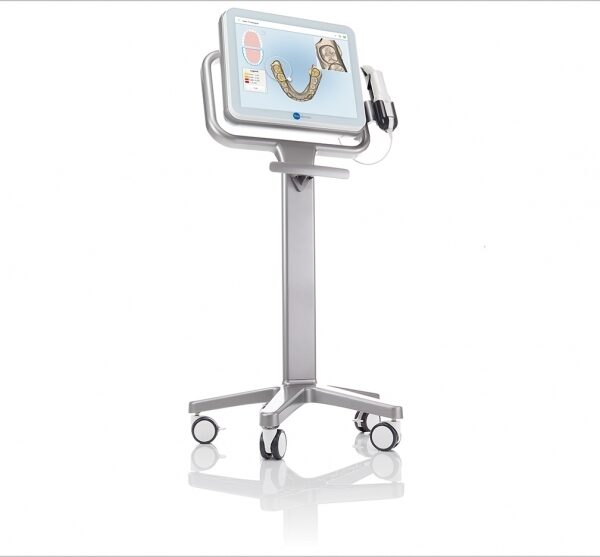
What Are iTero Intraoral Scanners?Intraoral scanners from iTero scan the mouths of patients, capturing images to create three-dimensional dental images in minutes. Intraoral scanners are simple to use and can be operated by one person. Their user-friendly nature helps dental professionals get the best results. The scans they produce are also more detailed than the traditional two-dimensional images they replace.Intraoral digital scans help dental professionals create accurate physical dental models for restorative work, including crowns, veneers, and implants. They also help orthodontists diagnose orthodontic problems and develop the best treatment plans.The company’s digital ecosystem software works seamlessly with its intraoral scanners, improving workflow for dental professionals working on orthodontic and restorative cases. However, unlike many early intraoral scanners, they are open systems. This feature gives dental professionals more flexibility about how they use their digital scan files. Intraoral digital scans from iTero scanners can be easily shared with other dental professionals and third-party providers such as Invisalign. When all relevant parties have the scans, they can communicate better to improve patient outcomes.What iTero Intraoral Scanners DoIntraoral scanners feature a wand, which the dental professional moves around a patient’s mouth. In the latest versions, the wand captures thousands of frames per second which are pieced together to create a three-dimensional visualisation of the patient’s mouth. The wands on iTero intraoral scanners are smaller than early intraoral scanners, allowing them to scan molars in the back of the mouth which were traditionally difficult to reach. Dental professionals using small wands also aren’t limited by how wide their patients can open their mouths. The small wands are also less likely to make patients gag than older forms of scanning technology.Intraoral scanners also have screens which display the digital dental images as they’re captured in real time. The screens show whether the scan is good or not before it’s saved and submitted to the lab. This feature can be a real time-saver for dental professionals who, in the past, could receive word from the lab two or three weeks later that their scans were inadequate. By providing immediate feedback, intraoral scanners can save dental professionals and patients time and frustration.Unlike many intraoral scanners, patients don’t need to cover their teeth in titanium dioxide powder before an iTero intraoral scan. This benefit further improves the scanning process for dental patients.How Intraoral Scanners Make Invisalign Orthodontics Easier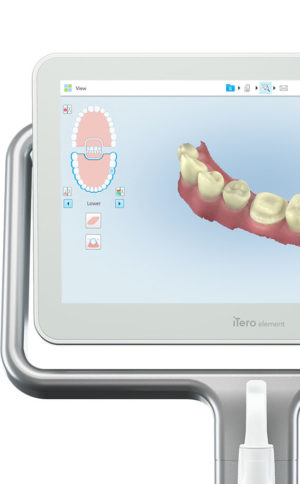 Invisalign clear aligners are one of the most popular teeth-straightening aids used today as they’re effective, removable, and virtually undetectable. Unlike many intraoral scanners, iTero intraoral scanners have open architecture which makes them compatible with the Invisalign system, including its Invisalign Outcome Simulator. Orthodontists can scan their patients’ mouths with an iTero intraoral scanner, then show them how their Invisalign treatment will look. This technology improves the patient experience because patients can know what to expect and feel more confident in their diagnosis and treatment plan. It also makes the ClinCheck setup three times faster.After setup, speed is still on the iTero intraoral scanners’ side. iTero states ClinCheck treatment plans submitted with its scans are usually posted to the Invisalign Doctor Site three times faster than traditional polyvinyl siloxane scans. As a result, your Invisalign aligners are created and posted back to your orthodontist sooner so that you can start treatment faster. Since the iTero intraoral scanning system is open, orthodontists can also send the scan files to any laboratory of their choosing for the creation of a retainer, which reinforces your treatment after the Invisalign process, and other dental tools.Orthodontists can also create better Invisalign treatment plans for their patients using iTero intraoral scans. Align Technology research shows orthodontists who use the scans have 10 times fewer rejections and seven times fewer issues with the fit of the Invisalign aligners. These results may be because iTero intraoral scanners can help orthodontists track their patients’ progress. Regular scans throughout Invisalign treatment can help orthodontists compare expected outcomes with results. If results aren’t as expected, orthodontists can use the scans to educate their patients about their treatment and the importance of complying with their recommendations.Improving iTero Intraoral Scanners iTero Element Intraoral ScannerWhile it’s already a leader in dental technology, iTero is constantly refining its intraoral scanning options. Its Element Itraoral Scanner, introduced in March 2015, captures 6,000 frames per second, up to 20 times faster than its predecessor. Its wand is also smaller and lighter, with in-built controls for more intuitive operation. Intraoral scanners from iTero are renowned for their accuracy, but the increased capture speed improves the company’s already impressive statistics. Invisalign clear aligners are one of the most popular teeth-straightening aids used today as they’re effective, removable, and virtually undetectable. Unlike many intraoral scanners, iTero intraoral scanners have open architecture which makes them compatible with the Invisalign system, including its Invisalign Outcome Simulator. Orthodontists can scan their patients’ mouths with an iTero intraoral scanner, then show them how their Invisalign treatment will look. This technology improves the patient experience because patients can know what to expect and feel more confident in their diagnosis and treatment plan. It also makes the ClinCheck setup three times faster.After setup, speed is still on the iTero intraoral scanners’ side. iTero states ClinCheck treatment plans submitted with its scans are usually posted to the Invisalign Doctor Site three times faster than traditional polyvinyl siloxane scans. As a result, your Invisalign aligners are created and posted back to your orthodontist sooner so that you can start treatment faster. Since the iTero intraoral scanning system is open, orthodontists can also send the scan files to any laboratory of their choosing for the creation of a retainer, which reinforces your treatment after the Invisalign process, and other dental tools.Orthodontists can also create better Invisalign treatment plans for their patients using iTero intraoral scans. Align Technology research shows orthodontists who use the scans have 10 times fewer rejections and seven times fewer issues with the fit of the Invisalign aligners. These results may be because iTero intraoral scanners can help orthodontists track their patients’ progress. Regular scans throughout Invisalign treatment can help orthodontists compare expected outcomes with results. If results aren’t as expected, orthodontists can use the scans to educate their patients about their treatment and the importance of complying with their recommendations.Improving iTero Intraoral Scanners iTero Element Intraoral ScannerWhile it’s already a leader in dental technology, iTero is constantly refining its intraoral scanning options. Its Element Itraoral Scanner, introduced in March 2015, captures 6,000 frames per second, up to 20 times faster than its predecessor. Its wand is also smaller and lighter, with in-built controls for more intuitive operation. Intraoral scanners from iTero are renowned for their accuracy, but the increased capture speed improves the company’s already impressive statistics. | SIRONA XG3 Digital Panoramic X-Ray
The ORTHOPHOS XG 3 is designed for the general practice dentist who would like to work with a basic X-ray system. The XG 3 offers you an outstanding price-performance ratio and provides the following benefits:- High image quality
- Extremely simple operation
- Solid workmanship
Accurate positioningThe ORTHOPHOS XG 3 uses proven, logical Sirona principles for exceptional imaging:- Exact, immediate positioning of the anterior teeth in the focal layer
- Effective, comfortable patient stabilisation with forehead and temple supports to prevent motion blurring
Proven TechnologyThe advanced technology from the XG product family enables the ORTHOPHOS XG 3 to produce high quality diagnostic images.
The benefits include:- Specific focal layers and orbital paths for anatomically optimised exposures
- Very detailed display of the anterior tooth region through automatic kV adaption as X-ray beam passes through spinal region
- 16 bit image acquisition technology provides more gray scales
- SIDEXIS XG imaging software with useful analysis tools
Features:SIRONA XG3 Digital Panoramic X-Ray- High-quality, digital panoramic and TMJ imaging power with advanced patient communication tools
- Outstanding price-performance ratio for seamless transition from film to direct digital imaging
- Easy operation with the Multipad; effective, three-point patient stabilization for sharp images
- Direct network capability for exceptional connectivity
SIRONA ORTHOPHOS XG 3The horizontally and vertically reduced pediatric panoramic program offers outstanding image quality with the lowest dose. Ideal for practices that treat a lot of children. The unit’s easy operation and seamless integration into your practice’s daily routines will save you valuable time. The high image quality and proven Sidexis software guarantee that you will come to a safe diagnosis quickly and easily.Quality from the very startHigh quality. Durable. Safe: the Orthophos XG 3 X-ray unit is the perfect basic equipment for general dentists. The unit’s easy operation and seamless integration into your practice’s daily routines will save you valuable time. The high image quality and proven Sidexis software guarantees that you will reach a safe diagnosis quickly and easily.The positioning can be very easily reproduced since image parameters such as the bite block height are saved together with the image data. A bitewing program is available, which helps in special cases and patient situations where intraoral images cannot be used and a shorter panoramic program with a reduced dose, which is suitable for treating children, is also available. | Dentsply Sirona CEREC PrimemillSpeedEngineered for speed and precision, the new CEREC Primemill inherits the proven strength of its predecessor and raises its powerful performance to entirely new heights.You can now mill zirconia restorations in Super Fast milling mode in around 5 minutes, cutting processing times by more than half. The improved grinding mode for high quality glass ceramics also grinds the material faster than ever before. The result? Satisfied patients and high productivity.QualityA combination of new electronics, software, motors and mechanical components contributes to finer resolution and enhanced dynamics. This results in outstanding restoration margins and surface details – for extremely precise results.The new highly accurate 0.5 mm milling tool reliably delivers first class clinical results. Switch to Extra Fine milling mode for a higher level of detail with occlusal fissures and interdental areas on bridges.Versatility Dentsply Sirona CEREC PrimemillWelcome to a world where you‘re spoiled for choice! The new CEREC Primemill combines wet and dry milling and wet grinding. No matter the indication, with CEREC Primemill you can select from a broad range of material options from validated partners providing the flexibility and predictability you need to offer patients the best possible treatment.Choose from the full spectrum of machining options, including dry and wet milled zirconia, or wet grinding of glass and hybrid ceramics.ConvenienceThe new 7” touch interface with user guidance guides operators step-by-step through the workflow, key maintenance procedures and other routine tasks, so you can delegate milling with complete peace-of-mind. The integrated block scanner is a time-saving new feature that automatically scans material blocks with compatible data matrix codes and records the information, including type, size, color and zirconia enlargement factor. All CEREC Primemill tools are fitted with a color-coded RFID chip that is read by the RFID tool reader, feeding into the tool status display, alerting the user if a tool needs replacing. This ensures all tools are performing at optimal levels. A LED light strip indicates unit status and milling and grinding progress.The all-new CERECThe latest generation of our CEREC system sets new standards so you can offer your patients an unmatched combination of single-visit dentistry and excellent quality.A unique solutionThe CEREC system comprises world-class components that interact perfectly ensuring seamless workflows. With CEREC Primescan, CEREC Software 5 and CEREC Primemill, digital chairside dentistry is faster, easier and more reliable than ever before.Outstanding resultsAfter 35 years of continuous optimization, CEREC gives you the options you need to treat multiple indications with the confidence that comes from outstanding results.
Designed to stand out – and fit inThe new CEREC Primemill does not just communicate seamlessly with other CEREC devices, but its sleek design is also the perfect match – and the ideal look for a progressive dental practice. |




Reviews
There are no reviews yet.