| Description | CEREC now provides a completely new process to dental practices: by combining the new CEREC SpeedFire furnace and CEREC Zirconia material, dentists can now deliver full contour crowns and small bridges made of the full-strength high-quality zirconium oxide in their own practice while the patient waits. | Automatic Positioning
With Quick Denta, setting up a file for 3D printing is no longer a manual process. It automatically adjusts 3D data to produce the most efficient and stable position on the printer’s work surface. Theoptimum angle of orientation can also be automatically saved as a preset value and configured for each type of model being made- eliminating the need to reset values each time.It really is that simple. Once a user imports an STL 3D file, Quick Denta software not only detects and heals errors but also does all the complex digital set-up for you. | Medit i700 makes the scanning experience a comfortable one for both the dentist and patient. Medit i700 is a fully open-source intraoral scanner, compatible with Medit’s Link software, as well as software from other CAD/CAM providers. | Intelligent Machine. Effortless Production. Superior Results.
The DGSHAPE DWX-42W enables wet milling of popular glass ceramic and composite resins with high precision and accuracy.- High speed production with proprietary DGSHAPE spindle
- Expanded 6-tool Automatic Tool Changer for uninterrupted milling
- LAN capable for easy connectivity
- Included VPanel for easy monitoring of milling jobs and tools
| A true open architecture system, the compact DWX-50 integrates with industry standard 3D scanners, computers and all popular CAD/CAM software to provide a very cost-effective production solution. Advanced communications tools and operating features allow the DWX-50 to mill unattended while providing confidence in the finished product to the lab technician. | BRAND NEW 3Shape Trios Cart T12A dental impression intraoral 3D scanner, it is new in the original crate with all accessories including scanner, wand and tips and has never been used. |
| Content | Sirona CEREC Zirconia SpeedFire Milling Unit
High strength, short manufacturing process
The greatest benefit of CEREC Zirconia is the high flexural strength of the material. It is suitable for individual crowns as well as small bridges and can be processed in thin wall thicknesses. Since these restorations are manufactured in monolithic form, there is no risk of chipping. Another benefit for dentists is that zirconium oxide can be cemented conventionally.CEREC Zirconia is a pre-shaded translucent zirconium oxide available in 10 shades on the basis of the VITA Classic Shade Guide®. The material is milled in an enlarged form and then densely sintered to its final size in the new sintering furnace CEREC Speed-Fire. The oversized milling facilitates a new level of milling accuracy leading to superb, precisely fitting restorations. The sintering process takes just 10-15 minutes for crowns and 25 minutes for bridges. The subsequent glaze firing gives the restoration a high gloss finish.The short process to produce CEREC Zirconia restorations is both convenient and economical. With this market launch, all CEREC milling/grinding units now provide wet and dry milling. Dry milling reduces the overall processing time for zirconia and, combined with the world’s fastest sintering cycles, enables the chairside procedure.The workflow is easy to learn since the CEREC Software 4.4.1 guides the dentist through the entire process, and even sends the sintering and glazing information to the furnace. No programming of the furnace is required – it is all handled automatically by the software. A high-performance material and a specially tailored workflow ensure a simple process and high-quality treatment.
CEREC meets patients’ needsSirona CEREC Zirconia SpeedFire Milling UnitEighty three percent of patients in a recent survey said they prefer single visit dentistry to traditional treatment. The majority said they would even be willing to pay more for single visit dentistry. Two thirds indicated they’d be happy to travel further than they currently do, in order to receive treatment in one session. Another two thirds said they would even be prepared to change their dentist. The advantages of single visit dentistry are obvious: Patients avoid impression material, receive fewer anesthetics and don’t need a temporary. Reducing the number of visits, injections and making the overall prosthetic procedure more comfortable influences patients to opt for treatment with CEREC.In addition to CEREC Zirconia, many other high-performance materials can be processed with CEREC. The range of materials with CEREC also expands clinical indications since the dentist can easily select the material suited for each indication.
Investment for a successful futureThere have always been good reasons to start using digital dentistry with CEREC. CEREC Zirconia completes the range of indications for chairside application for nearly
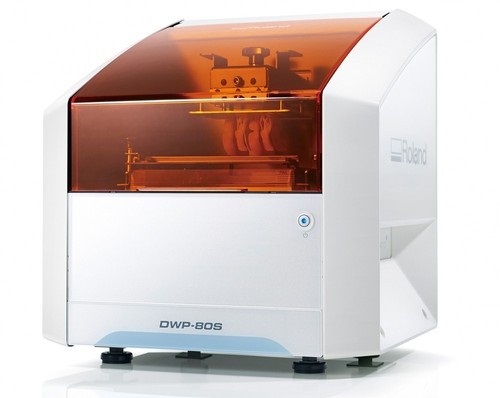
every situation, thus giving dentists greater choice and allowing them to increase the value of their practice’s offering.It is obvious that advanced technologies in automobiles, computers and smartphones make our daily lives easier. CEREC is also a technology that further develops a dental practice and can make it well positioned for the future. Especially now, as the system is highly flexible, it enables dentists to expand their offering in implant dentistry and orthodontics. | Roland DWP-80S Dental 3D Printer
Key software features
With Quick Denta, setting up a file for 3D printing is no longer a manual process. It automatically adjusts 3D data to produce the most efficient and stable position on the printer’s work surface. The optimum angle of orientation can also be automatically saved as a preset value and configured for each type of model being made- eliminating the need to reset values each time.Automatic Support Generation
Quick Denta simplifies the complex process of model support creation by automatically generating support structures with a single click.Error Detection and 3D Mesh Healing
An optional feature allows Quick Denta to automatically detect and repair minor errors during the STL importing process, without the need to return to the CAD software.Cost-Effective Resin Calculation
Quick Denta provides accurate, timesaving and cost-effective production by calculating the exact amount of resin needed for each job.Specs Roland DWP-80S Dental 3D Printer| Applications | Custom trays, base plates, and frameworks | | Build technology | Layered projection system | | Build size | 3.15 (W) x 3.15 (D) x 3.15 (H) in.
(80 (W) × 80 (D) ×80 (H) mm)
(The maximum amount of use per job is 300g(0.66 lb.)) | | Light source | UV-LED (Ultraviolet light-emitting diode) | | Machine Power Supply | DC 24 V、0.8 A | | Dedicated AC adapter | AC 100 to 240V ± 10%、50 / 60 Hz | | Power consumption | 20 W | | During standby | 49 dB (A) or less | | External dimensions | 16.93 (W) x 14.37 (D) x 17.72 (H) in.
(430 (W) × 365 (D) × 450 (H) mm) | | Interface | USB | | Noise During
operation | 55 dB (A) or less | | Noise Power off | 49 dB (A) or less | | External dimensions | 16.93 (W) x 14.37 (D) x 17.72 (H) in.
(430 (W) × 365 (D) × 450 (H) mm) | | Weight | 24 kg (53 lb.) | | Interface | USB | | Installation Environment During Operation | Temperature: 68 to 86°F (20 to 30°C),
Humidity: 35 to 80% RH (no condensation) | | Power off | Temperature: 41 to 95°F (5 to 40°C),
Humidity: 20 to 80% RH (no condensation) | | Included items | AC adapter, power cord, USB cable, liquid material vat, printing/cleaning tools (Metallic spatula, plastic spatula, tweezers, washing container x 2, hexagonal wrench, rubber gloves, work tray, etc.), Read First (booklet), Roland DG Software Package CD, etc. |
| Medit i700 intraoral scanner
The new medit i700 intraoral scanner is smaller, lighter and 2X faster than its predecessor. Summary of improvements:Hardware- Twice as fast as i500/ more vivid lifelike colors
- 18% smaller
- 12.5% lighter
- UVC light to disinfect camera internals
- Scanning area was 14×13 now 15×13
- Accuracy twice as good for full arch
- Room to room mobility with usb 3 cable connection
- 180-degree rotation on tip
- 45-degree mirror angle vs 40 – distal second molars
- Just plug right into computer for power and usb
- 100 uses for the tips autoclave vs 50
- Scans up to 70 frames per second (i500 30 frames per second)
- Remote control button – switch between scan stages / rotate without having to go back to keyboard
- Vibration when break continuity with scan
- Coverage of internal hardware
Software- Create master model from scan segments – 5 separate boxes will stitch together in segments
- Multiple bites
- Faster time to process scan
- Ortho module auto tooth segmentation
Other- Scan and produce open source .STL, .OBJ, .PLY files
- Normally delivers within 5-7 business days
- One year manufacturer warranty included (additional 2 year manufacturer warranty can be purchased at check out – Just remember, your assistant is not going to tell you s/he dropped the camera at month 13. S/He will tell you “the camera just stopped working!”)
- Includes Membership to CAD-Ray.com
- Includes Level 2 Training: two day hands-on training in Heidelberg (valid for 12 months after purchase, non-transferable)
- Includes initial remote training session
- Instructional videos to get started right away
- Peer to peer online support and private discussion forum
- Unlimited remote and phone support
- Satisfaction guarantee with return policy
- 10% restocking fee within 30 days
Full Service PackageIncludes Remote TrainingIncludes Unlimited Remote and Phone Support | Roland DWX-42W Wet Dental Milling Machine
The DWX-42W enables wet milling of popular glass-ceramic composite resins with high precision and accuracy. High-Speed Production with proprietary DGSHAPE spindle. Expanded 6-tool Automatic Tool Changer for uninterrupted milling. LAN capable for network and hardware connection and communication. VPanel user interface for easy monitoring of milling jobs and tools.The DGSHAPE DWX-42W enables wet milling of popular glass ceramic and composite resins with high precision and accuracy.- High speed production with proprietary DGSHAPE spindle
- Expanded 6-tool Automatic Tool Changer for uninterrupted milling
- LAN capable for easy connectivity
- Included VPanel for easy monitoring of milling jobs and tools
DWX-42W Roland DWX-42W Wet Dental Milling Machine| Millable material | Glass ceramics, Composite resin, PMMA | | Loadable workpiece shape | Width | Maximum 40 mm | | Depth | Maximum 20 mm | | Height | Maximum 20 mm | | Operating speed | 0.24 to 70.9 in./min. (6 to 1,800 mm/min.) | | Spindle speed | 15,000 to 60,000 rpm | | Rotary axis travel angle | A axis | ±360° | | Number of burs housed | 6 | | Attachable bur | Shank diameter | 3 mm, dedicated milling bur | | Compatible compressed air | Control Pressure | 0.3 MPA or more | | Air Capacity | 39 L/min or more | | Interface | USB, Ethernet (10 BASE-T/100 BASE-TX automatic switching) | | Control command set | RML-1, NC code | | Power requirements | AC 100 to 240 V ± 10%, 50/60 Hz (overvoltage category II, IEC 60664-1), 2.1 A | | Power consumption | Approximately 190 W | | Operating noise | During operation | 70 dB(A) or less (when not cutting) | | During standby | 48 dB(A) or less | | External dimensions | Width x Depth x Height | 19.0 x 22.0 x 23.6 in. (482 x 560 x 600 mm) | | Weight | 135 lbs. (61 kg) | | Installation environment | Indoor use, Altitude | Up to 6,562 ft. (2,000m) | | Temperature | 41 to 82 °F (5 to 28°C) | | Humidity | 35 to 80%RH (no condensation) | | Ambient pollution degree | 2 (as specified by IEC 60664-1) | | Short-term temporary overvoltage | 1,440 V | | Long-term temporary overvoltage | 490 V | | Included items | Power cord, USB cable, Roland DG Software Package CD, setup guide, drain hoses, dedicated milling burs (4), detection pin, dummy pin, rotary axis correction jig, ATC magazine correction jig and screw, hexagonal screwdriver, hexagonal wrench, measuring cup, mounting screws (4), milling bur removal jig, coolant tank, waste receptacle, filters (2), regulator with stay and screws (2), maintenance kit, daily maintenance card, 6 mm air hose, coolant additive, MillBox CAM software, Ethernet cable |
| Roland DWX-50 5-Axis Dental Milling Machine
The compact DWX-50 combines 5-axis simultaneous machining capability and a five-station automatic tool changer to deliver advanced features at a very affordable price point. Designed specifically for dental labs and technicians, the user-friendly DWX-50 allows for clean, quiet operation and the quality production of complex dental arches, abutments, bridges, copings and crowns from zirconia, wax and PMMA. Equipped with an integrated air blower and dust collection system, the DWX-50 ensures protection of moving parts while maintaining a clean, safe environment. Built on open technology, the DWX-50 supports a wide range of industry standard CAD/CAM software and tools, allowing for easy integration with popular commercially available dental prosthetic production solutions.5-axis simultaneous machiningCapable of 5-axis simultaneous machining, the DWX-50 supports the production of high-quality dental prosthetics at an affordable price point. The DWX-50 is designed to mill on X, Y and Z axes, rotating blocks and discs of material 360 degrees in both clockwise and counterclockwise movements, as well as tilting materials forward and backward 20 degrees to support complex cuts.Five-station automatic tool charger Roland DWX-50 5-Axis Dental Milling MachineThe five-station Automatic Tool Changer (ATC) with a tool length sensor enables the user to run multiple tools for one job or an entire disc unattended. Instead of inspecting finished pieces to determine if everything was milled correctly, the integrated tool diagnostics feature will notify users if a tool was broken prior to completion, resulting in reduced time and wasted materials.Taking control of prosthesis productionWith its unmatched ease of use and short learning time, the DWX-50 provides a cost-effective solution that is ideal for dental labs wishing to take control of the production process while avoiding the long lead times and costs associated with outsourcing.A true open architecture system, the compact DWX-50 integrates with industry standard 3D scanners, computers and all popular CAD/CAM software to provide a very cost-effective production solution. Advanced communications tools and operating features allow the DWX-50 to mill unattended while providing confidence in the finished product to the lab technician. | 3Shape Trios Cart T12a Impression 3D Intraoral Scanner3Shape TRIOS is a next-generation intraoral impression solution that is fast, accurate and easy to use. TRIOS is built on 3Shape’s Ultrafast Optical Sectioning™ technology and its features include high accuracy capture, spray- and powder-free scanning, clinical scan validation, intuitive Smart-Touch user interface, and more. TRIOS is optimized for a wide range of indications.TRIOS scanner benefits and features:
-Up to 1000 3D pictures for true geometries
-Spray-free for optimal accuracy and comfort
-Designed for high-speed impression capture
-Ergonomic grip for perfect control
-Autoclaveable scanner tip
-Scanning has never been easier. No need to hold the scanner at a specific distance or angle for focus. Dentists or assistants can even rest the scanner on the teeth for support as they scan.TRIOS cart benefits and features
-Live 3D visualization
-Easy-to-use touch screen
-Sleek design
-Unique motion sensor interface
-Mobility and Wi-Fi
-Easy-to-clean
-General benefits of digital impression takingDENTISTS:
-Less adjustment and grinding during seating
-Improved accuracy and clinical results
-Faster than traditional impression taking
-Reduced need for retakes
-No impression materials and mess
-Cost savings related to materials and shippingPATIENTS : 3Shape Trios Cart T12a Impression 3D Intraoral Scanner
-Quick and comfortable experience
-Better restoration fits and minimal grinding
-Improved clinical results
-Reduced number of appointments due to fewer retakes
-Reduced over-all chair-time3.5 Tips to Obtaining a Good Scan
PREPARATION
1. Turn on the cart or PC in advance to allow the system to heat up. See section Heating and
Mounting the Scanner Tip, step 1. Allow the system to warm up for about 10 minutes prior to use. If
using the heater, the final temperature is reached when the light goes out.
2. Retract the gingiva around the preparation for the preparation to stand out clearly.
3. Make sure the scanner tip is warm to avoid condensation on the mirror. See section Heating
and Mounting the Scanner Tip, step 5.
SCANNING
1. Dry the teeth lightly using compressed air. Be sure to reach the narrow regions between teeth.
Consider using a saliva ejector and/or tampons.
2. Get a good start:
• Start at preparation (or 1st molar if antagonist).
• Wait for about 5 scanner "clicks" before proceeding (helps build up a good starting point).
• Complete preparation including preparation line.
• Scan neighboring teeth: Occlusion, lingual/palatinal side, buccal/labial side.
3. Keep scanner head at 0-5mm from the teeth, it is OK to touch the teeth occasionally.
4. Move the scanner slowly and smoothly, you should hear a more rapid clicking sound.
41
5. Keep lips, cheeks, and tongue out of the scanner’s view:
• Use your finger or a dental mirror to create space between the teeth, lips and cheeks.
• Use a lip-and-cheek-retractor to keep lips and cheeks away.
• Be careful not to scan your own or assistant’s fingers.
• If you get lips, cheeks or tongue in the scan, make sure to delete it all, especially where they have
contact with the teeth (no surfaces should stick out from the teeth).
6. Keep focus on:
• Option 1 - Look at the teeth while scanning and listen to the "clicks". If it stops clicking/capturing,
carefully move back to the area marked on the screen.
• Option 2 - Look at the 2D image at the lower right corner. What you see here is what you scan.
Avoid lips, cheeks and the tongue to get an easy scan.
7. When scanning is complete, inspect the result by rotating the scan.
The important areas are:
• Preparation line (avoid interference from gingiva, saliva, blood).
• Contact points.
• Occlusal surfaces.
• If an important area is missing, simply touch this area on the model, and re-start scanning from
this point.
8. Bite Scan:
• Start from the second molar or at canine if you make an anterior scan.
• While centering the 2D image on occlusion plane, slowly move the scanner tip in straight mesial
direction with equal coverage of the upper and lower teeth.
• Scan 4 teeth for optimal alignment. This should take no more than 5 seconds.
9. Important for good colors:
• Avoid the light from the dentist chair lamp pointing directly into the patient's mouth. |




Reviews
There are no reviews yet.