| Description | Includes Acquisition Computer. Monitor, keyboard and mouse are not included. | Are you paying too much for digital X-ray sensors and warranties? Consider QuickRay from Video Dental Concepts! A dental imaging leader and innovator since 1989, VDC has provided over 7,000 dental professionals with the best diagnostic imaging values and personalized support for over 20 years. | From general to littles, this machine has you covered. This digital system excels at both general and pediatric practices, with great strengths in cosmetic dentistry and orthodontics as well. | Dental System is a solution that lets you focus on craftsmanship and creativity while the software does the rest. No matter the size of your lab, our dental CAD/CAM software will enable you to become more productive and provide profitable services such as dentures, clear aligners, smile designs, surgical guides, splints and more. And it gives you free access to an open system of design services, libraries, as well as third-party intraoral scanners, mills and 3D printers. | The ultimate in ease, material flexibility and unattended production, the DWX-52DC dental milling machine is designed to greatly expand your lab production and profit. Featuring a 6-slot Automatic Disc Changer, 15-station Automatic Tool Changer and other automated features, it gives users of all skill levels an exceptionally powerful, efficient and affordable dental restoration solution. | The Waterlase MD features Hydro- Photonics?a combination of YSGG laser energy and water?which allows the clinician to perform a wide range of conventional procedures with less anesthetic. Known for its precision and accuracy, the MD enables treatment of targeted areas of both tooth structure and soft tissue while maintaining the structural integrity of the tooth and leaving surrounding areas unaffected. |
| Content | Planmeca Promax Dimax 3 Digital Panoramic X RayPlanmeca ProMax offers a variety of imaging modalities in one intelligent X-ray unit.- Panoramic radiography for general diagnostics of the tooth arch and the jaw.
- Advanced panoramic radiography for specific diagnostics of the tooth arch, jaw maxillary sinuses and TMJ.
- Optional dental tomographic slices for detailed morphologic diagnostics of facial bones.
- Rotational freedom – the SCARA arm can produce any rotation pattern. Network Connectivity.
- Graphical user interface.
- Advanced collimation.
- Upgradable software.
- Dimax 3 Sensor
Planmeca is well-known for producing high-quality dental X-ray machines. With the Planmeca ProMax S3 pan-ceph with the DIMAX3, or previous generation 14-bit sensor, now orthodontists can add premium Planmeca imaging to their practices for a fraction of the price of new Planmeca dental equipment. Delivering standard and advanced 2D panoramic and cephalometric X-ray images, this versatile Planmeca X-ray machine can also be upgraded to medium field of view (8 x 8 cm) cone beam through the manufacturer, increasing your initial return on investment.PANORAMIC Planmeca Promax Dimax 3 Digital Panoramic X RayPlanmeca ProMax S3 includes the following panorex programs: standard, pediatric, lateral double TMJ, PA double TMJ, and PA rotational sinus. Optional advanced panorex programs include: horizontal segmenting, orthogonal, interproximal angulation, bitewings, lateral-PA double TMJ, PA multi-angle TMJ, lateral multi-angle TMJ, non-rotational sinus, and more.BITEWING PROGRAMWith the optional Planmeca extraoral bitewings program, you can replace conventional intraoral bitewing dental radiographs for sensitive patients with a fast and efficient alternative. (NOTE: Subject to availabilitySCARA TECHNOLOGYWith its advanced, exclusive robotic SCARA (Selectively Compliant Articulated Robot Arm) technology, the Planmeca ProMax S3 is triple-jointed to deliver precise, complex movements for optimized rotational maxillofacial digital denPEDO-FRIENDLYPlanmeca ProMax dental X-ray machines feature a pre-set "child" mode to reduce exposure area and minimize patient dose to help protect your smallest patients.tal X-ray radiography.DIMAX4 SENSORThis Planmeca ProMax dental X-ray machine includes the latest 16-bit DIMAX4 sensor, capturing the highest quality dental panoramic X-rays at up to 30-50% the price of new panoramic dental equipment. | QuickRay USB Size 1 And 2 X-Ray Sensor
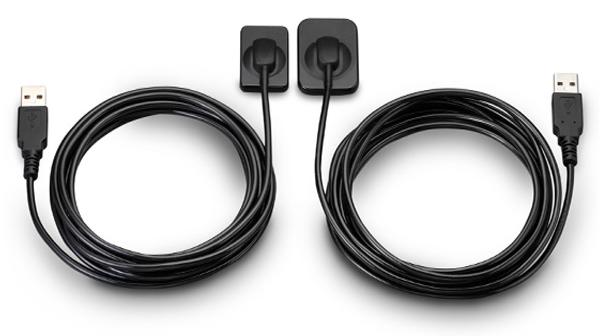
QuickRay USB is a breakthrough in digital X-rays. The embedded electronics are located in the sensor case so there is no interface box! Simply connect the sensor cable via its USB connector to your computer and go! QuickRay USB is currently compatible with these Apteryx based software systems: XVa3, XVLite, Cliniview, Clinitouch, XDR Imaging, MPDX-DMD, Lightyear, DentiMax, ProfSuni, Dr. Suni, Sigma, AFP Digital and Belmont.Great value QuickRay USB digital X-ray sensors connect directly to USB— no interface box needed!Are you paying too much for digital X-ray sensors and warranties? Consider QuickRay from Video Dental Concepts! A dental imaging leader and innovator since 1989, VDC has provided over 7,000 dental professionals with the best diagnostic imaging values and personalized support for over 20 years.QuickRay USB Size 1 And 2 X-Ray Sensor For SaleQuickRay USB is a breakthrough in digital X-rays. The embedded electronics are located in the sensor case so there is no interface box! Simply connect the sensor cable via its USB connector to your computer and go! QuickRay USB is currently compatible with these Apteryx based software systems: XVa3, XVLite, Cliniview, Clinitouch, XDR Imaging, MPDX-DMD, Lightyear, DentiMax, ProfSuni, Dr. Suni, Sigma, AFP Digital and Belmont.The QuickRay sensor gives you the highest resolution and clarity! The thin (less than 1/4″) intraoral sensors include a CMOS image sensor chip, CsI Scintillator, electronic circuits, shielding foils and shock absorbers. Tough polyamide housings have durable replaceable polyurethane cables with ergonomically placed connectors. Their rounded corners and smooth edges optimize patient comfort.
And QuickRay is the fastest sensor on the market! View X-rays in USB 2.0 High Speed Mode in only 3 seconds. Operate in USB 2.0 Full Speed Mode, if necessary.Every sensor is covered by the VDC two year warranty with no annual fees. Technical support is available for an additional fee on an annual basis. Optional pro rata warranty is available from VDC after purchase. All VDC products are FDA registered. | Soredex Cranex-D Panoramic X Ray
The Soredex Cranex D with cephalometric option provides a full range of digital panoramic and cephalometric dental x-ray examinations to meet the diagnostic needs of almost any general dental or specialty practice. With it’s minimal footprint, this Soredex option will help elevate the diagnostic functionality of any dental provider.Soredex Cranex D provides a full range of high quality digital panoramic x-ray examinations to meet the diagnostic needs of almost any dental practice – all at an affordable price.Acquisition computer includedFeatures Soredex Cranex-D Panoramic X Ray
CRANEX D is a direct digital panoramic and cephalometric x-ray system that provides superior image quality and more diagnostic value. Available as a single or dual sensor system, the CRANEX D grows with your practice, making it a valuable addition to meet the needs of your office. It combines quality images, ease-of-use, and flexibility to make your day-to-day diagnostics easy and accurate. Benefits
The system features superb anterior image quality in panoramic imaging with its patented Variable Panoramic Collimator (VPC) by expanding the focal trough by 50% compared to traditional techniques. Additional innovative features on the unit include Automatic Collimator Selector (ACS) to easily set proper collimation for the imaging program prescribed, as well as the Automatic Exposure Setting (AES) where the system recommends proper cephalometric exposure values based on the size of the patient. These automated and optimized exposure settings maximize the practice’s workflow. CRANEX D is built for contemporary, fast-paced dental care where reliability is key.The Soredex Cranex D with cephalometric option provides a full range of panoramic and cephalometric examinations to meet the needs of almost any practice.SOREDEX has over 30 years of expertise in state-of-the-art dental imaging systems. The Soredex® Cranex D with cephalometric option provides a full range of panoramic and cephalometric examinations to meet the needs of almost any practice. | 3SHAPE D850 DENTAL SCANNER
3SHAPE D850 DENTAL SCANNER is now also equipped with a blue LED light, increased internal volume and an integrated multi-die function. Particularly suited to implant-borne dentures thanks to high precision. As the D850 supports the scanning of textures, the model surface is recorded in high detail.Implant bar accuracy
The successor to the D800 is now also equipped with a blue LED light, increased internal volume and an integrated multi-die function. Particularly suited to implant-borne dentures thanks to high precision. As the D850 supports the scanning of textures, the model surface is recorded in high detail.– 2 x 5 MP cameras, blue LED
– Accuracy: 7 µm (ISO) / 8 µm (implant bar)
– Die scan time: 25 sec.
– Full arch scan time: 55 sec.
– Texture scanning
– Extended interior and multi-die scanning3Shape D850 dental scannerDetails - 2 x 5.0 megapixels, blue LED
- Scanaccuracy: 7 µm (ISO)
- Scan time – full jaw: 55 sec.
Extent of delivery inclusive - High-Performance-PC incl. Monitor, Mouse, Keyboard
- 1 x Scanner calibration object
- 3 x Scanner interface plates
- 1 x Scan Fix putty
CAD software package - Dental Designer – Premium
- Dental Manager & Dental Manager Inbox
- TRIOS Inbox
Dental System is a solution that lets you focus on craftsmanship and creativity while the software does the rest. No matter the size of your lab, our dental CAD/CAM software will enable you to become more productive and provide profitable services such as dentures, clear aligners, smile designs, surgical guides, splints and more. And it gives you free access to an open system of design services, libraries, as well as third-party intraoral scanners, mills and 3D printers.HIGHLIGHTS OF DENTAL SYSTEMEven faster for large system setupsFor large system setups, Dental System is now up to 10 times faster than before to start new cases, re-open previously designed cases and import and export material settings. Downloading cases is done in the background, to free your workstation for other tasks. And our new guide helps you with setting up a client-server system for optimal productivity.Even faster for large system setupsFor large system setups, Dental System is now up to 10 times faster than before to start new cases, re-open previously designed cases and import and export material settings. Downloading cases is done in the background, to free your workstation for other tasks. And our new guide helps you with setting up a client-server system for optimal productivity.- Design & produce dentures easily
Get access to the market’s most advanced denture software. Design digital dentures and connect with major libraries and manufacturers in a single smooth workflow.- Fast & intuitive splint design
This is what you have been waiting for: a fast and intuitive CAD software that makes it both easy and productive for labs to create splints, night guards and protectors*.
Let the system automatically create design proposals of single crowns and copings for your gypsum cases. Then use powerful tools to inspect and correct the design if needed during any step in the workflow.Dental System is designed by dental technicians for dental technicians to cost-effectively deliver the highest quality and largest selection of prosthetics to lab customers.Automated workflows for design proposalsLet the system automatically create design proposals of single crowns and copings for gypsum cases and use powerful tools to inspect and correct only when needed. The automated workflows boost productivity and give you more time to focus on the more complex and profitable cases.New fast and intuitive splint softwareOur completely new 3Shape Splint Studio* allows labs to easily produce splints, night guards, protectors and similar dental appliances with just a few clicks. Efficient digital design and manufacturing of splints gives you an attractive opportunity to add a new and highly profitable service to your offeringFit designs with true dynamic occlusion3Shape TRIOS intraoral scans come to the lab with recorded data showing the real patient specific motion. This makes it possible for dental technicians to fit designs according to the true dynamic occlusion and give patients highly functional restorations. | Roland DWX-52DC Dental Milling UnitDWX-52DC
| 5-Axis (Control XYZAB simultaneously) | Milling method:Dry mill | Cuttable material:Zirconia, Wax, PMMA, Composite resin, PEEK, Gypsum | | DWX-52DC | | Cuttable material | Zirconia, Wax, PMMA, Composite resin, PEEK, Gypsum, Fiber reinforced resin, CoCr sinter metal | | Loadable workpiece shape | Step section: | 98.5 mm (diameter), height 10 mm | | Body section: | 95 mm (diameter), height max. 35 mm
Pin diameter: 6 mm | | Pin diameter: | 6 mm | | Loadable workpiece weight | Up to 850 g | | Number of adapters housed | 6 | | Operating speed | XYZ axis: | 0.24 to 70.9 in./min.(6 to 1,800 mm/min.) | | Spindle motor | Brushless DC Motor | | Spindle speed | 6,000 to 30,000 rpm | | Rotary axis travel angle | A: | ±360° | | B: | ±30° | | Number of burs housed | 15 | | Attachable bur | Shank diameter: | 4 mm | | Length: | 40 to 55 mm | | Compatible compressed air | 0.2 MPa | | Interface | USB | | Control command set | RML-1, NC code | | Power requirements | AC 100 V to 240 V ±10%, 50/60 Hz, 2.0 A
(overvoltage category II, IEC60664-1) | | Power consumption | Approx. 200 W | | Operating noise | During operation: | 70 dB (A) or less (when not cutting), | | During standby: | 45 dB (A) or less | | External dimensions | Width x Depth x Height: | 34.6 x 26.0 x 23.6 in. (880 x 660 x 600 mm) | | Weight: | 105 kg (231.5 lbs.) |
The ultimate in ease Roland DWX-52DC Dental Milling Unitmaterial flexibility and unattended production, the DWX-52DCi dental milling machine with automatic disc changer expands your lab production and profit. With a 6-slot Automatic Disc Changer, 15-station Automatic Tool Changer and other automated features, it gives users of all skill levels an exceptionally powerful, efficient and affordable dental restoration solution. | Biolase Waterlase MDX All Tissue LaserThe MDX delivers 300 mJ of energy at 8 W, and it can easily be upgraded to a 450 mJ (9 W) model for 50% faster cutting as clinical skills improve and applications expand (see ?MDX Specs?). This next-generation of the best-selling WaterLase MD features improvements to the laser engine and delivery system ergonomics, and it enables rapid hardtissue cutting speed with unprecedented affordability.Time-Tested Technology Biolase Waterlase MDX All Tissue LaserThe MDX is built on the technologies and reputations of its predecessors, the BIOLASE WaterLase MD and WaterLase iPlus all-tissue lasers.The Waterlase MD features Hydro- Photonics?a combination of YSGG laser energy and water?which allows the clinician to perform a wide range of conventional procedures with less anesthetic. Known for its precision and accuracy, the MD enables treatment of targeted areas of both tooth structure and soft tissue while maintaining the structural integrity of the tooth and leaving surrounding areas unaffected.The Waterlase MD became the company?s flagship product, breaking new ground in the areas of cutting speed, user interface, and ergonomic design. In 2011 that ?flagship? designation was overtaken by the company?s new WaterLase iPlus, an even faster, more powerful machine. It delivers up to 10 W of power at 600 mJ, which makes it the most powerful laser on the global market at the short pulse length of 50 ?s, all through a highly intuitive preprogrammed user interface for everything from routine restorative cases to specialty periodontal, cosmetic, and endodontic procedures.The iPlus features Biolase?s 2780 nm YSGG technology with the versatility of a dual-wavelength configuration; namely, an integrated iLase 940 nm diode laser to handle unexpected soft-tissue cases, better bleeding control, and the potential for temporary pain relief and teeth whitening. As anticipated, the iPlus proved beneficial for experienced laser dentists who had been anxiously awaiting a machine that would deliver more power, control, and versatility. However, the new laser also provided many of the ?uninitiated? with an easier-than-expected, highly intuitive introduction to all-tissue laser dentistry. The MDX takes this one step further, with a price point that puts the technology within reach of nearly any dentist.
No More Excuses: Affordable Pricing, Substantial ROIThe perception of all-tissue laser technology as inaccessible to most dentists is beginning to dissipate. Even so, some dentists remain unconvinced.The reality, however, is that BIOLASE?s positioning of the MDX as an entry-level product, starting under $40,000, has made the technology much more affordable. Combining better and more efficient manufacturing with strategic sourcing of components results in pricing that most clinicians will view as extremely reasonable. In addition, the initial investment will be recouped with a substantial ROI, which can be realized via 3 main areas of application.1. For hard-tissue restorative dentistry? the ?bread and butter? of general practices?the MDX will enable faster, more efficient and, in most cases, virtually painless restorations for all cavity classes in both adults and children.2. The MDX allows dentists to retain patients who may have traditionally been referred out for osseous crown lengthening. Using the MDX, patients reap the benefits of considerably more comfortable soft-tissue procedures without the inconvenience of a referral, while the practice reaps the benefits of a happier and more loyal patient base.3. MDX provides an effective and efficient gateway into periodontics. Specifically, the MDX promotes deep pocket therapy with new attachment and is especially effective for minimally invasive removal of both subgingival inflamed tissue and calculus in patients with moderate to severe periodontal disease.Another DimensionBIOLASE?s comprehensive in-office and online training and support promise to render the learning curve extremely manageable. And, as intimidation is replaced by both comfort and confidence, clinicians will find that all-tissue laser technology will add a new and profitable dimension to their practices. |




Reviews
There are no reviews yet.