View cart “Carestream CS 3800 Dental Intraoral Scanner” has been added to your cart.
-44%
Availability: In Stock
Sirona CEREC Zirconia SpeedFire Milling Unit
$14,850.00$8,350.00
CEREC now provides a completely new process to dental practices: by combining the new CEREC SpeedFire furnace and CEREC Zirconia material, dentists can now deliver full contour crowns and small bridges made of the full-strength high-quality zirconium oxide in their own practice while the patient waits.
Other people want this. 15 people have this in their carts right now.
High strength, short manufacturing process
The greatest benefit of CEREC Zirconia is the high flexural strength of the material. It is suitable for individual crowns as well as small bridges and can be processed in thin wall thicknesses. Since these restorations are manufactured in monolithic form, there is no risk of chipping. Another benefit for dentists is that zirconium oxide can be cemented conventionally.
CEREC Zirconia is a pre-shaded translucent zirconium oxide available in 10 shades on the basis of the VITA Classic Shade Guide®. The material is milled in an enlarged form and then densely sintered to its final size in the new sintering furnace CEREC Speed-Fire. The oversized milling facilitates a new level of milling accuracy leading to superb, precisely fitting restorations. The sintering process takes just 10-15 minutes for crowns and 25 minutes for bridges. The subsequent glaze firing gives the restoration a high gloss finish.
The short process to produce CEREC Zirconia restorations is both convenient and economical. With this market launch, all CEREC milling/grinding units now provide wet and dry milling. Dry milling reduces the overall processing time for zirconia and, combined with the world’s fastest sintering cycles, enables the chairside procedure.
The workflow is easy to learn since the CEREC Software 4.4.1 guides the dentist through the entire process, and even sends the sintering and glazing information to the furnace. No programming of the furnace is required – it is all handled automatically by the software. A high-performance material and a specially tailored workflow ensure a simple process and high-quality treatment.
CEREC meets patients’ needs
Sirona CEREC Zirconia SpeedFire Milling Unit
Eighty three percent of patients in a recent survey said they prefer single visit dentistry to traditional treatment. The majority said they would even be willing to pay more for single visit dentistry. Two thirds indicated they’d be happy to travel further than they currently do, in order to receive treatment in one session. Another two thirds said they would even be prepared to change their dentist. The advantages of single visit dentistry are obvious: Patients avoid impression material, receive fewer anesthetics and don’t need a temporary. Reducing the number of visits, injections and making the overall prosthetic procedure more comfortable influences patients to opt for treatment with CEREC.
In addition to CEREC Zirconia, many other high-performance materials can be processed with CEREC. The range of materials with CEREC also expands clinical indications since the dentist can easily select the material suited for each indication.
Investment for a successful future
There have always been good reasons to start using digital dentistry with CEREC. CEREC Zirconia completes the range of indications for chairside application for nearly
every situation, thus giving dentists greater choice and allowing them to increase the value of their practice’s offering.
It is obvious that advanced technologies in automobiles, computers and smartphones make our daily lives easier. CEREC is also a technology that further develops a dental practice and can make it well positioned for the future. Especially now, as the system is highly flexible, it enables dentists to expand their offering in implant dentistry and orthodontics.
Reviews (0)
Reviews
There are no reviews yet.
Be the first to review “Sirona CEREC Zirconia SpeedFire Milling Unit” Cancel reply
CEREC now provides a completely new process to dental practices: by combining the new CEREC SpeedFire furnace and CEREC Zirconia material, dentists can now deliver full contour crowns and small bridges made of the full-strength high-quality zirconium oxide in their own practice while the patient waits.
The iTero Element Scanner is a digital impression system that eliminates the need for messy putty in your mouth.Improving iTero Intraoral ScannersWhile it’s already a leader in dental technology, iTero is constantly refining its intraoral scanning options. Its Element Itraoral Scanner, introduced in March 2015, captures 6,000 frames per second, up to 20 times faster than its predecessor. Its wand is also smaller and lighter, with in-built controls for more intuitive operation. Intraoral scanners from iTero are renowned for their accuracy, but the increased capture speed improves the company’s already impressive statistics.
Benefits:
Faster Scan Speed
Superb Image Quality
Light Guidance System
Portable for Easy Sharing
Lightweight Hand Piece
The DWX-51D 5-Axis Dental Milling Machine is designed for effortless production of dental prosthetics. Built for precision, error-free milling, you don’t need any machine expertise to operate it. With touch-button controls and automated milling features, the production of high-quality bridges, crowns, inlays, onlays, abutments and other restorations out of 98 mm discs and blocks has been made virtually foolproof.
TRIOS MOVE makes it simple to show digital impressions to your patients in order to explain their treatment plans and improve communication. The system features the same scanning technology as the TRIOS 3, including the option of a wireless model, and can capture full-color digital impressions, provide shade matching and more quickly and easily. As an open system, it can send digital impressions to almost any dental CAD/CAM software platform for the fabrication of almost any fixed, removable or orthodontic solution.
Milling Unit:• Choose from CEREC MC, CEREC MC X or CEREC MC XL
• Get access to the entire range of chairside treatment with up to 40 mm block size, including bridges and abutments
• Create fully anatomic, precise treatments quickly
• CEREC Guide 2 surgical guide
• Dry mill ready
• Includes CEREC software
High strength, short manufacturing process
The greatest benefit of CEREC Zirconia is the high flexural strength of the material. It is suitable for individual crowns as well as small bridges and can be processed in thin wall thicknesses. Since these restorations are manufactured in monolithic form, there is no risk of chipping. Another benefit for dentists is that zirconium oxide can be cemented conventionally.CEREC Zirconia is a pre-shaded translucent zirconium oxide available in 10 shades on the basis of the VITA Classic Shade Guide®. The material is milled in an enlarged form and then densely sintered to its final size in the new sintering furnace CEREC Speed-Fire. The oversized milling facilitates a new level of milling accuracy leading to superb, precisely fitting restorations. The sintering process takes just 10-15 minutes for crowns and 25 minutes for bridges. The subsequent glaze firing gives the restoration a high gloss finish.The short process to produce CEREC Zirconia restorations is both convenient and economical. With this market launch, all CEREC milling/grinding units now provide wet and dry milling. Dry milling reduces the overall processing time for zirconia and, combined with the world’s fastest sintering cycles, enables the chairside procedure.The workflow is easy to learn since the CEREC Software 4.4.1 guides the dentist through the entire process, and even sends the sintering and glazing information to the furnace. No programming of the furnace is required – it is all handled automatically by the software. A high-performance material and a specially tailored workflow ensure a simple process and high-quality treatment.
CEREC meets patients’ needsSirona CEREC Zirconia SpeedFire Milling UnitEighty three percent of patients in a recent survey said they prefer single visit dentistry to traditional treatment. The majority said they would even be willing to pay more for single visit dentistry. Two thirds indicated they’d be happy to travel further than they currently do, in order to receive treatment in one session. Another two thirds said they would even be prepared to change their dentist. The advantages of single visit dentistry are obvious: Patients avoid impression material, receive fewer anesthetics and don’t need a temporary. Reducing the number of visits, injections and making the overall prosthetic procedure more comfortable influences patients to opt for treatment with CEREC.In addition to CEREC Zirconia, many other high-performance materials can be processed with CEREC. The range of materials with CEREC also expands clinical indications since the dentist can easily select the material suited for each indication.
Investment for a successful futureThere have always been good reasons to start using digital dentistry with CEREC. CEREC Zirconia completes the range of indications for chairside application for nearly
every situation, thus giving dentists greater choice and allowing them to increase the value of their practice’s offering.It is obvious that advanced technologies in automobiles, computers and smartphones make our daily lives easier. CEREC is also a technology that further develops a dental practice and can make it well positioned for the future. Especially now, as the system is highly flexible, it enables dentists to expand their offering in implant dentistry and orthodontics.
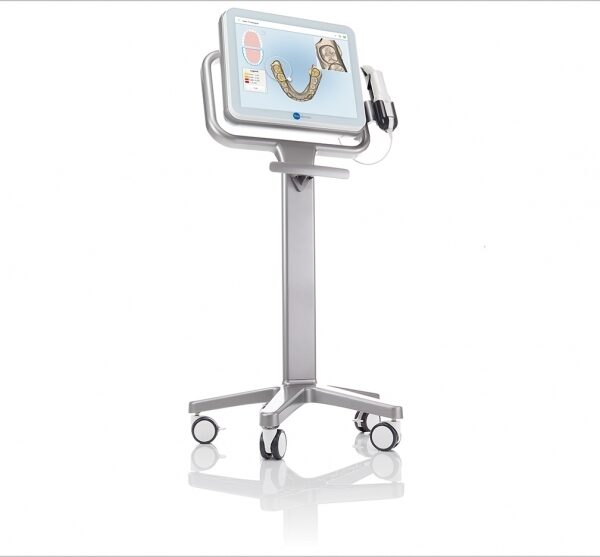
iTero Element Intraoral Scanner
What Are iTero Intraoral Scanners?Intraoral scanners from iTero scan the mouths of patients, capturing images to create three-dimensional dental images in minutes. Intraoral scanners are simple to use and can be operated by one person. Their user-friendly nature helps dental professionals get the best results. The scans they produce are also more detailed than the traditional two-dimensional images they replace.Intraoral digital scans help dental professionals create accurate physical dental models for restorative work, including crowns, veneers, and implants. They also help orthodontists diagnose orthodontic problems and develop the best treatment plans.The company’s digital ecosystem software works seamlessly with its intraoral scanners, improving workflow for dental professionals working on orthodontic and restorative cases. However, unlike many early intraoral scanners, they are open systems. This feature gives dental professionals more flexibility about how they use their digital scan files. Intraoral digital scans from iTero scanners can be easily shared with other dental professionals and third-party providers such as Invisalign. When all relevant parties have the scans, they can communicate better to improve patient outcomes.What iTero Intraoral Scanners DoIntraoral scanners feature a wand, which the dental professional moves around a patient’s mouth. In the latest versions, the wand captures thousands of frames per second which are pieced together to create a three-dimensional visualisation of the patient’s mouth. The wands on iTero intraoral scanners are smaller than early intraoral scanners, allowing them to scan molars in the back of the mouth which were traditionally difficult to reach. Dental professionals using small wands also aren’t limited by how wide their patients can open their mouths. The small wands are also less likely to make patients gag than older forms of scanning technology.Intraoral scanners also have screens which display the digital dental images as they’re captured in real time. The screens show whether the scan is good or not before it’s saved and submitted to the lab. This feature can be a real time-saver for dental professionals who, in the past, could receive word from the lab two or three weeks later that their scans were inadequate. By providing immediate feedback, intraoral scanners can save dental professionals and patients time and frustration.Unlike many intraoral scanners, patients don’t need to cover their teeth in titanium dioxide powder before an iTero intraoral scan. This benefit further improves the scanning process for dental patients.How Intraoral Scanners Make Invisalign Orthodontics EasierInvisalign clear aligners are one of the most popular teeth-straightening aids used today as they’re effective, removable, and virtually undetectable. Unlike many intraoral scanners, iTero intraoral scanners have open architecture which makes them compatible with the Invisalign system, including its Invisalign Outcome Simulator. Orthodontists can scan their patients’ mouths with an iTero intraoral scanner, then show them how their Invisalign treatment will look. This technology improves the patient experience because patients can know what to expect and feel more confident in their diagnosis and treatment plan. It also makes the ClinCheck setup three times faster.After setup, speed is still on the iTero intraoral scanners’ side. iTero states ClinCheck treatment plans submitted with its scans are usually posted to the Invisalign Doctor Site three times faster than traditional polyvinyl siloxane scans. As a result, your Invisalign aligners are created and posted back to your orthodontist sooner so that you can start treatment faster. Since the iTero intraoral scanning system is open, orthodontists can also send the scan files to any laboratory of their choosing for the creation of a retainer, which reinforces your treatment after the Invisalign process, and other dental tools.Orthodontists can also create better Invisalign treatment plans for their patients using iTero intraoral scans. Align Technology research shows orthodontists who use the scans have 10 times fewer rejections and seven times fewer issues with the fit of the Invisalign aligners. These results may be because iTero intraoral scanners can help orthodontists track their patients’ progress. Regular scans throughout Invisalign treatment can help orthodontists compare expected outcomes with results. If results aren’t as expected, orthodontists can use the scans to educate their patients about their treatment and the importance of complying with their recommendations.Improving iTero Intraoral Scanners iTero Element Intraoral ScannerWhile it’s already a leader in dental technology, iTero is constantly refining its intraoral scanning options. Its Element Itraoral Scanner, introduced in March 2015, captures 6,000 frames per second, up to 20 times faster than its predecessor. Its wand is also smaller and lighter, with in-built controls for more intuitive operation. Intraoral scanners from iTero are renowned for their accuracy, but the increased capture speed improves the company’s already impressive statistics.
Carestream CS 3600 Intraoral ScannerAcquire true color:With the CS 3600 Intraoral Scanner, practitioners can access 2D and 3D images that can be used with CS Restore software to design restorations within their practice. Colored 3D scans allow practitioners to easily define the margin lines and identify the differences between natural tooth structure and existing restorations. This makes restoration planning more accurate for practitioners.No external heater, powder or trolley system needed:The CS 3600 does not require you to spray powder of liquid over the patient’s teeth or gingival tissue before scanning. It features high-angulation scanning of up to 45 degrees and to a depth from -2 to +13m.Features a unique light guidance systemYet another feature of the CS 3600 that assists it in the capture of the data during the image acquisition process. This feature allows the user to place more focus on the patient’s mouth rather than the monitor.This device is easily shared:The CS 3600 can be easily shared between operatories because there is no heavy trolley to push around. Additionally, the intraoral scanner connects via USB 2 cable* to any PC workstation or laptop. * Windows 7, 32-bit minimum; 64-bit recommendedEasy to use and hold:The CS 3600’s sleek, lightweight design (295 grams) makes it comfortable and easy for users to navigate the intraoral scanner around patients’ mouths, especially during full arch acquisitions.Benefits:Carestream CS 3600 Intraoral Scanner
Faster Scan Speed
Superb Image Quality
Light Guidance System
Portable for Easy Sharing
Lightweight Hand Piece
Features
High Speed Continuous Scanning
Fast, Simple and Smooth user experience
Freefill Missing Scan Data at your Leisure
Scan History allows you to remove excess scanned tissue for more refined final digital impression
Three Workflows
user friendly interface
Autoclavable reusable tips in two interchangeable styles
Roland DWX-51D Integrated HD Mill Package
DWX-51D 5-Axis Dental Mill
High Definition Custom CAM Strategy SUM3D
Nabertherm High Speed Auto Cool Zi Furnace
Quatro IVAC Mill Suction
Integration Package for Implant Abutments
Integration Package for up to 60mm disc sizes
Integration Package for HD High Detail End Mills
Start Up Package for Milling Materials
Top To Bottom Mill Training by the Industry Experts
Equipment Set up, IT and Networking Included
Mill Contingency and Loaner ProgramBuilt-to-Last
For thirty years, Roland DG has been the trusted provider of milling machines that are built to last. The DWX-51D 5-Axis Dental Milling Machine is no exception. After extensive research in which lab technicians were asked what they needed in a production mill, the DWX-51D was developed to enhance user experience, maximize ease-of-use and improve output quality. Built with a simple and modern design, the DWX-51D looks as effortless as it operates.Features
5-axis simultaneous operation for non-stop precision milling
Sturdy and efficient ball screw-driven system
New C-clamp for easy adjustment and alignment
10-station Automatic Tool Changer (ATC) for continuous milling
Powerful vacuum and anti-static ionizer for clean calibration and dust reductionThe DWX-51D is designed for effortless, precision production of dental prosthetics fromcopings, crowns and bridges to inlays, onlays and abutments, etc. With a host of automated features and a clean, stable work environment, the DWX-51D is the perfect solution for labs wanting to increase production or those looking to get into digital milling for the first time.
Built-for-You.Built-to-Last.For thirty years, Roland DG has been the trusted provider of milling machines that are built to last. The DWX-51D 5-Axis Dental Milling Machine is no exception. After extensive research in which lab technicians were asked what they needed in a production mill, the DWX-51D was developed to enhance user experience, maximize ease-of-use and improve output quality. Built with a simple and modern design, the DWX-51D looks as effortless as it operates.
Distinguishing Features Roland DWX-51D Dental Milling Unit
5-axis simultaneous milling for precision milling
Steady and efficient ball screw-driven operation
New C-shape clamp for easy adjustment and alignment
10-station Automatic Tool Changer (ATC) for continuous milling
Powerful vacuum and anti-static ionizer for clean calibration and dust reduction
Ultimate Convenience and Ease-of-Use
A variety of new features ensure continuous, user-friendly milling, including
Sturdy frame ensures stability, while slim design fits nearly any lab space
Easy access tool drawer properly stores and protects tools
Color-coded LED status lights signal current job progress
Virtual Machine Panel (VPanel) allows users to configure settings from their computer, send CAM data to the DWX-51D for production, and track milling progress
Easily accessible cutting area for simple tool replacement and cleaning
3Shape TRIOS 3 Wireless Move Pen GripTRIOS is the world’s first intraoral scanner to offer a wireless option. 3Shape TRIOS 3 Wireless gives you the freedom to perform digital scans unrestricted by wires, optimizing comfort for both you and your patientsThe new 3Shape TRIOS MOVE is the ultimate patient/dentist communication tool. Show patients their digital scans and dynamic treatment information close-up, and create greater opportunities for treatment dialogue and joint decision-making.The ergonomic and lightweight design of TRIOS MOVE allows you to always position the screen in the right place, and enjoy superior user experience.Features of TRIOS MOVE;-13.3″ HD LCD Touchscreen – The perfect size when having it in front of a patient or working with up closeAdjustable arm- Bring the screen directly in front of the patient to involve them in the scanning process and the treatment planningPowerful custom PC designed for scanning – Specifically designed for use with all TRIOS 3 scanners to give a fast and smooth scan experience straight out of the boxFour wheels with integrated brakes – It is now very easy to move around the chair and from chair to chair
Enhance comfort with wireless innovation.TRIOS is the world’s first intraoral scanner to offer a wireless option. 3Shape TRIOS 3 Wireless gives you the freedom to perform digital scans unrestricted by wires, optimizing comfort for both you and your patientsThe new 3Shape TRIOS MOVE is the ultimate patient/dentist communication tool. Show patients their digital scans and dynamic treatment information close-up, and create greater opportunities for treatment dialogue and joint decision-making.The ergonomic and lightweight design of TRIOS MOVE allows you to always position the screen in the right place, and enjoy superior user experience.Features of TRIOS MOVE : 3Shape TRIOS 3 Wireless Move Pen Grip
13.3" HD LCD Touchscreen - The perfect size when having it in front of a patient or working with up closeAdjustable arm- Bring the screen directly in front of the patient to involve them in the scanning process and the treatment planningPowerful custom PC designed for scanning - Specifically designed for use with all TRIOS 3 scanners to give a fast and smooth scan experience straight out of the boxFour wheels with integrated brakes - It is now very easy to move around the chair and from chair to chair.
CEREC Primescan AC Intraoral scanner
Cerec Primescan from Dentsply Sirona is the most advanced digital scanner on the market. It’s providing a level of accuracy never before seen in dentistry. At the peak of innovation, it is widening the gap between those with and without digital dentistry. The Prime Scan is the fastest most accurate intraoral scanner to date. With new scanning technology, it is the ultimate in scanning. Prime Scan and CEREC 5.0 combinations are greatly reduced because more data allows many applications to become automated.For more than 30 years, CEREC® has provided technological precision, superior design and excellent performance to thousands of practices. Now, experience a brand-new fully integrated solution with CEREC Primescan AC. Acquire precise digital impressions with Primescan, design your proposal on the Primescan AC using the intelligent software, then produce precise, smooth restorations with your choice of milling unit. Find the next level of productivity and patient care – it’s all here.How Does CEREC Primescan Work?
CEREC Primescan is an alternative to traditional intraoral dental impressions, which use a putty-like substance to take physical impressions of your teeth. This method does not allow for digital assessment of your mouth, and some patients find it the process of physical impressions to be uncomfortable.CEREC Primescan uses a wand-like device, loaded with powerful imaging sensors which can capture more than 50,000 images of your mouth per second. These images are quickly stitched and compiled into a 3D image of your teeth, jaw, gums, and mouth, and displayed on a high-definition screen for immediate assessment by our doctors.Using this sensor, our doctors can image your entire mouth up to 20mm in depth, including gums, blood, and bone structures, quickly and accurately. The Primescan software (as compared to the Omnicam) creates high-resolution 3D models to assess your oral health and create the very best crowns, implants, removable prosthesis, restorations, and even 3D prints. With just a few quick sweeps of the CEREC Primescan device, we’ll be able to generate an in-depth, modifiable 3D image of your mouth in minutes.The Benefits of CEREC Primescan:
An excellent choice for outstanding results: Primescan is your perfect starting point in digital dentistry. No matter how you would like to design your workflows, Primescan is the enabler for efficient digital workflows – both chairside in your practice and with your preferred partners.Well designed and perfectly compatible: Along with the high-performance intraoral scanner comes the new Acquisition Center. Together, they form a highly effective and most comfortable system – meeting your needs with two individual software configurations:So, why is CEREC Primescan such a big deal? Here are just a few improvements to this sophisticated system:Shorter wait times – We can quickly image your mouth without waiting for dental impressions to set, allowing us to treat each patient more quickly and effectively. A full jaw impression only takes 2 minutes. This adds up to less time spent in the dental chair.Real-time image processing – Our dentists can quickly adjust and modify scanned images using filters and other tools, leading to more accurate diagnostics and better overall patient outcomes.Extremely versatile – CEREC Primescan can be used for almost any dental procedure. From implant dentistry to the creation of CEREC same-day crowns, the straightening of teeth, whitening, development of dentures and partial dentures.CEREC Primescan AC with CEREC Software Sirona Advantages:
Enables all kinds of treatment, from a single tooth to full arch
With Primescan intraoral scanning is now more accurate, faster and easier
Allows an efficient workflow, both chairside and with preferred partners
Along with the high-performance intraoral scanner comes the new Acquisition Center, together forming an effective and most comfortable system, meeting your needs with two individual software configurations: Primescan AC with Connect Software (supports the connection to established partners workflows) and CEREC Primescan AC with CEREC Software (ideal for cabinets)
Smart Pixel Sensor technology – allows superior precision and excellent detail reproduction, processes more than 1 million 3D points per second, producing photorealistic and highly accurate data
Due to its ability to scan at an incredible data density, it delivers complete 3D structures of everything in its field of view
Its dynamic depth scan technology enables perfect sharpness and outstanding precision, even at a measuring depth up to 20 mm
Easy to use
Easy scanning of all dental materials and hard to access areas
Allows you to start scanning right away
Self-heating for fog-free scanning
The increased field of view visualizes larger areas with fewer sweeps and immediate precision
Faster scanning with a smooth scan flow
Consolidating more than 50.000 images per second and fast processing of exactly the data the software needs Easy capturing and quicker processing of more data in higher resolution
Complete 3D-scan models are displayed immediately, no matter how fast you scan
Accelerate your workflow: Due to seamless, validated and open data transfer options, labs and other third parties are supplied with high-resolution models at an instant
3 different sleeves (disposable and stainless steel, with sapphire glass or autoclavable)
Acquisition Center – Smart features and greater comfort: intuitive use via movable 16:9 touchscreen and touchpad for perfect ergonomics
Kinematics for perfect ergonomic positioning
Smart Hygiene concept for fast and easy disinfection
Full mobility with more than 60-min. battery buffer
CEREC Primescan AC with CEREC Software – complete chairside system, which offers flexible data export options, with automatized workflow thanks to Artificial Intelligence and touch-enabled and intuitive user interface
Milling Unit:• Choose from CEREC MC, CEREC MC X or CEREC MC XL
• Get access to the entire range of chairside treatment with up to 40 mm block size, including bridges and abutments
• Create fully anatomic, precise treatments quickly
• CEREC Guide 2 surgical guide
• Dry mill ready
• Includes CEREC softwareStriking in every detail: The new Acquisition CenterThe new Acquisition Center is a work station designed for modern dentistry and with the dentist in mind. It comes with a touchpad and a 16:9 wide-format movable touchscreen, offering you a highly intuitive and ergonomic work platform.Your benefits at a glance:
Touchscreen & Touchpad for most comfortable, intuitive use
Kinematics for perfect ergonomic positioning
Smart Hygiene concept for fast and easy disinfection
Mobility concept for full mobility with more than 60-min. battery buffer
The best choice for your practice: Take digital impressions and continue working with your trusted partners or enjoy the benefits of complete chairside workflows.Primescan meets your needs with two individual software configurations:Primescan AC with Connect Software:
Supports data transfer options to your preferred partners
Secure and encrypted data transfer through Connect Case Center Inbox
Easy upgradability to full chairside workflow
Touch-enabled and intuitive user interface
CEREC Primescan AC with CEREC Software:
Supports full chairside workflows for single-visit dentistry
Flexible data export options
Automatized workflow thanks to Artifical Intelligence
Touch-enabled and intuitive user interface
Technical Data:CEREC Primescan AC Intraoral scanner
CAD system for high-precision intraoral optical impressions
High-resolution, heated intraoral 3D scanner
Integrated image processing
High processing power due to state-of-the-art processor
Trackball or touchpad
Hand and foot controlled enter keys
Ethernet port and WLAN
USB interfaces
The high-resolution 3D intraoral scanner allows image acquisition with the image control inside the scanner, the image data transfer is made through USB 2.0 interface
21.5″ inch TFT LED flat-screen display, HD resolution: 1920 x 1080 pixels
Mobile housing, with no water or air connection required
Voltage: 100 – 240 VAC/50-60Hz
Nominal current: 5.0 – 2.1 A
Type of protection against electric shock: Class I device




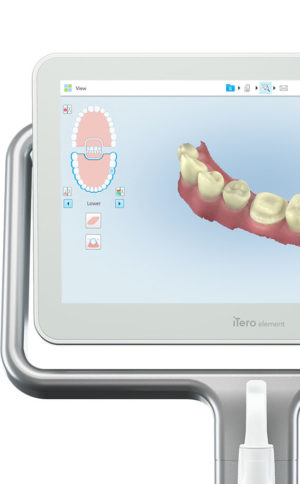 Invisalign clear aligners are one of the most popular teeth-straightening aids used today as they’re effective, removable, and virtually undetectable. Unlike many intraoral scanners, iTero intraoral scanners have open architecture which makes them compatible with the Invisalign system, including its Invisalign Outcome Simulator. Orthodontists can scan their patients’ mouths with an iTero intraoral scanner, then show them how their Invisalign treatment will look. This technology improves the patient experience because patients can know what to expect and feel more confident in their diagnosis and treatment plan. It also makes the ClinCheck setup three times faster.After setup, speed is still on the iTero intraoral scanners’ side. iTero states ClinCheck treatment plans submitted with its scans are usually posted to the Invisalign Doctor Site three times faster than traditional polyvinyl siloxane scans. As a result, your Invisalign aligners are created and posted back to your orthodontist sooner so that you can start treatment faster. Since the iTero intraoral scanning system is open, orthodontists can also send the scan files to any laboratory of their choosing for the creation of a retainer, which reinforces your treatment after the Invisalign process, and other dental tools.Orthodontists can also create better Invisalign treatment plans for their patients using iTero intraoral scans. Align Technology research shows orthodontists who use the scans have 10 times fewer rejections and seven times fewer issues with the fit of the Invisalign aligners. These results may be because iTero intraoral scanners can help orthodontists track their patients’ progress. Regular scans throughout Invisalign treatment can help orthodontists compare expected outcomes with results. If results aren’t as expected, orthodontists can use the scans to educate their patients about their treatment and the importance of complying with their recommendations.Improving iTero Intraoral Scanners iTero Element Intraoral ScannerWhile it’s already a leader in dental technology, iTero is constantly refining its intraoral scanning options. Its Element Itraoral Scanner, introduced in March 2015, captures 6,000 frames per second, up to 20 times faster than its predecessor. Its wand is also smaller and lighter, with in-built controls for more intuitive operation. Intraoral scanners from iTero are renowned for their accuracy, but the increased capture speed improves the company’s already impressive statistics.
 An excellent choice for outstanding results: Primescan is your perfect starting point in digital dentistry. No matter how you would like to design your workflows, Primescan is the enabler for efficient digital workflows – both chairside in your practice and with your preferred partners.Well designed and perfectly compatible: Along with the high-performance intraoral scanner comes the new Acquisition Center. Together, they form a highly effective and most comfortable system – meeting your needs with two individual software configurations:So, why is CEREC Primescan such a big deal? Here are just a few improvements to this sophisticated system:Shorter wait times – We can quickly image your mouth without waiting for dental impressions to set, allowing us to treat each patient more quickly and effectively. A full jaw impression only takes 2 minutes. This adds up to less time spent in the dental chair.Real-time image processing – Our dentists can quickly adjust and modify scanned images using filters and other tools, leading to more accurate diagnostics and better overall patient outcomes.Extremely versatile – CEREC Primescan can be used for almost any dental procedure. From implant dentistry to the creation of CEREC same-day crowns, the straightening of teeth, whitening, development of dentures and partial dentures.CEREC Primescan AC with CEREC Software Sirona Advantages:
 The new Acquisition Center is a work station designed for modern dentistry and with the dentist in mind. It comes with a touchpad and a 16:9 wide-format movable touchscreen, offering you a highly intuitive and ergonomic work platform.Your benefits at a glance:


Reviews
There are no reviews yet.