| Description | By Sirona has remained the preferred CAD/CAM technology of dentists worldwide for the fabrication of all-ceramic dental restorations in a single treatment appointment. CEREC is proven by hundreds of clinical studies and is offered by thousands of dentists to millions of patients around the world each year. It also has the broadest restorative range of any dental CAD/CAM system on the market. Proven performance, unrivalled success, and unequalled capabilities have made CEREC the number one dental CAD/CAM choice for over 30 years. | Automatic Positioning
With Quick Denta, setting up a file for 3D printing is no longer a manual process. It automatically adjusts 3D data to produce the most efficient and stable position on the printer’s work surface. Theoptimum angle of orientation can also be automatically saved as a preset value and configured for each type of model being made- eliminating the need to reset values each time.It really is that simple. Once a user imports an STL 3D file, Quick Denta software not only detects and heals errors but also does all the complex digital set-up for you. | The DWX-51D 5-Axis Dental Milling Machine is designed for effortless production of dental prosthetics. Built for precision, error-free milling, you don’t need any machine expertise to operate it. With touch-button controls and automated milling features, the production of high-quality bridges, crowns, inlays, onlays, abutments and other restorations out of 98 mm discs and blocks has been made virtually foolproof. | CEREC now provides a completely new process to dental practices: by combining the new CEREC SpeedFire furnace and CEREC Zirconia material, dentists can now deliver full contour crowns and small bridges made of the full-strength high-quality zirconium oxide in their own practice while the patient waits. | With the intraoral scanner dwio the canadian company Dental Wings presented at the IDS a really revolutionary approach in the field of intraoral scanner. The digitally interested users will have noticed the similarity of the dwio with the Steinbichler intraoral scanner which was launched at the IDS 2 years before. In fact, the dwio intraoral scanner represents a further development. | Benefits:- Faster Scan Speed
- Superb Image Quality
- Light Guidance System
- Portable for Easy Sharing
- Lightweight Hand Piece
|
| Content | SIRONA Cerec Omnicam+MCXL Milling
Single Appointment Dental Care
Most dental restorative methods require more than one visit to the dentist. This means that on the first visit, you get an injection of anaesthesia, your tooth prepared, an impression taken, and a temporary restoration put on your tooth. You make a second appointment for a couple of weeks later, get another injection, have the temporary pried off (if it hasn’t fallen off already), and have a permanent restoration put on. With CEREC, the procedure is done in a single appointment, start to finish. No temporary restorations. Now with CEREC Omnicam,MC XL Inlab milling unit and sinter and crystallisation ovens, 3-4 unit bridges can be fabricated in a day.Finest Dental Materials
A CEREC tooth restoration isn’t just convenient, it is also healthy. Many years ago, dentists had few options to repair decayed and damaged teeth other than amalgam, gold, and other metals. With CEREC, your dentist can use strong, tooth coloured ceramic materials to restore your teeth to their natural strength, beauty, and function. These materials closely match the composition of natural tooth structure. The materials are chemically bonded to your tooth, so your dentist can save as much healthy tooth tissue as possible while providing you with a dental restoration that strengthens your tooth. Using metal free materials that are the closest to your natural enamel, CEREC gives you the highest quality restorative care.Smile Enhancement SIRONA Cerec Omnicam+MCXL Milling
We use CEREC for more than just crowns. CEREC Omnicam and the MC XL inlab milling unit is capable of producing any single tooth restoration, implant abutments and up to 9 unit bridges. Chipped or discoloured front teeth can be repaired with beautiful CEREC porcelain anterior crowns or veneers. Your smile makes a lasting first impression. Enhance it with CEREC.Your dentist is in complete control of the final result
Since the crown, inlay, onlay or veneer is designed and fabricated from start to finish by your dentist, he has total control over how it will look and fit.No temporary restorations
With Cerec your restorations are placed in a single appointment. If you have lab made veneers you would require temporary veneers during the wait whilst your new teeth are being made by the technician. These have been known to fall off and cause problems. This step is eliminated with CEREC restorations.Crystallisation, characterisation and glaze ovens
In certain circumstances it may be necessary to customise your restorations to blend in with your natural neighbouring teeth. This is accomplished by adding colouring stains to your restoration and firing it in an oven before the final glazing is done.
Glazing gives the restoration a very smooth and shiny surface texture, enhancing optimum oral hygiene.
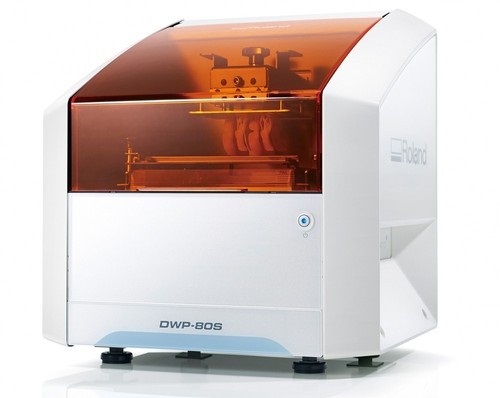
Sinter ovens are used to harden and bake zirconium materials for implant abutments and bridge frameworks. | Roland DWP-80S Dental 3D Printer
Key software features
With Quick Denta, setting up a file for 3D printing is no longer a manual process. It automatically adjusts 3D data to produce the most efficient and stable position on the printer’s work surface. The optimum angle of orientation can also be automatically saved as a preset value and configured for each type of model being made- eliminating the need to reset values each time.Automatic Support Generation
Quick Denta simplifies the complex process of model support creation by automatically generating support structures with a single click.Error Detection and 3D Mesh Healing
An optional feature allows Quick Denta to automatically detect and repair minor errors during the STL importing process, without the need to return to the CAD software.Cost-Effective Resin Calculation
Quick Denta provides accurate, timesaving and cost-effective production by calculating the exact amount of resin needed for each job.Specs Roland DWP-80S Dental 3D Printer| Applications | Custom trays, base plates, and frameworks | | Build technology | Layered projection system | | Build size | 3.15 (W) x 3.15 (D) x 3.15 (H) in.
(80 (W) × 80 (D) ×80 (H) mm)
(The maximum amount of use per job is 300g(0.66 lb.)) | | Light source | UV-LED (Ultraviolet light-emitting diode) | | Machine Power Supply | DC 24 V、0.8 A | | Dedicated AC adapter | AC 100 to 240V ± 10%、50 / 60 Hz | | Power consumption | 20 W | | During standby | 49 dB (A) or less | | External dimensions | 16.93 (W) x 14.37 (D) x 17.72 (H) in.
(430 (W) × 365 (D) × 450 (H) mm) | | Interface | USB | | Noise During
operation | 55 dB (A) or less | | Noise Power off | 49 dB (A) or less | | External dimensions | 16.93 (W) x 14.37 (D) x 17.72 (H) in.
(430 (W) × 365 (D) × 450 (H) mm) | | Weight | 24 kg (53 lb.) | | Interface | USB | | Installation Environment During Operation | Temperature: 68 to 86°F (20 to 30°C),
Humidity: 35 to 80% RH (no condensation) | | Power off | Temperature: 41 to 95°F (5 to 40°C),
Humidity: 20 to 80% RH (no condensation) | | Included items | AC adapter, power cord, USB cable, liquid material vat, printing/cleaning tools (Metallic spatula, plastic spatula, tweezers, washing container x 2, hexagonal wrench, rubber gloves, work tray, etc.), Read First (booklet), Roland DG Software Package CD, etc. |
| Roland DWX-51D Dental Milling Unit
Roland DWX-51D Integrated HD Mill Package
DWX-51D 5-Axis Dental Mill
High Definition Custom CAM Strategy SUM3D
Nabertherm High Speed Auto Cool Zi Furnace
Quatro IVAC Mill Suction
Integration Package for Implant Abutments
Integration Package for up to 60mm disc sizes
Integration Package for HD High Detail End Mills
Start Up Package for Milling Materials
Top To Bottom Mill Training by the Industry Experts
Equipment Set up, IT and Networking Included
Mill Contingency and Loaner ProgramBuilt-to-Last
For thirty years, Roland DG has been the trusted provider of milling machines that are built to last. The DWX-51D 5-Axis Dental Milling Machine is no exception. After extensive research in which lab technicians were asked what they needed in a production mill, the DWX-51D was developed to enhance user experience, maximize ease-of-use and improve output quality. Built with a simple and modern design, the DWX-51D looks as effortless as it operates.Features
5-axis simultaneous operation for non-stop precision milling
Sturdy and efficient ball screw-driven system
New C-clamp for easy adjustment and alignment
10-station Automatic Tool Changer (ATC) for continuous milling
Powerful vacuum and anti-static ionizer for clean calibration and dust reductionThe DWX-51D is designed for effortless, precision production of dental prosthetics fromcopings, crowns and bridges to inlays, onlays and abutments, etc. With a host of automated features and a clean, stable work environment, the DWX-51D is the perfect solution for labs wanting to increase production or those looking to get into digital milling for the first time.Built-for-You.Built-to-Last.For thirty years, Roland DG has been the trusted provider of milling machines that are built to last. The DWX-51D 5-Axis Dental Milling Machine is no exception. After extensive research in which lab technicians were asked what they needed in a production mill, the DWX-51D was developed to enhance user experience, maximize ease-of-use and improve output quality. Built with a simple and modern design, the DWX-51D looks as effortless as it operates. Distinguishing Features Roland DWX-51D Dental Milling Unit- 5-axis simultaneous milling for precision milling
- Steady and efficient ball screw-driven operation
- New C-shape clamp for easy adjustment and alignment
- 10-station Automatic Tool Changer (ATC) for continuous milling
- Powerful vacuum and anti-static ionizer for clean calibration and dust reduction
Ultimate Convenience and Ease-of-Use- A variety of new features ensure continuous, user-friendly milling, including
- Sturdy frame ensures stability, while slim design fits nearly any lab space
- Easy access tool drawer properly stores and protects tools
- Color-coded LED status lights signal current job progress
- Virtual Machine Panel (VPanel) allows users to configure settings from their computer, send CAM data to the DWX-51D for production, and track milling progress
- Easily accessible cutting area for simple tool replacement and cleaning
| Sirona CEREC Zirconia SpeedFire Milling Unit
High strength, short manufacturing process
The greatest benefit of CEREC Zirconia is the high flexural strength of the material. It is suitable for individual crowns as well as small bridges and can be processed in thin wall thicknesses. Since these restorations are manufactured in monolithic form, there is no risk of chipping. Another benefit for dentists is that zirconium oxide can be cemented conventionally.CEREC Zirconia is a pre-shaded translucent zirconium oxide available in 10 shades on the basis of the VITA Classic Shade Guide®. The material is milled in an enlarged form and then densely sintered to its final size in the new sintering furnace CEREC Speed-Fire. The oversized milling facilitates a new level of milling accuracy leading to superb, precisely fitting restorations. The sintering process takes just 10-15 minutes for crowns and 25 minutes for bridges. The subsequent glaze firing gives the restoration a high gloss finish.The short process to produce CEREC Zirconia restorations is both convenient and economical. With this market launch, all CEREC milling/grinding units now provide wet and dry milling. Dry milling reduces the overall processing time for zirconia and, combined with the world’s fastest sintering cycles, enables the chairside procedure.The workflow is easy to learn since the CEREC Software 4.4.1 guides the dentist through the entire process, and even sends the sintering and glazing information to the furnace. No programming of the furnace is required – it is all handled automatically by the software. A high-performance material and a specially tailored workflow ensure a simple process and high-quality treatment.
CEREC meets patients’ needsSirona CEREC Zirconia SpeedFire Milling UnitEighty three percent of patients in a recent survey said they prefer single visit dentistry to traditional treatment. The majority said they would even be willing to pay more for single visit dentistry. Two thirds indicated they’d be happy to travel further than they currently do, in order to receive treatment in one session. Another two thirds said they would even be prepared to change their dentist. The advantages of single visit dentistry are obvious: Patients avoid impression material, receive fewer anesthetics and don’t need a temporary. Reducing the number of visits, injections and making the overall prosthetic procedure more comfortable influences patients to opt for treatment with CEREC.In addition to CEREC Zirconia, many other high-performance materials can be processed with CEREC. The range of materials with CEREC also expands clinical indications since the dentist can easily select the material suited for each indication.
Investment for a successful futureThere have always been good reasons to start using digital dentistry with CEREC. CEREC Zirconia completes the range of indications for chairside application for nearly
every situation, thus giving dentists greater choice and allowing them to increase the value of their practice’s offering.It is obvious that advanced technologies in automobiles, computers and smartphones make our daily lives easier. CEREC is also a technology that further develops a dental practice and can make it well positioned for the future. Especially now, as the system is highly flexible, it enables dentists to expand their offering in implant dentistry and orthodontics. | Dwio Intraoral Scanner Dental WingsIntraoral scanner
Based on a novel and incredibly compact 3D capture technique called Multiscan Imaging, the Dental Wings intraoral scanner allows dentists to take digital impressions in a natural, fluid manner. Its remarkably small handpiece, gesture control, and easy maintenance make it a compelling digital impression option for clinicians.Design approach: the patient first
The intraoral scanner was designed to address the needs of dental professionals looking for an intuitive technology for capturing digital impressions. With the overall objective to help dentists focus on the patient rather than the technology, the Dental Wings intraoral scanner offers:– A remarkably small handpiece very similar in size, shape, and weight to existing dental handpieces. Its familiar shape allows to assume a natural position relative to the patient.
– Visual and auditive feedback — a luminescent ring and audible signals indicate when data is being successfully captured, allowing the user to focus in the mouth rather than on the screen.
– Easy maintenance of the lightweight all-metal handpiece that has no moving parts, no complex illumination or cooling system.
– Motion control technology for a no-touch operation of the system while the user has gloves on.Scanning technology Dwio Intraoral Scanner Dental Wings
Five miniaturized 3D scanners in the handpiece tip directly view the teeth and soft tissue from multiple orientations simultaneously, capturing even the most difficult to see areas of preparations with minimal effort by the user.Open workflows
The intraoral scanner is a dedicated “scan only” chairside system with multiple options for the design and fabrication steps. Captured data is seamlessly transmitted to in-office or remote systems via DWOS Connect for prosthesis design and production. Users of Dental Wings’ simple to use yet powerful DWOS CAD suite of design applications, as well as other open dental CAD software, are able to import the scan data directly. | Carestream CS 3600 Intraoral ScannerAcquire true color:With the CS 3600 Intraoral Scanner, practitioners can access 2D and 3D images that can be used with CS Restore software to design restorations within their practice. Colored 3D scans allow practitioners to easily define the margin lines and identify the differences between natural tooth structure and existing restorations. This makes restoration planning more accurate for practitioners.No external heater, powder or trolley system needed:The CS 3600 does not require you to spray powder of liquid over the patient’s teeth or gingival tissue before scanning. It features high-angulation scanning of up to 45 degrees and to a depth from -2 to +13m.Features a unique light guidance systemYet another feature of the CS 3600 that assists it in the capture of the data during the image acquisition process. This feature allows the user to place more focus on the patient’s mouth rather than the monitor.This device is easily shared:The CS 3600 can be easily shared between operatories because there is no heavy trolley to push around. Additionally, the intraoral scanner connects via USB 2 cable* to any PC workstation or laptop. * Windows 7, 32-bit minimum; 64-bit recommendedEasy to use and hold:The CS 3600’s sleek, lightweight design (295 grams) makes it comfortable and easy for users to navigate the intraoral scanner around patients’ mouths, especially during full arch acquisitions.Benefits:Carestream CS 3600 Intraoral Scanner- Faster Scan Speed
- Superb Image Quality
- Light Guidance System
- Portable for Easy Sharing
- Lightweight Hand Piece
- Features
- High Speed Continuous Scanning
- Fast, Simple and Smooth user experience
- Freefill Missing Scan Data at your Leisure
- Scan History allows you to remove excess scanned tissue for more refined final digital impression
- Three Workflows
- user friendly interface
- Autoclavable reusable tips in two interchangeable styles
- Accurate full 3D HD Color scanning
|




Reviews
There are no reviews yet.