| Description | The treatment unit of the Actus series has been installed in over 10,000 practices worldwide providing support to both dentists and assistants. The success of the Actus treatment unit is easy to explain: quality at a reasonable price and maximum functionality. The treatment tray incorporates swivel and height adjustment. It allows optimal access to all instruments including the control console for the chair and instrument functions. | iTero Element Flex is a system allowing for quick and easy transfer between offices, enabling GPs and orthodontists the capacity to perform scans that are full-arch beyond the practice. iTero Element Flex Features- -Compact footprint for transportability and convenience
- -Custom-designed carrying case for the ultimate in mobility
- -Enhanced color for stunning and precise imaging
- -Perform crisp, full-color, high-definition 3D scans in as little as 60 seconds*
- -Wand touchpad is as intuitive and easy as gesturing on your smartphone
| INCLUDES:- Picasso Lite+ Laser 3.0 Watts
- Wireless Foot Control
- Quick Start Guide
- Owner’s Manual
- Universal Power Supply
- One Transportation Box
- One Multi-Tip Handpiece
- Three Pairs of Protective Laser Goggles
- 3 Year Warranty
| BRAND NEW 3Shape Trios Cart T12A dental impression intraoral 3D scanner, it is new in the original crate with all accessories including scanner, wand and tips and has never been used. | As one of the most user-friendly Cone Beam Computed Tomography (CBCT) systems on the market, the 9000 3D Extraoral Imaging System offers several versatile solutions for your extraoral imaging needs. Combining focused-field 3D technology with dedicated panoramic imaging, this affordable 2-in-1 unit delivers the best of both worlds, offering the highest resolution and the lowest radiation dose. | VersatilityWelcome to a world where you‘re spoiled for choice! The new CEREC Primemill combines wet and dry milling and wet grinding. No matter the indication, with CEREC Primemill you can select from a broad range of material options from validated partners providing the flexibility and predictability you need to offer patients the best possible treatment. |
| Content | J Morita Actus 101 Dental Treatment Unit (With chair)
The treatment unit of the Actus series has been installed in over 10,000 practices worldwide providing support to both dentists and assistants. The success of the Actus treatment unit is easy to explain: quality at a reasonable price and maximum functionality. The treatment tray incorporates swivel and height adjustment. It allows optimal access to all instruments including the control console for the chair and instrument functions.– Four automatic chair positions
– Foot control
– Instrument holder for the assistant
– Comfortable headrest (removable and inclinable)
– Instrument holder for 5 instruments incl. three-way spray
– Swivel adjustable, transparent glass cuspidor, water rinsing, automatic tumbler filler, water heaterSpecifications:
– Connected load : 220-240 V / 60 Hz / 1,5 kVA
– Chair height : max. 760 mm / min. 400 mm
– Length : 1.840 mm
– Width without tray : 868 mm
– Tray width : 452,5 mm
– Weight : 240 kgPackage includes : J Morita Actus 101 Dental Treatment Unit (With chair)
– Over arm delivery
– 2x optic highspeed lines
– 1x Brushless micromotor
– Luna Vue operating light
– 3 position assistant arm
– 2x Morita operating stoolsThe Actus 101 chair has been installed in over 10,000 practices worldwide providing support to both dentists and assistants. The Actus treatment unit is available at a reasonable price with maximum functionality. The treatment tray swivels and the height can be adjusted. It allows optimal access to all instruments including the control console for the chair and instrument functions. The chair features four automatic chair positions, foot controls, an instrument holder for the assistant, a comfortable headrest that is removable and inclinable an instrument holder for five instruments includes a three-way spray. Other features include a swivel adjustable, transparent glass cuspidor, automatic tumbler filler and a water heater. | iTero Element Flex Intraoral Scanner
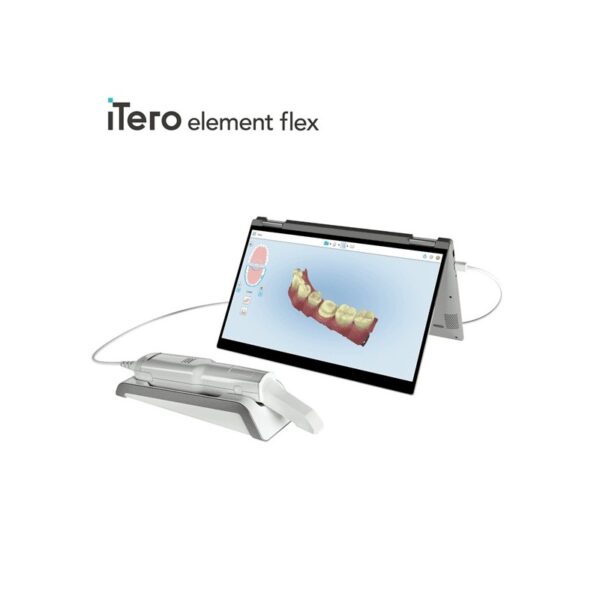
iTero Element Flex is a system allowing for quick and easy transfer between offices, enabling GPs and orthodontists the capacity to perform scans that are full-arch beyond the practice.The iTero Element Flex wand-only configuration is a portable scanner for transport from office to office, enabling doctors to leverage the power of chairside visualization. It is ideal for practices with multiple locations who want a scanner that’s convenient and easy to transport. Working using notebooks that are compatible, professionals are now able to scan everywhere, even at the smallest of operatories. The Element Flex contains a custom-designed carrying case.The Element Flex, which is the choice includes a custom-designed carrying case, and allows for connectivity. Every scanner maintains the same capabilities as its predecessor.Initially, intraoral scanning wands considered as difficult to use, and were bulky. Therefore, when it came time to make a purchasing decision clinicians chosen to forego it. Now, there are options provided by a vast assortment.With the launch of this Element Flex, scans can be carried out directly onto notebooks, making scanning that was intraoral more mobile than ever before. However, that’s not the only invention in IOS scanning. The most recent release from 3shape, the TRIOS MOVE, offers a wireless scanning wand along with an arm and swiveling screen which makes it possible for clinicians to readily show patients the process, as well as the treatment planning.The iTero Element Flex system is delivered as a laptop-based workstation for performing oral scans from the office of the doctor. This operation manual describes how to boot and shut down the machine to Deal with cable and the, and also to clean the scanning device and replace its sleevesThe iTero Element Flex system provides an intuitive user interface for performing digital scans for Indices or use. The physician is directed by means of text and visual aid via the arrangement. The notebook’s touch screen and also the wand buttons are used to respond to display instructions.Benefits of this iTero Element Flex system
The Element Flex system that is iTero Offers significant advantages over present methods that are crown-production, such as higher precision that is crown-production scanning, and instant feedback through the
Scanning procedureStreamlined Workflows with Full-Color Scans
Like most iTero Element scanners, iTero Element two and iTero Element Flex are designed to operate with present iTero orthodontic and restorative workflows, such as laboratory workflows, custom made models, open STL export, custom implant abutment and chairside milling partners. Sharp, full-color 3D scans that may be taken in as few as 60 seconds4 are generated by all of iTero Element scanners.iTero Element Flex Features iTero Element Flex Intraoral Scanner- -Compact footprint for transportability and convenience
- -Custom-designed carrying case for the ultimate in mobility
- -Enhanced color for stunning and precise imaging
- -Perform crisp, full-color, high-definition 3D scans in as little as 60 seconds*
- -Wand touchpad is as intuitive and easy as gesturing on your smartphone
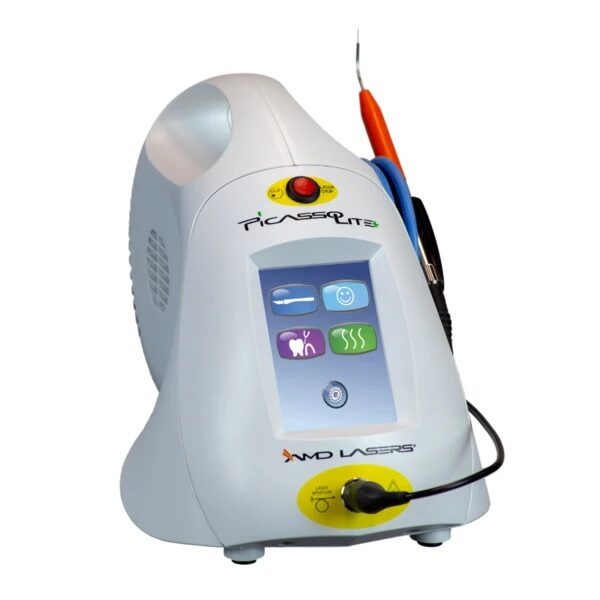
| AMD Picasso Lite Plus Dental Diode LaserFeature & Benefits-3.0 Watts-Wireless Foot Control-Color Touch Screen-Easy to Use Presets-Built-In Treatment Timers for Periodontal Treatment and Aphthous Ulcer Treatment-Customizable Continuous/ Pulsed Modes-Multiple Languages Menu-Adjustable Volume & Aiming Beam Intensity-Two-Year Warranty*-Ideal for First-Time and Expert Laser Practitioners-Performs a Wide Range of Soft-Tissue Surgical Procedures & Periodontal Treatment-Offers the Convenience of Disposable Fiber Tips or Low-Cost Strippable Fiber*Warranty – 2 years parts and labor on the laser unit. Other terms and conditions apply.See the Owner’s Manual for complete details. Procedures -Gingival Troughing for Crown Impressions; Gingivectomy & Gingivoplasty-Gingival Incision & Excision; Hemostasis & Coagulation-Excisional & Incisional Biopsies-Soft-Tissue Crown Lengthening & Fibromal Removal-Frenectomy & Frenotomy-Implant Recovery & Exposure of Unerupted Teeth-Incision & Drainage of Abscess-Pulpotomy as an Adjunct to Root Canal Therapy & Reduction of Gingival Hypertrophy-Operculectomy & Vestibuloplasty-Leukoplakia & Oral Papillectomies-Treatment of Canker Sores, Herpetic & Aphthous Ulcers of the Oral Mucosa– Sulcular Debridement– Laser Soft-Tissue Curettage– Removal of Highly Inflamed Edematous Tissue Affected by Bacteria Penetration of the Pocket Lining & Junctional Epithelium INCLUDES:- Picasso Lite+ Laser 3.0 Watts
- Wireless Foot Control
- Quick Start Guide
- Owner’s Manual
- Universal Power Supply
- One Transportation Box
- One Multi-Tip Handpiece
- Three Pairs of Protective Laser Goggles
- 3 Year Warranty
THE MOST AFFORDABLE LASER IN THE DENTAL INDUSTRYKeeping up with technology and implementing a dental laser into your practice sounds like a huge expense, but AMD Picasso Lasers are not only the most awarded soft-tissue lasers in the industry, but also the best priced--we guarantee! It’s no wonder Picasso Lasers are the most utilized soft-tissue lasers on the market. | 3Shape Trios Cart T12a Impression 3D Intraoral Scanner3Shape TRIOS is a next-generation intraoral impression solution that is fast, accurate and easy to use. TRIOS is built on 3Shape’s Ultrafast Optical Sectioning™ technology and its features include high accuracy capture, spray- and powder-free scanning, clinical scan validation, intuitive Smart-Touch user interface, and more. TRIOS is optimized for a wide range of indications.TRIOS scanner benefits and features:
-Up to 1000 3D pictures for true geometries
-Spray-free for optimal accuracy and comfort
-Designed for high-speed impression capture
-Ergonomic grip for perfect control
-Autoclaveable scanner tip
-Scanning has never been easier. No need to hold the scanner at a specific distance or angle for focus. Dentists or assistants can even rest the scanner on the teeth for support as they scan.TRIOS cart benefits and features
-Live 3D visualization
-Easy-to-use touch screen
-Sleek design
-Unique motion sensor interface
-Mobility and Wi-Fi
-Easy-to-clean
-General benefits of digital impression takingDENTISTS:
-Less adjustment and grinding during seating
-Improved accuracy and clinical results
-Faster than traditional impression taking
-Reduced need for retakes
-No impression materials and mess
-Cost savings related to materials and shippingPATIENTS : 3Shape Trios Cart T12a Impression 3D Intraoral Scanner
-Quick and comfortable experience
-Better restoration fits and minimal grinding
-Improved clinical results
-Reduced number of appointments due to fewer retakes
-Reduced over-all chair-time3.5 Tips to Obtaining a Good Scan
PREPARATION
1. Turn on the cart or PC in advance to allow the system to heat up. See section Heating and
Mounting the Scanner Tip, step 1. Allow the system to warm up for about 10 minutes prior to use. If
using the heater, the final temperature is reached when the light goes out.
2. Retract the gingiva around the preparation for the preparation to stand out clearly.
3. Make sure the scanner tip is warm to avoid condensation on the mirror. See section Heating
and Mounting the Scanner Tip, step 5.
SCANNING
1. Dry the teeth lightly using compressed air. Be sure to reach the narrow regions between teeth.
Consider using a saliva ejector and/or tampons.
2. Get a good start:
• Start at preparation (or 1st molar if antagonist).
• Wait for about 5 scanner "clicks" before proceeding (helps build up a good starting point).
• Complete preparation including preparation line.
• Scan neighboring teeth: Occlusion, lingual/palatinal side, buccal/labial side.
3. Keep scanner head at 0-5mm from the teeth, it is OK to touch the teeth occasionally.
4. Move the scanner slowly and smoothly, you should hear a more rapid clicking sound.
41
5. Keep lips, cheeks, and tongue out of the scanner’s view:
• Use your finger or a dental mirror to create space between the teeth, lips and cheeks.
• Use a lip-and-cheek-retractor to keep lips and cheeks away.
• Be careful not to scan your own or assistant’s fingers.
• If you get lips, cheeks or tongue in the scan, make sure to delete it all, especially where they have
contact with the teeth (no surfaces should stick out from the teeth).
6. Keep focus on:
• Option 1 - Look at the teeth while scanning and listen to the "clicks". If it stops clicking/capturing,
carefully move back to the area marked on the screen.
• Option 2 - Look at the 2D image at the lower right corner. What you see here is what you scan.
Avoid lips, cheeks and the tongue to get an easy scan.
7. When scanning is complete, inspect the result by rotating the scan.
The important areas are:
• Preparation line (avoid interference from gingiva, saliva, blood).
• Contact points.
• Occlusal surfaces.
• If an important area is missing, simply touch this area on the model, and re-start scanning from
this point.
8. Bite Scan:
• Start from the second molar or at canine if you make an anterior scan.
• While centering the 2D image on occlusion plane, slowly move the scanner tip in straight mesial
direction with equal coverage of the upper and lower teeth.
• Scan 4 teeth for optimal alignment. This should take no more than 5 seconds.
9. Important for good colors:
• Avoid the light from the dentist chair lamp pointing directly into the patient's mouth. | Kodak 9000 3D Extraoral Imaging System
Add cephalometric imaging abilities to your 9000 3D System for even more abilities. Through our revolutionary one-shot technology, cephalometric image acquisition takes less than a second—thereby reducing exposure time and the risk of retakes due to patient movement. With the 9000C 3D System, you can perform a wider range of diagnoses and treatments right in your office, rather than referring patients to imaging centers. Reduce multiple visits, prevent rescheduling issues, and enhance patient care with three versatile imaging abilities right at your fingertips: panoramic, cephalometric, and 3D imaging.Superb image quality, all three modalitiesVariable focal trough adapts to patient’s jaw morphology – generating high-quality, true panoramic images Best-in-class cephalometric image quality with reduced risk of motion blur Ultra-high resolution, low-dose, focused-field CBCT images provide superior visualization of fine bony anatomy, such as radicular structures
Optimized for radiology workflowsDR technology reduces exam time and eliminates steps, such as film processing and cassette handling One-shot cephalometric technology captures images in less than a second, reducing exam time and risk of retakes Dedicated sensors for each modality save technologist time, reduce risk of breakage DICOM conformance ensures easy integration with PACS, RIS, and printing systems
Simple by design Kodak 9000 3D Extraoral Imaging SystemStreamlined user interface, preset programs and face-to-face positioning makes exams quick and simple Accommodates patients of all shapes and sizes and wheelchair accessible Intuitive, easy-to-use imaging software with improved features for reviewing, reporting and sharing images Includes a comprehensive implant planning model to help referring dentists identify exact measurements and create simulations of proposed treatments
A trusted company, proven productsProven product reliability – even in demanding, high-volume environments Broad range of Carestream equipment and professional services such equipment service agreements, site planning and DICOM integration services. - One-stop shopping for digital imaging and IT solutions from a company with over a century of medical and dental imaging expertise
| Panoramic Modality | Cephalometric Modality | Cone Beam CT Modality | Technology CCD – Optical | CCD – Optical Fiber Sensor | One-Shot with CCD Sensor with Optical Fiber | Cone Beam with CMOS Sensor with Optical Fiber | Gray Scale | 14 bit | 14 bit | 15 bit | 3D Field-of-View | n/a | n/a | • Single Volume: 5 cm x 3.75 cm • Stitched Volumes (up to 3): 9 cm x 7 cm x 3.75 cm | Exam Options | • Panoramic • Child Mode • Segmented Panoramic • Maxillary Sinus • LA TMJ x 2 • LA TMJ x 4 | • Cephalometric • Lateral • Oblique • Frontal (AP/PA) • Submento-Vertex • Carpus • Multiple Cephalometric Field Choices: 30 x 30, 24 x 30, 24 x 24, 18 x 24, 18 x 18 | • CBCT • Resolution Options: 76, 100, or 200 micrometers • Location of Exam: User-defined (mandible, maxilla, TMJ) | Input Voltage | 230/240 V – 60 Hz | 230/240 V – 60 Hz | 230/240 V – 60 Hz | Tube Voltage | 60-90 kV (max) | 60-90 kV (max) | 60-90 kV (max) | Tube Current | 2-15 mA (max | 2-15 mA (max | 2-15 mA (max | Frequency | 140 kHZ (max) | 140 kHZ (max) | 140 kHZ (max) | Total Filtration | > 3.5 mm eq. AL | > 3.5 mm eq. AL | > 3.5 mm eq. AL | Weight | 353 lb (160 kg) | 438 lb (199 kg) | 353 lb (160 kg) |
| Dentsply Sirona CEREC PrimemillSpeedEngineered for speed and precision, the new CEREC Primemill inherits the proven strength of its predecessor and raises its powerful performance to entirely new heights.You can now mill zirconia restorations in Super Fast milling mode in around 5 minutes, cutting processing times by more than half. The improved grinding mode for high quality glass ceramics also grinds the material faster than ever before. The result? Satisfied patients and high productivity.QualityA combination of new electronics, software, motors and mechanical components contributes to finer resolution and enhanced dynamics. This results in outstanding restoration margins and surface details – for extremely precise results.The new highly accurate 0.5 mm milling tool reliably delivers first class clinical results. Switch to Extra Fine milling mode for a higher level of detail with occlusal fissures and interdental areas on bridges.Versatility Dentsply Sirona CEREC PrimemillWelcome to a world where you‘re spoiled for choice! The new CEREC Primemill combines wet and dry milling and wet grinding. No matter the indication, with CEREC Primemill you can select from a broad range of material options from validated partners providing the flexibility and predictability you need to offer patients the best possible treatment.Choose from the full spectrum of machining options, including dry and wet milled zirconia, or wet grinding of glass and hybrid ceramics.ConvenienceThe new 7” touch interface with user guidance guides operators step-by-step through the workflow, key maintenance procedures and other routine tasks, so you can delegate milling with complete peace-of-mind. The integrated block scanner is a time-saving new feature that automatically scans material blocks with compatible data matrix codes and records the information, including type, size, color and zirconia enlargement factor. All CEREC Primemill tools are fitted with a color-coded RFID chip that is read by the RFID tool reader, feeding into the tool status display, alerting the user if a tool needs replacing. This ensures all tools are performing at optimal levels. A LED light strip indicates unit status and milling and grinding progress.The all-new CERECThe latest generation of our CEREC system sets new standards so you can offer your patients an unmatched combination of single-visit dentistry and excellent quality.A unique solutionThe CEREC system comprises world-class components that interact perfectly ensuring seamless workflows. With CEREC Primescan, CEREC Software 5 and CEREC Primemill, digital chairside dentistry is faster, easier and more reliable than ever before.Outstanding resultsAfter 35 years of continuous optimization, CEREC gives you the options you need to treat multiple indications with the confidence that comes from outstanding results.
Designed to stand out – and fit inThe new CEREC Primemill does not just communicate seamlessly with other CEREC devices, but its sleek design is also the perfect match – and the ideal look for a progressive dental practice. |




Reviews
There are no reviews yet.