| Description | The treatment unit of the Actus series has been installed in over 10,000 practices worldwide providing support to both dentists and assistants. The success of the Actus treatment unit is easy to explain: quality at a reasonable price and maximum functionality. The treatment tray incorporates swivel and height adjustment. It allows optimal access to all instruments including the control console for the chair and instrument functions. | TRIOS Color automatically measures the teeth shades as you scan. The dentist has the option to evaluate and highlight relevant areas for the lab. The complete shade information sis sent to the lab together with the impression. | New Carestream Dental Intraoral Scanner Announced – the CS 3800A wireless intraoral scanner with high-performance experience | TRIOS MOVE makes it simple to show digital impressions to your patients in order to explain their treatment plans and improve communication. The system features the same scanning technology as the TRIOS 3, including the option of a wireless model, and can capture full-color digital impressions, provide shade matching and more quickly and easily. As an open system, it can send digital impressions to almost any dental CAD/CAM software platform for the fabrication of almost any fixed, removable or orthodontic solution. | 3Shape TRIOS MOVE is the ultimate patient/dentist communication tool. Show patients their digital scans and dynamic treatment information close-up and create greater opportunities for treatment dialogue and joint decision-making. The ergonomic and lightweight design of TRIOS MOVE allows you to always position the screen in the right place and enjoy superior user experience. | The iTero Element Scanner is a digital impression system that eliminates the need for messy putty in your mouth.Improving iTero Intraoral ScannersWhile it’s already a leader in dental technology, iTero is constantly refining its intraoral scanning options. Its Element Itraoral Scanner, introduced in March 2015, captures 6,000 frames per second, up to 20 times faster than its predecessor. Its wand is also smaller and lighter, with in-built controls for more intuitive operation. Intraoral scanners from iTero are renowned for their accuracy, but the increased capture speed improves the company’s already impressive statistics. |
| Content | J Morita Actus 101 Dental Treatment Unit (With chair)
The treatment unit of the Actus series has been installed in over 10,000 practices worldwide providing support to both dentists and assistants. The success of the Actus treatment unit is easy to explain: quality at a reasonable price and maximum functionality. The treatment tray incorporates swivel and height adjustment. It allows optimal access to all instruments including the control console for the chair and instrument functions.– Four automatic chair positions
– Foot control
– Instrument holder for the assistant
– Comfortable headrest (removable and inclinable)
– Instrument holder for 5 instruments incl. three-way spray
– Swivel adjustable, transparent glass cuspidor, water rinsing, automatic tumbler filler, water heaterSpecifications:
– Connected load : 220-240 V / 60 Hz / 1,5 kVA
– Chair height : max. 760 mm / min. 400 mm
– Length : 1.840 mm
– Width without tray : 868 mm
– Tray width : 452,5 mm
– Weight : 240 kgPackage includes : J Morita Actus 101 Dental Treatment Unit (With chair)
– Over arm delivery
– 2x optic highspeed lines
– 1x Brushless micromotor
– Luna Vue operating light
– 3 position assistant arm
– 2x Morita operating stoolsThe Actus 101 chair has been installed in over 10,000 practices worldwide providing support to both dentists and assistants. The Actus treatment unit is available at a reasonable price with maximum functionality. The treatment tray swivels and the height can be adjusted. It allows optimal access to all instruments including the control console for the chair and instrument functions. The chair features four automatic chair positions, foot controls, an instrument holder for the assistant, a comfortable headrest that is removable and inclinable an instrument holder for five instruments includes a three-way spray. Other features include a swivel adjustable, transparent glass cuspidor, automatic tumbler filler and a water heater. | 3Shape Trios 3 Pod ColorNew ! 3Shape TRIOS Color POD Digital impressions3Shape TRIOS Pod is a new configuration solution and an alternative to the TRIOS cart. It enables scanning with the TRIOS handheld scanner and software using selected laptop PCs. The solution offers a high degree of mobility and flexibility for dentists working in multiple locations or for clinics with limited space. The TRIOS Pod lets users control scanning from an iPad or mirror the 3D view on other displays in the clinic such as monitors integrated in the chair.Connect to your laptop or PC
Use the Pod with your laptop or the PC in your treatment room. Simply connect to the USB port and start scanning.FEATURES : 3Shape Trios 3 Pod Color
– RealColor scans with many clinical advantages: With TRIOS color you can scan in natural colors to clearly distinguish between teeth, gingiva, and restorative materials. Easily identify true preparation margins and improve scanning experience.
– Powder-free for optimal accuracy and comfort: Applying powder is technique demanding, can ruin scan accuracy, is uncomfortable for patients, and prolongs chair time.
– Autoclaveable tip with anti-mist heater: Achieve optimal hygiene and meet clinical requirements. The integrated antimist heater automatically ensures an optimal temperature for undistorted and crystal clear scanning.
– Extreme Mobility: The light and handy Pod solution is easy to share among treatment rooms or different locations
– Use your iPad with scanning: Control TRIOS from your iPad or mirror the live 3D view directly on other displays in the clinic such as monitors integrated in the chair.
– Connect to multiple laptops or PCs: Use with laptops, PCs in your treatment rooms, or with the PCs integrated in your chair units. Simply connect to the USB port and start scanning. Note: Use with approved PCs.
– Small footprint: The compact TRIOS Pod can be placed anywhere in the treatment room or even in rooms where space is very limited.Included : Mac laptop | Carestream CS 3800 Dental Intraoral Scanner
With CS 3800, the time has come to restore your liberty.The CS 3800 offers dental practitioners a whole new experience in acquiring impressions: freedom. Freedom from cables, freedom to pursue their preferred workflow, freedom to pay only for what they use, and freedom to interact with their partners, how they prefer, when they prefer. And, as the result of a renewed collaboration with Studio F. A. Porsche, the CS 3800 displays a timeless, ergonomic design that ensures a high-performance scanning experience.Benefits at a glance Carestream CS 3800 Dental Intraoral Scanner- High-performance wireless intraoral scanner for optimal mobility and seamless user experience
- One of the lightest and most compact intraoral scanners of the market
- Faster and smoother scanning thanks to a larger and broader field of view and a deeper field of view
- Full control of intraoral capabilities right on the handpiece
- Ergonomic design by Studio F. A. Porsche
A renewed feat with Studio F. A. PorscheThe CS 3800 intraoral scanner is the result of an ongoing collaboration with Studio F. A. PorscheThis time, the design firm moved towards the idea of designing the scanner with optimal comfort based on the morphology of the human hand combined with fluid and organic lines. The handpiece is thus refined to fit naturally in the palm of the hand, no matter the grip.Dedicated WiFi ensures continuous and efficient scanningThe CS 3800 uses dedicated point-to-point WiFi access that instantly receives data transferred from the handpiece to the computer. It’s as easy as plugging in a WiFi dongle. Once connected, it’s immediately ready to receive a signal from the handpiece: the pairing maintains a robust and stable transmission band for a continuous and efficient scanning procedure.Powered by CS ScanFlowCS ScanFlow software is the acquisition software paired with the CS 3800. Free yourself from imposed procedures: there is no need to choose a workflow when starting to scan – simply grab the handpiece and scan, then decide later which indication to apply to the data set. A four-step process keeps you on track from beginning to end. | 3Shape TRIOS 3 Wireless Move Pen GripTRIOS is the world’s first intraoral scanner to offer a wireless option. 3Shape TRIOS 3 Wireless gives you the freedom to perform digital scans unrestricted by wires, optimizing comfort for both you and your patientsThe new 3Shape TRIOS MOVE is the ultimate patient/dentist communication tool. Show patients their digital scans and dynamic treatment information close-up, and create greater opportunities for treatment dialogue and joint decision-making.The ergonomic and lightweight design of TRIOS MOVE allows you to always position the screen in the right place, and enjoy superior user experience.Features of TRIOS MOVE;-13.3″ HD LCD Touchscreen – The perfect size when having it in front of a patient or working with up closeAdjustable arm- Bring the screen directly in front of the patient to involve them in the scanning process and the treatment planningPowerful custom PC designed for scanning – Specifically designed for use with all TRIOS 3 scanners to give a fast and smooth scan experience straight out of the boxFour wheels with integrated brakes – It is now very easy to move around the chair and from chair to chairEnhance comfort with wireless innovation.TRIOS is the world’s first intraoral scanner to offer a wireless option. 3Shape TRIOS 3 Wireless gives you the freedom to perform digital scans unrestricted by wires, optimizing comfort for both you and your patientsThe new 3Shape TRIOS MOVE is the ultimate patient/dentist communication tool. Show patients their digital scans and dynamic treatment information close-up, and create greater opportunities for treatment dialogue and joint decision-making.The ergonomic and lightweight design of TRIOS MOVE allows you to always position the screen in the right place, and enjoy superior user experience.Features of TRIOS MOVE : 3Shape TRIOS 3 Wireless Move Pen Grip 13.3" HD LCD Touchscreen - The perfect size when having it in front of a patient or working with up closeAdjustable arm- Bring the screen directly in front of the patient to involve them in the scanning process and the treatment planningPowerful custom PC designed for scanning - Specifically designed for use with all TRIOS 3 scanners to give a fast and smooth scan experience straight out of the boxFour wheels with integrated brakes - It is now very easy to move around the chair and from chair to chair. | 3Shape TRIOS MOVE Intraoral Scanning Setup3Shape TRIOS MOVE is the ultimate patient/dentist communication tool. Show patients their digital scans and dynamic treatment information close-up and create greater opportunities for treatment dialogue and joint decision-making. The ergonomic and lightweight design of TRIOS MOVE allows you to always position the screen in the right place and enjoy superior user experience. Introducing 3Shape TRIOS MOVE
 3Shape spoke to more than a hundred dentists and identified their biggest problem; having the screen in the right place to show patients their teeth and the treatment needed. We used this insight to create an ergonomic solution that ensures the screen is always in the right place to engage, excite and drive treatment acceptance with patients
The brand new hardware setup placed the 3Shape TRIOS 3 scanner, monitor, and PC on the lightweight, fully-adjustable, ergonomic 3Shape TRIOS MOVE. TRIOS MOVE’s mobility enables doctors to always position the screen in the right place to provide a superior experience for both dentists and patients. TRIOS MOVE is perfectly balanced and can be rolled effortlessly from operatory to operatory.All TRIOS 3 intraoral scanners, including the new 3Shape TRIOS 3 Wireless model, work seamlessly with TRIOS MOVE. The amazing TRIOS 3 scanners improve patient experience through remarkable scanning speed, and documented accuracy. Thanks to TRIOS MOVE, the digital impressions in realistic colors can easily be shown to your patients to engage and excite them about their treatment options. Use 3Shape TRIOS apps to give your patients insights into their dental health and proposed treatment plans.Provide better preventative care with 3Shape TRIOS Patient Monitoring*
Compare a patient’s scans between visits to monitor changes in their dental status, and identify a timely and effective care plan. Share the insights with your patient to gain acceptance for the treatment they really need. Show patients their future smile with 3Shape TRIOS Smile Design
Simply take a photo of your patient’s face, and easily create their new beautiful teeth in minutes. Share the photo-realistic image with your patient to excite them and advance treatment acceptance. Grow orthodontic treatments with 3Shape TRIOS Treatment Simulator*
Scan your patient and show their present dentition compared to the final results of orthodontic treatment to gain case approval. The best solution for the patient and the best satisfaction for the patient
We spoke to hundreds of dentists and discovered that they needed an easy way to get the screen positioned in the right place to share intraoral scans and images with patients. This is important, as seeing is believing and patients trust a dentist they believe in.With this insight, TRIOS MOVE was born, allowing you to easily share your digital scans, images, and treatment plan with patients. This helps patients picture their final results and ultimately, advance case acceptance.The new 3Shape TRIOS MOVE now places the 3Shape TRIOS intraoral scanner, monitor and PC on the lightweight, fully-adjustable, ergonomic 3Shape TRIOS MOVE. The mobility of the 3Shape TRIOS MOVE enables doctors to always position the screen in the right place. This provides a superior experience for both the orthodontist and patient and makes it easy to share dynamic treatment information close-up with patients to advance treatment dialogue and acceptance. 3Shape TRIOS MOVE is perfectly-balanced and can be rolled effortlessly.Professionals using the 3Shape TRIOS MOVE with TRIOS 3 Wireless additionally benefit from complete freedom of movement because there are no connecting cables between the wand and hardware. Features 3Shape TRIOS MOVE Intraoral Scanning Setup- 13.3″ Full HD touch LCD screen
- Adjustable arm & swiveling screen
- Powerful custom PC designed for scanning
- Apps designed to excite
- Four wheels with integrated brakes
- The perfect size for bringing in front of a patient or when working with up close.
Show scans easily, boost involvementOne of the challenges of working with intraoral scans is in organizing the physical space: how to position your screen in the right place to not only prepare and scan but also share your work? To help you solve this, we developed a TRIOS MOVE. It allows you to move your screen with digital scans, images, and simulated expected treatment outcomes to where the patient sits. This helps them picture their final results and ultimately, advance case acceptance. On top of that, it is more ergonomic for dentists Superior scanning technology, always where you need itAll TRIOS 3 intraoral scanners, including the new 3Shape TRIOS 3 Wireless model work seamlessly with TRIOS MOVE. The amazing TRIOS 3 scanners improve patient experience through remarkable scanning speed, and documented accuracy. Thanks to TRIOS MOVE, the digital impressions in realistic colors can easily be shown to your patients to engage and excite them about their treatment options. Our flexible TRIOS setup solution comes in two sizes: 15.6″ (MOVE+) and 13.3″ (MOVE). Both come with a stylus touch pen and a powerful 1TB PC, specially designed for scanning. They can be purchased in combination with TRIOS 3 Basic, TRIOS 3 and TRIOS 4. - TRIOS 3 Wireless scanner wand
- Charger incl. power cord
- Wall mount kit for the charger
- 3x batteries
- 5x TRIOS 3 scanner tips
- TRIOS 3 Protection tip
- TRIOS 3 Calibration tip
- TRIOS 3 Color Calibration kit
- TRIOS MOVE incl. power cord
- HEX S10 key (for foot assembly)
- Screwdrivers TX6 and TX8
- Ethernet cable
- 2x Fuses
- USB Dongle with software
- Documentation
Also available as a stand-alone accessory for all existing TRIOS 3 users. Can be used as a second scanning station or replacement for a PC/CARTCompatible with TRIOS 3 Mono, TRIOS 3 & TRIOS 3 Wireless in both, Pen or Handle grip | iTero Element Intraoral Scanner
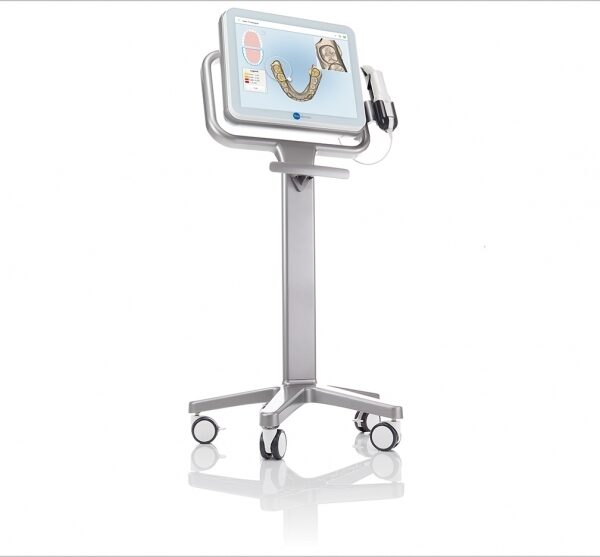
What Are iTero Intraoral Scanners?Intraoral scanners from iTero scan the mouths of patients, capturing images to create three-dimensional dental images in minutes. Intraoral scanners are simple to use and can be operated by one person. Their user-friendly nature helps dental professionals get the best results. The scans they produce are also more detailed than the traditional two-dimensional images they replace.Intraoral digital scans help dental professionals create accurate physical dental models for restorative work, including crowns, veneers, and implants. They also help orthodontists diagnose orthodontic problems and develop the best treatment plans.The company’s digital ecosystem software works seamlessly with its intraoral scanners, improving workflow for dental professionals working on orthodontic and restorative cases. However, unlike many early intraoral scanners, they are open systems. This feature gives dental professionals more flexibility about how they use their digital scan files. Intraoral digital scans from iTero scanners can be easily shared with other dental professionals and third-party providers such as Invisalign. When all relevant parties have the scans, they can communicate better to improve patient outcomes.What iTero Intraoral Scanners DoIntraoral scanners feature a wand, which the dental professional moves around a patient’s mouth. In the latest versions, the wand captures thousands of frames per second which are pieced together to create a three-dimensional visualisation of the patient’s mouth. The wands on iTero intraoral scanners are smaller than early intraoral scanners, allowing them to scan molars in the back of the mouth which were traditionally difficult to reach. Dental professionals using small wands also aren’t limited by how wide their patients can open their mouths. The small wands are also less likely to make patients gag than older forms of scanning technology.Intraoral scanners also have screens which display the digital dental images as they’re captured in real time. The screens show whether the scan is good or not before it’s saved and submitted to the lab. This feature can be a real time-saver for dental professionals who, in the past, could receive word from the lab two or three weeks later that their scans were inadequate. By providing immediate feedback, intraoral scanners can save dental professionals and patients time and frustration.Unlike many intraoral scanners, patients don’t need to cover their teeth in titanium dioxide powder before an iTero intraoral scan. This benefit further improves the scanning process for dental patients.How Intraoral Scanners Make Invisalign Orthodontics Easier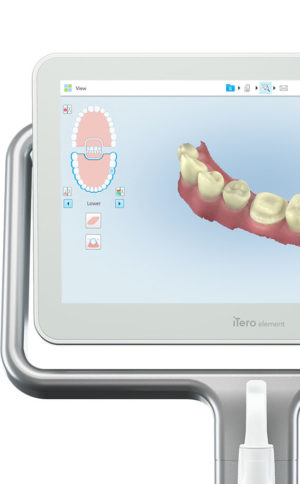 Invisalign clear aligners are one of the most popular teeth-straightening aids used today as they’re effective, removable, and virtually undetectable. Unlike many intraoral scanners, iTero intraoral scanners have open architecture which makes them compatible with the Invisalign system, including its Invisalign Outcome Simulator. Orthodontists can scan their patients’ mouths with an iTero intraoral scanner, then show them how their Invisalign treatment will look. This technology improves the patient experience because patients can know what to expect and feel more confident in their diagnosis and treatment plan. It also makes the ClinCheck setup three times faster.After setup, speed is still on the iTero intraoral scanners’ side. iTero states ClinCheck treatment plans submitted with its scans are usually posted to the Invisalign Doctor Site three times faster than traditional polyvinyl siloxane scans. As a result, your Invisalign aligners are created and posted back to your orthodontist sooner so that you can start treatment faster. Since the iTero intraoral scanning system is open, orthodontists can also send the scan files to any laboratory of their choosing for the creation of a retainer, which reinforces your treatment after the Invisalign process, and other dental tools.Orthodontists can also create better Invisalign treatment plans for their patients using iTero intraoral scans. Align Technology research shows orthodontists who use the scans have 10 times fewer rejections and seven times fewer issues with the fit of the Invisalign aligners. These results may be because iTero intraoral scanners can help orthodontists track their patients’ progress. Regular scans throughout Invisalign treatment can help orthodontists compare expected outcomes with results. If results aren’t as expected, orthodontists can use the scans to educate their patients about their treatment and the importance of complying with their recommendations.Improving iTero Intraoral Scanners iTero Element Intraoral ScannerWhile it’s already a leader in dental technology, iTero is constantly refining its intraoral scanning options. Its Element Itraoral Scanner, introduced in March 2015, captures 6,000 frames per second, up to 20 times faster than its predecessor. Its wand is also smaller and lighter, with in-built controls for more intuitive operation. Intraoral scanners from iTero are renowned for their accuracy, but the increased capture speed improves the company’s already impressive statistics. Invisalign clear aligners are one of the most popular teeth-straightening aids used today as they’re effective, removable, and virtually undetectable. Unlike many intraoral scanners, iTero intraoral scanners have open architecture which makes them compatible with the Invisalign system, including its Invisalign Outcome Simulator. Orthodontists can scan their patients’ mouths with an iTero intraoral scanner, then show them how their Invisalign treatment will look. This technology improves the patient experience because patients can know what to expect and feel more confident in their diagnosis and treatment plan. It also makes the ClinCheck setup three times faster.After setup, speed is still on the iTero intraoral scanners’ side. iTero states ClinCheck treatment plans submitted with its scans are usually posted to the Invisalign Doctor Site three times faster than traditional polyvinyl siloxane scans. As a result, your Invisalign aligners are created and posted back to your orthodontist sooner so that you can start treatment faster. Since the iTero intraoral scanning system is open, orthodontists can also send the scan files to any laboratory of their choosing for the creation of a retainer, which reinforces your treatment after the Invisalign process, and other dental tools.Orthodontists can also create better Invisalign treatment plans for their patients using iTero intraoral scans. Align Technology research shows orthodontists who use the scans have 10 times fewer rejections and seven times fewer issues with the fit of the Invisalign aligners. These results may be because iTero intraoral scanners can help orthodontists track their patients’ progress. Regular scans throughout Invisalign treatment can help orthodontists compare expected outcomes with results. If results aren’t as expected, orthodontists can use the scans to educate their patients about their treatment and the importance of complying with their recommendations.Improving iTero Intraoral Scanners iTero Element Intraoral ScannerWhile it’s already a leader in dental technology, iTero is constantly refining its intraoral scanning options. Its Element Itraoral Scanner, introduced in March 2015, captures 6,000 frames per second, up to 20 times faster than its predecessor. Its wand is also smaller and lighter, with in-built controls for more intuitive operation. Intraoral scanners from iTero are renowned for their accuracy, but the increased capture speed improves the company’s already impressive statistics. |




Reviews
There are no reviews yet.